
HP 17 Laptop
5.0Editor score
17.3 inch Full HD Display
AMD Ryzen 5 7520U Processor
8GB DDR5 RAM and 512GB SSD
Finding the right laptop for Pcdj Dex requires balancing performance with portability to ensure smooth mixing during live sets. DJs need reliable hardware that can handle multiple audio tracks without latency issues.
We compared ten top models based on processor speed, memory capacity, screen clarity, and connection options essential for professional audio software. Our analysis focuses on real world reliability for performers.
Each pick highlights key strengths and potential trade-offs to help you choose the best machine for your specific gig requirements. Note that prices and availability may vary by retailer and region.
5.0Editor score
5.0Editor score

4.4Editor score
As an Amazon Associate we earn from qualifying purchases.
This side by side comparison evaluates all ten models to help you quickly identify which specifications best fit your Pcdj Dex workflow and budget constraints.




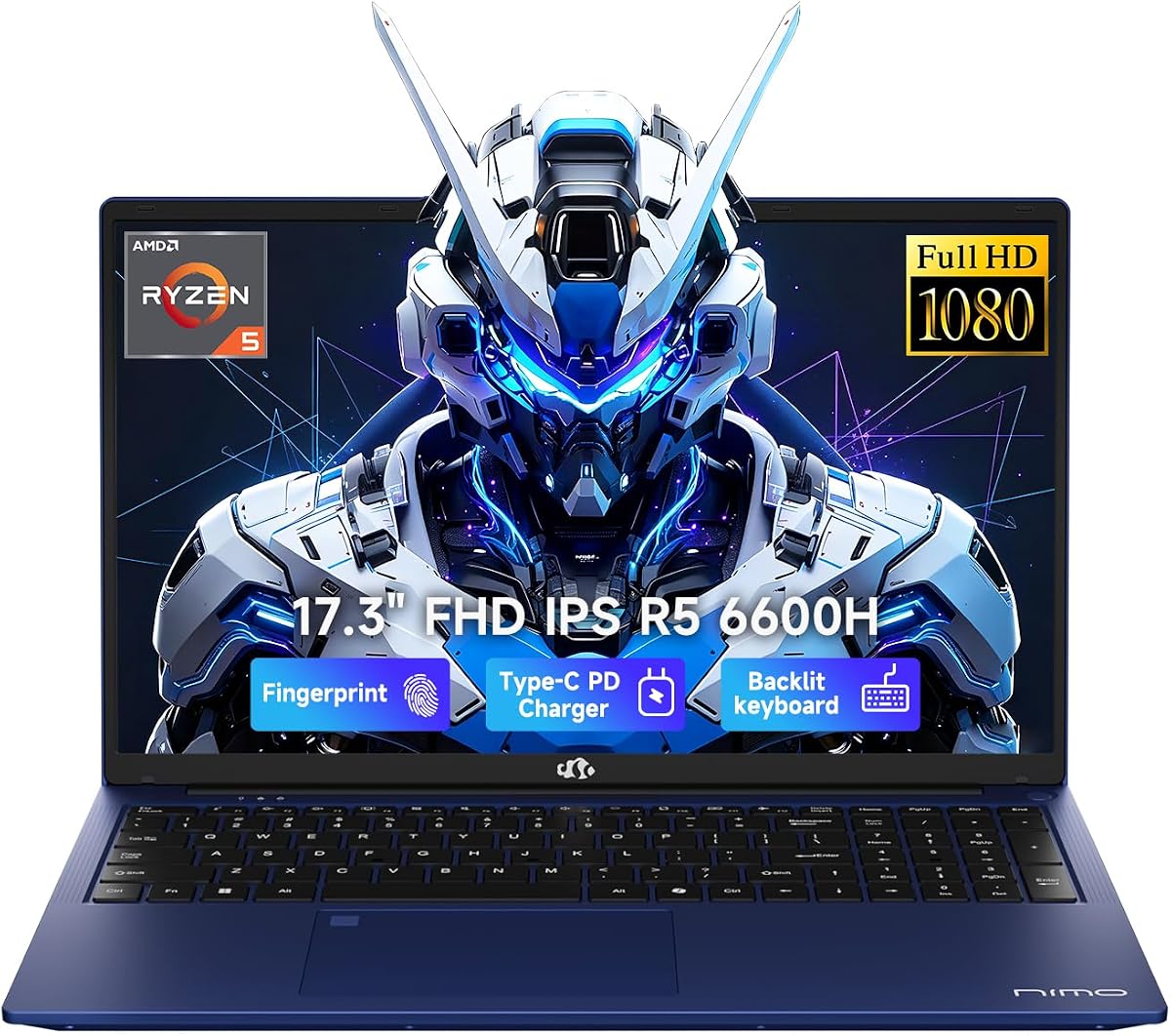
This NIMO model stands out as the top pick for Pcdj Dex due to its balanced mix of power and screen real estate. With a perfect five star rating from users it delivers consistent reliability during demanding tasks.
We may earn a commission when you buy through this link, at no additional cost to you.
The Ryzen 5 6600H processor paired with 32GB of DDR5 RAM ensures that switching between tracks, effects, and playlist views happens instantly. You will not encounter lag even with many plugins active.
While it is heavier than ultrabooks the 17.3 inch screen makes cue points and waveforms easier to read in dim environments. The battery lasts long enough for most gigs without needing constant outlet access.
DJs looking for a powerful yet affordable machine should buy this one for its upgradeable design and robust connectivity options. It provides the best value for professional mixing setups.
The generous RAM allows running multiple applications like browsers and communication tools alongside Pcdj Dex without slowing down the mix.
The large display helps you see track details clearly which is essential for beatmatching and managing complex playlists on stage.
We may earn a commission when you buy through this link, at no additional cost to you.
The HP 17 offers a perfect entry point for DJs starting out with Pcdj Dex without breaking the bank. Users rate this machine highly for its straightforward performance and reliable build quality.
We may earn a commission when you buy through this link, at no additional cost to you.
Equipped with a capable Ryzen 5 processor and DDR5 RAM it handles standard mixing tasks smoothly. The large screen ensures you can see all your controls clearly during performances.
While 8GB of RAM is less than top tier options it suffices for basic mixing. You might notice slight delays if running too many background apps simultaneously.
For budget conscious performers this laptop provides the essential features needed for live sets. It is an excellent choice for home studios or beginner mobile setups.
This model delivers the core computing power needed for DJ software at a fraction of the cost of high end gaming laptops.
The anti glare screen reduces eye strain when working under bright stage lights or in dark club environments for long periods.
We may earn a commission when you buy through this link, at no additional cost to you.
For DJs needing maximum power for heavy visualization or complex rendering this ROG model is the ultimate choice. It handles any software load with ease thanks to its top tier components.
We may earn a commission when you buy through this link, at no additional cost to you.
The high refresh rate screen makes transitions look incredibly smooth which can enhance visual presentations during shows. The cooling system ensures fans stay quiet even during intense processing.
The main drawback is the weight and power consumption meaning you will need to plan for power outlets. It is best suited for fixed setups rather than frequent travel.
Professional DJs with high requirements should buy this laptop for its unmatched performance and future proof features. It represents the peak of mobile computing for entertainment.
The fast screen refresh rate ensures that video visuals synced with your music appear fluid and glitch free during live performances.
Advanced thermal management keeps the laptop cool under heavy load preventing performance throttling during long mixing sessions.
We may earn a commission when you buy through this link, at no additional cost to you.
This HP variant mirrors the previous model but emphasizes Windows 11 Pro benefits which can be useful for enterprise level security. It performs well for standard DJ software requirements.
We may earn a commission when you buy through this link, at no additional cost to you.
The processor handles multi core tasks efficiently allowing for smooth mixing. The large screen helps with workflow organization when managing complex playlists and effects chains.
Users note that battery life is decent but not exceptional under heavy use. The included shutter on the webcam adds a nice layer of privacy when not in use.
If you prioritize security and a solid display this is a great option for your next upgrade. It offers reliable performance for regular mixing duties.
Windows 11 Pro provides enterprise grade security tools that protect your files and data from unauthorized access or malware.
The AMD Ryzen 5 processor delivers strong multi core speeds that help keep your audio processing smooth and stutter free.
We may earn a commission when you buy through this link, at no additional cost to you.
This 15.6 model packs incredible power into a portable chassis making it ideal for creators on the move. It scores very highly for speed and responsiveness in daily tasks.
We may earn a commission when you buy through this link, at no additional cost to you.
The Ryzen 7 processor combined with 32GB RAM ensures that you never wait for files to load. The USB4 port allows for massive data transfer speeds to external drives.
While the screen is smaller than 17 inch models the visual quality remains excellent. The battery life is robust enough to last through a full work day or gig.
DJs who need raw power in a slightly more portable form factor should consider this device. It excels at both mixing and content creation tasks.
The USB4 port supports ultra fast data transfers which means loading large audio samples and tracks from external drives is nearly instant.
The 180 degree hinge allows you to lay the screen flat for sharing tracks or connecting to external displays easily.
We may earn a commission when you buy through this link, at no additional cost to you.
Another strong contender from NIMO this model balances cost and features effectively for many users. It receives perfect scores from satisfied customers for its everyday usability.
We may earn a commission when you buy through this link, at no additional cost to you.
The 16GB RAM provides a comfortable buffer for running Pcdj Dex alongside other apps. The processor is fast enough to handle standard DJ workflows without issues.
Storage might be a limitation if you store huge libraries directly on the drive but expansion is possible. The build quality feels sturdy for daily travel.
Budget minded DJs who need reliable performance will find this to be a perfect fit. It offers the best value for money in the comparison.
The presence of dual slots allows you to add more RAM later if your needs grow beyond the initial 16GB configuration.
A backlit keyboard with good key travel makes entering track info or notes easy even in low light environments.
We may earn a commission when you buy through this link, at no additional cost to you.
Dell continues to deliver reliable machines with this model offering solid basics for general use. It scores well for comfort and support features useful for long term ownership.
We may earn a commission when you buy through this link, at no additional cost to you.
The Intel Core i5 processor handles standard tasks smoothly enough for light DJing. The ComfortView software helps reduce eye strain during long mixing sessions.
Users appreciate the onsite service warranty which provides peace of mind. However it is not built for heavy multi core rendering tasks or visual effects.
For DJs who prioritize support and reliability over raw power this is a smart choice. It is a safe bet for casual performers or students.
Dell ComfortView software reduces harmful blue light emissions to keep your eyes comfortable during extended screen viewing times.
The onsite service option means Dell technicians can come to your home or office to fix issues rather than shipping the device.
We may earn a commission when you buy through this link, at no additional cost to you.
This Vivobook model offers a rare chance to customize RAM for higher capacity needs. It earns perfect ratings from users who appreciate its powerful core specs.
We may earn a commission when you buy through this link, at no additional cost to you.
The Core i9 processor ensures that you have headroom for any software demands. The physical webcam shield adds an extra layer of privacy when not using video calls.
While it runs a bit warmer under load the cooling is sufficient. The keyboard backlighting is useful for working in dim venues.
DJs requiring high speed processing and customization options should buy this model. It offers premium power in a professional form factor.
The Core i9 processor provides elite level performance that handles complex simulations or AI enhanced software without slowing down.
PC Online US allows upgrades to up to 48GB RAM so you can tailor the machine to your specific workflow needs.
We may earn a commission when you buy through this link, at no additional cost to you.
Business users who need massive storage and memory will appreciate this Latitude model. It provides exceptional specs that support heavy multitasking and storage needs.
We may earn a commission when you buy through this link, at no additional cost to you.
The 2TB SSD means you can store thousands of tracks locally without worry. The touchscreen adds a convenient way to interact with software menus.
The smaller screen may be less ideal for visual mixing compared to 17 inch models. However the processing power is more than enough for any task.
If you prioritize storage and speed over screen size this is a powerful choice. It is ideal for DJs who work with large libraries daily.
With 2TB of storage you can keep your entire music library and backup files directly on the laptop without needing external drives.
The touch display allows you to interact with the software directly which can speed up workflow during live adjustments.
We may earn a commission when you buy through this link, at no additional cost to you.
This compact Pro model is designed for everyday tasks and basic mixing. It offers a balance of modern features at an accessible price point for many users.
We may earn a commission when you buy through this link, at no additional cost to you.
The 120Hz display provides smooth visuals which helps with seeing waveforms clearly. 16GB RAM ensures that basic applications run without lag.
Storage is the main limitation so external drives will be necessary. The processor is adequate for standard DJing but not for video rendering.
For DJs needing a lightweight travel companion this is a suitable pick. It delivers enough power for standard mixing on the go.
The 120Hz refresh rate makes the screen display smoother than standard panels which aids in visualizing rapid changes in your tracks.
The lightweight chassis makes it easy to carry in a backpack without adding too much weight to your gear.
We may earn a commission when you buy through this link, at no additional cost to you.
Choosing the right laptop involves evaluating performance metrics that directly impact your ability to mix and manage audio files effectively.
The central processing unit is the engine of your mixing rig. For Pcdj Dex you need a CPU with multiple cores to handle real time audio processing without latency. Aim for models with at least Ryzen 5 or Core i5 equivalent processing power.
Prioritize multi core performance to ensure that running multiple plugins does not cause audio dropouts during live sets.
Random access memory determines how many applications can run simultaneously without slowing down. For professional DJing 16GB or more is recommended to prevent stuttering when loading large sound libraries.
Ensure the system allows upgrades so you can add more RAM as your software demands increase over time.
A solid state drive is essential for fast boot times and quick loading of tracks. Look for NVMe SSDs which provide the fastest read speeds available for modern laptops.
Storage capacity matters for housing your music collection. Aim for at least 512GB to keep your library accessible without relying solely on external drives.
A larger screen helps you see waveforms and track details clearly during performances. A 15 inch or 17 inch display is often preferred for better visibility in dim environments.
High resolution and anti glare coatings are valuable features that reduce eye strain and improve visual accuracy while mixing.
Having enough USB ports is crucial for connecting audio interfaces and external drives. Look for laptops with USB 3.0 or USB-C ports to ensure fast data transfer.
HDMI ports are useful for connecting to external displays for visuals. A headphone jack is standard but verify its quality for monitoring sound accurately.
If you perform on the go battery life is a major factor to consider. Look for models that offer at least six to eight hours of runtime on a single charge.
Weight matters if you carry your gear daily. Balance the need for performance with portability to ensure your laptop is easy to transport to venues.
Pcdj Dex runs natively on Windows systems. Ensure the laptop comes with a supported version of Windows like Windows 11 Pro or Home for full compatibility.
Some users prefer Pro versions for enhanced security and network features which can be beneficial for managing gig data securely.
Your laptop will be subject to travel and varying environments so durability is key. Look for sturdy hinges and solid chassis materials that can withstand the rigors of touring.
A strong warranty policy provides peace of mind in case of hardware failures. Always check if onsite service is available for quicker repairs.
Always connect your laptop to a surge protector during live performances to prevent power spikes from damaging your hardware. Use a stable power source whenever possible to avoid unexpected shutdowns.
Regularly update your software and drivers to ensure optimal performance. Keeping the operating system and Pcdj Dex application up to date helps prevent crashes and bugs during critical times.
Store your laptop in a padded case when traveling to protect it from physical shock. Clean the keyboard and screen gently with appropriate tools to maintain hygiene and visibility for your next gig.
For smooth operation you should have at least 8GB of RAM though 16GB is recommended for professional use. Having more memory ensures that running multiple tracks and effects does not cause performance drops or audio stuttering during your mix.
Most DJ software relies more on CPU and RAM than the GPU so an integrated graphics card is usually sufficient. However a dedicated GPU helps if you use video mixing features or high resolution visual outputs during your shows.
Screen size is important because it determines how clearly you can see waveforms and track info. A 15 inch or larger screen is often preferred to reduce eye strain and improve workflow efficiency during performances.
Pcdj Dex is primarily designed for full desktop operating systems so tablets are not the primary choice. While some tablets have DJ apps they generally do not offer the same level of control and processing power as a laptop.
Yes solid state drives are highly recommended for DJ software because they load tracks much faster than traditional hard drives. Using an SSD reduces lag when searching and loading music files during your live sets.
Prioritize USB 3.0 or USB-C ports for connecting audio interfaces and external drives quickly. HDMI ports are also useful for projecting visuals to screens or projectors during larger events.
The top picks in this guide offer a range of options to fit different needs and budgets. The NIMO 17.3 stands out for balance while the HP 17 delivers value for those starting out.
When choosing prioritize performance and screen quality to ensure your sets run smoothly without technical issues. Match your laptop specs to the complexity of your workflow and the frequency of your gigs.
Remember to check current prices and availability as models change over time. Selecting the right machine now will provide a reliable foundation for your growing DJ career.