
2Pcs Nano V3.0 Board
4.5Editor score
ATmega328P and CH340G Chip
USB-C Port Included
Compatible with Arduino IDE
This guide compares the top 10 Arduino Nano Board options available in October 2026 to help you choose the right microcontroller for your project.
The Arduino Nano Board remains a cornerstone of electronics prototyping, offering a compact form factor packed with essential features for makers and engineers alike. Its small size makes it ideal for wearable devices, robotics, and embedded systems where space is at a premium without sacrificing performance.
We evaluated ten distinct models based on compatibility, connectivity options, power management, and overall value. Our analysis covers everything from classic clones to the latest official variants like the Nano R4 and ESP32, ensuring you find a board that meets your specific technical requirements.
Each selection below highlights key specifications, pros, and cons to help you make an informed decision. Keep in mind that availability and pricing can fluctuate frequently, so check the current listings before finalizing your purchase to ensure you get the best deal available.
4.5Editor score
4.6Editor score

4.5Editor score
This side-by-side comparison highlights the key specifications and unique features of each board to help you quickly identify the model that best fits your project needs.


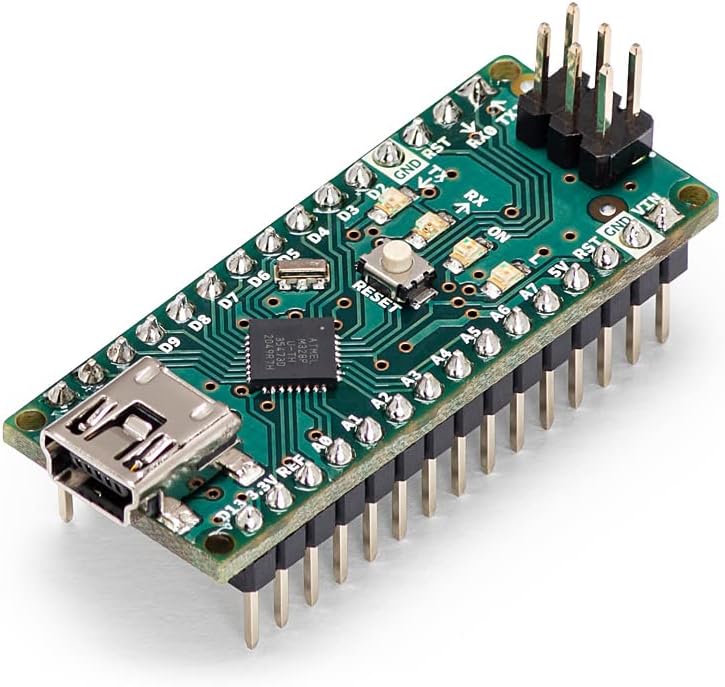
The Arduino Nano [A000005] stands out as the premier choice for enthusiasts and professionals seeking reliability. With a robust rating of 4.6 stars, it delivers consistent performance across a wide range of DIY and industrial projects.
We may earn a commission when you buy through this link, at no additional cost to you.
Its compact design houses the powerful ATmega328P microcontroller, offering 14 digital I/O pins and 8 analog inputs. This versatility allows precise control over sensors, motors, and LEDs, making it perfect for robotics and automation tasks.
While the Mini-USB port is less modern than USB-C, it ensures stable connections for programming and power. The board integrates seamlessly with the Arduino IDE, providing access to a vast library of community code and examples.
This board is ideal for makers who prioritize authenticity and long-term support. Whether you are prototyping a new gadget or building a complex embedded system, the Arduino Nano [A000005] remains a trusted standard in the maker community.
Engineered with high-quality components, this board ensures stable operation even under varying power conditions.
Being an official product, it benefits from extensive documentation and active forum support for troubleshooting.
We may earn a commission when you buy through this link, at no additional cost to you.
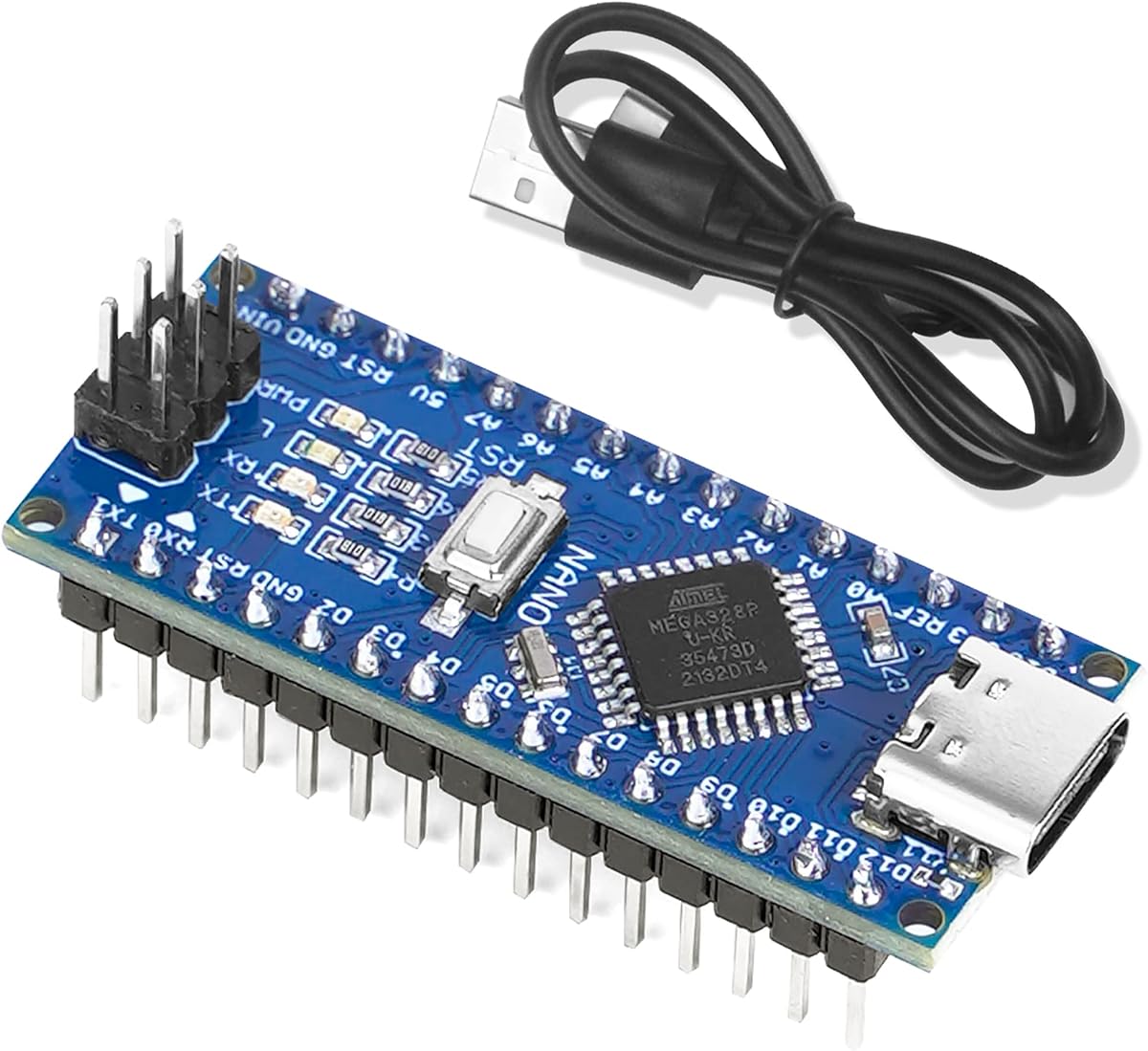
The 2Pcs Nano V3.0 Board offers exceptional value for hobbyists needing multiple units. Rated at 4.5 stars, this kit includes two boards and USB cables, making it a practical choice for bulk projects or classroom settings.
We may earn a commission when you buy through this link, at no additional cost to you.
Built with the ATmega328P and CH340G chip, it supports seamless USB programming. The inclusion of a USB-C port modernizes the connectivity, allowing easier integration with contemporary laptops and power sources.
While third-party boards may require driver installation, the performance matches the original closely for most applications. The flexible power supply options allow it to switch automatically between USB and external power sources.
If you need a reliable, affordable solution for testing multiple prototypes, this kit is an excellent starting point. It balances cost and functionality effectively, ensuring you get enough units to spare without breaking the bank.
The USB-C port simplifies cabling and future-proofs your setup against older USB standards.
Buying a two-pack reduces per-unit costs, ideal for projects where boards might be damaged during soldering.
We may earn a commission when you buy through this link, at no additional cost to you.
The Arduino Nano R4 with Headers represents the next evolution in microcontroller design. With a 4.5-star rating, it brings powerful Renesas technology to the classic Nano form factor, appealing to advanced users.
We may earn a commission when you buy through this link, at no additional cost to you.
Powered by the RA4M1 microcontroller, it offers 256KB flash and 32KB RAM, enabling complex applications without external memory. The pre-soldered headers save time, allowing immediate connection to breadboards without extra assembly.
Unique features like the Qwiic connector and programmable RGB LED enhance connectivity and debugging. The RGB LED provides visual feedback for status updates, while Qwiic simplifies wiring for I2C sensors and actuators.
Ideal for production and educational use, this board blends performance with ease of use. If you need a modern upgrade with better processing power and easier expansion options, the Nano R4 is a premium investment worth considering.
The RA4M1 chip provides faster clock speeds and better efficiency than older AVR-based boards.
Built-in Qwiic support eliminates the need for external breakout boards for many common sensors.
We may earn a commission when you buy through this link, at no additional cost to you.
This three-pack of Nano V3.0 boards delivers great value for those needing redundancy. With a 4.6-star rating, users appreciate the improved CH340G driver which simplifies installation on modern operating systems.
We may earn a commission when you buy through this link, at no additional cost to you.
The boards are fully compatible with Arduino IDE and offer standard functionality like 14 digital I/O pins. Their compact design makes them easy to fit into tight spaces, similar to the original Diecimila but smaller.
Each unit comes with a USB cable, ensuring you have everything needed to start immediately. The consistent performance across the pack makes them reliable for batch production or educational workshops where multiple students need equipment.
If you need multiple units without spending heavily, this pack is a smart choice. It balances reliability with cost, providing a straightforward solution for standard microcontroller tasks without needing advanced features.
The CH340G chip replaced older drivers, reducing compatibility issues on Mac and Linux systems.
Its small footprint ensures it fits comfortably on breadboards without overcrowding other components.
We may earn a commission when you buy through this link, at no additional cost to you.
The Arduino Nano Every upgrades the classic design with an ATmega4809 microcontroller. Rated at 4.6 stars, it provides enhanced efficiency and memory, making it ideal for complex projects requiring more resources.
We may earn a commission when you buy through this link, at no additional cost to you.
With 48KB flash and 6KB SRAM, you can store more code and data locally. The 20 digital I/O pins offer expanded control options compared to the standard Nano, useful for robotics needing more sensors or motors.
The switch to USB-C ensures faster programming and stable power delivery. It maintains compatibility with existing Arduino IDE and shields, allowing a smooth transition for users upgrading their systems.
This board is perfect for IoT applications and real-time tasks. Its balance of modern features and classic usability makes it a strong contender for anyone looking to move beyond basic limitations while staying within the Arduino ecosystem.
Improved architecture ensures better power consumption, extending battery life in portable devices.
More flash and RAM allow for richer features without external storage dependencies.
We may earn a commission when you buy through this link, at no additional cost to you.
The Arduino Nano ESP32 transforms the board into a connected powerhouse. With a 4.6-star rating, it offers dual-core performance and built-in Wi-Fi, opening doors to advanced IoT and cloud projects.
We may earn a commission when you buy through this link, at no additional cost to you.
It supports MicroPython, making coding easier for those familiar with Python. The USB-C port provides modern connectivity, while HID support allows it to act as a keyboard or mouse for computer interaction.
The board runs on an ESP32-S3 chip, enabling machine learning at the edge and complex data processing. This makes it suitable for smart home devices, wearables, and remote sensors requiring robust networking.
If wireless capability is your priority, this board is unmatched in the Nano form factor. While it may be more complex than standard boards, its features offer incredible versatility for modern development needs.
Integrated Wi-Fi and Bluetooth remove the need for additional communication modules.
MicroPython compatibility lowers the barrier to entry for developers comfortable with scripting.
We may earn a commission when you buy through this link, at no additional cost to you.
ELEGOO's Presoldered Nano offers convenience right out of the box. Rated at 4.6 stars, the boards come with headers already soldered, eliminating the need for tools or technical soldering skills.
We may earn a commission when you buy through this link, at no additional cost to you.
The USB-C port ensures modern connectivity for programming and power. Each pack includes three boards, allowing you to test, build, and spare components easily. They are compatible with classic AVR sketches for broad software support.
The compact footprint fits neatly on breadboards without requiring additional header installation. This saves time during prototyping and reduces the risk of damaging components during assembly.
Perfect for beginners or teams focused on rapid deployment, this kit removes friction from setup. If you want a hassle-free experience with modern connectivity, these boards are a practical choice for your next build.
No need to solder headers saves valuable time and ensures consistent quality across all pins.
The USB-C connection aligns with current device standards, simplifying cable management.
We may earn a commission when you buy through this link, at no additional cost to you.
This three-pack of Nano V3.0 boards with USB-C ports offers great versatility. With a 4.5-star rating, users benefit from automatic power source switching between USB and external inputs without jumpers.
We may earn a commission when you buy through this link, at no additional cost to you.
The ATmega328P MCU provides reliable performance for standard tasks. The USB-C socket modernizes connections, making it easier to power and program with current cables. Each board comes with a cable for immediate use.
It maintains compatibility with Windows, Mac, and Linux systems seamlessly. The design is breadboard-friendly, simplifying connections for experiments and permanent builds alike. This adaptability makes it suitable for various project types.
Ideal for general electronics work, this pack balances modern updates with traditional reliability. If you need a straightforward, plug-and-play solution for multiple builds, these boards deliver consistent value without unnecessary complexity.
Automatic voltage selection ensures the board always runs from the strongest power source available.
Cross-platform support means you can work with these boards regardless of your preferred operating system.
We may earn a commission when you buy through this link, at no additional cost to you.
The Arduino Nano R4 Loose Pins version offers maximum customization for advanced builds. Rated at 4.2 stars, it includes loose header pins and castellated edges, ideal for soldering directly onto custom PCBs.
We may earn a commission when you buy through this link, at no additional cost to you.
It features the powerful Renesas RA4M1 microcontroller for fast processing and expanded memory. The programmable RGB LED and Qwiic connector enhance usability, providing visual feedback and easy sensor connectivity.
While it requires manual assembly, this flexibility allows integration into compact or industrial designs. The board retains full IDE compatibility, making it accessible despite the need for soldering expertise.
Perfect for prototyping embedded systems, this version supports both breadboard and custom PCB workflows. If you need a board tailored to specific production needs without pre-installed headers, this offers excellent adaptability.
Castellated edges allow direct mounting on custom boards, reducing the need for connectors.
Despite loose pins, it retains the powerful features of the standard R4 model for high performance.
We may earn a commission when you buy through this link, at no additional cost to you.
The OSOYOO Nano Module is a compact solution for basic microcontroller needs. With a 4.6-star rating, it offers the classic functionality of a Nano in a USB-C compatible design at an entry-level price point.
We may earn a commission when you buy through this link, at no additional cost to you.
Powered by the ATmega328P, it supports ISP and USB downloads efficiently. The breadboard-friendly layout simplifies connections, making it easy to integrate into circuits quickly. It works across Windows, Mac, and Linux systems.
Although sold as a single unit, it provides a complete package for testing or small projects. The USB-C port ensures future compatibility, allowing you to use modern cables for programming and power supply.
Best for students or hobbyists on a tight budget, this module offers solid performance without extra features. If you just need a functional, small board for simple tasks, this is a reliable and affordable starting point.
The straightforward design eliminates unnecessary complexity, letting you focus on coding and building.
Its low price makes it accessible for learners without sacrificing core performance capabilities.
We may earn a commission when you buy through this link, at no additional cost to you.
Selecting the right Arduino Nano Board depends on your specific project requirements. Here are the key factors to consider before making your decision.
The core chip determines processing speed and memory. Classic boards use the ATmega328P, while newer models like the Nano Every or R4 offer enhanced memory and performance for complex tasks.
Choose based on your memory needs and application complexity.
Ports like USB-C or Mini-USB affect how you connect to computers. Modern boards use USB-C for faster data transfer and power stability, while older ones may need adapters.
Prioritize USB-C for longevity and convenience in new builds.
Some boards support auto-switching between USB and external power sources. This feature simplifies wiring and ensures your project stays powered even if the USB connection is interrupted.
Look for flexible power inputs if your project runs on batteries.
Models like the Nano ESP32 include built-in Wi-Fi and Bluetooth. This is essential for IoT projects that need to communicate over networks without adding external modules.
Select wireless-enabled boards for remote sensing and automation projects.
Pre-soldered headers save assembly time and reduce the risk of damaging pins. If you plan to use the board on a breadboard frequently, this feature is highly valuable.
Opt for pre-soldered versions if you want to start building immediately.
Ensure the board works with your operating system and the Arduino IDE. Official boards usually have the best support, though many third-party options are fully compatible with Windows, Mac, and Linux.
Check driver requirements before purchasing to avoid software headaches.
Pricing varies between official and third-party boards. Buying in packs can reduce the per-unit cost significantly, which is ideal if you need multiple boards for experiments.
Balance cost with necessary features to find the best value for your needs.
Newer models include RGB LEDs, Qwiic connectors, or castellated edges. These enhance debugging and integration possibilities for professional or specialized applications.
Consider these features if you plan to develop complex or production-ready systems.
Always verify your driver installation before uploading code. On some systems, you may need to install the CH340 or FTDI drivers to ensure the board appears as a serial device in your IDE.
When powering the board, avoid connecting multiple voltage sources simultaneously to prevent damage. Use the USB port for testing and external power only when needed with proper voltage regulation.
Store boards in anti-static bags when not in use to protect sensitive components. Handle the edges carefully and avoid applying pressure to pins, which can bend or break during prototyping.
Yes, most USB-C boards are compatible with standard sketches. However, check your shields and wiring to ensure they fit the new connector type without requiring adapters.
Official boards guarantee quality control and support. Third-party versions often offer lower prices and similar features, but quality may vary depending on the manufacturer.
The Arduino Nano ESP32 includes built-in Wi-Fi and Bluetooth, making it ideal for connected projects without needing external modules.
Not always. Many modern boards come with pre-soldered headers, allowing you to plug them directly into breadboards immediately after unboxing.
Most Nano boards accept 7 to 12 volts unregulated or 5V regulated via the VIN pin. Always check the specific manual to avoid damaging the voltage regulator.
Go to Tools > Board and select Arduino Nano. If using a clone, ensure you choose the correct processor or driver settings if required by the OS.
Yes, many models support low-power sleep modes. Ensure you disconnect USB during battery use and manage current consumption to extend battery life.
While robust for prototyping, industrial applications may require boards with certified durability. For general projects, these options offer reliable performance in varied environments.
Whether you choose the reliable Arduino Nano [A000005] or a cost-effective third-party version, the Nano form factor remains a versatile choice for developers. The official models provide assurance, while clones offer flexibility.
Prioritize features that match your workflow, such as USB-C support or wireless capabilities. Understanding your project's memory and connectivity needs will help you narrow down the options effectively.
Always check current listings for availability and deals before purchasing. Prices can change, and stock levels vary, so reviewing real-time options ensures you secure the best board for your needs.