
VSD Mini Macro Pad Shortcut Keypad
4.1Editor score
Compact six key LCD design
Dual side RGB light bars
USB powered for continuous operation
This expert guide compares the top ten macro pads for streaming to help you choose the best device for controlling OBS, apps, and audio during live broadcasts.
Streamers need efficient tools to manage complex workflows without interrupting their content. A macro pad for streaming provides customizable keys that trigger scenes, commands, and audio instantly. These devices streamline production and keep broadcasts professional and engaging for viewers.
We evaluated ten real products based on customization, compatibility, build quality, and user feedback. Each option offers unique layouts from compact six key models to full sixteen key decks with RGB lighting. Our analysis focuses on features that matter most to creators and professionals.
Each review highlights strengths and tradeoffs to help you find the right fit for your setup. Prices and availability change often so check current listings before purchasing. This guide aims to simplify your decision with clear comparisons and expert insights.
4.1Editor score

4.4Editor score

4.4Editor score
The following table compares key specifications across all ten models. Use this overview to quickly identify differences in key counts, connectivity, and unique features before reading detailed reviews.


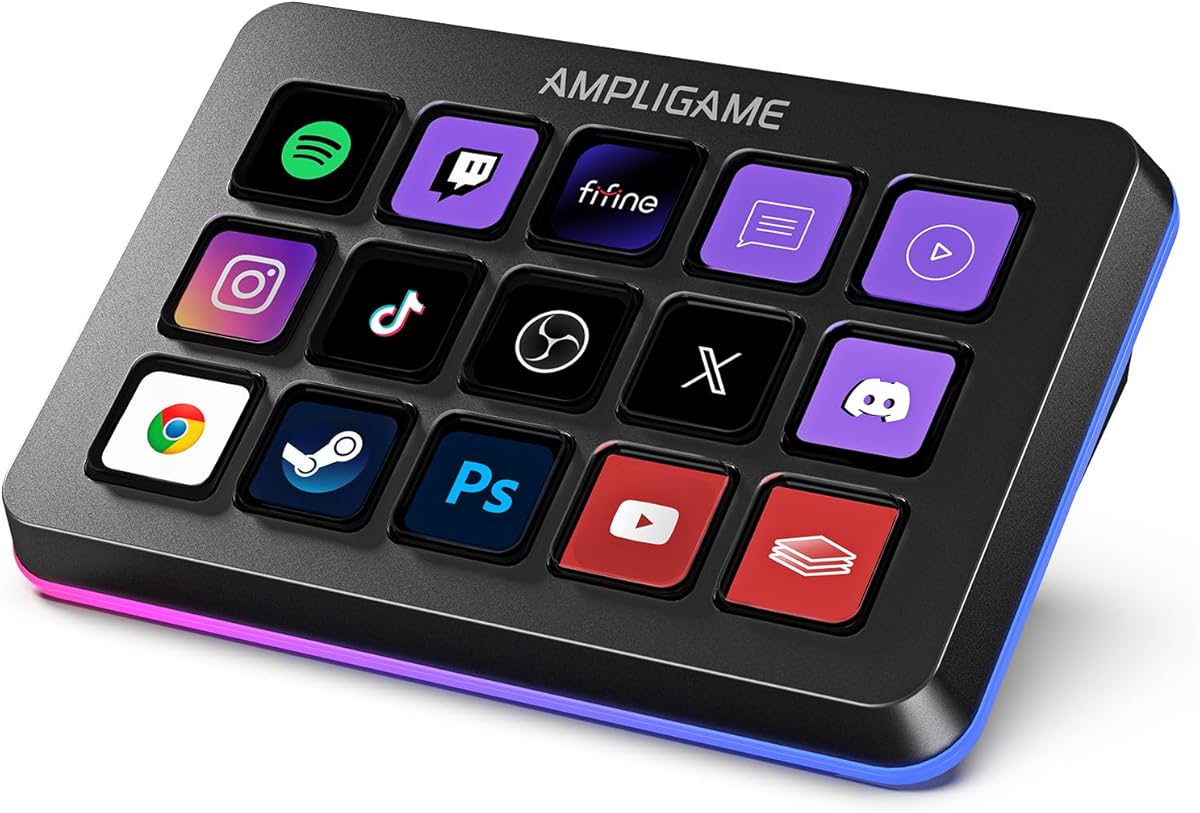


The VSD M18 Macro Pad is a top choice for streamers needing extensive control. With eighteen programmable keys including fifteen LCD visual keys and three physical buttons it offers significant flexibility. Its rating of 4.4 reflects solid performance and user satisfaction across various use cases.
We may earn a commission when you buy through this link, at no additional cost to you.
This device supports single tap commands for quick operations like launching apps or switching OBS scenes. The LCD keys accept images and animations for easy recognition. An adjustable RGB surrounding light ring adds visual appeal to your desk setup during gaming or streaming sessions.
Users note the sturdy construction and built-in plugins like clock and weather as useful features. However Linux users may need SDK development for customization rather than plug-and-play support. The software setup is straightforward for Windows and macOS users making it accessible for most.
Buyers seeking a balance of key count and visual customization will find this deck ideal. It streamlines workflows for gaming editing and professional tasks. The combination of macro capabilities and ambient lighting makes it a strong recommendation for content creators.
Customize single or multi-step sequences for daily operations and game combos.
LCD keys and RGB lighting enhance both usability and desktop aesthetics.
We may earn a commission when you buy through this link, at no additional cost to you.
The Stream Dock N1 stands out with its vertical space-saving design that expands shortcut keys while minimizing footprint. With a high rating of 4.7 users appreciate its ergonomic and efficient layout. It serves multiple needs beyond streaming including calculations and numeric keypad functions.
We may earn a commission when you buy through this link, at no additional cost to you.
This model offers three practical switchable modes including a left-hand shortcut mode and calculator mode. The fifteen LCD keys allow drag-and-drop customization for files apps and images. Compatibility with Windows and macOS ensures broad software integration for creators and professionals.
Customers highlight the extensive plugin marketplace and included icon packs as major advantages for customization. The two year warranty period provides peace of mind for long-term use. Some users note the need to learn different modes to maximize utility effectively.
Ideal for users with limited desk space who need versatility in one device. The combination of productivity tools and streaming controls makes it a unique option. Prioritize this if you value ergonomic design and extensive software support.
Vertical positioning frees up valuable horizontal desk real estate.
Switch between macro calculator and keypad modes as needed.
We may earn a commission when you buy through this link, at no additional cost to you.
The VSD M18 Stream Controller focuses on efficiency with one-touch operations for launching macros and scenes. Its 4.5 rating indicates reliable performance and user satisfaction. The device combines visual LCD keys with physical buttons for flexible task management.
We may earn a commission when you buy through this link, at no additional cost to you.
Key strengths include the ability to execute multi-hotkey macros with a single click. This simplifies complex workflows in gaming editing and photography. The surrounding RGB light ring enhances the desktop experience with customizable colors and lighting effects.
Users appreciate the versatile compatibility with Windows and macOS along with popular software like OBS. The high-quality construction ensures stable long-term performance. However Linux users may need to rely on SDK files for adaptation instead of native support.
This controller is best for those who prioritize speed and customization in daily tasks. The balance of physical and visual keys offers intuitive control. Consider it if you want a reliable tool for both entertainment and professional work.
One-touch macros reduce repetitive steps during live sessions.
RGB lighting and custom icons create an immersive setup.
We may earn a commission when you buy through this link, at no additional cost to you.
The VSD Mini Macro Pad offers an accessible entry point for creators needing basic macro control. With six customizable LCD keys it fits smaller budgets and desks while retaining core functionality. Its 4.1 rating reflects satisfaction among users seeking value for money.
We may earn a commission when you buy through this link, at no additional cost to you.
This device features dual side custom RGB light bars for ambient lighting without bulk. It supports one-touch shortcut execution for switching scenes and launching apps. The USB powered operation ensures continuous supply during extended sessions without battery concerns.
Users note the compact build is ideal for portable setups or minimal desks. While it requires VSD Craft software for full setup the process is straightforward. Linux users can adapt via open-source SDK for personalized functionality.
Ideal for beginners or those with limited space and budget constraints. It delivers essential macro features without compromising on aesthetic appeal. Choose this if you want a cost-effective tool to streamline your workflow.
Affordable price point makes macro tools accessible to more users.
Lightweight size allows easy transport between locations.
We may earn a commission when you buy through this link, at no additional cost to you.
The VSD N4 Pro is a premium device combining keys knobs and a touch bar for advanced control. With a 4.4 rating it appeals to users needing detailed audio and scene management. It includes ten LCD keys plus four RGB knobs for granular adjustments.
We may earn a commission when you buy through this link, at no additional cost to you.
This model functions as a USB sound deck triggering audio control commands without built-in speakers. The built-in passive USB dock adds connectivity for mice and drives. An adjustable ergonomic stand ensures comfortable viewing during long editing or streaming sessions.
Users highlight the dynamic RGB visuals and carbon-fiber panels for a high-end look. The plugin ecosystem supports batch tasks and daily efficiency. However the price and setup complexity may be barriers for casual users.
Best for professional creators requiring integrated audio and hardware connectivity. The combination of knobs and keys offers superior workflow control. Invest in this if you demand premium features and robust build quality.
RGB knobs allow fine-tuned volume and level adjustments.
Built-in dock reduces cable clutter on your desk.
We may earn a commission when you buy through this link, at no additional cost to you.
The fifine D6 macro keyboard offers fifteen customizable keys ideal for multi-tasking scenarios. Its 4.6 rating suggests high user satisfaction with its visual and functional features. This device allows drag-and-drop customization for apps and files easily.
We may earn a commission when you buy through this link, at no additional cost to you.
Key features include vivid RGB lighting with controllable modes to match your setup. The visual operation keypad lets you see applications directly on the controller reducing window switching. It works well with OBS Streamlabs and major streaming platforms.
Users appreciate the extensive plugin options and folder generation for organizing tasks. However ensuring firmware and software are updated is critical for optimal performance. Some third-party services may require active accounts for full integration.
This is a great choice for users who prioritize visual feedback and ease of use. The multi-tasking scenes support allows independent processing of different workflows. Consider it if you want a flexible tool for diverse content creation needs.
On-device display shows app states without opening windows.
Folders and scenes help manage complex multi-tasking needs.
We may earn a commission when you buy through this link, at no additional cost to you.
The TreasLin VSDinside controller offers eighteen macro keys with flexible mode switching for varied needs. With a 4.4 rating it balances productivity and streaming features well. This device includes a rotary knob and clickable buttons for enhanced control options.
We may earn a commission when you buy through this link, at no additional cost to you.
It supports dynamic icons and animated scenes for vibrant visual customization. The extensive plugin marketplace provides thousands of options for controlling apps and services. Users can create dedicated scenarios for daily work live streaming or media playback.
The three modes including calculator and numeric keypad make it useful beyond standard streaming. However Spotify integration requires an active premium account for full functionality. Technical support is available for engineering teams to assist during setup.
Ideal for users needing both macro control and numeric utility in one device. The dynamic icon feature adds personality to your setup. Choose this if you want comprehensive customization with built-in productivity modes.
Animated icons bring your dashboard to life with motion.
Switch to calculator or numeric modes for efficient work.
We may earn a commission when you buy through this link, at no additional cost to you.
The Streonor S15 controller stands out with three non-touch status display panels for real-time information. Its 4.6 rating highlights strong performance in providing system metrics at a glance. This device offers fifteen customizable keys for diverse workflow needs.
We may earn a commission when you buy through this link, at no additional cost to you.
Users can display CPU temperature GPU status and memory usage on the panels during streaming. Preset control pages allow dedicated layouts for editing gaming or office work. The action flows feature lets you trigger multiple commands with one key press.
The software store offers over one hundred plugins and icon packs for personalization. However Linux users are not supported and previous controller software should be uninstalled first. Ensure you download the latest software from the official website for stable use.
This model is ideal for streamers needing hardware-level monitoring and custom layouts. The status panels keep vital info accessible without cluttering your main screen. Consider it if you value system insights alongside macro control.
Display performance stats without opening system monitors.
Switch between scenarios like gaming and editing instantly.
We may earn a commission when you buy through this link, at no additional cost to you.
The Streonor S10 is a premium console combining keys touchscreen and knobs for demanding workflows. With an outstanding 4.9 rating it delivers top-tier performance for creators needing instant commands and precise adjustments. It serves as a central hub for streaming and editing.
We may earn a commission when you buy through this link, at no additional cost to you.
This device features ten LCD keys plus a touchscreen for supported information and controls. The four rotary knobs assign volume microphone levels and media playback directly to hardware. You can launch apps and switch scenes with multi-action workflows reducing repetitive steps.
It supports over one hundred plugins and icon packs for deep customization across platforms. While the price is higher the integrated audio mixer adds significant value for streamers. Note that Linux support is not available for this model.
Best for professionals who need robust audio control and touchscreen interaction. The combination of hardware and software features streamlines complex projects. Invest in this if you want a flagship device for content production.
Rotary knobs provide granular control over audio levels.
Use the touchscreen for detailed settings without menus.
We may earn a commission when you buy through this link, at no additional cost to you.
The Elgato Stream Deck MK.2 remains an industry standard for macro control with fifteen customizable LCD keys. Its 4.8 rating reflects widespread trust and reliability among professionals. This device offers immediate control over apps tools and platforms without screen clutter.
We may earn a commission when you buy through this link, at no additional cost to you.
One-touch operation allows triggering single or multiple actions like adjusting audio or social posts. Powerful plugins support integrations with OBS Twitch Twitter and Philips Hue for smart home control. Visual feedback confirms commands have been executed instantly for reassurance.
Users praise the streamlined workflow for editing and production tasks. While it lacks hardware knobs the software ecosystem is deeply developed. The brand reputation ensures long-term software support and community resources.
Ideal for those seeking a proven and supported solution for streaming. The balance of simplicity and functionality makes it a safe choice. Consider this if you want a reliable tool with extensive community backing.
Extensive plugin support covers almost any software need.
Visual confirmation keeps you confident during live streams.
We may earn a commission when you buy through this link, at no additional cost to you.
Selecting the right macro pad depends on your workflow needs desk space and software requirements.
Evaluate how many keys you need for your specific tasks. Devices range from six keys for simple shortcuts to eighteen for complex workflows. Look for customizable LCD keys that accept images or animations for intuitive recognition.
Choose a key count that matches your typical usage scenarios.
Ensure the device works with your primary OS. Most models support Windows and macOS but Linux compatibility varies. Some devices require specific software installation for full functionality on supported platforms.
Confirm OS support before purchasing to avoid setup issues.
Check the availability of plugins for your favorite apps like OBS or Streamlabs. A strong plugin ecosystem extends the device utility beyond basic macros. Some brands offer marketplaces with thousands of options.
Prioritize brands with active plugin communities for long-term value.
Consider the physical size and orientation of the deck. Vertical designs save horizontal space while compact models suit portable setups. Ensure the build quality allows for stable use during active sessions.
Select a form factor that fits your desk layout.
Look for useful additions like RGB lighting status panels or built-in docks. Some devices include audio mixers or rotary knobs for precise adjustments. These features enhance usability beyond simple key presses.
Extra hardware features can improve ergonomics and efficiency.
Inspect materials and construction standards for long-term reliability. Devices with sturdy panels and reliable switches withstand frequent use better. Some models include warranty periods to protect your investment.
Prioritize durable materials for daily professional use.
Review setup requirements including software installation and configuration steps. User-friendly software with drag-and-drop features simplifies customization. Check for online tutorials or customer support availability during setup.
Choose a device with intuitive setup to get started faster.
Compare prices against features to determine overall value. Budget models offer core functionality while premium options include advanced controls. Consider long-term needs when deciding between entry-level and flagship devices.
Balance cost with features that match your actual workflow.
Begin by connecting the device via USB to your computer and installing the required software. Follow the on-screen prompts to configure key assignments and select icons. Ensure your system permissions allow the software to access necessary applications.
Test your macros with common tasks like launching OBS or switching scenes. Create distinct profiles for different activities like gaming and editing. Regularly back up your profiles to prevent data loss during system changes.
Keep your device clean by wiping keys with a soft dry cloth. Avoid spills and extreme temperatures to protect electronic components. Update firmware and software regularly to access new features and security patches.
Most macro pads support mainstream streaming software like OBS and Streamlabs. However specific integrations may require installing plugins. Always check the device compatibility list before purchasing.
Yes macro pads are versatile tools for productivity. They can launch documents control media or automate office workflows. Many users utilize them for gaming and editing beyond streaming.
Many devices require proprietary software rather than system drivers. This software handles customization and key mapping. Ensure you download the latest version for stability.
Most modern macro pads store unlimited independent scene presets. You can switch between these profiles instantly. Check specific limits in the product documentation.
Yes LCD keys typically support custom images and animations. You can upload JPG or PNG files to represent different functions. This helps visualize what each key does instantly.
Built with durable materials many macro pads last for years of daily use. Regular cleaning and proper storage extend their life. Warranty terms also indicate expected durability.
Yes you can connect multiple USB devices to a single system. Some software allows mapping different profiles to each device. This setup can support complex production environments.
Some devices lack native Linux support but offer SDKs for customization. This may require technical knowledge to configure. Check community forums for existing Linux solutions.
This guide explored ten macro pads ranging from budget friendly to premium options. Top picks include the VSD M18 for key count and the Streonor S10 for audio features. Each device offers unique strengths depending on your specific workflow.
Prioritize compatibility and customization features that match your daily tasks. A well chosen deck can significantly improve your streaming efficiency. Consider both software ecosystem and hardware build when making your decision.
Remember that prices and availability fluctuate so check current listings before buying. Investing in a reliable macro tool pays off in streamlined productions. Choose a device that supports your creative goals effectively.