
ASRock J4125M Intel Quad-Core Processor J4125
3.4Editor score
Quad-Core J4125 Processor
Supports DDR4 Memory
Compact Micro ATX Design
This guide compares the top ten low power motherboards for home servers and mini PCs based on efficiency, connectivity, and build quality.
Low power motherboards are essential for building energy-efficient systems that run 24/7 without excessive heat or electricity costs.
We compared ten real products based on CPU efficiency, connectivity options, and thermal design to find the best picks for your needs.
Each pick shows key specs and real-world strengths while we remind you that prices change frequently on Amazon and other retailers.
3.4Editor score

4.5Editor score

4.1Editor score
This side-by-side comparison lists all ten low power motherboards with their key specs so you can quickly identify the right fit for your build.





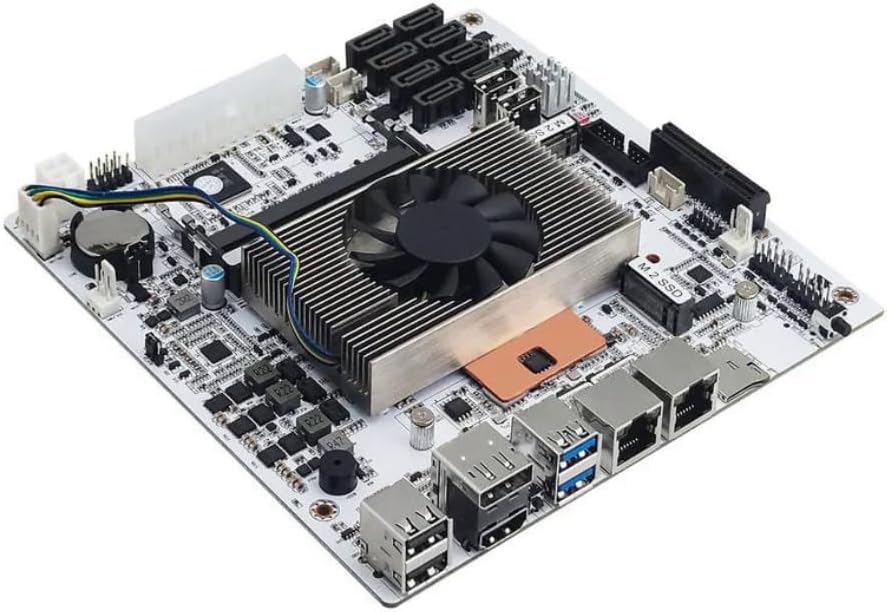
This industrial motherboard stands out with its N5105 low power processor and four 2.5GbE network ports for serious NAS builds. It earned a strong 4.5 rating from users who value its connectivity and stability for 24/7 operation.
We may earn a commission when you buy through this link, at no additional cost to you.
The standout quality is its network performance. The four i226 ports allow you to build a firewall, router, or storage server with aggregated bandwidth. Six SATA ports give you plenty of room for hard drives without expansion cards.
On the downside, the board needs both a 24pin and 4pin power connector to function. Users also report a few minutes wait time on the first boot while memory information is read. These are minor trade-offs for the build power.
Buy this if you need a stable industrial NAS or firewall appliance. Its mix of networking storage and display options makes it a powerful choice for home servers and small offices.
The four 2.5GbE LAN ports allow for link aggregation or multi-WAN setups, delivering high throughput for media streaming and file transfers.
Dual display support through HDMI 2.0 and DisplayPort 1.4b enables multi-monitor setups at 4K resolution for efficient server management.
We may earn a commission when you buy through this link, at no additional cost to you.
For tight budgets, this Micro ATX board offers incredible value by including a J1800 processor. It received a 4.0 rating from users building basic media centers or entry level NAS systems.
We may earn a commission when you buy through this link, at no additional cost to you.
The key strength is its low price and included CPU. It supports DDR3 memory which is cheap and easy to find. The board also offers VGA, DVI, and HDMI ports for wide monitor compatibility.
Trade-offs include only two SATA2 ports and limited USB 3.0 availability. However, for low speed storage like optical drives or small NAS setups, this is perfectly acceptable.
Buy this if you need a simple low power PC for office work or light media streaming. It is the most affordable option for a functional home server.
The J1800 CPU is included in the motherboard package, eliminating the need to buy a separate processor for basic computing tasks.
Legacy VGA, DVI, and modern HDMI outputs ensure you can connect almost any monitor or TV without needing adapters.
We may earn a commission when you buy through this link, at no additional cost to you.
This AM4 board is a great choice if you plan to use a Ryzen CPU for better performance while keeping power use reasonable. It received a 4.4 rating from users upgrading old PCs to modern hardware.
We may earn a commission when you buy through this link, at no additional cost to you.
The main strength is its compatibility with the latest Ryzen 5000 series. Dual M.2 slots and PCIe 4.0 support mean you can add fast SSDs and powerful graphics cards without bottlenecks.
The lack of onboard Wi-Fi means you need a PCIe adapter. USB options are also limited compared to higher end boards. Still, the power design ensures stable performance for gaming or office tasks.
Buy this if you want an upgrade path to Ryzen 5000 processors. It is perfect for budget builds that need future proofing and fast storage.
With one PCIe 4.0 M.2 slot and one PCIe 3.0 M.2 slot, you can install the fastest NVMe SSDs for rapid load times.
The 3+3 VRM digital design paired with premium chokes keeps power clean and steady even under sustained workloads.
We may earn a commission when you buy through this link, at no additional cost to you.
This board is designed for performance within a compact form factor. It earned a 4.4 rating from users who value its memory tuning capabilities and cooling solutions.
We may earn a commission when you buy through this link, at no additional cost to you.
The key strength is MSI Core Boost and memory overclocking support. You can push DDR4 RAM to high speeds which improves Ryzen CPU performance significantly. The Frozr AI cooling adjusts fans based on CPU temperature.
The audio codec is basic compared to high end boards. Rear USB ports are limited which may require a front panel extension. These are minor issues for a board focused on raw performance.
Buy this if you plan to overclock memory or need high speed gaming performance. It is a strong choice for compact gaming builds or productivity workstations.
Frozr AI cooling automatically adjusts fan speeds based on CPU and GPU temperatures to maintain quiet operation and stable performance.
Steel Armor reinforces the primary PCIe x16 slot to protect your graphics card from bending or breaking under heavy use.
We may earn a commission when you buy through this link, at no additional cost to you.
This compact board is built for small form factor PCs. It received a 3.4 rating which suggests mixed user experiences but it remains a popular budget choice for low power systems.
We may earn a commission when you buy through this link, at no additional cost to you.
The J4125 processor offers good quad-core performance for media transcoding and light computing. It supports DDR4 RAM which provides decent speed for office work. The M.2 Key E slot supports WiFi modules.
The PCIe 2.0 x16 slot limits modern GPU performance. Some users may experience boot or power issues. Still, for pure NAS or media tasks, it is a solid budget pick.
Buy this if you need a cheap compact motherboard for a home theater PC. It is a good starting point for basic home server builds.
The Micro ATX design fits in small cases while the J4125 CPU keeps power consumption low for 24/7 operation.
The M.2 Key E slot allows you to add wireless networking without occupying a standard expansion slot.
We may earn a commission when you buy through this link, at no additional cost to you.
This board is a strong value for AMD users wanting Ryzen 5000 support. It earned a 4.5 rating for its reliability and mix of modern and legacy features.
We may earn a commission when you buy through this link, at no additional cost to you.
The key strength is its three video outputs including D-Sub for old monitors. Memory overclocking support up to 4733MHz ensures fast system performance. The 6 power phase design keeps power delivery stable.
Audio and USB options are basic. The layout may not fit all compact cases perfectly. Still, the combination of price and performance makes it a strong budget AM4 choice.
Buy this if you want a reliable budget board for a Ryzen build. It is great for office PCs that need multiple display connections.
HDMI, DVI-D, and D-Sub outputs allow you to connect a wide range of monitors including older office displays.
DDR4 support up to 4733+ ensures you can tune your memory for higher speeds and better system responsiveness.
We may earn a commission when you buy through this link, at no additional cost to you.
This Mini-ITX board is perfect for small PC builds. It earned a 4.4 rating from users who value its built-in wireless and compact design.
We may earn a commission when you buy through this link, at no additional cost to you.
The key strength is the onboard Intel Wi-Fi and Bluetooth. The Digital PWM heatsink ensures cool performance in tight cases. Three display outputs allow flexible monitor setups.
The A520 chipset limits PCIe lanes and overclocking. It is more expensive than larger boards due to the form factor. However, the convenience of Wi-Fi makes it worthwhile for many users.
Buy this if you need a tiny PC with wireless connectivity. It is ideal for living room media centers or portable workstations.
Built-in Wi-Fi and Bluetooth save you from needing a USB dongle or PCIe card in small cases.
Direct 6 Phase Digital PWM with 55A DrMOS ensures stable power and efficient operation in small form factor systems.
We may earn a commission when you buy through this link, at no additional cost to you.
This board stands out for its Wi-Fi 6E support and perfect user rating. Users love its stable power delivery and fast network performance for modern tasks.
We may earn a commission when you buy through this link, at no additional cost to you.
The key strength is the 802.11axe Wi-Fi 6E which provides low latency. The 8 phase power design ensures stability. Four DDR4 slots support up to 128GB of RAM.
It is slightly more expensive than non-WiFi versions. The audio is standard but clear. Still, the wireless speed and build quality make it a premium choice.
Buy this if you want the latest wireless standard. It is perfect for gamers or users who need fast reliable internet without cables.
Wi-Fi 6E support provides access to the 6GHz band for ultra low latency and high speeds in congested areas.
Four DDR4 slots support up to 128GB total RAM allowing for heavy virtualization or professional workloads.
We may earn a commission when you buy through this link, at no additional cost to you.
This board is designed for storage heavy builds with low power use. It earned a 4.1 rating from users who need massive storage in a small form factor.
We may earn a commission when you buy through this link, at no additional cost to you.
The main strength is eight SATA ports combined with 2.5GbE networking. The 8-thread low power CPU handles virtualization well. It supports dual 4K displays for easy management.
A known sleep mode bug may affect some users. The rear I/O is limited. Still, the storage density and efficiency are hard to beat for home servers.
Buy this if you need a small NAS with lots of drives. It is perfect for Plex media servers or home lab setups.
Eight SATA ports allow you to connect multiple hard drives without needing expensive expansion cards.
Dual 2.5GbE LAN ports provide fast connectivity for media streaming and quick file transfers.
We may earn a commission when you buy through this link, at no additional cost to you.
This board is built for enterprise grade NAS builds with low power use. It offers Core i5 performance with 24/7 readiness.
We may earn a commission when you buy through this link, at no additional cost to you.
The main strength is 8 SATA and 2 NVMe ports. The Core i5 8265U CPU handles virtualization and media transcoding. Dual 2.5GbE LAN ports support link aggregation.
Sleep mode is not supported which is expected for servers. It is a newer product so long term stability is less known. Still, the features are compelling.
Buy this if you want enterprise features in a low power board. It is great for advanced home lab projects and NAS servers.
The Core i5 8265U provides 8 threads for multitasking and virtualization tasks.
Designed for 24/7 operation with Clear CMOS and UEFI support for reliable server builds.
We may earn a commission when you buy through this link, at no additional cost to you.
Choosing the right low power motherboard depends on your specific needs for CPU performance, connectivity, and build size.
The most critical factor is CPU power usage. Look for boards with Intel Celeron or AMD Ryzen CPUs that have low TDP ratings like 15W or under.
Low TDP ensures the system runs cool and consumes less electricity over time.
Decide between Micro ATX and Mini ITX based on case size. Mini ITX is ideal for small PCs but costs more and has fewer expansion slots.
Choose a size that fits your case and allows for future upgrades.
Check RAM and SATA limits to ensure you can add enough drives. High-end NAS boards often support eight SATA ports or multiple M.2 slots.
More memory slots give you flexibility for virtualization and future upgrades.
For media servers and firewalls prioritize boards with multiple 2.5GbE or 10GbE LAN ports. Standard Gigabit may bottleneck large file transfers.
Multiple LAN ports also enable link aggregation for better performance.
If you need to connect a monitor look for boards with HDMI or DisplayPort. Some models include legacy VGA for older office monitors.
Dual display support helps in multi-monitor setups for server management.
Many industrial boards need both 24pin and 4pin power connectors. Make sure your power supply has these cables before buying.
Standard PSUs usually include 24pin but 4pin may require specific cables.
Wi-Fi 6E is a great feature for compact builds that lack Ethernet ports. It adds convenience without needing extra cards.
Always check if the board supports the latest Wi-Fi standard.
For advanced users look for CPUs with VT-x and VT-d support. This allows running multiple operating systems on one machine.
Virtualization support is essential for home labs and testing environments.
When installing the motherboard ensure it sits on standoffs in your case to prevent short circuits. Connect the 24pin and 4pin power cables securely to avoid boot issues.
Keep the system clean by dusting the fans and heatsinks regularly. Use compressed air every three months to maintain good airflow and prevent overheating.
Update BIOS firmware periodically to improve compatibility and stability. Always read release notes before flashing to avoid errors during the update process.
A low power motherboard uses energy efficient CPUs like Intel Celeron or AMD Ryzen U-series with TDP ratings under 35W. These boards optimize power delivery to reduce electricity usage and heat generation.
Yes many boards like the N5105 and Mini-ITX models are designed specifically for NAS. They include multiple SATA ports and stable Ethernet controllers for 24/7 operation.
Yes but PCIe lane limits may restrict performance. B550 and X570 boards offer PCIe 4.0 support for high-end GPUs while Celeron boards usually support only basic graphics.
Yes boards with 8-thread CPUs and VT-x VT-d support are great for virtualization. You can run multiple VMs simultaneously without excessive power draw.
Use a standard ATX power supply. Some industrial boards require a 4pin CPU power connector in addition to the main 24pin cable. Check your PSU for these cables.
Most CPUs on these boards include passive cooling. But adding a case fan helps maintain airflow. Avoid blocking CPU fans to ensure stable performance.
We found the N5105 Industrial board and the Mini-ITX 8 Thread models stand out for their unique features. Budget buyers may prefer the ASRock J4125M for simple needs.
Prioritize CPU efficiency and network ports if you build a server. For general office use focus on display outputs and memory support to get the most value.
Prices change frequently so check current deals before buying. Always verify compatibility with your case and power supply to ensure a smooth build experience.