
WALI Computer Monitor Stand for Desk
4.7Editor score
Holds up to 44 lbs
Vented platform for cooling
Under-stand storage space
Finding the right laptop rack for desk can transform your workspace into a more efficient and ergonomic environment. A quality stand elevates your device to eye level, reducing neck strain and improving airflow for better cooling during extended use sessions.
We have compared ten top-rated models based on stability, material quality, adjustability, and overall value. Each product was evaluated for its ability to fit various laptop sizes while maintaining a sleek profile that complements modern office setups.
Our picks highlight the best options for different budgets and workspace configurations. Keep in mind that prices fluctuate frequently, so always verify current availability before making your final purchase decision for your specific needs.
4.7Editor score

4.8Editor score

4.6Editor score
As an Amazon Associate we earn from qualifying purchases.
The following table provides a side-by-side comparison of all ten models to help you quickly identify key specifications and features that matter most for your specific setup requirements.





The OMOTON Dual Vertical Desk Laptop Stand Holder stands out as a top choice for users needing to store multiple devices efficiently. With a high rating of 4.8 stars, it is praised for its sturdy aluminum construction and versatile dual docking capability that fits most modern laptops.
We may earn a commission when you buy through this link, at no additional cost to you.
Its standout quality is the ability to hold two laptops at once, which is ideal for professionals managing dual devices. The adjustable width ensures compatibility with notebooks ranging from 0.55 inches to 1.65 inches thick. Non-slip silicone mats on the base and slots secure devices firmly while preventing any surface scratches.
While it excels in stability and build quality, it is designed primarily for vertical storage which may not suit users who need immediate access to screens. Additionally, the slots are tailored for laptops, so tablets might not fit as snugly without additional padding or accessories.
This stand is best for users who need a durable, space-saving solution for multiple laptops. If you value organization and device protection in a single unit, this model offers exceptional value and performance for home or office setups.
The double dock design allows simultaneous storage of two laptops, significantly reducing desk clutter and keeping workspaces tidy without sacrificing accessibility.
Crafted from anodized aluminum with a sandblasted finish, it mirrors the texture of Apple devices while offering scratch-resistant durability for long-term use.
We may earn a commission when you buy through this link, at no additional cost to you.
The NODOCA 2-Slot Laptop Storage for Desk is a versatile option designed to keep your workspace organized by mounting vertically on the side of your desk. It features a robust carbon steel frame that ensures stability while offering extra storage for accessories like headphones or game controllers.
We may earn a commission when you buy through this link, at no additional cost to you.
Its broad compatibility allows it to fit most laptop models from Air to Dell and HP. The built-in hook at the bottom provides a practical place to hang items, keeping your main workspace clear. The silicone protective pad on the bottom prevents scratches on your device and the desk surface.
However, installation requires a desk with specific dimensions, needing a depth greater than 5cm and thickness less than 6cm. This limits its use on very thick or glass desks where clamping may not be secure. Users should measure carefully before purchasing to ensure a proper fit.
This rack is ideal for users who need to maximize vertical space and keep peripherals within reach. If your desk meets the size requirements, it offers a sturdy and functional solution for organizing multiple devices and accessories efficiently.
By mounting on the side of the desk, it frees up valuable horizontal workspace while keeping laptops accessible for quick swaps or charging.
The included hook allows you to hang headphones or hats, reducing clutter on the desktop and keeping your essentials organized in one spot.
We may earn a commission when you buy through this link, at no additional cost to you.
The BYMECOST No Drill Under Desk Laptop Mount offers a clever way to organize your tech without cluttering your desktop surface. Its no-drill design allows for quick installation by clipping directly to the desk frame, making it perfect for renters or temporary setups.
We may earn a commission when you buy through this link, at no additional cost to you.
This metal shelf provides substantial storage space for devices like iPads, Mac Minis, or power cords. The hollow structure promotes airflow which helps keep connected devices cool. It can hold up to 44 pounds ensuring stability even with heavier items like external hard drives or monitors.
Installation limitations apply to tables with crossbars or those smaller than 20 inches in width. Users must measure their desk carefully as the tray itself is 16.7 inches wide. Without these dimensions, the mounting clips may not secure properly leading to potential instability.
This mount is best for users with standing desks or large tables needing hidden storage. It transforms unused under-desk space into a functional hub for tech accessories while keeping your main workspace clean and professional.
Placing items underneath your desk frees up primary workspace, ideal for small offices or shared desks where surface space is limited and valuable.
Three openings on the tray help route charging cables neatly preventing tangled cords and keeping your desk area tidy and organized.
We may earn a commission when you buy through this link, at no additional cost to you.
The Adjustable Laptop Stand for Desk focuses heavily on ergonomics allowing you to raise your laptop to a comfortable viewing height. Made from sturdy metal, it supports up to 17.6 pounds and features ventilation holes that improve airflow to keep devices cool during operation.
We may earn a commission when you buy through this link, at no additional cost to you.
Its adjustable design helps fix posture and reduce strain during long work sessions. Rubber mats on the hook and anti-skid pads ensure your device stays secure without scratching. The smooth edges are designed not to hurt your hands during adjustment or placement.
While it offers significant benefits for comfort, some users report that adjustments can loosen slightly with frequent use. Additionally, the metal construction while durable means care is needed during transport to avoid bending the frame if packed tightly in a backpack.
This stand is ideal for users working from home or office who need relief from neck strain. If portability and ergonomic health are your priorities, this model offers a practical balance of stability and adjustability at a reasonable cost.
Adjustable height and angles allow you to position the screen at eye level significantly reducing neck fatigue and improving overall posture during work.
Ventilation holes allow maximum airflow under the laptop helping prevent overheating and maintaining optimal performance during demanding tasks.
We may earn a commission when you buy through this link, at no additional cost to you.
The LOXP Adjustable Laptop Stand distinguishes itself with a unique 360-degree rotating base that allows you to pivot your laptop easily. This flexibility is great for collaboration or changing work angles without moving the entire stand. It is built from one-piece fiber metal for superior durability.
We may earn a commission when you buy through this link, at no additional cost to you.
The stand supports laptops up to 16 inches and features a foldable design for easy travel. Non-slip silicone pads keep the device secure while preventing scratches. Its ergonomic adjustments help maintain eye level positioning reducing physical strain during daily use.
However, the rotating base adds to the overall footprint which might not fit smaller desks. Also, if you use a 17-inch gaming laptop, it may not fit securely. Users with larger devices should verify dimensions before purchasing to ensure compatibility.
This stand is best for professionals who work in shared spaces or need to share screens easily. If rotation and portability are key requirements for your workflow, this model offers robust construction and functional design.
The 360-degree rotating base allows you to pivot the laptop freely making it easy to share screens with colleagues or adjust viewing positions.
Constructed from one-piece fiber metal, it provides more stability and longevity compared to standard aluminum alloy stands available in the market.
We may earn a commission when you buy through this link, at no additional cost to you.
The BESIGN LS03 Aluminum Laptop Stand is a reliable choice for users seeking a permanent desk solution. It elevates your laptop by six inches improving posture and reducing neck pain. The aluminum alloy construction ensures it remains sturdy without any wobbling even during typing.
We may earn a commission when you buy through this link, at no additional cost to you.
Its open design promotes excellent airflow keeping the device cool during extended sessions. The detachable design allows for easy assembly in three steps and storage when not in use. Rubber holders grip the device tightly preventing any sliding or scratching.
While it is great for stationary desks, it lacks foldability for travel which might be a drawback for frequent movers. Also, the height and angle are fixed so there is no adjustability for different user preferences or ergonomic needs.
This stand is ideal for users with a dedicated home office. If you value simplicity, durability, and a sleek aesthetic, this model provides solid support and effective cooling for most standard laptops.
Thanks to the detachable design you can assemble or disassemble the stand quickly without tools making it easy to move or store when needed.
The open aluminum design allows air to circulate freely under the device preventing overheating and maintaining optimal performance for your laptop.
We may earn a commission when you buy through this link, at no additional cost to you.
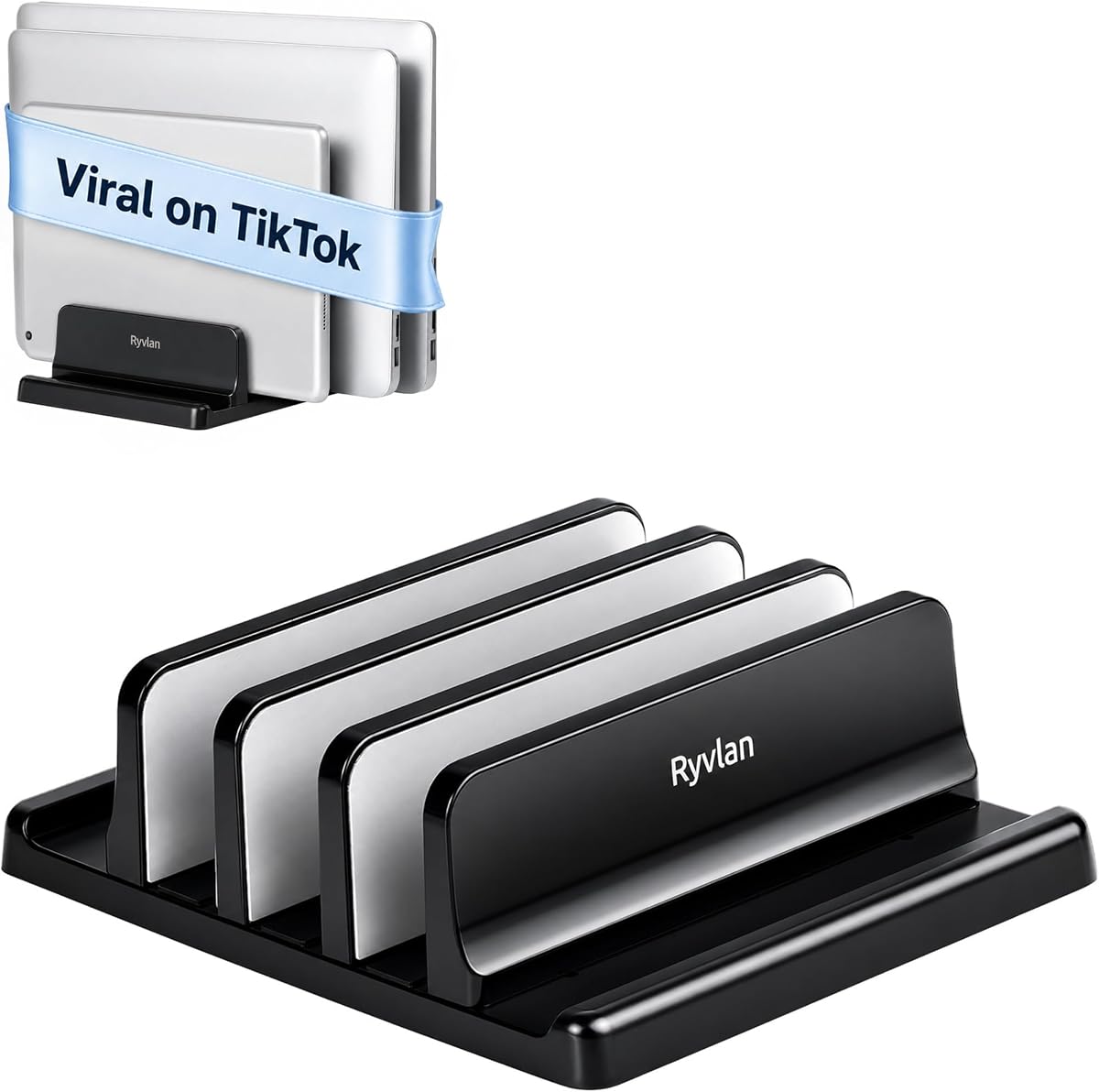
The Ryvlan Vertical Laptop Stand for Desk is designed for maximum density fitting three laptops plus two tablets in a single footprint. This multi-slot design is perfect for shared workspaces where multiple devices need to be stored vertically. It uses adjustable slots to secure various thicknesses snugly.
We may earn a commission when you buy through this link, at no additional cost to you.
Each slot adjusts from 0.47 inches to 1.2 inches using a provided wrench ensuring a custom fit for different brands. The ABS plastic construction is light enough to move but weighted enough to stay put on your desk. Silicone padding protects devices from scratches on all sides.
While the plastic build is cost-effective it may not be as durable as metal over years of heavy use. Also, adjusting the slots requires using a wrench which can be slightly tedious if you swap devices frequently. Users may need to keep the wrench handy.
This stand is best for students or teams managing multiple laptops. If you need to clear a desk surface and store several devices in one organized unit, this model offers practical capacity and flexible compatibility.
With three laptop slots plus two tablet holders this stand clears the entire desk surface allowing for a highly organized workspace with minimal footprint.
Adjustable slots fit thin ultraportables and thick gaming machines equally well ensuring each device sits securely without wobbling or sliding.
We may earn a commission when you buy through this link, at no additional cost to you.
The Vaydeer Vertical Laptop Stand Holder Organizer offers a compact solution for storing laptops and tablets vertically. Its 3-in-1 design cradles one laptop and one device simultaneously making it efficient for small desks. The adjustable width accommodates laptops from 0.55 inches to 1.69 inches thick.
We may earn a commission when you buy through this link, at no additional cost to you.
Constructed from high-quality ABS plastic it is lightweight yet stable enough to hold standard devices. Soft silicone mats protect against scratches and the polished surface gives a sleek look. It includes an Allen wrench for easy adjustment to suit your specific device needs.
Plastic models are generally less durable than metal under heavy impact which may be a concern for high-traffic areas. Also, it is not designed for extremely heavy gaming laptops. Users should check the weight of their device before purchasing to ensure stability.
This organizer is best for home offices needing tidy storage. If you want an affordable way to keep your laptop accessible and organized without taking up much room, this is a practical choice.
This vertical stand maximizes limited desk space by storing devices upright keeping surfaces clear for writing or other daily activities.
Adjustable width supports most laptop sizes up to 17.3 inches ensuring it fits various brands and models without needing custom brackets.
We may earn a commission when you buy through this link, at no additional cost to you.
The Elestoria 5- Slot Vertical Laptop Stand is a premium option designed for power users managing multiple devices. Its heavy-duty aluminum construction provides unmatched stability for laptops up to 17.3 inches. The adjustable width mechanism allows tool-free customization to secure devices tightly without gaps.
We may earn a commission when you buy through this link, at no additional cost to you.
This model reclaims up to 80% of desk space by stacking devices vertically. Polished edges and soft silicone padding ensure protection from scratches. The closed design also provides better cooling airflow. Its modern look complements high-end setups while streamlining your tech ecosystem.
While the quality is excellent it comes with a higher price tag which might not suit budget buyers. Also, the large footprint requires a spacious desk to accommodate four laptops vertically. Ensure you have adequate room before investing in this robust unit.
This stand is best for professionals with extensive setups. If you need a premium solution for heavy-duty use and want to keep multiple high-end devices secure and cool this model is an outstanding investment.
The heavy and stable base ensures the stand holds up to four laptops without tipping even on uneven desk surfaces or during vigorous use.
Tool-free adjustment lets you quickly change slot widths to fit different laptop thicknesses securely without needing any screws or tools.
We may earn a commission when you buy through this link, at no additional cost to you.
The WALI Computer Monitor Stand for Desk serves as a robust platform capable of holding up to 44 pounds. It functions as both a monitor riser and a laptop stand offering versatility. Its metal shelf is large enough for most displays and laptops keeping them elevated for better airflow.
We may earn a commission when you buy through this link, at no additional cost to you.
Three height options let you choose the viewing angle that suits your posture best. Vented holes prevent overheating by allowing air to circulate underneath devices. The space beneath the shelf is perfect for storing keyboards or notebooks clearing up valuable desk surface area.
While stable and functional, it is a fixed structure that does not offer the same ergonomic tilt as vertical stands. Users who need precise screen angle control may find it less ideal than specialized risers. However, it remains a solid all-in-one solution for general use.
This stand is best for budget-conscious buyers needing strong support. If you want a durable platform that organizes both your laptop and monitor affordably, this model delivers excellent value and reliability.
With a support limit of 44 pounds this stand handles large monitors and heavy laptops easily ensuring stability for any common desktop setup.
Adjustable height settings help reduce neck strain by allowing you to lift devices to a comfortable eye level for prolonged daily work.
We may earn a commission when you buy through this link, at no additional cost to you.
Selecting the right laptop rack requires considering your specific workspace needs device size and desired functionality. Understanding key features helps you invest in a product that offers lasting value.
Consider how many devices you need to store at once. Dual or triple slot stands are ideal for shared workspaces while single stands suit individual users focusing on one device at a time.
Choose capacity based on your daily workflow to avoid overcrowding or underutilizing the stand.
Aluminum alloys offer durability and heat dissipation while ABS plastic is lighter and more affordable. Metal stands generally last longer under heavy use and resist scratching better than plastic options.
Prioritize solid construction that feels stable on your desk surface.
Adjustable width slots ensure compatibility with various laptop thicknesses ranging from ultrabooks to gaming machines. Some models offer tool-free adjustments while others require a wrench for customization.
Ensure the range covers your specific device dimensions before purchasing.
Open designs with ventilation holes help dissipate heat keeping your laptop running efficiently during heavy loads. Closed designs may trap heat if not properly engineered for airflow.
Look for perforations or open frames to maintain thermal performance.
If you travel frequently a foldable or detachable stand is essential. Portable models are lightweight but must remain sturdy enough to prevent wobbling during typing.
Check fold dimensions to ensure they fit your travel bag comfortably.
Non-slip silicone pads protect both your device and the desk surface from scratches. Rubberized edges on the rack itself prevent accidental damage during installation.
Ensure all contact points are padded for maximum safety.
Some under-desk mounts require drilling while others use clip-on systems. Choose a method compatible with your desk type to avoid structural damage or instability.
Review installation requirements carefully especially for rental properties.
Select a finish that matches your existing workspace decor. Silver aluminum suits tech-heavy setups while black plastic blends into traditional offices.
Visual harmony contributes to a professional and organized environment.
Place the rack on a flat stable surface to ensure it does not tip over. If it is adjustable verify all slots are correctly tightened before placing devices inside.
Clean the stand regularly with a dry microfiber cloth to remove dust that can accumulate in ventilation holes or slots. Avoid using chemical cleaners on silicone pads to maintain their grip.
When adjusting widths on screw-based models loosen slightly then tighten securely once the device is placed. Check pads periodically for wear and replace if they lose elasticity over time.
Most high-end racks like the Elestoria and OMOTON models accommodate laptops up to 17.3 inches thick. Check the adjustable width range carefully to ensure it covers your device's thickness before purchasing.
Not if the stand includes protective silicone pads on all contact points. Ensure your laptop is closed securely in the slots to prevent screen pressure or movement during use.
Some models like the Ryvlan offer specific slots for tablets. If not check the width range to see if your tablet fits securely without falling out.
Clip-on models simply attach to the edge of your desk frame. Measure your desk thickness first to ensure the clips fit. No tools are needed for most no-drill options.
Yes most stands specifically list compatibility with MacBook Air and Pro models. Ensure the width range covers your specific model year for a snug fit.
Wipe it down with a soft damp cloth and mild soap. Dry immediately to prevent water spots and avoid soaking any rubber components or slots.
Vertical racks often support clamshell mode for cooling and organization. Ensure your laptop is closed fully to avoid screen damage during transport.
Metal models typically support up to 44 pounds while plastic ones handle standard laptops. Check the product specifications to ensure your combined device weight is within limits.
We have explored ten top-performing models ranging from the versatile OMOTON dual stand to the budget-friendly WALI platform. Each offers unique advantages for different workspace setups and organizational needs.
Prioritize stability and adjustability to ensure your devices remain secure. Consider material quality for longevity and portability if you work remotely.
Always verify current prices and availability before purchasing. Product specs and stock vary so checking the latest listings ensures you get the best deal for your setup.