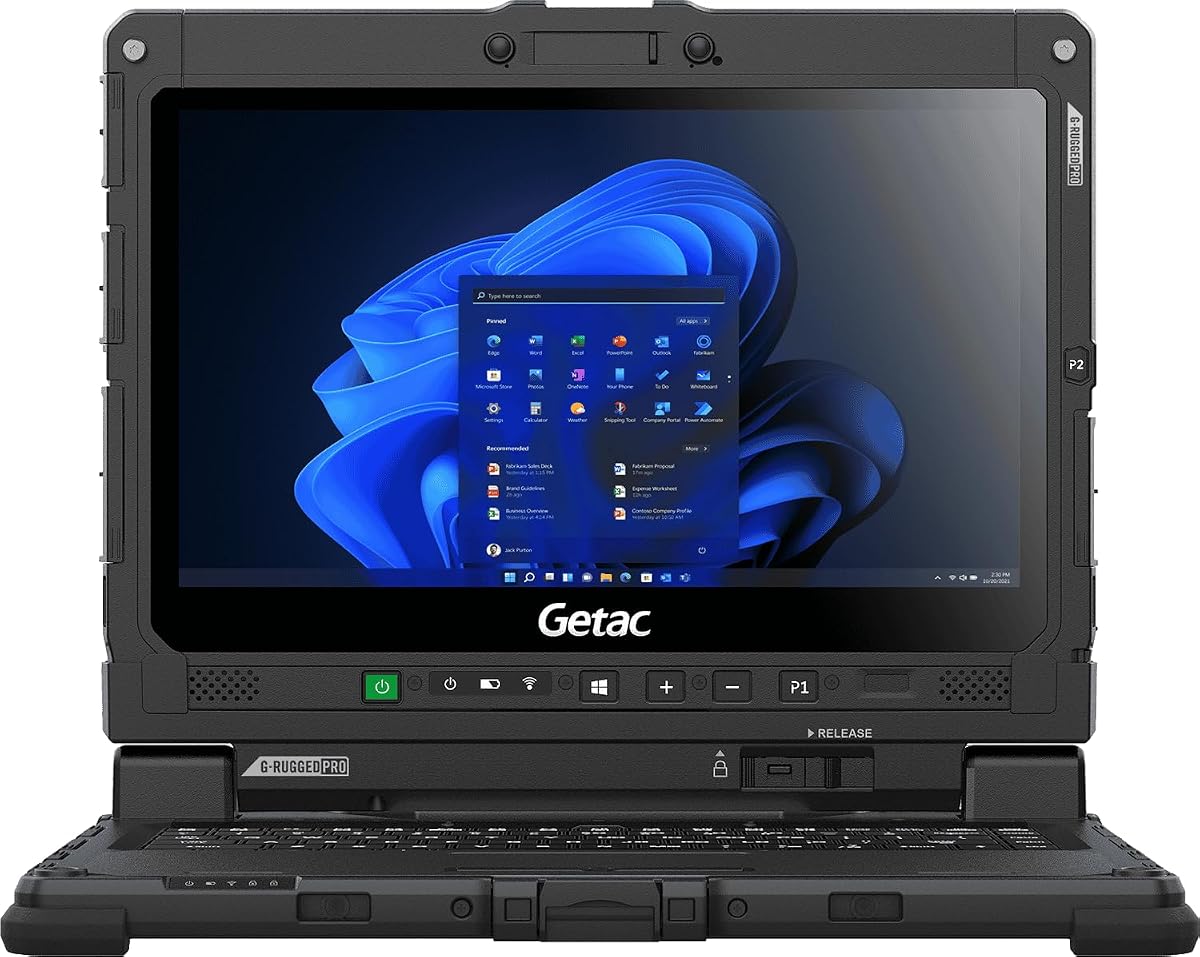
Getac Renewed K120
5.0Editor score
1200 Nits Sunlight Readable
MIL-STD-810H Certified
Windows 11 Pro Included
Finding a laptop that remains visible under direct sunlight is essential for outdoor professionals working in construction, military, or field research environments. Standard screens often fail in these conditions, making specialized displays a critical requirement for productivity and safety in the field.
We evaluated ten top-rated laptops based on display brightness, durability certifications, processing power, and battery life to ensure they meet the demands of harsh outdoor settings. Each model was assessed for its ability to maintain clarity and performance when exposed to intense lighting and challenging environmental factors.
Each pick below details key specifications, real-world strengths, and potential limitations to help you choose the right device for your specific workflow. Keep in mind that pricing and availability can fluctuate frequently, so verify current details before making your final purchase decision today.
5.0Editor score

4.1Editor score

4.3Editor score
As an Amazon Associate we earn from qualifying purchases.
The following comparison table highlights the core specifications and ratings of all ten laptops selected for their superior sunlight readability and outdoor durability features.


The MUNBYN IRX17 is a high-end rugged laptop designed for professionals who need reliable performance under direct sunlight. It features a 1000-nit display that ensures clear visibility outdoors, paired with an Intel i7-1255U processor for demanding tasks.
We may earn a commission when you buy through this link, at no additional cost to you.
This laptop delivers industrial-grade power with 32GB of DDR5 RAM, enabling smooth operation in AutoCAD, SolidWorks, and other heavy applications. The IP65 rating protects against dust and water jets, making it suitable for construction sites and harsh environments.
While it offers robust features like dual batteries and Wi-Fi 6, the price point is higher than average. However, the durability and performance justify the cost for users requiring consistent field reliability and sunlight-readable visuals.
Buyers seeking a durable, high-performance machine for outdoor workflows will find the IRX17 a top choice. Its balance of brightness, computing power, and protection makes it ideal for engineering and field data professionals.
The 1000-nit display ensures vibrant visuals even under direct sun, eliminating glare issues common with standard screens.
IP65 and MIL-STD-810H certifications mean this device can withstand heavy rain, dust, and physical shocks reliably.
We may earn a commission when you buy through this link, at no additional cost to you.
The Getac K120 is an Amazon Renewed option offering exceptional brightness at an affordable price. With 1200 nits, its screen excels in bright conditions, ensuring readability without external shade or accessories.
We may earn a commission when you buy through this link, at no additional cost to you.
This model includes 16GB RAM and a fast NVMe SSD, providing reliable performance for field applications. Its military-grade build withstands drops, extreme temperatures, and humidity, making it perfect for rugged environments.
Though the processor is older, it still handles multitasking and data analysis well. Users might find storage limited, but it is expandable. The value proposition is strong for budget-conscious buyers.
For those needing a cost-effective sunlight-readable laptop, the K120 is a standout choice. Its proven durability and high brightness make it a trusted tool for field workers on a budget.
At 1200 nits, this display outperforms many competitors, making it easy to read in peak daylight hours.
Professionally restored units offer like-new functionality with a lower price tag, supported by a 90-day warranty.
We may earn a commission when you buy through this link, at no additional cost to you.
The Getac S510 combines premium specs with rugged design. Its 1000-nit touchscreen and Ultra 5 processor ensure top-tier performance and clarity, even in direct sun. It is ideal for professionals needing advanced computing capabilities.
We may earn a commission when you buy through this link, at no additional cost to you.
With 32GB DDR5 RAM and a 1TB SSD, this machine handles heavy workloads effortlessly. The inclusion of Thunderbolt 4 and a 5MP webcam highlights its modern connectivity and multimedia support for field collaboration.
While it carries a higher price, the feature set justifies the cost for power users. The MIL-STD certification ensures it can survive drops and harsh weather, maintaining reliability in critical situations.
If you require a top-of-the-line sunlight laptop, the S510 delivers. Its blend of brightness, speed, and durability makes it a premium choice for complex industrial and enterprise needs.
The Ultra 5 125U processor offers AI-enhanced multitasking, ensuring efficient workflows on demanding software applications.
Thunderbolt 4 ports allow for fast data transfer and docking capabilities, essential for modern field operations.
We may earn a commission when you buy through this link, at no additional cost to you.
The MUNBYN IRX16 balances performance and durability at a mid-range price point. Its 1000-nit screen ensures visibility outdoors, while the i5 processor handles standard industrial applications like AutoCAD or ArcGIS effectively.
We may earn a commission when you buy through this link, at no additional cost to you.
With 16GB DDR5 RAM and expandable SSD storage, this laptop adapts to changing storage needs. The IP65 rating protects against environmental hazards, ensuring reliability in wet or dusty conditions without compromising functionality.
While it lacks the power of the IRX17, it remains a practical option for general field work. Users should note that storage upgrades require physical installation, which is straightforward but requires effort.
For professionals needing a reliable, sunlight-readable laptop without extreme specs, the IRX16 is a solid pick. Its durability and clear display support efficient daily operations in bright environments.
The sunlight-readable display ensures you can work clearly under direct sun without needing to find shade constantly.
Users can easily upgrade the SSD up to 4TB, accommodating large datasets or project files as needed.
We may earn a commission when you buy through this link, at no additional cost to you.
The HP OmniBook 3 14 offers a modern AI PC experience with an OLED display. While not as bright as rugged units, its 300 nits and vibrant colors make it suitable for semi-outdoor or bright indoor environments.
We may earn a commission when you buy through this link, at no additional cost to you.
Powered by the Snapdragon X processor, it delivers impressive battery life, lasting up to 41 hours on a single charge. This makes it ideal for long workdays where access to power is limited.
The OLED screen provides rich colors, though it may struggle in direct sunlight compared to 1000-nit screens. It lacks rugged protections but is built for urban commuters and general productivity.
For users prioritizing battery and portability over extreme durability, this is a great option. It handles everyday tasks well and supports AI features for streamlined workflows in bright office settings.
With up to 41 hours of battery, this laptop supports extended use without needing a charger or power outlet.
Copilot+ PC features and Snapdragon AI assist with productivity tasks, transcribing meetings and optimizing workflows.
We may earn a commission when you buy through this link, at no additional cost to you.
The HP OmniBook 3 16 provides a large 2K touchscreen for detailed work. Its anti-glare IPS panel improves visibility in bright indoor spaces, though it is not optimized for direct sunlight like rugged models.
We may earn a commission when you buy through this link, at no additional cost to you.
With 8GB RAM and a Ryzen 3 processor, it handles everyday tasks like web browsing and document editing efficiently. The touchscreen adds convenience for multitasking and navigation through applications.
Users should note that it lacks rugged durability and has modest storage. However, for general office use in well-lit rooms, it offers strong value and a comfortable viewing experience.
Ideal for students or home office users, this laptop balances size and performance. Its anti-glare screen helps reduce eye strain during long sessions in bright environments.
The 1920 x 1200 resolution delivers crisp details, making text and images easy to read on the 16-inch panel.
Advanced AI noise reduction filters background sounds during calls, ensuring clear communication in noisy areas.
We may earn a commission when you buy through this link, at no additional cost to you.
The Dell 15.6 is a standard consumer laptop designed for efficiency. It features ComfortView technology to reduce blue light, making it comfortable for long viewing sessions in bright office environments.
We may earn a commission when you buy through this link, at no additional cost to you.
With an i5 processor and a full numeric keypad, it suits data entry and productivity tasks well. It lacks specialized sunlight reading but works well indoors under bright lighting.
Its ergonomic design and lift hinges provide typing comfort. While not built for harsh conditions, it offers reliable performance for typical daily workflows and office settings.
For general users needing a dependable laptop, this model is a safe choice. Its blue light filtering and balanced specs support comfortable work in bright indoor conditions.
ComfortView software reduces harmful blue light emissions, helping to prevent eye strain during extended screen use.
Ergonomic hinges and spacious keypads ensure a comfortable typing angle, reducing wrist fatigue over time.
We may earn a commission when you buy through this link, at no additional cost to you.
The HP 17.3 laptop offers a massive screen for media and work. Its anti-glare IPS panel helps maintain clarity in bright rooms, though it is not intended for outdoor sunlight use.
We may earn a commission when you buy through this link, at no additional cost to you.
Powered by Ryzen 5, it delivers smooth multitasking and streaming performance. The 1TB storage ensures ample space for files, and the included cooler aids thermal management during heavy usage.
Privacy features like a webcam shutter add security. While it is not rugged, its performance and size make it a great home or office workstation.
For users needing a large, reliable screen for tasks and entertainment, this is a top choice. Its anti-glare coating ensures comfortable viewing in well-lit indoor spaces.
The 17.3-inch display offers expansive visuals, perfect for multitasking, media, or detailed document work.
Included laptop cooler helps maintain optimal performance by keeping the system cool during long sessions.
We may earn a commission when you buy through this link, at no additional cost to you.
The Panasonic Toughbook FZ-55 is a renewed rugged laptop offering durability. Its 1000-nit touchscreen ensures high visibility outdoors, making it suitable for field professionals needing reliable connectivity.
We may earn a commission when you buy through this link, at no additional cost to you.
Equipped with an i7 processor and 16GB RAM, it handles multitasking efficiently. The built-in 4G LTE keeps you connected in remote areas where Wi-Fi is unavailable.
Though older, it remains a proven workhorse. The included stylus and privacy cover add versatility. For buyers needing a durable option without the new-model price, it is excellent.
This laptop is ideal for mobile workers requiring sunlight-readable displays. Its rugged build ensures longevity, while the renewed status offers affordability and trust in functionality.
Built-in 4G LTE multi-carrier support ensures reliable internet access in remote locations without Wi-Fi hotspots.
The 1000-nit touchscreen supports stylus input, enhancing productivity for detailed notes or field data entry.
We may earn a commission when you buy through this link, at no additional cost to you.
The Dell 16 offers a modern, wide-screen experience for productivity. Its ComfortView Plus reduces blue light, enhancing comfort during long viewing sessions in bright indoor environments.
We may earn a commission when you buy through this link, at no additional cost to you.
Powered by Core 7, it ensures fast performance for business tasks. The edge-to-edge display provides an immersive workspace for multitasking and document editing without distraction.
While not rugged, it supports virtual connections with HD cameras. Adaptive thermals ensure efficient power use. This is a reliable choice for office productivity and collaboration.
Buyers seeking a large, efficient laptop will appreciate this model. Its wide screen and comfort features make it ideal for daily work in well-lit office or home settings.
The 16:10 aspect ratio and edge-to-edge design offer a wide, immersive viewing area for enhanced productivity.
Adaptive thermals adjust power and cooling based on surface stability, ensuring consistent performance without overheating.
We may earn a commission when you buy through this link, at no additional cost to you.
Selecting the right laptop for bright sunlight requires evaluating specific hardware features that ensure visibility and durability. This section outlines key factors to consider before purchasing.
Brightness is measured in nits, and for outdoor use, you need at least 1000 nits to ensure visibility under direct sunlight. Standard laptops typically range from 250 to 400 nits, which become unusable outdoors. Look for displays explicitly marketed as sunlight-readable or with high-nit specifications.
Prioritize models with 1000+ nits to avoid glare and ensure clear visibility during field work.
Rugged laptops often feature MIL-STD-810H or IP ratings like IP65, indicating resistance to dust, water, and drops. These certifications are critical for protecting your investment in harsh environments. A durable chassis prevents damage from accidental impacts or extreme weather conditions.
Choose a laptop with military-grade or waterproof certifications to ensure longevity in rough conditions.
Ensure the processor matches your workload. Industrial applications like AutoCAD or SolidWorks require powerful CPUs like Intel i7 or newer. Field data analysis may work with i5, but avoid older generations if you need fast multitasking. RAM should be at least 16GB for modern software.
Match the CPU and RAM to your specific software requirements for smooth performance.
Outdoors often means limited access to power outlets. Look for laptops offering long battery life, ideally 10 hours or more, to sustain work through the day. Some rugged models support hot-swappable batteries, allowing you to swap in a fresh battery without shutting down.
Select a device with extended battery life or removable battery options for uninterrupted work.
Reliable internet is essential for remote work. Wi-Fi 6 or 6E provides faster speeds and better range. Some laptops include 4G or 5G cellular connectivity, ensuring you stay online even when Wi-Fi is unavailable in remote areas.
Opt for Wi-Fi 6 or built-in LTE/5G for consistent connectivity in the field.
Large datasets require ample storage. SSDs are preferred for speed, and capacities should ideally start at 512GB. Consider models with upgradeable SSD slots so you can expand storage as your data grows over time without replacing the whole unit.
Ensure your laptop has sufficient and expandable SSD storage to handle your data needs.
If you wear gloves, a touchscreen that responds to glove input is crucial. Keyboard layout should be ergonomic, and spill resistance helps prevent damage from accidental liquid contact. Physical camera switches add privacy for security-conscious users.
Check for glove-friendly touchscreens and spill-resistant keyboards for practical outdoor use.
Field work is demanding, and hardware failures can happen. A comprehensive warranty covering accidental damage is valuable. Some manufacturers offer onsite service, sending technicians to your location rather than requiring you to ship the device.
Look for warranties that cover accidental damage and offer onsite support options.
Keep your screen clean by wiping it with a soft, microfiber cloth to maintain visibility. Avoid harsh chemicals or rough materials that could scratch the display coating, which protects against glare.
When not in use, store the laptop in a protective case to prevent dust accumulation. If your device supports hot-swappable batteries, keep an extra charged battery on hand for continuous operation during long field shifts.
Regularly update your firmware and drivers to maintain performance and security. If your laptop has a SIM card, ensure it is properly seated to avoid connectivity issues when relying on cellular data in remote locations.
1000 nits refers to the brightness level of the display. Higher brightness ensures that the screen remains visible even under direct sunlight. Standard laptops are often too dim (250-400 nits), making this a critical spec for outdoor use.
Rugged laptops are worth it if you work in harsh environments. They offer protection against dust, water, and drops that standard laptops lack. For field workers, this durability prevents costly repairs and downtime.
Standard laptops can work in shaded areas, but they struggle in direct sunlight due to low brightness. If you frequently work outside, a sunlight-readable display is recommended to avoid eye strain and ensure visibility.
Many rugged laptops like the Panasonic Toughbook include built-in 4G LTE. Others rely on Wi-Fi. Check specifications before buying to ensure cellular support if you need internet in remote areas without Wi-Fi.
Use a soft microfiber cloth for cleaning and avoid applying pressure to the screen. Some models come with protective films. Keep the device in a padded case when transporting it to prevent accidental scratches.
Rugged laptops typically offer 8 to 12 hours of battery life, while premium models may last longer. For extended field work, look for removable battery options to swap power sources without shutting down.
Many rugged laptops allow storage upgrades. Check if the SSD is user-replaceable. Models like the MUNBYN IRX17 allow expanding storage up to 4TB, accommodating future data needs easily.
Most rugged laptops come with Windows 11 Pro, suitable for enterprise software. Some consumer options use Windows 11 Home. Ensure the OS meets your application requirements before purchasing.
We reviewed ten laptops ranging from budget-friendly to premium rugged options. The MUNBYN IRX17 and Getac K120 stand out for their balance of brightness, durability, and performance.
When choosing, prioritize brightness over other specs to ensure visibility. Match the processor and durability to your specific work environment. For extreme conditions, go rugged; for bright indoor use, standard models may suffice.
Prices and availability change often, so verify the latest details before purchasing. Investing in a quality laptop for sunlight ensures productivity and longevity in your professional workflows.