
Cherry KC 1000 Smartcard Keyboard
4.6Editor score
FIPS 201 approved security
One-handed card operation
Thin low-profile design
This guide compares ten top-rated keyboards with smart card readers for secure authentication across banking, healthcare, government, and enterprise environment
Finding the right keyboard with smart card reader ensures secure logons and protects sensitive data in professional environments. These devices integrate authentication directly into your typing workflow for better efficiency and safety.
We analyzed ten leading models based on compatibility, build quality, smart card standards support, and user feedback. Our comparison highlights key features like TAA compliance, ergonomic design, and reader reliability for various sectors.
Each pick shows specific strengths such as mechanical switches, spill resistance, or government certifications. Note that prices and availability change frequently so verify details before purchasing to ensure you get the best deal.
4.6Editor score
4.6Editor score

4.1Editor score
This side-by-side comparison details ten secure keyboards featuring built-in smart card readers designed for enterprise banking healthcare and government use cases with varying certifications and ergonomics.


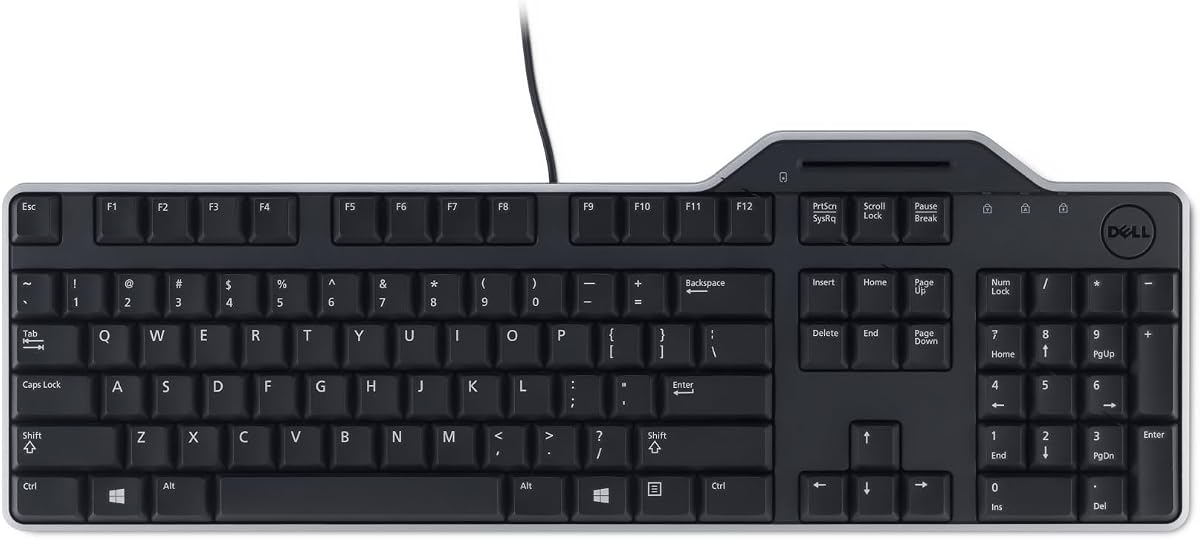
The Dell KB813 stands out as a top choice for secure typing with its integrated smart card reader delivering a rating of 4.6 stars. It combines durability and comfort making it ideal for office environments requiring frequent authentication without extra hardware.
We may earn a commission when you buy through this link, at no additional cost to you.
Its spill-resistant design protects against accidental liquid spills ensuring longevity in busy workspaces. The ergonomic setup includes low-profile keys and a detachable palm rest reducing strain during long sessions while the wired USB connection guarantees fast secure data transfers.
While it works best with Dell systems limiting versatility across other brands the focus on security and reliability justifies this constraint. The modern sleek black design adds elegance to any workspace without compromising functionality or comfort standards.
Buyers needing a dependable keyboard with smart card reader for Dell environments should consider this model first. It balances security features ergonomic comfort and build quality effectively making it a strong recommendation for enterprise users prioritizing productivity and protection.
The built-in smartcard reader enhances security by allowing seamless authentication directly through the keyboard which reduces dependency on external devices.
Low-profile keys and a detachable palm rest provide ergonomic support ensuring comfort and reducing wrist strain during extended typing sessions.
We may earn a commission when you buy through this link, at no additional cost to you.
The Adesso TruForm offers premium ergonomic features combined with a robust smart card reader earning a solid 4.1 rating. It is designed for long comfort with split key zones and built-in TAA compliance making it suitable for government and enterprise use.
We may earn a commission when you buy through this link, at no additional cost to you.
Its split ergonomic design encourages natural hand positioning reducing joint pain and improving posture over time. The built-in smart card reader supports international standards like ISO7816 and PC/SC ensuring compatibility across secure web applications and identification systems securely.
While the price is higher than basic models the investment in ergonomic health and government compliance pays off for organizations. The multimedia hotkeys add convenience though the membrane switches may feel less responsive to those used to mechanical feedback.
Users seeking ergonomic comfort alongside strict regulatory compliance should prioritize this model for workstation setups. It delivers on security posture health and connectivity making it an excellent choice for agencies and businesses requiring TAA certified secure input devices.
The split design with sloped zones promotes natural wrist positioning helping to relieve back pain and spinal discomfort during extended use.
TAA compliance ensures it meets U.S. government sourcing standards making it ready for deployment in federal institutions and public sector agencies.
We may earn a commission when you buy through this link, at no additional cost to you.
The Cherry KC 1000 delivers high security at an affordable price point with a rating of 4.6 stars. It features FIPS 201 approval and one-handed smart card operation making it ideal for secure environments needing reliable authentication without extra cost.
We may earn a commission when you buy through this link, at no additional cost to you.
Its thin design integrates a low contacting unit for smooth reading/writing of ISO 7816 compliant smartcards. The secure PIN entry protects sensitive data while supporting T=0 T=1 protocols ensuring robust interoperability across Windows MacOS and Linux systems easily.
Although it lacks multimedia hotkeys or backlighting the focus on security standards and cross-platform compatibility makes it valuable. The one-handed operation simplifies authentication workflows enhancing efficiency for users who need quick secure access throughout their workday.
Organizations requiring certified security on a budget should consider this model for their workstations. It balances compliance affordability and functionality effectively making it a practical choice for enterprises prioritizing data protection and seamless smart card integration.
FIPS 201 and EMV 2000 approvals ensure it meets strict government and financial security requirements for reliable authentication and data protection.
Driver support for Windows MacOS and Linux allows flexible deployment across diverse operating environments without compatibility issues or extra setup.
We may earn a commission when you buy through this link, at no additional cost to you.
The Adesso EasyTouch 130SB brings mechanical switch feedback to secure typing with a strong 4.6 rating. Its built-in smart card reader and Copilot AI hotkey make it unique for developers and professionals needing both productivity and secure authentication.
We may earn a commission when you buy through this link, at no additional cost to you.
Red mechanical switches provide tactile feedback and silence rated for 50 million keystrokes ensuring durability. The dedicated Copilot AI key offers instant code generation or language assistance while large print keycaps improve visibility for users requiring enhanced legibility in low light.
Certified to EMV 4.0 and ISO7816 standards it handles secure banking transactions and logon processes reliably. However mechanical switches might not suit quiet office environments and the price reflects the advanced feature set compared to standard membrane models available.
Professionals seeking mechanical durability alongside smart authentication should choose this model for their desk. It merges AI productivity features robust security certifications and tactile typing quality making it a standout for tech-savvy users in secure workflows.
The Copilot AI hotkey provides instant access to Microsoft Copilot for code generation and creative tasks streamlining workflows directly from the keyboard.
Large print keycaps offer excellent contrast and readability helping users type accurately in low-light conditions or with visual impairments.
We may earn a commission when you buy through this link, at no additional cost to you.
The Dell Keyboard Smartcard USB earns a high 4.7 rating for reliability and comfort in secure environments. It offers fast secure data transfers via wired USB while eliminating the need for batteries with a spill-resistant design protecting against liquid mishaps.
We may earn a commission when you buy through this link, at no additional cost to you.
Low-profile keys ensure a quiet typing experience reducing distractions in shared workspaces. The full-size layout includes a detachable palm rest supporting comfort during long data entry tasks and making it practical for professionals needing both security and productivity.
While it lacks multimedia features its focus on core performance and ergonomic support stands out. The simple sleek design fits any office decor and provides the essential functions needed for secure logons and efficient workflow without unnecessary complexity.
Users prioritizing quietness and reliability should consider this model for daily secure work. It delivers a smooth typing experience essential security integration and durability making it a trusted choice for business environments seeking functional and quiet keyboards.
Wired USB connectivity ensures fast secure transfers without battery dependency enhancing reliability for continuous secure access throughout the workday.
Spill-resistant construction safeguards against accidental liquid spills extending the keyboard lifespan in busy office environments with frequent beverage use.
We may earn a commission when you buy through this link, at no additional cost to you.
The Kensington KB201C is designed for government and secure sectors with TAA and FIPS-201 compliance earning a solid 3.8 rating. It offers reliable authentication and robust security measures ensuring compliance for U.S. Federal Government institutions and organizations requiring regulated sourcing.
We may earn a commission when you buy through this link, at no additional cost to you.
Its quiet-click design enhances workspace peace allowing focus without disturbing colleagues while the full-size layout with numeric keypad boosts productivity. Wired USB-A connection ensures performance without software installation batteries or charging making setup simple and maintenance free.
While the rating is lower the warranty and regulatory compliance provide value for specific buyers. The lack of advanced features is acceptable given its targeted use case for agencies prioritizing standards adherence over ergonomic customization or multimedia integration options.
Government contractors and federal agencies should choose this model to meet sourcing mandates. It guarantees regulatory compliance reliable security and a comprehensive warranty making it a pragmatic solution for public sector deployments needing certified secure input devices.
TAA and FIPS-201 compliance ensures it meets strict U.S. federal sourcing and security standards ready for deployment in government institutions.
A numeric keypad full-size layout speeds up data entry allowing professionals to work faster and more efficiently without extra tools.
We may earn a commission when you buy through this link, at no additional cost to you.
The Lenovo Smartcard Wired Keyboard II delivers essential secure typing features with a 4.4 rating for dependability. It integrates a smartcard reader into a standard full-size layout ensuring compatibility with enterprise environments using US English language settings securely.
We may earn a commission when you buy through this link, at no additional cost to you.
As a wired USB solution it eliminates battery concerns and simplifies connections for quick deployment. The compact design fits standard workstations while providing the security needed for identification systems and secure web applications without compromising on basic typing comfort.
Although detailed specs are minimal its reputation for reliability and straightforward integration makes it practical. The focused design means fewer extra buttons but ensures core functionality works smoothly for organizations prioritizing simplicity and secure access over advanced features.
Users needing a reliable secure keyboard for daily office tasks should consider this model. It balances cost effectiveness and security integration making it a suitable choice for small to medium businesses requiring standard secure input without complex configurations.
Integrated smartcard reader supports secure logon workflows ensuring smooth authentication with enterprise systems and identity management solutions efficiently.
Lenovo build quality ensures stable performance reducing downtime and maintenance for secure environments needing consistent reliable keyboard functionality.
We may earn a commission when you buy through this link, at no additional cost to you.
The HP USB Business Slim Smartcard Keyboard offers a compact secure solution with a strong 4.5 rating. Its built-in spill drain protects against liquid damage while LED light indicators provide visual feedback ensuring users can monitor key status effectively during tasks.
We may earn a commission when you buy through this link, at no additional cost to you.
Cable connectivity ensures reliable performance without wireless latency or pairing issues. The membrane keyswitches deliver quiet comfortable typing suited for office environments while the slim profile saves desk space making it ideal for tight workstations requiring secure authentication access.
While it lacks a palm rest its design prioritizes durability and efficiency for daily use. The USB interface supports broad compatibility ensuring seamless integration with Windows systems for secure logons and identification applications requiring consistent reliable input.
Office managers seeking a slim durable secure keyboard should choose this model. It balances space-saving design spill protection and essential security features making it a practical choice for businesses needing reliable secure input on limited desk space.
Built-in spill drain ensures quick liquid removal protecting internal components and extending keyboard lifespan in active office environments.
LED key light indicators give instant visual feedback for key status improving usability and security awareness during secure authentication.
We may earn a commission when you buy through this link, at no additional cost to you.
The Cherry Secure Board 1.0 is built for high-security applications with a 4.2 rating. Its intelligent security features include authentication encryption modes and an RF NFC interface supporting both smartcards and tags making it versatile for diverse identification needs.
We may earn a commission when you buy through this link, at no additional cost to you.
Secure mode enhances data protection especially with thin clients and secure authentication protocols like T=0 T=1 and T=CL. The PC/SC reader supports ISO 7816 and ISO 14443 A/B compliant cards ensuring broad interoperability across security systems and environments.
While specialized for high security the GS approval adds trust for European markets. The focus on encryption and diverse card support means it may cost more but delivers unmatched protection for organizations handling sensitive transactions or government data securely.
Security managers requiring encryption and flexible card support should select this model. It provides advanced authentication features and compliance certifications making it ideal for high-risk environments prioritizing data protection and seamless secure access workflows.
Secure mode with encryption ensures data remains protected during authentication sessions especially critical for thin client and government deployments.
Support for ISO 7816 and ISO 14443 A/B cards allows compatibility with a wide range of smartcards and RFID tags for flexible identity access.
We may earn a commission when you buy through this link, at no additional cost to you.
The NEW OEM Dell KB813t provides a reliable replacement option with a 4.4 rating for compatibility and performance. As a Dell brand OEM product it ensures seamless integration with existing Dell systems delivering secure smart card authentication without extra setup.
We may earn a commission when you buy through this link, at no additional cost to you.
Wired USB interface guarantees stable fast data transfers eliminating battery or wireless connection issues. The English layout meets standard enterprise requirements while the OEM packaging ensures quality assurance making it an ideal choice for organizations expanding or replacing secure workstations.
While primarily suited for Dell ecosystems it offers cost-effective security for those environments. The focus on OEM quality ensures consistent performance reducing troubleshooting needs and maintenance efforts for IT departments managing large secure desktop deployments easily.
Enterprises needing Dell-compatible replacements should choose this model. It delivers reliable security integration and build quality making it a practical solution for maintaining secure workflows without compromising on hardware compatibility or performance expectations.
OEM quality assurance ensures consistent performance and compatibility with Dell systems reducing setup time and troubleshooting for IT departments.
Smart card reader integration allows secure logons with Dell systems ensuring compatibility and smooth workflow across enterprise environments.
We may earn a commission when you buy through this link, at no additional cost to you.
Selecting the right secure keyboard requires balancing security standards ergonomics and compatibility for your specific work environment and industry needs.
Ensure the keyboard supports required certifications like FIPS 201 ISO 7816 or EMV standards depending on your industry. Government and financial sectors often mandate these to protect sensitive data during authentication processes.
Look for PC/SC compatibility to guarantee smooth integration with operating systems and identity management software.
Decide between contact and contactless readers based on your card infrastructure. Contact readers use physical chips while contactless use RF or NFC for wireless authentication offering different speeds and convenience levels.
Check for support of multiple standards like ISO 14443 for tags and ISO 7816 for smartcards to ensure flexibility.
For long typing sessions consider models with split designs palm rests or low-profile keys to reduce strain. Ergonomics directly impact productivity and health especially in environments requiring constant secure access.
Choose a size and layout that fits your desk and supports your posture to maintain comfort over time.
Verify driver support for Windows macOS or Linux since security devices often need specific software to function correctly. Cross-platform support simplifies IT management in mixed environments.
Ensure the reader integrates with your authentication tools and identity providers seamlessly.
Opt for spill-resistant designs and robust build materials to withstand office environments. Key lifecycle ratings such as 5 million or 50 million keystrokes indicate longevity for high-volume users.
Consider warranty terms and brand reputation for reliable long-term performance.
Government agencies need TAA compliant products to meet federal sourcing rules. This ensures procurement aligns with regulatory requirements for public sector projects.
Check GS or other regional approvals if operating internationally to avoid compliance issues.
Select a full-size layout with numeric keypad if data entry is critical or compact if space is limited. Multimedia hotkeys and Copilot AI keys can boost productivity depending on your workflow needs.
Ensure the key switch type membrane or mechanical matches your preference for noise and feedback.
Wired USB connections provide reliable security without wireless interference making them ideal for sensitive environments. Check cable length and port compatibility for your setup.
Avoid wireless options unless necessary due to potential security vulnerabilities or pairing issues.
Start by connecting the keyboard to your computer using the USB interface and install any necessary drivers provided by the manufacturer to ensure the smart card reader functions properly with your operating system.
Insert your smartcard securely into the reader slot ensuring the chip aligns correctly with the contacts. Verify that the authentication software recognizes the card and that your secure logon process initializes without error.
Clean the keyboard regularly using compressed air and a soft cloth to remove dust from keys and the reader slot. Avoid liquids and keep the spill drain clear to maintain the device lifespan and security performance.
These keyboards integrate secure authentication directly into the typing workflow allowing users to insert smartcards for logons or transactions. They are common in banking healthcare and government sectors to protect sensitive data during access.
Most require specific drivers or middleware to communicate with operating systems and authentication tools. Check the product documentation for supported OS versions and install necessary software before first use.
Many models support Windows macOS and Linux with cross-platform drivers. Verify compatibility lists for specific operating system versions to ensure seamless functionality without extra configuration steps.
Look for FIPS 201 ISO 7816 EMV or TAA compliance depending on your industry requirements. These certifications ensure the device meets strict security and regulatory mandates for enterprise or government use.
Keep the reader slot clean and free of dust using compressed air. Avoid inserting dirty or damaged cards and store the device in a dry environment to prevent mechanical or electrical issues.
While available wired models are preferred for security to avoid wireless interception. If wireless is needed ensure strong encryption is supported and the environment allows safe Bluetooth or RF connectivity protocols.
The Dell KB813 Adesso TruForm and Cherry KC 1000 lead our list offering balanced security ergonomics and compliance for various professional environments requiring secure authentication and reliable performance.
Prioritize security standards and ergonomic features based on your industry needs whether government banking or general office use to ensure the device supports both safety and productivity goals effectively.
Always verify current pricing and availability before purchase since models and deals change frequently to ensure you select the right product for your secure workstation setup today.