
Womier DK75
4.5Editor score
Silent membrane switches
PBT keycaps
Long battery life
Explore the top ten green backlit gaming keyboards compared for layout, connectivity, and performance to help you find the perfect setup for your desk.
Green backlit gaming keyboards offer a unique blend of style and function for enthusiasts seeking a specific aesthetic. These keyboards provide visual appeal while ensuring reliable performance for daily tasks and intense gaming sessions alike.
We evaluated ten highly rated models based on connectivity options, build quality, and customization features. Each product was assessed for its unique strengths to help you make an informed decision for your specific setup.
Each pick highlights key features and potential trade-offs to guide your choice effectively. Note that prices and availability change frequently, so verify current details before purchasing to ensure the best value for your needs.
4.5Editor score
4.6Editor score
4.8Editor score
This comparison highlights key differences across all ten models to help you identify the best fit for your needs quickly and efficiently.


The AULA F75 stands out as a top choice for gamers seeking a versatile mechanical experience. With a 4.6 rating and robust features like hot-swappable switches, it delivers exceptional performance for daily tasks and competitive play.
We may earn a commission when you buy through this link, at no additional cost to you.
Its tri-mode connectivity allows seamless switching between Bluetooth, 2.4GHz, and USB-C connections. The gasket-mounted design paired with pre-lubricated stabilizers ensures a creamy, thocky sound that enthusiasts adore for long sessions.
While the driver is Windows-only for full macro programming, the hardware remains versatile across devices. Some users might find the price point higher than basic membrane options, but the build quality justifies the investment for serious users.
This keyboard is ideal for gamers and creators who prioritize tactile feedback and customization. Its comprehensive feature set makes it a standout choice for those wanting a premium feel without excessive bulk.
Full-key programmable macros let you streamline complex actions for better gameplay efficiency and workflow automation.
Advanced lighting effects and sound dampening layers create an immersive atmosphere that enhances focus during gaming.
We may earn a commission when you buy through this link, at no additional cost to you.
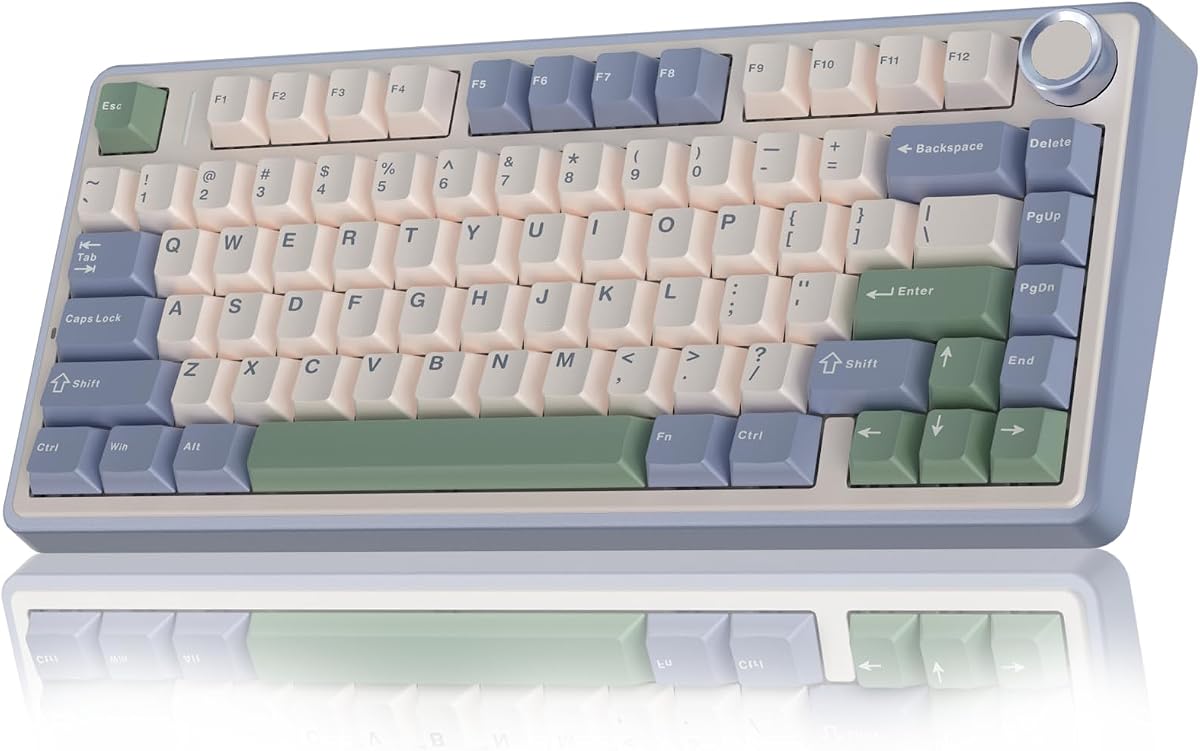
The Womier DK75 offers exceptional value for budget-conscious users needing a reliable wireless keyboard. It combines a compact layout with a high 4.5 rating, making it a great entry-level option for gaming and work.
We may earn a commission when you buy through this link, at no additional cost to you.
Silent membrane switches ensure minimal noise, perfect for shared spaces or late-night sessions. PBT keycaps resist wear and oil buildup, maintaining a premium texture over time despite the lower cost structure.
While it lacks mechanical hot-swap capabilities, the battery life is impressive at 4000mAh, supporting extended use on a single charge. Users focused on typing comfort rather than switch customization will find this trade-off acceptable.
This keyboard is perfect for students or professionals who want a clean look and wireless convenience. It balances affordability with durable construction, ensuring longevity without breaking the bank for your desk setup.
The 75% layout retains essential keys while reducing footprint, ideal for smaller desks or minimalistic setups.
A dedicated rotary knob simplifies volume and lighting adjustments, enhancing user convenience during tasks.
We may earn a commission when you buy through this link, at no additional cost to you.
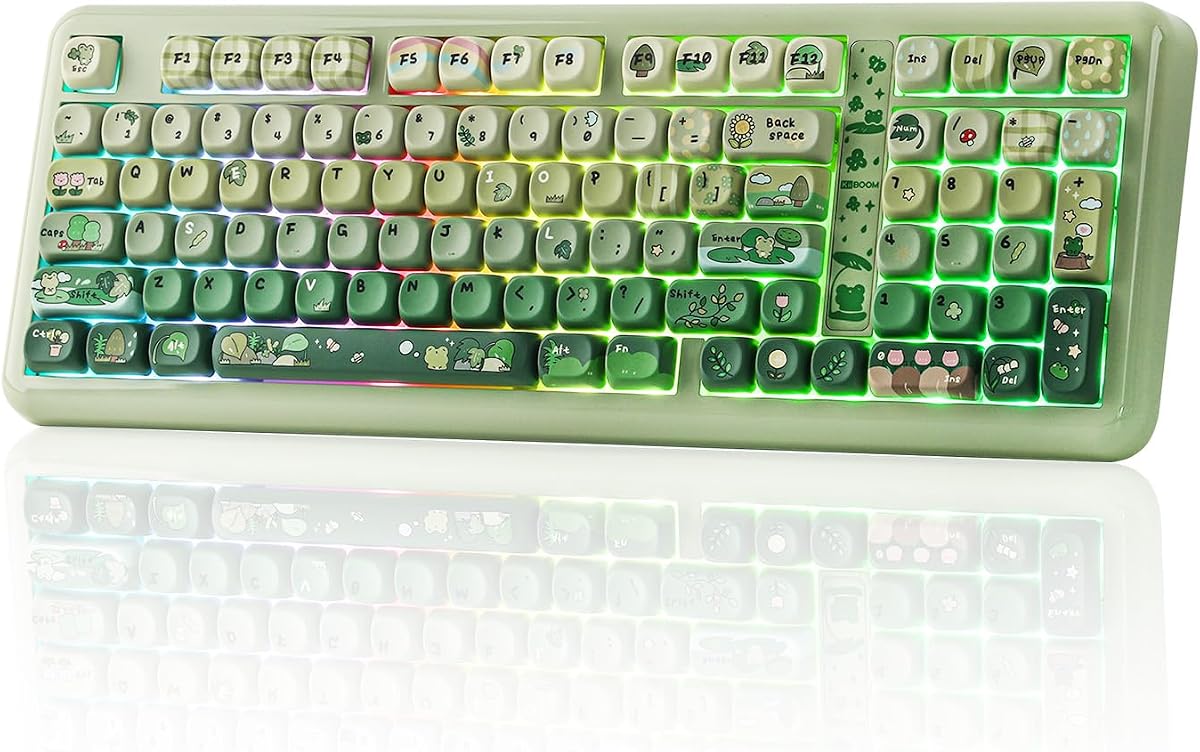
The KiiBoom Phantom98 Lite represents the pinnacle of wireless mechanical keyboard engineering. With a 4.8 rating and VIA support, it offers unmatched customization for enthusiasts seeking deep personalization options.
We may earn a commission when you buy through this link, at no additional cost to you.
Gasket mounting and layered foam create a smooth, thocky sound profile. The massive 8000mAh battery ensures extended wireless usage without frequent charging, making it ideal for travelers or heavy daily users.
While the price is higher, the quality justifies the investment. Advanced users may find VIA configuration complex initially, but the control it provides over macros and keymaps is superior to standard driver software.
This keyboard is best suited for professionals and gamers who demand precision and durability. Its refined audio and tactile experience make it a standout choice for those willing to invest in top-tier peripherals.
VIA compatibility allows for deep remapping and macro programming to suit complex workflow or gaming strategies.
An exceptionally large battery ensures consistent performance over long periods without needing a recharge.
We may earn a commission when you buy through this link, at no additional cost to you.
The AULA S99 balances compactness with functionality, featuring a 96% layout. With a 4.2 rating, it appeals to users who need a numpad without full size bulk. It supports Bluetooth and USB connectivity for versatile setup.
We may earn a commission when you buy through this link, at no additional cost to you.
Macro customization on all keys allows for efficient workflow automation in games. The dual-mode knob simplifies volume and lighting adjustments, providing intuitive control without navigating complex software menus on your screen.
As a membrane keyboard, it lacks the tactile crispness of mechanical switches, but the ergonomic stand helps reduce wrist strain. This makes it a practical choice for mixed office and gaming use where budget is a consideration.
It is an excellent option for those needing a portable, all-in-one solution. The inclusion of a numeric keypad in a smaller form factor makes it uniquely useful for data entry and gaming alike.
Bluetooth and USB-C options allow easy switching between devices, ensuring adaptability across multiple screens.
Foldable stands provide adjustable angles to reduce wrist pressure during long typing sessions.
We may earn a commission when you buy through this link, at no additional cost to you.
The Womier SK80 brings a unique visual element with its multimedia screen. With a 4.6 rating, it combines style and substance by featuring a hot-swappable PCB for switch customization. The screen displays GIFs and connection status clearly.
We may earn a commission when you buy through this link, at no additional cost to you.
Gasket mounting provides a satisfying typing feel, reducing noise and improving stability. This mechanical setup ensures responsive keystrokes, which is ideal for fast-paced gaming where every millisecond counts during intense moments.
While the software is primarily for Windows users, the hardware works universally. Mac users may find the customization limited, but the core typing experience remains excellent across operating systems for general daily tasks.
This keyboard is best for streamers or enthusiasts who want a distinct look. The ability to show custom images adds personality to your setup while maintaining reliable performance for work and gaming alike.
The color screen allows for GIFs and system status to be displayed directly on the keyboard for easy viewing.
Gasket mounting reduces vibration, creating a cleaner, more focused sound during typing or gaming.
We may earn a commission when you buy through this link, at no additional cost to you.
The Keymatic Gaming Keyboard offers a distinct visual appeal with a status screen and number pad. With a 4.4 rating, it targets users seeking a cute yet functional layout. The membrane design ensures quiet typing for shared environments.
We may earn a commission when you buy through this link, at no additional cost to you.
Silver paste technology improves responsiveness compared to standard membranes. While it lacks mechanical switches, the feedback feels satisfying enough for casual gaming and long typing sessions where noise control is a priority.
The 4000mAh battery supports extended wireless usage between charges. Users should note that deep customization is limited compared to mechanical counterparts, but the stability and layout make it reliable for standard office tasks.
This keyboard is perfect for those who prioritize aesthetics and quiet operation. The compact layout with a numpad saves space while maintaining full functionality for various professional and recreational activities.
The integrated screen displays connection status and battery life, providing quick access to essential data.
An internal iron plate ensures the keyboard stays firmly in place during aggressive typing or gaming.
We may earn a commission when you buy through this link, at no additional cost to you.
The Owpkeenthy delivers a traditional full-size experience with a 4.5 rating. Wired connectivity ensures zero latency, making it ideal for competitive gaming. Red switches provide a smooth, linear action suitable for rapid key presses.
We may earn a commission when you buy through this link, at no additional cost to you.
N-key rollover guarantees all keystrokes are registered accurately during intense moments. XDA profile keycaps offer uniformity and comfort, reducing finger fatigue during long sessions without compromising on style or usability for daily tasks.
Lack of wireless mode limits portability, but stability is unmatched. Users needing a dedicated home office or desk setup will appreciate the reliable connection and full key availability for data entry and gaming combined.
This keyboard is best for those who prefer a traditional, stable setup. Its focus on ergonomics and full layout functionality makes it a strong contender for users needing all standard keys without compromise.
Full 104-key layout ensures every standard function is accessible without needing function layer switches.
N-key rollover technology ensures no missed commands during complex multi-key inputs in games.
We may earn a commission when you buy through this link, at no additional cost to you.
The Aula Nova75 stands out with a massive 8000mAh battery and gasket mount. With a 4.7 rating, it offers a premium wireless experience. The multimedia screen and hot-swap features make it a versatile choice for various setups.
We may earn a commission when you buy through this link, at no additional cost to you.
South-facing LEDs provide clean illumination without switch interference. PBT keycaps ensure durability and a satisfying feel that lasts. The high capacity battery means fewer interruptions for charging during intensive work or gaming sessions.
Software is required for custom GIFs and advanced macros, which is a minor hurdle for many users. Some users might prefer a standard color, but the aesthetic appeal of this model adds significant character to any desk.
This keyboard is ideal for users wanting a blend of power and personalization. Its high-end specs ensure reliable performance and long usage times, making it suitable for demanding daily tasks and gaming.
A high-capacity battery ensures the keyboard stays active for extended periods without needing a recharge.
Gasket mounting and double-shot PBT keycaps provide a comfortable and durable typing experience.
We may earn a commission when you buy through this link, at no additional cost to you.
The Aula F75 Green delivers top-tier performance with a 4.8 rating. It features a gasket structure for sound dampening and PBT manga keycaps for longevity. This wireless model ensures consistent performance without cable clutter on your desk.
We may earn a commission when you buy through this link, at no additional cost to you.
Full macro programmability enhances efficiency in games and work tasks. Auto-sleep modes conserve battery while keeping response times instant. Users get a creamy sound profile that is highly rated by enthusiasts for its distinct acoustics.
While the driver supports only Windows, the hardware is compatible across systems. Limited layout choices may deter some, but the core typing experience remains highly competitive for those seeking a compact mechanical solution.
This keyboard is perfect for gamers needing a reliable compact layout. Its combination of build quality, sound, and connectivity makes it a top recommendation for users prioritizing function and feel over complex software features.
Auto-sleep features ensure battery lasts longer while maintaining responsiveness when you return to the keyboard.
Tri-mode wireless options allow seamless switching between up to five different devices for any setup.
We may earn a commission when you buy through this link, at no additional cost to you.
The Redragon K742 supports QMK/VIA for open-source customization. With a 4.6 rating, it offers a 98% compact layout that balances functionality with space. A 5-layer gasket ensures a creamy, thocky sound profile.
We may earn a commission when you buy through this link, at no additional cost to you.
Hot-swappable PCB supports 3-pin and 5-pin switches, enabling easy modifications. A large battery supports extended use, and OEM PBT keycaps resist wear. This makes it a strong contender for users who value technical control.
VIA setup requires initial configuration, which may deter non-technical users. However, the flexibility it provides allows for tailored macros and key mapping that standard drivers cannot match for advanced workflows.
This keyboard is ideal for tech-savvy users seeking a tailored experience. Its balance of build quality, battery life, and open-source customization makes it a robust option for daily tasks and gaming alike.
VIA compatibility allows deep customization of keys and macros, providing endless possibilities for workflows.
Five layers of sound dampening materials ensure a quiet, consistent sound during every keystroke.
We may earn a commission when you buy through this link, at no additional cost to you.
Selecting the right green backlit gaming keyboard requires understanding your specific needs regarding connectivity, typing feel, and layout.
Decide between wired, wireless, or multi-mode options. Wireless models with Bluetooth and 2.4GHz support offer flexibility but may have slight latency compared to wired connections. If you prioritize performance, check battery life and switching speed.
For hybrid setups, tri-mode keyboards provide the best of both worlds by allowing seamless switching between devices.
Mechanical switches offer tactile feedback and durability, while membrane switches are quieter and more affordable. Consider whether you need linear, tactile, or clicky feedback based on your gaming style or office environment noise levels.
Hot-swappable keyboards allow you to change switches without soldering, offering future flexibility as your preferences evolve.
Full-size keyboards include a numpad, which is essential for data entry. Compact layouts like 75% or 60% save desk space but may remove arrow keys or function rows. Choose based on your primary activity and available desk area.
Consider the 96% layout if you need a numpad but want a smaller footprint than a traditional full-size model.
RGB or green backlighting can enhance visual appeal and visibility in low light. Look for customizable brightness and color options to match your setup theme. Aesthetic details like keycap material also affect long-term durability and feel.
Choose PBT keycaps for better texture resistance and longevity compared to ABS material over time.
For wireless models, battery capacity is critical for uninterrupted use. Larger batteries reduce charging frequency but may add weight. Check specs for typical usage time to ensure it matches your daily demands and travel needs.
A battery capacity above 4000mAh is recommended for extended wireless sessions without frequent charging interruptions.
Advanced software allows you to program macros for complex actions. Ensure driver compatibility with your operating system before purchase. Some models offer on-board memory to save profiles without needing software installation.
Full-key programmability provides flexibility for both gaming commands and productivity shortcuts tailored to your workflow.
Look for adjustable stands, wrist rests, or ergonomic designs to reduce strain during long sessions. Gasket-mounted keyboards often provide better shock absorption and typing comfort. Prioritize features that support your natural hand position.
Comfort features like tilt adjustability help prevent wrist fatigue and improve overall typing experience over time.
Check for reinforced internal structures and durable materials that resist wear and tear. High-quality construction ensures the keyboard remains stable during intense gaming or heavy typing. Consider models with robust warranties for long-term peace of mind.
Solid build quality prevents flex and maintains consistent performance, extending the useful life of the keyboard.
Proper cleaning is essential for maintaining performance. Use compressed air to remove dust from key switches periodically. Avoid using wet cloths directly on the keyboard to prevent moisture damage to internal electronics.
Customize your lighting and macros to enhance usability. Adjust brightness to suit your environment and save profiles via driver software for different modes like gaming or work. Regularly update firmware to access new features or bug fixes.
Store the keyboard in a dry, temperature-controlled environment when not in use. If using wireless, fully charge before long-term storage to prevent battery degradation. Use a protective cover if transporting it to prevent scratches or key damage.
Green backlit keyboards offer excellent visibility in low-light environments without the overwhelming light of RGB. They provide a focused aesthetic that reduces visual distraction, helping gamers maintain concentration on their screens during long sessions.
High-quality wireless models use 2.4GHz connections to minimize latency comparable to wired setups. Bluetooth may have slight delays but is generally fine for typing. Look for dedicated receivers to ensure optimal response for competitive gaming.
No, membrane keyboards do not support switch replacement as they rely on rubber domes and PCB contacts. If you want to change the tactile feel or switch type, you need a mechanical keyboard with a hot-swappable PCB.
A rotary knob allows quick adjustments to volume, brightness, or media playback without navigating menus. This physical control saves time and adds convenience, making it easier to manage settings during active gaming or work sessions.
PBT keycaps are more durable and resist shine and oil buildup compared to ABS. They offer a textured feel and better longevity, making them ideal for heavy users who want their keyboard to look new for longer periods.
Turn off the keyboard and use a soft brush to dislodge debris from around keys. Use compressed air to blow out dust and debris. Avoid liquids directly on the switches to prevent electrical damage or corrosion of internal parts.
Compact layouts save desk space and bring your mouse closer, improving ergonomics. While they omit a numpad, they often retain essential keys like arrows, making them ideal for gaming setups where space efficiency is a priority.
We reviewed ten exceptional models ranging from budget membrane options to high-end mechanical keyboards. Each offers unique strengths in connectivity, build, and customization to suit different user preferences and desk environments effectively.
Prioritize factors like switch type and connectivity based on your primary use. Gamers may prefer hot-swappable mechanical keyboards, while office workers might value silent membrane or compact layouts for noise reduction and space efficiency.
Remember to check current prices and availability before purchasing. Technology and discounts change frequently, ensuring you secure the best value for your specific needs and budget when you make your final decision today.