
Kayoubi LCD Writing Tablet
4.6Editor score
14.5 inch large drawing space
No mess paperless writing
One-click erase and lock
This guide compares the top electronic sketch pads for artists students and kids evaluating screen quality pressure sensitivity and portability to help you
Electronic sketch pads have transformed how we create art and take notes by blending tactile pen pressure with digital storage. These devices range from simple LCD doodle boards for children to advanced standalone tablets for professional artists. Understanding the differences between screen types and connectivity options is essential for making an informed purchase decision.
We analyzed ten top rated models based on user feedback technical specifications and overall value. Our comparison covers standalone tablets computer connected graphic tablets and basic writing boards. Each product was evaluated on pressure sensitivity screen quality battery life and ease of use to ensure this list meets diverse creative and educational needs.
Every pick includes detailed pros and cons along with key specifications to highlight what makes each device unique. Please note that product availability and pricing can change frequently so verify current details before purchasing. This guide aims to simplify your search for the perfect electronic sketch pad tailored to your specific workflow or budget.
4.6Editor score

4.4Editor score

4.4Editor score
The following table provides a side-by-side overview of all ten products to help you quickly compare key features and decide which model aligns best with your drawing or note-taking requirements.




The HUION Note Digital Notebook bridges the gap between traditional paper and digital storage by offering a tactile writing experience with seamless connectivity. Rated 4.2 stars by users it combines a physical notepad with a smart pen that digitizes your handwriting in real time. This unique approach appeals to students and professionals who want to keep the feel of paper without losing their notes.
We may earn a commission when you buy through this link, at no additional cost to you.
Key strengths include the ability to sync notes automatically via Bluetooth and the option to record audio that matches your writing process. The battery-free pen ensures you never miss a moment due to power issues while the app allows you to share files as images or PDFs instantly. You can organize pages into groups merge or split them as needed making it ideal for structured note-taking.
Trade-offs involve reliance on the mobile app which may limit standalone functionality if you prefer a dedicated tablet screen. Also the creative tools within the app are basic compared to full drawing software so it is best for notes rather than detailed illustrations. These limitations are acceptable for users prioritizing organization and portability over advanced artistic features.
This device is perfect for anyone who wants to go paperless but still enjoys writing on real paper. Whether for meetings classes or brainstorming sessions it keeps your ideas accessible and shareable across devices. We recommend it for students and professionals seeking an efficient way to capture and manage handwritten notes digitally.
The pen captures vector lines simultaneously as you write allowing instant access to your notes on mobile devices.
Record audio during meetings and replay it synced with your handwriting to ensure you never miss important details.
We may earn a commission when you buy through this link, at no additional cost to you.
The XPPen 10.95 Standalone Drawing Tablet delivers a professional grade experience with its paper-like texture and vibrant color display. Rated 4.4 stars it stands out for its 16K pressure sensitivity and 90Hz refresh rate which eliminate lag and provide smooth stroke transitions. This device is ideal for artists who want a dedicated tool without needing to connect to a computer.
We may earn a commission when you buy through this link, at no additional cost to you.
Its standout feature is the AG nano-etching technology that mimics the friction of traditional paper making sketches feel natural. The three color modes allow you to switch between notes sketching and reading modes while the Android 14 system supports downloading additional apps from Google Play. With a slim 7mm body it is easy to carry and use anywhere for creative work on the go.
The main trade-off is the higher price compared to basic tablets and the need to charge the device regularly. However the battery life is optimized for extended use and the included stylus never needs batteries. These factors are justified for professionals who value precision and portability in their digital art workflow.
Artists students and professionals will appreciate the freedom to create without wires or computers. Whether you are sketching ideas annotating PDFs or learning new techniques this tablet offers versatility and quality. We highly recommend it for anyone seeking a high-performance standalone solution for digital art and note-taking.
16384 pressure levels combined with tilt support enable precise control for shading and detailed illustration work.
TUV-certified low blue light and anti-glare technology reduce strain during long creative sessions.
We may earn a commission when you buy through this link, at no additional cost to you.
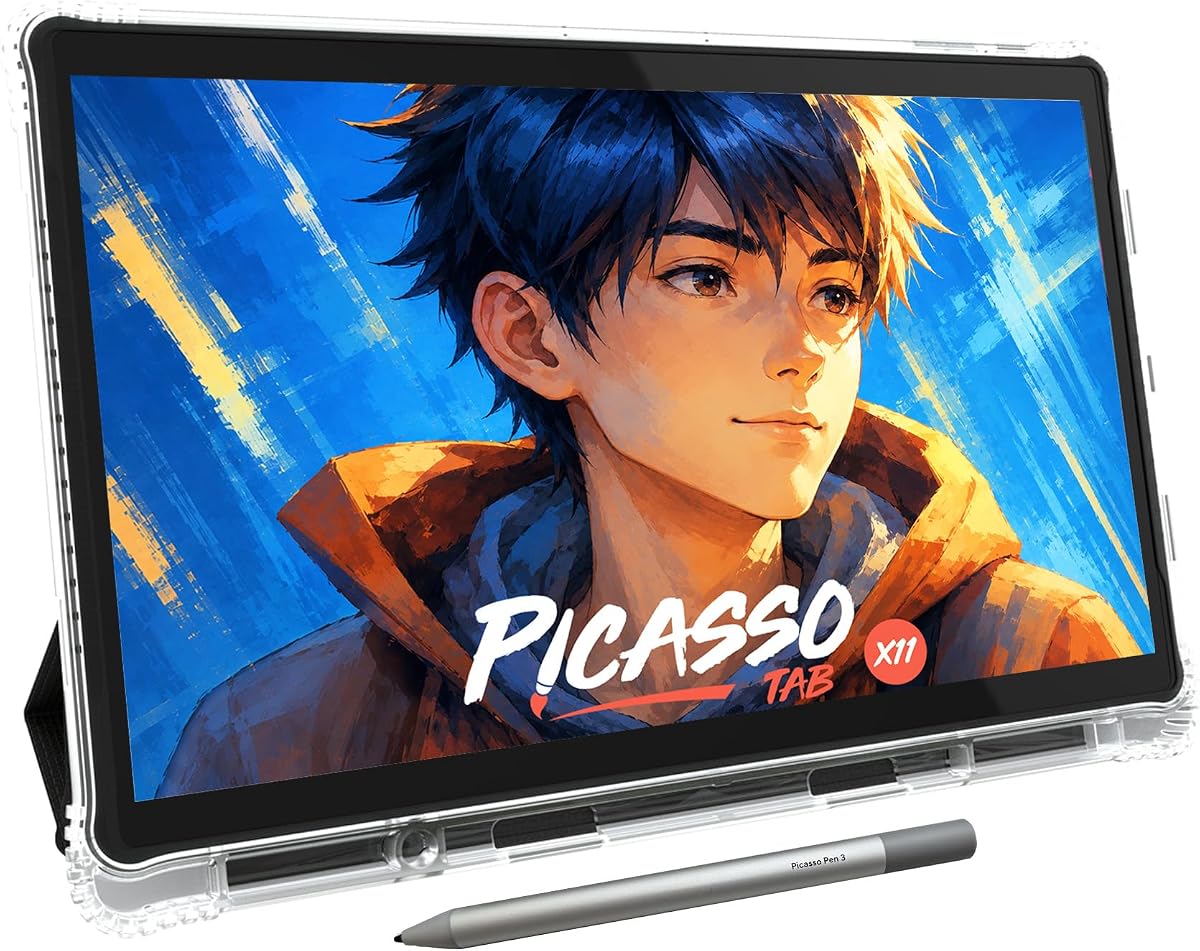
The PicassoTab X11 is a versatile standalone tablet designed for beginners and creative learners with preloaded apps and tutorials. Rated 4.2 stars it offers an 11-inch 2K screen that reduces parallax for a natural drawing feel. This model is perfect for those who want an all-in-one solution without needing a computer or additional software.
We may earn a commission when you buy through this link, at no additional cost to you.
Its strongest feature is the lifetime VIP upgrade for tutorials which provides step-by-step lessons for new artists. The octa-core processor and 6GB RAM handle multitasking and drawing apps smoothly while the expandable storage allows up to 1TB of content. The bonus accessories including a case and screen protector add significant value to the package.
Trade-offs include average build quality compared to premium models and occasional software updates needed to maintain performance. However these issues are minor given the price point and the educational resources provided. It remains a strong choice for learners starting their digital art journey.
This tablet is ideal for students and hobbyists who need a dedicated device for creativity and learning. With built-in guides and apps you can start drawing immediately without setup hurdles. We recommend it for anyone seeking an affordable yet capable standalone drawing tablet with educational support.
Includes beginner-friendly lessons and guided practice to help you develop skills quickly and confidently.
Built-in 128GB storage can be expanded up to 1TB for extensive artwork and media libraries.
We may earn a commission when you buy through this link, at no additional cost to you.
The Kayoubi LCD Writing Tablet offers a massive 14.5-inch screen for kids to explore their creativity without paper or ink. Rated 4.6 stars it features a reusable doodle pad that erases with one click making it clean and easy to use. This device is perfect for young artists who need a safe and engaging toy for home or travel.
We may earn a commission when you buy through this link, at no additional cost to you.
Its key benefits include zero harsh blue light and glare protecting little eyes during extended use. The paperless design saves thousands of sheets of paper and eliminates ink stains keeping your space tidy. Additionally the one-click lock function prevents accidental deletions ensuring your child can save their masterpieces safely.
The main limitation is the lack of color options or advanced features since it is designed for basic drawing and writing. However this simplicity is intentional for children and ensures intuitive use without complex menus. These trade-offs are acceptable for a toy focused on imaginative play.
Parents seeking an educational and mess-free toy will find this tablet an excellent choice. It is lightweight durable and suitable for various occasions from birthdays to holidays. We recommend it for kids aged 3 to 8 who enjoy drawing and need a safe portable creative outlet.
Reusable screen allows endless writing and erasing without ink or paper waste keeping your home clean.
Zero blue light and glare technology ensure comfortable use during long play sessions.
We may earn a commission when you buy through this link, at no additional cost to you.
The Bravokids 10 Inch LCD Writing Tablet provides a colorful and lightweight drawing experience for young children. Rated 4.6 stars it features a screen that responds to pressure and allows instant erasing with one button press. This pad is designed to be portable and durable making it a great companion for travel or school.
We may earn a commission when you buy through this link, at no additional cost to you.
Strengths include the round corner design and anti-fall construction which protect against drops and impacts. The colorful display stimulates imagination while the lock key saves content from accidental deletion. Parents appreciate its ease of use and ability to keep children engaged quietly during trips or meals.
The trade-off is that the screen is small for detailed artwork and lacks advanced features beyond basic drawing. However for its target audience of young children these limitations are minimal and ensure simplicity. It remains a practical and fun tool for early creative expression.
This tablet is an ideal gift for birthdays holidays or school supplies. It encourages creativity and fine motor skills without the mess of traditional art supplies. We recommend it for toddlers and early elementary students who need a safe and fun drawing pad.
Built with durable plastic and rounded corners to withstand drops and protect children from injury.
Weighing only 150 grams it fits easily in backpacks for travel or school use.
We may earn a commission when you buy through this link, at no additional cost to you.
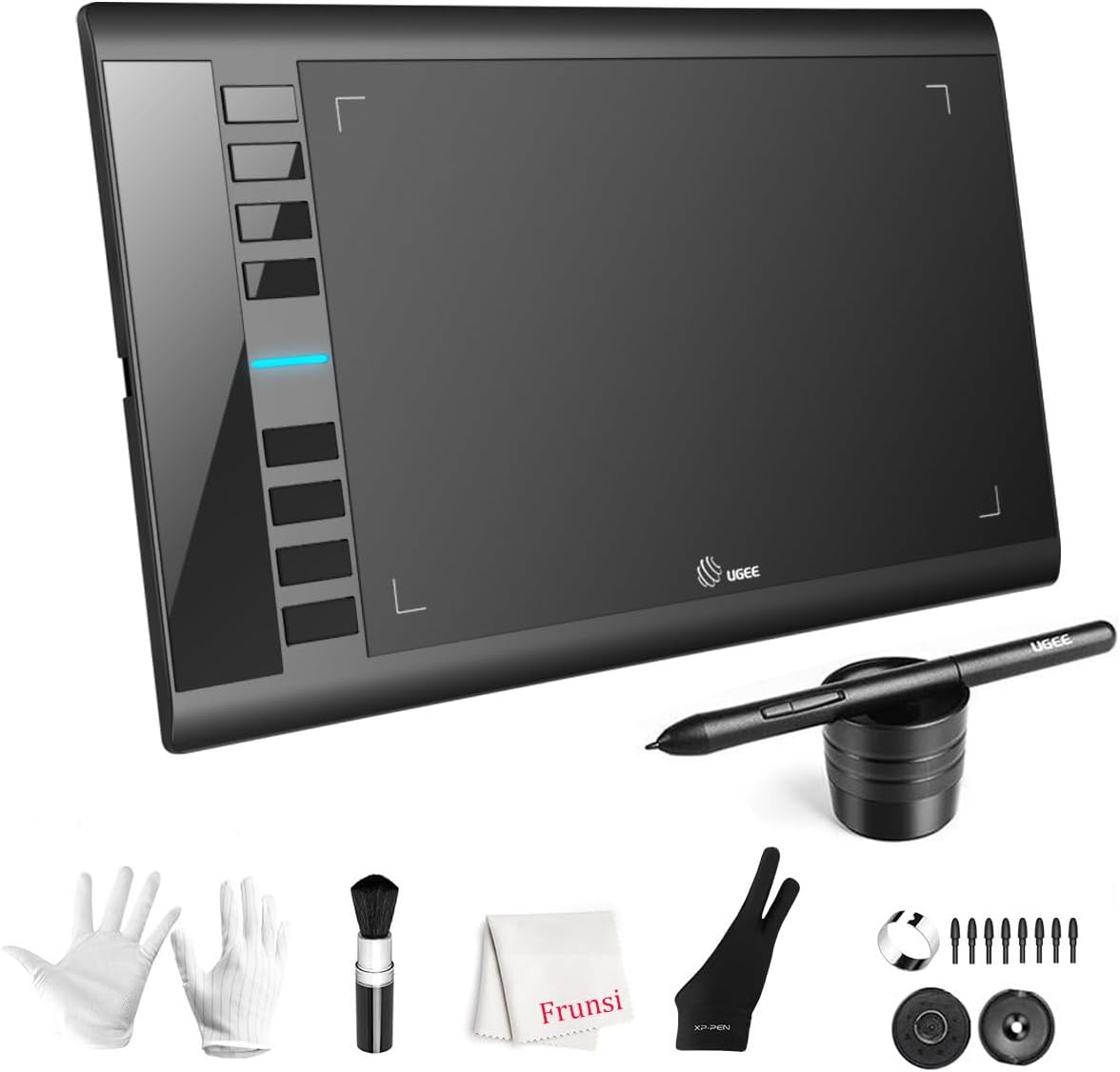
The UGEE M708 Drawing Tablet offers a large active area and high pressure sensitivity for digital artists on a budget. Rated 4.4 stars it features 16384 pressure levels and 8 express keys that streamline workflow in design software. This tablet is ideal for beginners who want professional capabilities without a high price tag.
We may earn a commission when you buy through this link, at no additional cost to you.
Key strengths include its compatibility with Windows Mac and Linux systems and support for popular creative apps like Photoshop and Illustrator. The ergonomic shortcut keys improve productivity by reducing mouse dependency and the USB-C connectivity ensures easy setup. Its papery texture surface provides a smooth and natural drawing experience.
The main downside is the requirement for a computer connection which limits mobility compared to standalone tablets. Additionally initial driver installation may take time for new users. However these factors are minor given the tablet's robust features and affordability.
This tablet is perfect for students hobbyists and entry-level designers looking to explore digital art. It balances performance and cost effectively making it accessible for everyone. We recommend it for anyone seeking a capable graphic tablet to start their creative journey.
Eight customizable shortcuts allow quick access to tools like eraser and undo for efficient workflows.
Works with Windows Mac Chrome OS and Linux along with major creative software packages.
We may earn a commission when you buy through this link, at no additional cost to you.
The Mafiti LCD Writing Tablet is a compact and lightweight tool for quick notes or children's drawing. Rated 4.2 stars it features an 8.5-inch screen with a kick-stand for hands-free viewing and a replaceable battery for longevity. This board is ideal for office memos classroom notes or simple creative play.
We may earn a commission when you buy through this link, at no additional cost to you.
Strengths include the thick writing line that is easy to view and the single-button erase for instant clearing. The kick-stand adds versatility allowing you to display messages or draw without holding the device. Its slim design makes it easy to carry in bags or pockets for on-the-go use.
Limitations involve the small screen which restricts detailed drawing and the basic feature set lacking color or advanced tools. However these constraints suit its purpose as a simple memo or doodle board. It remains a practical and affordable option for quick writing tasks.
This tablet is suitable for office workers students and young children needing a portable writing surface. It is a cost-effective alternative to paper for quick notes and ideas. We recommend it for anyone seeking a lightweight and functional memo board.
Built-in stylus doubles as a kick-stand to display your messages hands-free for easy viewing.
Battery can be easily replaced when it depletes ensuring continuous use without disposal.
We may earn a commission when you buy through this link, at no additional cost to you.
The TEKFUN LCD Writing Tablet provides a colorful and durable option for children to draw and write on the go. Rated 4.5 stars it features a 10-inch screen with a six-month battery life and waterproof construction. This toy is perfect for travel keeping kids entertained during flights or road trips.
We may earn a commission when you buy through this link, at no additional cost to you.
Its standout features include the pressure-sensitive screen that works with stylus or nails and the lock function to save drawings. The lightweight design and durable plastic make it resistant to drops and spills which is ideal for active children. The battery lifespan ensures long-term use without frequent replacements.
The main drawback is the lack of a stylus included in the package and limited functionality beyond basic drawing. However these issues are minimal for a toy designed to be fun and safe. It remains a solid choice for travel and quiet time.
Parents looking for an educational travel toy will find this tablet reliable and engaging. It reduces mess and keeps children entertained without requiring external power sources. We recommend it for families seeking a durable and portable creative option for kids.
Waterproof and anti-fall design ensures the tablet withstands drops and spills during active play.
Built-in battery lasts up to six months reducing the need for frequent replacements or charging.
We may earn a commission when you buy through this link, at no additional cost to you.
The Wacom Intuos Small is a professional-grade graphic tablet offering industry-leading precision and control. Rated 4.6 stars it features a battery-free pen that feels like pen on paper along with included software for immediate creative use. This device is ideal for graphic designers illustrators and editors seeking reliable performance.
We may earn a commission when you buy through this link, at no additional cost to you.
Strengths include the trusted Wacom technology which ensures accurate tracking and comfort during long sessions. The bundled creative software adds value allowing users to start creating right away without extra costs. Its compact size makes it easy to fit on any desk while maintaining high functionality.
The trade-off is the need for a computer connection and a smaller active area compared to larger models. However these limitations are balanced by the tablet's precision and brand reputation. It remains a top choice for professionals and serious hobbyists.
This tablet is perfect for anyone entering digital design or needing a reliable tool for editing and drawing. The included training and software help beginners get started quickly. We recommend it for users prioritizing quality and brand trust.
Industry-leading pen technology provides superior control and accuracy for detailed design work.
Registering the tablet grants access to top creative software and online training resources.
We may earn a commission when you buy through this link, at no additional cost to you.
The XP-PEN Artist12 Monitor offers a vibrant FHD display that brings your digital art to life with precise color. Rated 4.4 stars it features an 11.6-inch screen with 8192 pressure levels and a battery-free pen for natural drawing. This monitor is ideal for artists who need accurate color and direct screen interaction.
We may earn a commission when you buy through this link, at no additional cost to you.
Key strengths include the wide color gamut and anti-reflective screen protector that enhance viewing comfort. The shortcut keys and touch bar improve workflow efficiency allowing quick zooming and scrolling. It works with most creative software making it versatile for various professional tasks.
The main limitation is the requirement for a computer connection which limits portability compared to standalone tablets. Additionally initial driver setup may take time for new users. However these factors are acceptable given the display quality and functionality.
This monitor is perfect for professional artists animators and designers needing color accuracy and direct control. It bridges the gap between traditional drawing and digital editing effectively. We recommend it for users seeking a high-quality pen display for detailed artwork.
72 percent NTSC color gamut ensures vibrant and true-to-life color representation for critical work.
Draw directly on the screen for a natural feel and precise control over your artwork.
We may earn a commission when you buy through this link, at no additional cost to you.
Selecting the right electronic sketch pad depends on your specific needs such as art level portability and budget. This guide outlines key factors to consider before making your purchase.
The screen size determines how much space you have for drawing or writing. Larger screens like 10 inches or more are better for detailed work while smaller options suit portability. Resolution impacts clarity so look for 2K or FHD displays for sharp lines and colors.
Choose a screen that balances size with your carrying needs to ensure comfort during long sessions.
Pressure sensitivity refers to how many levels of pen pressure the tablet recognizes. Higher levels like 16K allow for more nuanced strokes and shading. For basic writing lower sensitivity is fine but professional art benefits from higher sensitivity.
Opt for at least 4096 levels for artistic work to achieve smooth transitions and control.
Standalone tablets run on their own operating system and do not need a computer. This offers great mobility but may have higher costs. Computer-connected tablets rely on your PC or Mac but often provide better software support.
Decide based on whether you prioritize mobility or advanced software compatibility for your workflow.
Battery life is critical for portable use. Some pens are battery-free while devices need regular charging. Look for at least 10 hours of use or replaceable batteries to avoid interruptions.
Prioritize devices with long battery life or battery-free pens if you work on the go frequently.
Display technology affects texture and glare. Anti-glare coatings and paper-like textures reduce eye strain. Some devices use LCD screens that are safer for children compared to high-brightness screens.
Select a display with anti-glare properties to protect your eyes during extended creative sessions.
Ensure the tablet works with your preferred creative software. Most support major apps but check system requirements for Mac or Windows. Standalone devices may have limited app choices compared to PC-connected models.
Verify compatibility with your essential tools to avoid workflow disruptions after purchase.
Build quality ensures the tablet lasts through regular use. Look for durable materials and protective designs especially for kids. Features like round corners and waterproofing add value for active environments.
Choose a well-built device with protective features to withstand drops and daily wear.
Accessories like cases gloves or spare nibs add value to the package. Some kits include educational content or software upgrades which save money later. Assess what is included to judge overall worth.
Look for bundles that offer essential accessories to maximize value and usability out of the box.
To get started connect your tablet to the appropriate device or power it on if standalone. Install any required drivers or apps to ensure full functionality. Use the included stylus to draw or write applying varying pressure for different line thickness.
Clean the screen with a soft dry cloth to remove dust and smudges without scratching the surface. Avoid using harsh chemicals or water directly on the device. Store the tablet in its case when not in use to prevent physical damage.
Keep your firmware and software updated regularly to benefit from new features and bug fixes. Replace stylus nibs when they become worn to maintain drawing quality. Charge the device fully before long trips to avoid running out of battery during creative work.
Yes standalone electronic sketch pads like the XPPen Magic Note Pad or PicassoTab X11 operate independently with built-in operating systems. They do not require a computer and can run drawing apps or store files directly. However computer-connected models like Wacom or XP-PEN need a host device to function fully.
Many electronic sketch pads are designed for professional use offering high pressure sensitivity and color accuracy. Models like the XP-PEN Artist12 or XPPen 10.95 provide tools needed for detailed illustration and design. They support industry-standard software making them viable for commercial workflows.
Battery life varies by model but many offer 10 to 18 hours of continuous use on a full charge. Devices like HUION Note claim up to 18 hours which is ideal for travel or daily use. Always check specific specs to ensure it fits your routine without frequent charging.
Yes dedicated LCD writing tablets are designed for children with eye-safe screens and no harmful radiation. They are lightweight and durable with lock features to prevent accidental erasures. These models are perfect for young kids to draw and write without mess or screen time risks.
Most tablets support major creative software like Photoshop Illustrator and Clip Studio Paint. Compatibility typically includes Windows Mac and Linux systems. Drivers must be installed to enable full features and pressure sensitivity across different applications.
Use a soft microfiber cloth to gently wipe the screen dry or slightly dampened if needed. Avoid harsh chemicals abrasive materials or excessive pressure which could damage the surface. Clean regularly to maintain clarity and avoid scratches that impact the drawing experience.
Many packages include spare nibs and a pen holder to maintain performance over time. Brands like XP-PEN and UGEE provide replacement tips with the purchase. Check product details to confirm what accessories are included before buying.
Yes most devices support file transfer via USB cloud apps or Bluetooth. Standalone tablets often have SD card slots or apps for exporting. Computer-connected models transfer directly through software. This makes sharing work or backing up files straightforward.
We reviewed ten top electronic sketch pads ranging from professional standalone tablets to kid-friendly doodle boards. The XPPen 10.95 leads for artists with its high-resolution screen and standalone power. The Kayoubi LCD Writing Tablet remains the top budget pick for children and casual use.
When choosing prioritize features like pressure sensitivity screen size and portability based on your workflow. Professionals will benefit from direct pen displays while students may prefer standalone options. Consider battery life and software compatibility to ensure the device fits your daily needs seamlessly.
Prices and availability change frequently so verify the latest details before purchasing to get the best deal. Remember to check warranty terms and included accessories to maximize value. We hope this guide helps you find the perfect electronic sketch pad to bring your creative ideas to life.