
Digital Calendar 10.1 Touchscreen
4.4Editor score
No subscription fees
Weekly meal manager
Touchscreen interface
Digital touchscreen organizers transform chaotic kitchens into organized command centers. These smart devices combine calendars, chore charts, and photo displays on one sleek screen.
We compared ten top models based on sync capabilities, ease of use, and family features. Our analysis covers everything from basic planners to advanced Android hubs.
Each pick highlights unique strengths for different household needs. Prices and availability change frequently, so check current listings before purchasing your ideal organizer.
4.4Editor score

4.4Editor score

4.6Editor score
As an Amazon Associate we earn from qualifying purchases.
This side-by-side comparison highlights key features across all ten models to help you find the perfect digital organizer for your specific household needs and budget constraints.


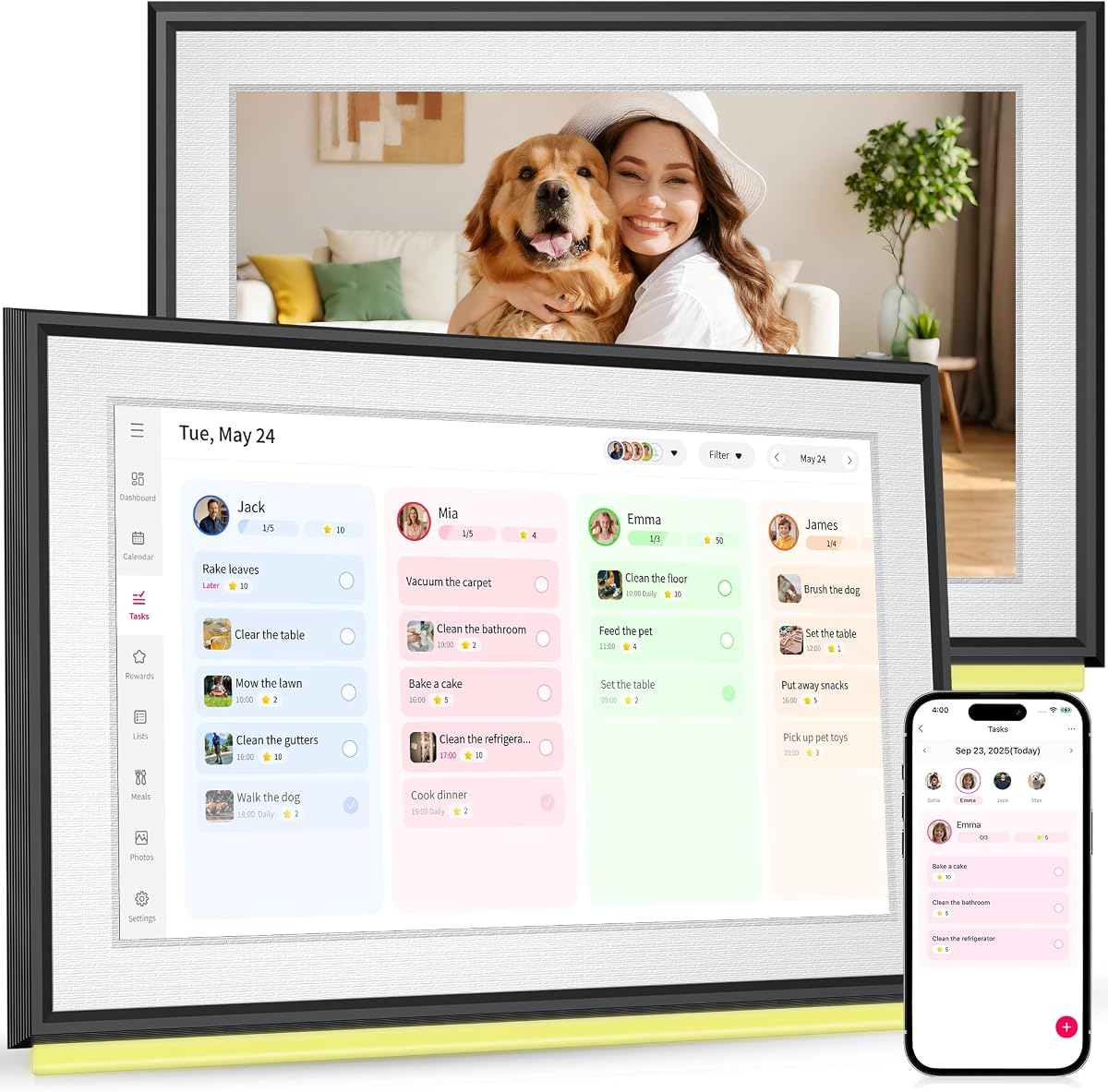

This 15.6-inch digital calendar wall touch screen earns top marks for its comprehensive family coordination capabilities and clear high-definition display.
We may earn a commission when you buy through this link, at no additional cost to you.
Its standout qualities include seamless real-time sync with Google, Outlook, and iCloud without requiring any monthly subscription fees. The motivational chore and reward system for kids transforms daily routines into a fun gamified experience, while the built-in photo frame with AI enhancement adds warmth to your home when idle.
While the large screen requires significant wall space and batteries are not included for backup power, these trade-offs are acceptable given the device's versatility and high-quality build that ensures reliable performance.
Busy households seeking a centralized command center to manage schedules, meals, and chores will find this model particularly valuable for maintaining organization and reducing daily stress.
Multiple family members can edit schedules simultaneously through real-time sync, ensuring everyone stays updated without confusion or missed appointments.
The interactive chore chart assigns tasks with reward points, encouraging children to build responsibility and good habits independently.
We may earn a commission when you buy through this link, at no additional cost to you.
Skylight Calendar offers a premium hub experience designed to keep busy families in sync with shared schedules and an interactive digital chore chart.
We may earn a commission when you buy through this link, at no additional cost to you.
Its standout qualities include effortless Wi-Fi setup and seamless syncing with Google, iCloud, and Outlook, allowing any family member to add updates directly on the device or via the app. The customizable design fits naturally into layouts like kitchen countertops or hallway tables.
While optional premium features like Magic Import and Disney Mode require a subscription and the price is higher than basic models, the core functionality provides significant value for those seeking a dedicated family planning tool.
Families wanting a permanent electronic wall calendar that simplifies routines and reduces the stress of planning meals will appreciate this reliable and polished digital organizer.
The HD smart display presents daily schedules and family events in a readable format, allowing quick checks to confirm plans.
Mount it on a wall or place it on a desk to fit your family's daily spaces and preferred layout.
We may earn a commission when you buy through this link, at no additional cost to you.
This 10.1-inch digital calendar offers exceptional value as a smart electronic wall organizer with zero hidden fees and all essential family planning features.
We may earn a commission when you buy through this link, at no additional cost to you.
Its standout qualities include a fully unlocked interactive chore list that lets parents assign tasks and monitor progress, turning routines into a fun game that builds responsibility. The visual weekly meal manager displays menus beautifully with automatic grocery list generation, while the built-in to-do list keeps work priorities in sight.
While the smaller 10.1-inch screen offers less viewing space than larger models and the interface is relatively basic, these limitations are acceptable for those seeking an affordable solution for daily household coordination.
Parents looking for a thoughtful gift that helps busy moms or grandmas stay organized without monthly costs will find this device provides the mental rest they truly deserve.
Children race to earn stars and unlock rewards through interactive tasks, reducing daily nagging and fostering independence.
Everyone's plans and chores live together on one screen, eliminating the need to chase updates for what is next.
We may earn a commission when you buy through this link, at no additional cost to you.
This 10.1-inch smart touchscreen acts as an all-in-one family organizer with calendar sync and AI-powered imports to keep your household running smoothly.
We may earn a commission when you buy through this link, at no additional cost to you.
Its standout qualities include a simple star-based reward system that motivates kids to complete daily tasks while keeping family routines consistent. The 1080P HD touchscreen doubles as a digital photo frame when idle with 32GB of storage for thousands of photos, and weekly meal planning helps organize to-do lists in one place.
While the interface is relatively basic compared to advanced models and the 10.1-inch screen offers moderate viewing space, these factors are acceptable for families seeking a practical command center without monthly fees.
Families wanting a functional and personalized hub to stay organized, connected, and on schedule will find this device an ideal organizational tool for any occasion.
Work seamlessly with Google and iCloud calendars by adding or updating events directly on the touchscreen.
Use the device as a digital photo frame to display memories alongside your schedules.
We may earn a commission when you buy through this link, at no additional cost to you.
This 15.6-inch HD touchscreen digital calendar works as a smart chore chart and home organization hub designed with an intuitive interface.
We may earn a commission when you buy through this link, at no additional cost to you.
Its standout qualities include easy task creation with color coding to track everyone's activities at a glance, plus a built-in photo frame that showcases favorite memories through rotating slideshows when not managing schedules. The weather display keeps you prepared with up-to-date information alongside your daily schedule.
While it includes only a standard US-style plug and mounting hardware may be limited, these minor drawbacks do not detract from its versatility as a thoughtful gift for birthdays or housewarmings.
Households wanting to eliminate missed appointments and stay organized while keeping important moments close will find this versatile planner perfect for kitchens or home offices.
Connect to Wi-Fi and seamlessly sync schedules from Google and iCloud in minutes with a plug-and-play setup.
Create weekly meal plans and track progress with stars to build responsibility through positive daily habits.
We may earn a commission when you buy through this link, at no additional cost to you.
This 10.1-inch smart digital calendar serves as the ultimate family command center with a professional color classification system for scientific family management.
We may earn a commission when you buy through this link, at no additional cost to you.
Its standout qualities include real-time data synchronization with mainstream platforms and a one-click recipe saving function that simplifies daily household management. The remote photo sharing feature enables all family members to view and share warm life moments, easing the longing of grandparents for their grandchildren.
While it requires app installation via Wanmine and supports only horizontal or vertical placement, these constraints are acceptable given the device's ability to standardize daily routines and reduce parenting pressure.
Households wanting to cultivate children's independence while creating a cozy and loving home atmosphere will appreciate this reliable organizer backed by a one-year warranty.
Use exclusive color markers to distinguish plans and chores for different members to make tasks engaging.
Simplify daily household management with flexible editable checklists and automatic grocery shopping lists.
We may earn a commission when you buy through this link, at no additional cost to you.
This 21.5-inch digital calendar offers a premium dual-mode experience that switches between simple scheduling and a fully customizable Android dashboard.
We may earn a commission when you buy through this link, at no additional cost to you.
Its standout qualities include the ability to download additional apps from Google Play and use the built-in Google Gemini voice assistant to control smart home devices directly. The smart photo frame displays videos from Google Photos with beautiful screensavers, and the anti-glare HD touchscreen ensures comfortable viewing.
While the price is the highest in this comparison and installation requires more wall space, these trade-offs are acceptable for those seeking maximum customization and smart home integration.
Tech-savvy families wanting a fully connected dashboard that fits their daily needs will find this device an unparalleled command center for organizing life.
Switch easily between simple scheduling and a dashboard with widgets for weather, clocks, and music.
Check schedules, set reminders, and manage tasks hands-free with the built-in Google Gemini assistant.
We may earn a commission when you buy through this link, at no additional cost to you.
This 15.6-inch digital calendar provides a premium dual-mode experience with a stand included for versatile desk or wall placement.
We may earn a commission when you buy through this link, at no additional cost to you.
Its standout qualities include the ability to personalize your screen with apps and widgets for weather and smart home controls, plus a smart photo frame that displays videos from Google Photos. The interactive chore chart helps kids stay motivated by completing tasks and earning rewards to build habits.
While the screen is smaller than the 21.5-inch premium model and some app features require switching modes, these factors are acceptable for those wanting a versatile and polished organizational hub.
Families seeking a sleek and intuitive display that stays simple for daily use while offering deep customization will find this model an excellent choice.
Create a fully connected family dashboard with custom layouts that fit your daily needs.
Get started in minutes with step-by-step guides and ongoing support from the help center.
We may earn a commission when you buy through this link, at no additional cost to you.
This 10.1-inch WiFi-enabled smart digital calendar simplifies scheduling with color-coded tasks and transforms into a digital photo frame.
We may earn a commission when you buy through this link, at no additional cost to you.
Its standout qualities include effortless color-coding to assign tasks to family members for smooth coordination and a free mobile app that lets you add events anywhere. The device syncs with internet time servers for precise timekeeping and automatically loads events to stay up to date.
While it is not designed for wall mounting and initial startup requires patience to allow sufficient system processing time, these are acceptable limitations for a compact tabletop command center.
Busy families seeking a stress-free home with a beautiful photo display will find this device a perfect gift to end the daily chaos.
Build responsibility in children with interactive charts and display weekly meal plans to end dinner questions.
Share photos directly from your phone to display cherished memories as a dynamic display for all.
We may earn a commission when you buy through this link, at no additional cost to you.
This 21.5-inch digital wall calendar combines a wall calendar, desk planner, and chore chart into one elegant touchscreen device with wide viewing angles.
We may earn a commission when you buy through this link, at no additional cost to you.
Its standout qualities include a grandparent-friendly interface with customizable font sizes and themes, plus a chore chart that assigns tasks with reward points to motivate your family. The device delivers vibrant colors and allows you to swipe and write just like on a tablet.
While premium customization requires a subscription and the large size may limit placement options, these factors are acceptable for those needing a high visibility command center.
Busy households wanting a crystal clear display to manage schedules and celebrate family memories with a built-in photo mode will find this a powerful tool.
Manage your schedule from anywhere using the free iOS and Android app that syncs instantly with your calendar.
Assign tasks and set reward points to build lifelong habits together and celebrate moments when idle.
We may earn a commission when you buy through this link, at no additional cost to you.
Selecting the right digital touchscreen organizer requires evaluating screen size, connectivity, and family features to match your household needs.
Screen size determines visibility and placement options. Larger displays like 21.5 inches offer high visibility for shared spaces, while 10.1 inch models fit compact desks. Look for HD or 1080P resolution with anti-glare technology to ensure clear viewing in bright kitchens.
Prioritize a screen size that matches your mounting location and offers the resolution needed for clear text and photos.
Ensure the organizer supports real-time sync with Google, iCloud, Outlook, and other platforms your family uses. This feature allows multiple members to edit schedules from phones, keeping everyone updated without confusion or manual entry.
Choose a model that integrates seamlessly with your existing calendar apps to avoid data silos.
Many digital organizers promise no monthly fees, while others offer premium features behind a subscription. Review the model core features like task lists and photo frames are fully unlocked without additional costs before purchasing.
Opt for a subscription-free model if you prefer a one-time investment without recurring charges.
Interactive chore charts with gamified reward systems help children build responsibility independently. Look for star tracking, color-coded tasks, and points that motivate completion without constant parent reminders.
Select a device with clear visual progress tools to foster self-discipline in your home.
A good digital organizer should transition into a photo frame when idle to showcase memories. Check for storage capacity, slideshow options, and app syncing to ensure your cherished photos display smoothly.
Choose a model that offers flexible photo album features to personalize your device when not managing schedules.
The best organizers offer plug-and-play setup with simple Wi-Fi connection and intuitive touch interfaces. Ensure the device is user-friendly for seniors and kids, with clear instructions and accessible controls.
Prioritize models with step-by-step guides and simple navigation to ensure all family members can use the device.
Consider whether the device supports wall mounting, desk placement, or both. Most organizers include mounting hardware, but some are designed for tabletop use only. Verify if a stand is included or sold separately.
Choose a placement option that fits your kitchen or home office layout and allows easy access for everyone.
Reliable customer support and warranty coverage are essential for electronic home devices. Look for 24/7 support options, physical warranties, and responsive help centers to resolve any technical issues quickly.
Select a model with strong support backing to ensure long-term reliability for your family's daily use.
Place the organizer in a central family area like the kitchen to ensure maximum visibility. Connect it to your home Wi-Fi and follow the initial setup instructions to sync calendars and configure preferences.
Regularly check for software updates to access the latest features and performance improvements. Use the touch screen gently to avoid scratches and keep the surface clean with a soft microfiber cloth.
Customize the display by uploading family photos and setting up recurring weekly meals. Utilize the sleep wake modes to save energy while keeping the device ready for immediate use.
Many models in this guide are designed with zero hidden fees and no monthly subscriptions. Core features like calendar sync, photo frames, and basic chore lists are fully unlocked in these options. Some premium models offer optional upgrades for enhanced widgets or exclusive themes.
Yes, most digital organizers support real-time syncing with Google or iCloud calendars. This allows multiple family members to edit schedules on their phones, and the changes appear instantly on the device. You can also log in directly on the touchscreen to make updates.
Photo sharing is typically done through a dedicated mobile app. Upload photos or videos to your phone, and they sync to the device over Wi-Fi. Some models also support direct Google Photos integration for automatic displays.
Most digital organizers in this guide offer both wall mount and desk options. Mounting hardware is often included for secure installation. Check the product specifications to confirm if a stand is included if you plan to place it on a countertop.
Top models support syncing with major platforms including Google Calendar, iCloud, Outlook, Cozi, and Yahoo. This ensures your work, school, and personal schedules are all centralized in one place for easy access by the whole family.
Most features require a Wi-Fi connection to sync data and download content. However, local tasks and saved photos can usually be viewed offline. Check your specific model to understand which features remain functional without internet access.
Many models feature customizable font sizes and simplified interfaces designed for ease of use. The touch screen allows intuitive interaction without complex menus, making them accessible for older family members who need to stay connected.
Our top picks include the 15.6 Digital Calendar Wall Touch Screen for overall family coordination, the 10.1 Digital Calendar for budget-friendly planning, and the Apolosign 21.5-inch for premium customization. Each offers unique strengths depending on your household size and tech needs.
Prioritize models that offer no subscription fees and robust sync capabilities to ensure your family stays coordinated without recurring costs. Evaluate screen size and mounting options to ensure the device fits comfortably in your shared spaces.
Remember that prices and availability change frequently, so check current listings before purchasing. Investing in a quality digital organizer today can transform your household management for years to come.