
Tokluck PS5 Cooling Station
4.4Editor score
Auto temperature controlled fan
RGB lighting effects
Fast two point five hour charge
This guide compares the top cooling stand for PS5 console options including vertical and horizontal models with charging fans and storage features for gamers.
Finding the right cooling stand for PS5 console is essential for maintaining optimal performance during long gaming sessions. Overheating can throttle system speed and reduce the lifespan of your expensive hardware investment significantly. A quality accessory ensures proper airflow while keeping your setup organized and visually appealing in any room environment.
We evaluated ten top-rated products based on cooling efficiency compatibility with Slim Pro and standard models and additional features like charging docks. Each option was scrutinized for build quality noise levels and ease of installation to ensure you receive a reliable solution for your specific needs today. Our team analyzed user feedback and technical specifications to compile this comprehensive ranking for informed decision-making.
Each product entry highlights key strengths potential limitations and specific use cases to help you match a unit with your gaming habits. Prices and availability fluctuate frequently so please verify current details on the official product pages before making your final purchase decision. Use this guide as a trusted resource to secure the best value for your PlayStation setup right now.
4.4Editor score
4.4Editor score

4.3Editor score
The following table provides a side-by-side comparison of all ten products analyzed in this guide to help you quickly identify the best match for your setup requirements.


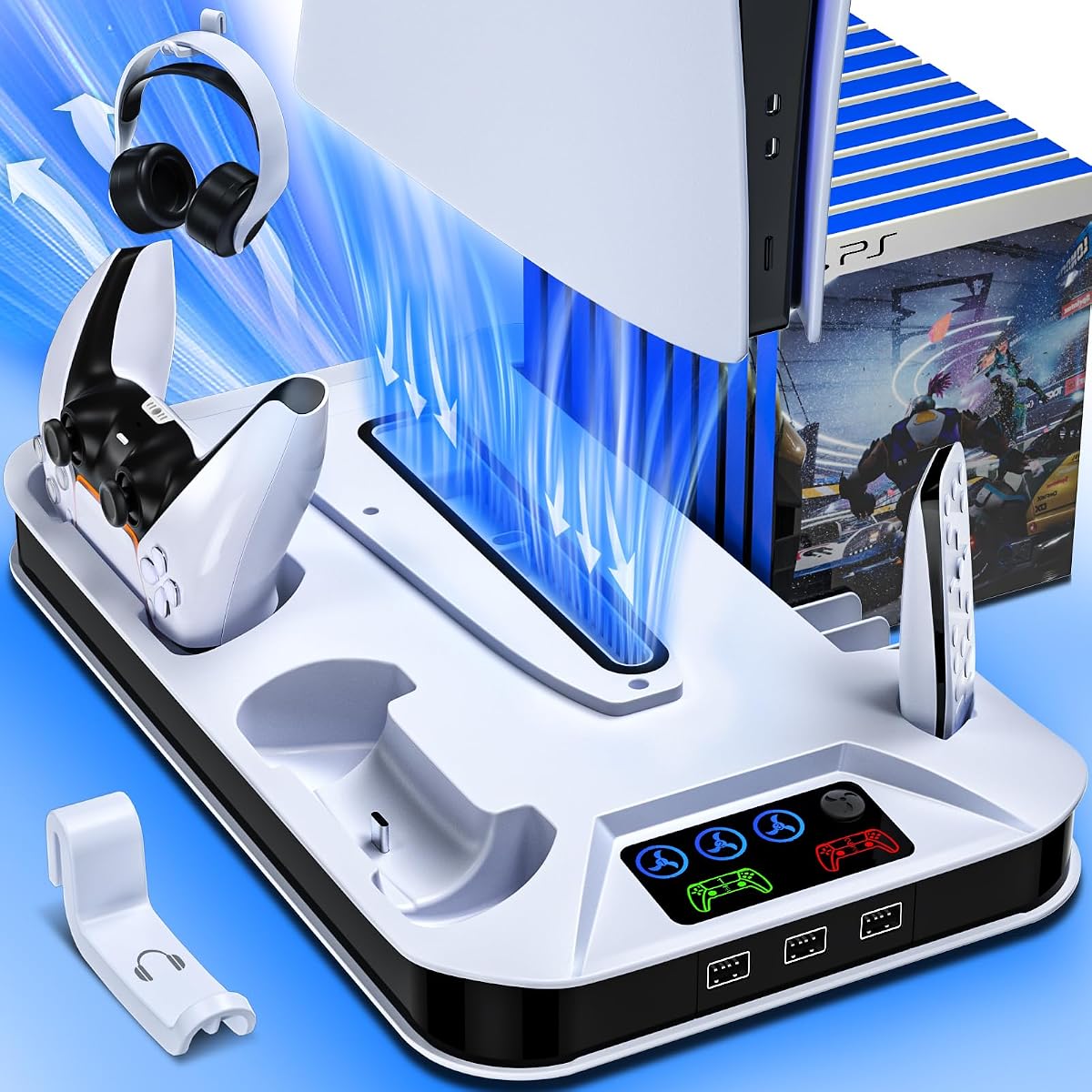
This PS5 Cooling Station stands out as the top choice for gamers seeking a complete accessory solution. With a 4.4 rating and robust cooling features it effectively manages heat during intense gaming sessions while keeping your controllers charged and ready for play immediately.
We may earn a commission when you buy through this link, at no additional cost to you.
The high-efficiency turbo fan offers three adjustable speeds ensuring you can tailor airflow to your specific thermal needs. It supports both original and Slim models with a secure screw lock and includes three USB hubs for charging headsets or other devices conveniently.
While the price is higher than basic options the added functionality justifies the investment for serious players. The only minor inconvenience is removing the panel adapter for Slim consoles but this ensures a perfect aesthetic match every time you setup your station.
If you want a reliable all-in-one solution that combines cooling charging and organization this unit is the clear winner. It protects your console longevity while keeping your gaming area neat and efficient for daily use without hassle or downtime.
The turbo fan dissipates hot air from the bottom of the console effectively preventing overheating during long play sessions.
Smart protection chips prevent overcharging while the USB hubs allow you to charge multiple devices without extra adapters.
We may earn a commission when you buy through this link, at no additional cost to you.
The Tokluck PS5 Cooling Station offers exceptional value with its automatic temperature control and vibrant RGB lighting. It receives a 4.4 rating from users who appreciate the ability to adjust fan speeds manually or let the system handle cooling based on heat levels.
We may earn a commission when you buy through this link, at no additional cost to you.
Its intelligent probe automatically ramps the fan up when the console gets hot and slows it down when cool for efficient operation. The RGB lighting adds a gaming atmosphere to your desk while the dual controller charging dock ensures you never run out of battery mid-game.
Some users may need to remove the panel adapter for Slim models but this is a standard trade-off for compatibility. The memory function keeps your last fan setting so you do not have to reconfigure it every time you turn the stand on.
For gamers who want advanced features like auto cooling and lights without spending a premium this is the ideal budget pick. It balances performance and aesthetics well to make it a top choice for budget-conscious users who refuse to sacrifice quality.
The built-in temperature probe adjusts fan speeds automatically to maintain optimal console performance without manual intervention.
Nine RGB lighting modes allow you to match your gaming setup with vibrant colors and breathing effects.
We may earn a commission when you buy through this link, at no additional cost to you.
This Horizontal Stand is a premium choice for gamers who prefer a sideways layout for their console. With a 4.3 rating it features a scalable design that fits all PS5 models including the latest Pro version without requiring complex adjustments or tools.
We may earn a commission when you buy through this link, at no additional cost to you.
The three-speed adjustable cooling fans provide powerful heat dissipation while the dual controller dock charges your Edge controllers simultaneously. You can install it in minutes using the included EVA foam and screws which makes setup effortless even for first-time users.
While the horizontal orientation requires more shelf space it eliminates the need for separate charging docks entirely. The touch switch lets you control fan speed easily ensuring you have the cooling power you need during intense gaming marathons.
Choose this if you want a sleek horizontal setup with high-end features and versatile compatibility. It is perfect for users who prioritize organization and a clean look while ensuring their console stays cool and controllers stay charged efficiently.
The stand adapts to Standard Slim and Pro models with a flexible structure that meets placement needs for every console generation.
Installation requires no complex tools so you can assemble the stand quickly with simple steps and clear instructions.
We may earn a commission when you buy through this link, at no additional cost to you.
The PS5 Cooling Station White model is highly rated at 4.5 for its quiet operation and comprehensive feature set. It excels in keeping your console cool with a low noise turbo fan while charging your controllers quickly without adding disruptive sound to your game environment.
We may earn a commission when you buy through this link, at no additional cost to you.
It includes a headset holder and three USB hubs making it easy to organize your audio gear and other peripherals. The fast charging takes only two and a half hours to fill both controllers ensuring you always have power ready for your next session.
Note that it does not support Edge controllers but works perfectly with standard DualSense models for most users. You may need to remove the panel adapter for Slim units but this ensures a clean look that matches your console design perfectly.
This unit is ideal for those who prioritize noise control and organization alongside cooling. Its white finish and balanced features make it a great match for modern gaming setups that demand style and function in one package.
The low noise turbo fan ensures efficient cooling without disturbing your audio or causing distraction during gameplay.
Built-in slots for headsets and media remotes keep your area tidy and accessories within easy reach.
We may earn a commission when you buy through this link, at no additional cost to you.
The Rysker PS5 Stand is a versatile option that supports both standard and Edge controllers which is rare in this category. It features a 4.4 rating and includes a safety screw to ensure your console stays firmly in place during use.
We may earn a commission when you buy through this link, at no additional cost to you.
The three adjustable fan speeds let you customize cooling power while the USB ports allow you to charge headsets or other devices simultaneously. Its memory function remembers your last fan setting making it convenient to use every time you power up the station.
While it may require removing the panel adapter for Slim models it offers a secure and balanced fit for all console versions. The design is clean and functional blending well with the console aesthetic without overpowering your room's decor.
This stand is a top pick for those who own Edge controllers or need extra USB ports for peripherals. It combines safety features with flexible charging options to serve as a reliable hub for your entire gaming ecosystem.
Unlike many competitors this stand fully supports the PS5 Edge controller for professional-grade gaming setups.
Three USB ports allow you to charge headsets and other accessories alongside your controllers easily.
We may earn a commission when you buy through this link, at no additional cost to you.
This Cooling Station combines automatic temperature control with stunning RGB honeycomb lighting to create a premium visual experience. It receives a 4.5 rating and supports all PS5 models with a fan that adjusts automatically to heat levels for optimal performance.
We may earn a commission when you buy through this link, at no additional cost to you.
The nine RGB modes allow you to customize your setup with single-color or breathing effects that match your gaming mood. Charging both controllers takes just two and a half hours and the memory function ensures your settings are retained after restart.
Some users may find the fan loud on high speed but this ensures maximum cooling when needed during intense sessions. It also supports Edge controllers which adds versatility for gamers who use specialized hardware for competitive play.
Choose this if you want a balance of smart cooling and aesthetic flair. It is perfect for gamers who want their station to look impressive while still delivering reliable protection for their console and accessories.
The fan adjusts speed automatically based on temperature thresholds to keep your console safe without manual input.
Nine honeycomb lighting options let you customize your gaming atmosphere with colors and breathing effects.
We may earn a commission when you buy through this link, at no additional cost to you.
This Horizontal Stand Kit is designed for gamers who prefer a sideways setup and need versatile compatibility. With a scalable design it fits all PS5 models and supports Edge controllers without requiring extra tools to assemble or install on your shelf.
We may earn a commission when you buy through this link, at no additional cost to you.
The three-speed cooling fans provide powerful airflow and the dual controller dock charges your controllers quickly with clear LED indicators. The no-tool setup ensures you can start using it immediately without needing drills or complex adjustments.
While it does take up more shelf space than vertical stands it consolidates your charging and cooling into one compact unit. This eliminates clutter from separate chargers and keeps your gaming area organized and ready for action at all times.
If you want a robust horizontal solution with strong cooling and Edge compatibility this is the best choice. It is ideal for setups where vertical space is limited and organization is a top priority for daily gaming use.
The stand adapts to Standard Slim and Pro models with a flexible structure that meets placement needs.
Assembly is simple and fast requiring no complex tools so you can set up your station quickly.
We may earn a commission when you buy through this link, at no additional cost to you.
This Cooling Stand features a powerful auto-adjustable fan that changes speed based on temperature for efficient thermal management. With a 4.5 rating it charges controllers in just two hours and includes a smart chip that stops charging at 70% to protect battery life.
We may earn a commission when you buy through this link, at no additional cost to you.
It supports Disc and Digital editions seamlessly and includes three USB ports for charging headsets or other accessories. The safety screw ensures your console is locked securely in place preventing accidental knocks or movement during use.
Some users may want to charge beyond 70% but the smart chip prioritizes long-term battery health over rapid full charges. You may need to remove the panel adapter for Slim units but this ensures a perfect fit with the console design.
Choose this if you want smart protection and fast charging combined with reliable cooling. It is ideal for users who prioritize battery longevity and want a stand that can handle multiple devices without extra adapters.
Built-in chips automatically stop charging at 70% to prevent overcharging and extend battery lifespan.
The fan adjusts automatically to temperature ensuring efficient cooling without needing manual intervention.
We may earn a commission when you buy through this link, at no additional cost to you.
The heclynis PS5 Cooling Stand offers a sleek design with cooling RGB lighting and silent fan operation. It receives a 4.4 rating and features dual USB A hub ports for charging your controllers and other accessories simultaneously with ease.
We may earn a commission when you buy through this link, at no additional cost to you.
Its three-level silent fan speeds ensure your console stays cool without adding noise to your room. The RGB ring adds a vibrant gaming atmosphere and the safety screw keeps your console secure and balanced on any surface.
Users note that charging stops at 70% which helps protect battery life but may require more frequent charging. You may need to remove the panel adapter for Slim units but the design remains aesthetic and functional regardless of console version.
Choose this if you want a stylish station with quiet cooling and multiple charging options. It is ideal for gamers who value aesthetics and organization while keeping their console protected and accessories powered.
The fan provides efficient cooling at three levels without adding noise to your gaming environment.
Eight RGB colors and four light modes create a vibrant gaming atmosphere on your desk.
We may earn a commission when you buy through this link, at no additional cost to you.
The PS5 Cooling Station Set is built for durability and organization with a strong build quality and clear LED indicators. It receives a 4.5 rating and includes a headset holder along with USB and Type C ports for charging multiple devices simultaneously.
We may earn a commission when you buy through this link, at no additional cost to you.
The three-level fan gives you control over airflow while the fast charging ensures your controllers are ready in hours. The concealed cables and safety screws make it easy to integrate into any setup without visible clutter or loose wires.
While it requires removing the panel adapter for Slim units the result is a clean look that matches the console perfectly. The Type C port adds versatility for charging modern devices which are more common than older USB standards today.
Choose this if you want a sturdy reliable station that charges multiple devices and looks professional. It is ideal for users who want a comprehensive solution for cooling charging and organization in one premium product.
The stand is built with sturdy materials to withstand daily use without shaking or damaging your products.
Concealed cables ensure a clean look that harmonizes beautifully with your console and setup.
We may earn a commission when you buy through this link, at no additional cost to you.
Choosing the right cooling stand requires evaluating compatibility, cooling performance, and additional features.
Ensure the stand supports your specific console version whether it is the original, Slim, or Pro model. Some stands require removing panel adapters for certain versions so check the product description for exact fit details.
Always verify compatibility with your disc or digital edition before purchase to avoid return hassles later.
Look for stands with adjustable fan speeds to manage noise and heat effectively during different usage scenarios. Turbo fans with automatic temperature control offer the best protection against overheating during long sessions.
Prioritize models that actively dissipate heat from the bottom or sides of the console for better airflow.
A good stand should include a dual controller charging dock to keep your game controllers powered up. Check for smart chip protection that prevents overcharging to extend battery life over the long term.
Fast charging features can reduce downtime so look for units that charge controllers in under three hours.
Stands with extra USB ports allow you to charge headsets and other accessories without needing separate power bricks. This helps keep your area organized and reduces cable clutter across your desk or shelf.
Check if the stand includes a Type-C port to support modern devices and broader charging options.
Features like headset holders and media remote slots help keep your gaming area tidy and accessible. Some units also offer storage for game discs which helps you manage your library easily without extra cases.
Choose a design that organizes your accessories efficiently to save space on your entertainment center.
Select a stand that matches the visual style of your console with colors like white or clean lines. RGB lighting models can add a vibrant gaming atmosphere to your room if that fits your personal style.
Ensure the design does not obstruct ventilation holes or block access to console ports when assembled.
Look for stands that offer easy no-tool or minimal-tool setup to get you gaming faster without frustration. Safety screws and non-slip pads are important for stability to prevent your console from falling or tipping.
Durable materials ensure the stand withstands daily use without wobbling or breaking over time.
Price ranges vary so balance the features you need with your budget to find the best value option. Higher-end models may offer auto cooling and more ports but budget options often provide essential cooling and charging.
Check reviews and warranty terms to ensure long-term reliability regardless of the price you pay.
Place the stand on a flat stable surface ensuring it has enough clearance around the sides for proper airflow. Connect the power cable to your console or wall adapter and power on the unit to activate the cooling features.
Insert your PS5 console into the stand and secure it with the included safety screw to prevent any movement. Place your controllers in the charging docks to start the charging process immediately for future use.
Clean the fan and vents regularly with a soft cloth to remove dust that could reduce cooling efficiency. Adjust fan speeds based on your gaming intensity to balance noise levels with thermal performance needs.
Yes, a quality cooling stand actively dissipates heat from your console using fans which helps maintain optimal operating temperatures. This is especially useful during long gaming sessions or when playing demanding games that push your system hard.
Most models in this guide are designed to fit Standard, Slim, and Pro versions. However, you may need to remove an adapter panel for Slim units so check the product details for specific compatibility notes.
Yes, most stands include dual controller charging docks that support original and Edge controllers. Some units also have USB hubs for charging headsets and other devices alongside your controllers.
Many models offer three-speed settings so you can choose a low-speed option for quieter operation. Fans with automatic control often ramp up only when needed so they stay quiet during light use.
Some stands draw power directly from your console via USB while others require a separate wall adapter. Check the product description to see if it is powered by your PS5 or needs an external outlet.
Most stands are designed for official PS5 controllers but some also support third-party or Edge controllers. Always verify controller compatibility in the product description before purchase to avoid fit issues.
It is best to clean the fan and vents every few months to prevent dust buildup. Use a soft cloth or compressed air to maintain airflow and ensure optimal cooling performance over time.
Yes, most stands in this guide explicitly list support for the PS5 Pro along with other versions. Just ensure you select a unit that includes the necessary adapters or design features for the Pro model.
We hope this guide has helped you identify the perfect cooling solution for your gaming setup. The top picks range from budget-friendly options with auto cooling to premium models with RGB lighting and extensive ports.
Prioritize what matters most to you such as noise levels charging speed or console compatibility when making your final choice. Investing in a quality stand ensures your PS5 stays cool and organized for years of uninterrupted gaming.
Remember that prices and stock can change quickly so check the provided links for the latest availability and deals. Thank you for reading this expert guide on finding the best cooling stand for PS5 console.