
Learning Resources Code & Go Robot Mouse
4.5Editor score
Designed for ages four and up
Includes maze grids and coding cards
No screens or tablets required
This guide compares the top coding toys for kids in 2026, evaluating screen-free options, robotics kits, and app-based learning tools to help parents choose
Coding toys have revolutionized how children learn programming logic by turning abstract concepts into tangible play. These interactive tools help young minds understand sequencing, loops, and problem-solving through hands-on engagement without requiring prior technical knowledge.
We evaluated the leading options based on educational value, ease of use, durability, and age appropriateness. Each product was analyzed for its ability to foster critical thinking skills while keeping children engaged through fun challenges and interactive gameplay mechanics.
Every pick in this list highlights unique strengths suited to different learning styles and developmental stages. Prices and availability may fluctuate over time, so checking current listings ensures you get the best value when purchasing these educational resources for your child.
4.5Editor score

4.1Editor score

4.6Editor score
This side-by-side comparison breaks down the core features, age ranges, and coding methods for every top pick to help you decide which robotic or programmable toy fits your child needs best.






This robotic chameleon kit combines engineering assembly with color-sensing programming to create an engaging learning experience. With a 4.1 rating from users, it stands out for its unique approach to teaching coding concepts without needing any screens or tablets.
We may earn a commission when you buy through this link, at no additional cost to you.
The kit allows children to build a 15-inch reptile that reacts to physical colored cards. Kids can program sequences using action cards that trigger specific movements like tongue retraction or color changes based on environmental light.
While assembly requires patience and adult support for younger builders, the final product is highly interactive. The main trade-off is the cost compared to simpler toys, but the depth of engineering lessons justifies the investment for serious STEM learners.
This pick is ideal for children ages eight and up who enjoy hands-on building and want to see immediate physical results from their coding efforts. It serves as a fantastic introduction to robotics principles and sensor logic.
The color sensor system lets kids program behaviors using physical cards, reinforcing logic skills without digital distractions.
Articulated joints in the torso and legs simulate real biological movements, teaching kids about mechanical engineering applications.
We may earn a commission when you buy through this link, at no additional cost to you.
Makeblock mBot is a popular entry-level robot kit designed to guide kids from basic block coding to more advanced Arduino programming. With a strong 4.6 rating, it is widely recognized for its durability and educational depth within the STEM community.
We may earn a commission when you buy through this link, at no additional cost to you.
The robot builds quickly in about 15 minutes using clear instructions. It supports multiple functions like line-following and obstacle avoidance, making it versatile for different types of coding challenges and logic puzzles.
Users appreciate the open-source nature that allows compatibility with over 100 electronic modules. However, parents should note that batteries are not included, which is a common oversight that requires pre-planning before first play.
This kit is perfect for ages 8 to 12 who want a robot that grows with them. The transition from visual coding to text-based logic prepares older children for more technical programming tasks.
Compatible with 100 plus electronic modules allows kids to expand capabilities and experiment with new sensor types.
The metal frame ensures the robot withstands rough play while maintaining structural integrity during complex movements.
We may earn a commission when you buy through this link, at no additional cost to you.
Sphero Mini packs a ton of fun into a size of a ping pong ball. It is rated 4.6 by users who appreciate its balance of gaming entertainment and serious coding education through a free dedicated app.
We may earn a commission when you buy through this link, at no additional cost to you.
The robot offers multiple ways to control movement including joystick and tilt modes. It also supports drag-and-drop block coding and JavaScript, allowing learners to progress from simple commands to complex scripts easily.
While the battery life is limited to one hour per charge, the inclusion of traffic cones and bowling pins encourages physical setup and real-world navigation challenges. This makes it a great tool for both solo and group play.
This option is best for tech-savvy kids aged 8 and up who have access to a smartphone or tablet. It bridges the gap between casual gaming and educational programming concepts.
Kids can drive the ball like a game controller or program it to navigate mazes using block-based or JavaScript code.
The small footprint means it fits in a backpack and can be used anywhere with enough floor space.
We may earn a commission when you buy through this link, at no additional cost to you.
The Code & Go Robot Mouse is a top choice for early learners because it requires absolutely no screens. With a 4.5 rating, parents value how it introduces basic coding concepts through simple physical buttons on the mouse.
We may earn a commission when you buy through this link, at no additional cost to you.
Children program the mouse by pressing arrows to create a sequence. The set includes 16 maze grids and walls to build a 20 by 20 inch board, offering endless setup variations for problem-solving practice.
The mouse is designed specifically for children as young as four. While this simplicity limits advanced logic features, it ensures that very young kids can engage with technology safely and effectively without frustration.
This toy is ideal for preschoolers and kindergarteners ready to explore logical sequencing. It is also widely used in classrooms due to its durability and straightforward educational goals.
Pushing buttons creates a visible order of commands that teaches cause and effect directly on the mouse device.
The included activity cards and repeatable maze grids make it easy for teachers to set up group learning rotations.
We may earn a commission when you buy through this link, at no additional cost to you.
Mech-5 is unique because it focuses on mechanical engineering principles alongside coding logic. It has a 4.5 rating from users who enjoy the challenge of building a complex robot that can actually throw objects or kick things.
We may earn a commission when you buy through this link, at no additional cost to you.
The coding system uses a physical wheel where you snap buttons to define actions like lift, kick, or draw. This tangible interface makes abstract concepts concrete for kids who prefer tactile interaction over digital menus.
The main consideration is that building this robot takes multiple hours. It is not a quick toy; it requires focus and patience. However the resulting machine is robust and capable of performing genuine mechanical tasks.
This kit is best for children ages 10 and up who are interested in how things move and work. It serves as a bridge between simple toys and serious engineering projects.
Snap-on buttons on the wheel let kids define sequences for complex motions like throwing or drawing.
Following detailed step-by-step instructions provides a realistic experience of building a functional machine.
We may earn a commission when you buy through this link, at no additional cost to you.
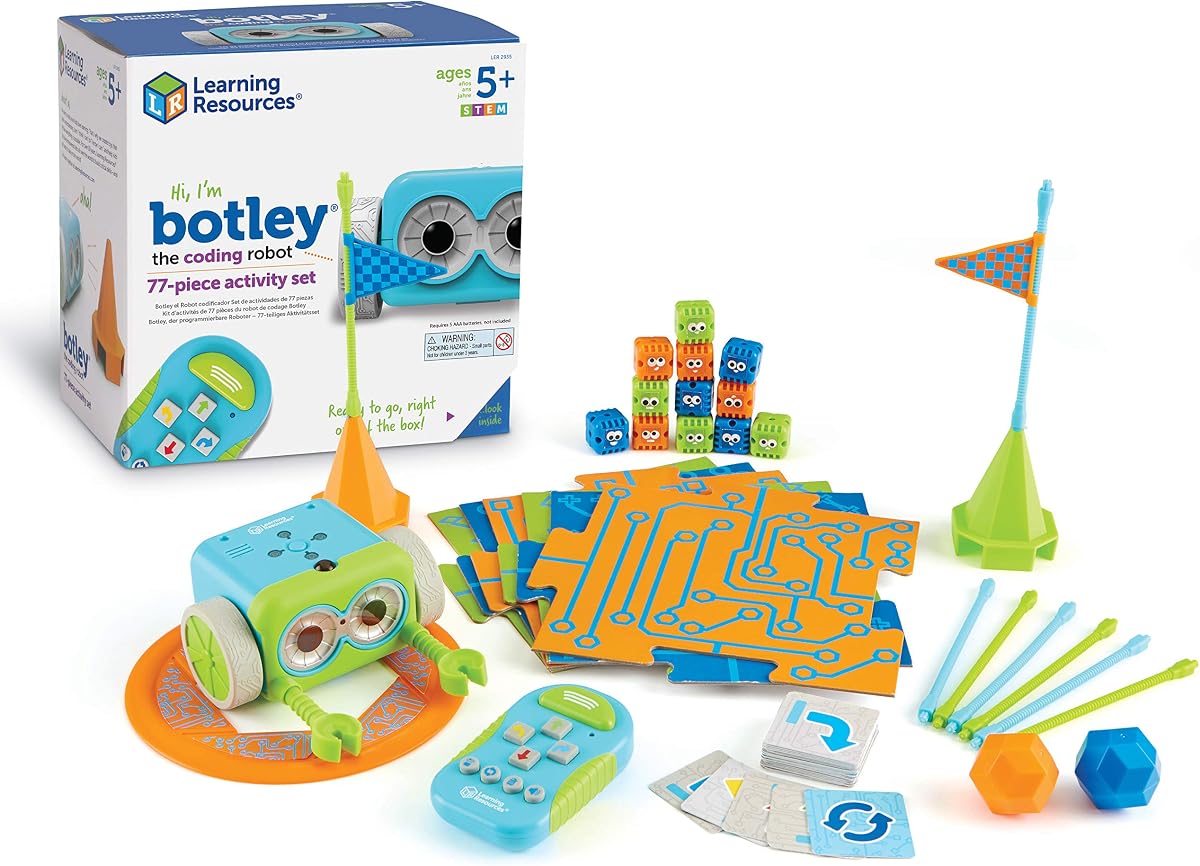
Botley offers advanced screen-free coding with object detection features. It holds a 4.6 rating because it can avoid obstacles and follow loops without requiring any phone or tablet connection during operation.
We may earn a commission when you buy through this link, at no additional cost to you.
The robot uses a dedicated remote programmer to send commands. It comes with detachable arms and 40 coding cards, allowing for complex sequences and creative building scenarios that other screen-free toys do not offer.
One unique feature is its ability to detect objects and react to them. This adds a layer of autonomy that helps children understand sensor logic. The main downside is the need for multiple batteries to keep the robot moving.
This set is perfect for kids aged 5 and up who want to create complex mazes and challenges. It stands out for its depth of features within a completely analog operating system.
Botley can sense what is in front of it and adjust its path to avoid obstacles automatically.
Children can program commands to repeat in loops, teaching them about iterative processes in coding.
We may earn a commission when you buy through this link, at no additional cost to you.
The Ozobot Evo Kit stands out for its comprehensive educational resources. It has a 4.6 rating from educators and parents who value the access to over 700 free lessons covering a wide range of STEM subjects.
We may earn a commission when you buy through this link, at no additional cost to you.
The robot works by following colored lines drawn by kids. It can detect these codes and change speed or direction accordingly. The kit includes dual-tip markers specifically designed to ensure the colors are readable by the sensors.
It supports five different skill levels allowing growth from beginner to master coding. This adaptability makes it a long-term investment that remains useful as the child develops more advanced logical abilities over time.
This kit is best for families or teachers wanting a structured curriculum. The durable zip case ensures everything stays organized, making it a premium choice for serious learning environments.
You can code using physical color markers on paper or use the Blockly app for more complex programming tasks.
Access to 700 free lessons means you never run out of structured activities to guide learning sessions.
We may earn a commission when you buy through this link, at no additional cost to you.
Botley 2.0 upgrades the original with more movement options like 45-degree turns. With a 4.5 rating, it is praised for its open-ended play features that encourage kids to invent their own mazes and storylines.
We may earn a commission when you buy through this link, at no additional cost to you.
The robot includes a remote programmer that lets you send commands without screens. It also offers light and sound feedback to signal actions, adding a sensory layer that helps children track what the robot is doing.
One new feature is the ability to react to objects in its path. This makes obstacle courses more dynamic and challenging. The main limitation is that it does not support color coding like the Evo, limiting some visual programming options.
This set is ideal for kids who love imaginative play alongside coding. The stackable obstacle pieces allow for custom creations that grow with the child skills and confidence.
45 degree turns allow for more precise movement and complex maze layouts than standard right-angle robots.
Lights and playful music provide immediate feedback that helps younger kids understand command execution.
We may earn a commission when you buy through this link, at no additional cost to you.
Dash is a robust robot ready to use immediately without assembly. It has a 4.6 rating for its engaging features like dancing and singing, which appeal to younger kids while teaching solid programming concepts.
We may earn a commission when you buy through this link, at no additional cost to you.
The robot connects to five different apps that allow coding via Blockly or custom code. This ecosystem supports a wide range of activities from simple path creation to advanced variable management and event handling.
Dash uses voice commands and can navigate around obstacles using sensors. The main trade-off is that it requires a tablet or phone to control, meaning it is not a screen-free option for parents seeking that feature.
This robot is best for kids aged 6 and up who enjoy interactive characters. Its widespread adoption in schools ensures that support materials and community resources are abundant.
Access to multiple apps allows for diverse learning experiences ranging from basic play to advanced coding challenges.
No assembly means the robot works as soon as you open the box, encouraging immediate engagement.
We may earn a commission when you buy through this link, at no additional cost to you.
TaleBot Pro is designed specifically for the youngest learners with an emphasis on storytelling. With a 4.7 rating, it is highly rated for combining coding basics with creative recording features that engage toddlers effectively.
We may earn a commission when you buy through this link, at no additional cost to you.
The robot responds to buttons that make it walk or sing. It includes an interactive map and recording function allowing kids to record their own voice commands to bring stories to life through physical play.
This toy is compatible with standard Lego blocks to expand creative building options. While the coding is simpler than other options, it introduces key concepts like loops and sequences in a very accessible way.
This pick is best for ages 3 to 5 who enjoy stories and simple interactions. It offers a gentle entry into STEM that aligns well with early childhood development goals.
Kids can record their voices and play them back to make the robot act out their stories directly.
Teaches simple sequences and loops that build a foundation for future technical learning.
We may earn a commission when you buy through this link, at no additional cost to you.
Selecting the right coding toy depends on age, learning style, and the level of involvement you want your child to have with technology.
Different coding toys target specific developmental stages. Younger children benefit from physical buttons and simple sequences, while older kids can handle complex software and assembly projects. Always check the recommended age range to ensure the content matches their attention span and logical skills.
Choose a toy that aligns with your child current abilities to prevent frustration and keep engagement high.
Some parents prefer robots that operate without screens to reduce digital exposure. Others find app-based systems more flexible and powerful. Consider whether you want your child to learn logic through physical cards or through digital interfaces.
Screen-free toys are great for foundational logic, while app-based ones offer more advanced coding progression.
Robot kits vary from plug-and-play models to complex building sets. Some require hours of assembly which can be educational but may take time away from coding. Decide if you want a quick start or a deeper build experience.
Build-focused kits are ideal for engineering interest, while pre-assembled ones allow immediate play.
Look at what programming concepts the toy teaches. Basic toys use arrows and sequences. Advanced ones introduce loops, variables, and even JavaScript. Ensure the progression matches the child educational goals.
Select toys that can grow with your child to avoid needing a new robot as skills improve.
Many coding robots require AAA or AA batteries that are not included. This is a hidden cost that you should factor in. Also check the battery life to ensure enough play time between charges or swaps.
Choose toys with long battery life or rechargeable options to maximize usage and reduce ongoing costs.
Since these toys are often handled roughly by children, durability is key. Metal components and solid plastic joints last longer than fragile parts. Check reviews for comments on how well the robot holds up over time.
Invest in sturdy designs to ensure the toy remains functional through repeated building and play sessions.
Some kits include lesson plans or online resources that provide structured activities. These guides can make it easier to teach the concepts effectively. Look for options that offer curriculum support if you are not a coding expert.
Robots with extensive lesson plans help parents and teachers deliver consistent and high-quality STEM education.
Check if the robot supports add-ons or compatible accessories. Robots that can connect to extra sensors or bricks allow for more creativity. This feature extends the life of the toy as the child seeks new challenges.
Expandable kits offer better long-term value and keep coding fun fresh for years.
To get started, ensure all batteries are inserted correctly and the robot is charged if rechargeable. Place the robot on a flat surface away from pets or obstacles. Follow the instruction manual to set up the first simple sequence like moving forward or turning.
Regularly check the sensors and moving parts to ensure they are clean and free of dirt. For robots that use color cards or markers, store them in the provided case to prevent damage. Avoid using the robot on rough or uneven surfaces that could wear down the wheels.
As your child grows more skilled, try combining the robot with other building blocks or challenges. Encourage them to create their own stories or mazes. This flexibility ensures the toy remains an engaging learning tool rather than a static plaything.
Yes, most coding toys are designed for beginners. They include step-by-step guides and beginner modes that require no prior knowledge. The visual and physical cues make it easy for any adult to learn alongside their child.
Screen-free coding toys reduce digital dependency while teaching logic. They help children understand cause and effect through physical interaction which can be less distracting and more focused for young minds.
While direct links vary, STEM tools support logical thinking and problem-solving skills. These skills often translate to better math and reading performance by improving focus and the ability to break down complex tasks.
It is best to balance coding play with other activities. Sessions of 20 to 40 minutes are usually sufficient to maintain interest without overwhelming the child. Regular short bursts are often more effective than long sessions.
Many of the kits reviewed are designed for school use with durable parts and group activities. Teachers often use them to support STEM curriculums because they offer structured lessons and measurable outcomes for students.
Yes, options exist for children as young as three. These toys use simple buttons and storytelling features to introduce basic sequencing and problem-solving concepts in a fun and age-appropriate way.
Choosing the right coding toy depends on the specific needs of your child and your family lifestyle. From screen-free options like Botley to app-driven robots like Dash, each pick offers a unique path to learning logic and engineering.
Focus on selecting toys that challenge your child without overwhelming them. Consider their attention span and whether they prefer building or immediate play. The best toy is one that keeps them engaged enough to practice consistently.
Remember that prices and availability can change quickly. We recommend verifying current details before buying to ensure you get the best value for these educational resources. Happy coding with your young future engineer.