
Universal Audio Apollo Twin X QUAD Gen 2
4.0Editor score
200 plus UAD DSP plug-ins
Unison preamps for analog tone
Thunderbolt 3 connectivity
This guide compares the top audio interfaces with built in DSP for low latency recording, live monitoring, and professional effects without taxing your
Audio interfaces with built in DSP allow musicians and creators to process sound in real time without relying on system resources. This technology ensures zero latency monitoring and consistent performance during critical recording sessions.
We evaluated ten top models based on DSP capability, sound quality, connectivity, and software bundles. Each entry offers unique features tailored to streaming, podcasting, or studio production workflows.
Every pick highlights key strengths and trade-offs to help you find the right tool for your setup. Prices and availability may change, so check current listings before purchasing your next interface.
4.0Editor score
4.7Editor score

4.8Editor score
Compare the top ten audio interfaces with built in DSP across key specs to find the best fit for your streaming, recording, or production workflow needs.




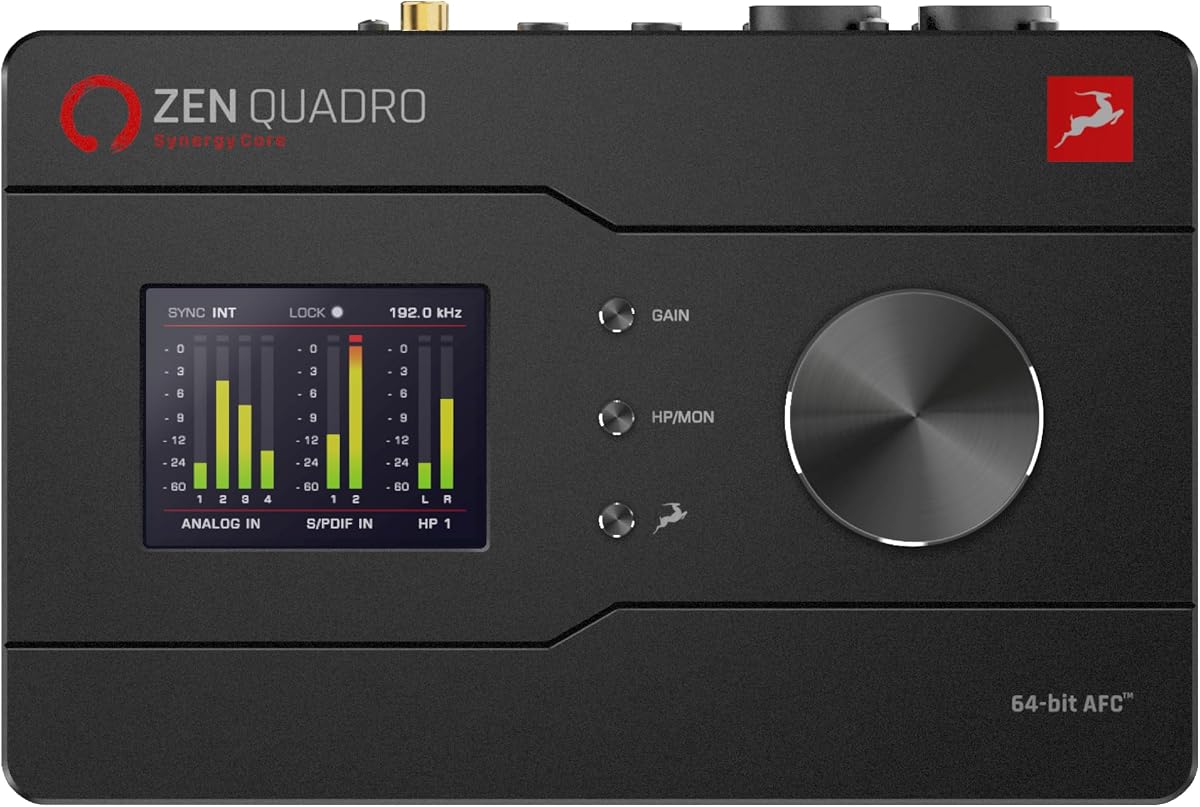
The Antelope Audio Zen Quadro stands out as a top choice for creators who need real time processing without CPU strain. It features dedicated DSP hardware that handles complex effects chains while you record.
We may earn a commission when you buy through this link, at no additional cost to you.
Its Synergy Core FX system offers over ninety effects including analog modeled compressors and EQs. This ensures professional sound quality that remains consistent regardless of your computer performance.
While the interface is compact it supports up to eight channels via ADAT. The dual USB-C ports allow flexible routing for phones or tablets alongside your main workstation.
This unit is ideal for mobile studios needing high fidelity and low latency. If you value precise control and expandability the Zen Quadro delivers exceptional results.
The dedicated FPGA and DSP chips ensure your system resources remain free for heavy DAW tasks during critical recording sessions.
With 64-bit AFC clocking this interface reduces jitter to deliver clean audio that resonates with professional engineers worldwide.
We may earn a commission when you buy through this link, at no additional cost to you.
The Universal Audio Apollo Twin X QUAD Gen 2 offers unmatched access to a massive library of DSP driven plugins. Its Unison preamps let you record through authentic emulations of classic hardware gear.
We may earn a commission when you buy through this link, at no additional cost to you.
You can track with studio quality effects like Capitol Chambers and EL8 Distressor in real time. This eliminates the need for post production processing on many tracks.
The cost is significant and requires a Thunderbolt connection which may not suit all machines. However the sound quality and ecosystem justify the investment for serious producers.
If you demand the highest fidelity and classic analog tones this interface is a top investment. It remains a standard choice for professional home studios.
Unison preamps change impedance during tracking to mirror the feel and tone of legendary hardware units.
Access over two hundred UAD and native plug-ins that cover every effect and instrument you might need.
We may earn a commission when you buy through this link, at no additional cost to you.
The Antelope Audio Zenith 2 brings high-end DSP to a budget-friendly package. It allows you to record and monitor through effects with zero latency using onboard processing.
We may earn a commission when you buy through this link, at no additional cost to you.
Two independent headphone mixes are a unique feature for collaboration. This means you and a guest can hear different levels without needing extra hardware.
It lacks expansion inputs and has fewer physical knobs than higher-end models. Still the color display and Smart Vocal Chain make it perfect for podcasting.
For streamers and content creators needing polished sound without complexity this interface delivers. It is a complete solution out of the box.
Unique in its class this interface offers two outputs with separate mixes ideal for collaboration or guest interviews.
Dedicated effects shape your voice into a polished sound instantly for podcasts and live streams.
We may earn a commission when you buy through this link, at no additional cost to you.
The Focusrite Scarlett Solo 4th Gen is a trusted entry level option for solo artists. It delivers studio sound quality with 120 dB dynamic range converters found in flagship interfaces.
We may earn a commission when you buy through this link, at no additional cost to you.
Its Air mode adds richness to vocals and guitars giving a polished sound instantly. The bundle includes essential software like Ableton Live Lite and Hitmaker Expansion.
This unit has minimal onboard DSP and only one mic input. If you need complex real-time effects or multiple channels you may outgrow it quickly.
Beginners will find it easy to use and powerful enough for high quality demos. It is a reliable first step into professional recording.
Improved Air mode lifts vocals to the front of the mix with musical presence and rich harmonic drive.
Includes a suite of essential effects instruments and mastering tools to start creating music right away.
We may earn a commission when you buy through this link, at no additional cost to you.
The Elgato Wave XLR MK.2 is a powerful DSP mixer designed for podcasting and streaming. Its Wave FX Processor unifies DSP effects and VST plugins in one signal chain.
We may earn a commission when you buy through this link, at no additional cost to you.
You gain loud clear amplification with 80 dB gain for any XLR microphone. Touch controls allow you to mute or adjust levels instantly with visual feedback.
It relies heavily on the Wave Link app for routing which may limit flexibility. The single input is not suitable for multi-person podcasts without splitters.
For solo content creators this unit provides professional voice processing with minimal setup. The intuitive controls make it great for live performance.
A unified signal chain that merges onboard DSP with external plugins for seamless voice enhancement.
Adjust levels and mute instantly with a touch and see status with customizable LED lighting.
We may earn a commission when you buy through this link, at no additional cost to you.
The Universal Audio Apollo Twin X DUO Gen 2 brings studio grade processing to a compact design. You can track through real time emulations of Neve and API gear.
We may earn a commission when you buy through this link, at no additional cost to you.
Access to the full library of UAD DSP plug-ins ensures you have all tools ready. Bass management allows a subwoofer to extend monitor capabilities.
The cost is high and requires a Thunderbolt port which not all machines have. However for producers needing classic tones this remains a top choice.
If you value authentic analog sound and professional processing this interface is worth the investment. It simplifies complex workflows with Auto-Gain.
Add a subwoofer to your monitor setup to hear low-end detail with precision in your mixes.
Set levels across inputs in seconds to ensure you never miss a take during recording.
We may earn a commission when you buy through this link, at no additional cost to you.
The Solid State Logic 2 MKII Plus delivers legendary analog tone in a compact package. Its 4K Analog Enhancement adds presence and clarity to recordings instantly.
We may earn a commission when you buy through this link, at no additional cost to you.
Zero latency monitoring ensures you hear your signal in real time without delay. The SSL production pack includes software that fits any workflow.
It lacks DSP and effects and is limited to two inputs. If you need complex processing you may need external plugins instead.
For producers focused on analog warmth and quality this unit is a top pick. It is ideal for simple setups that need big sound.
Add harmonic richness and presence to your sound with a legendary enhancement from SSL.
Hear your sound in real time without delay for natural and responsive recording.
We may earn a commission when you buy through this link, at no additional cost to you.
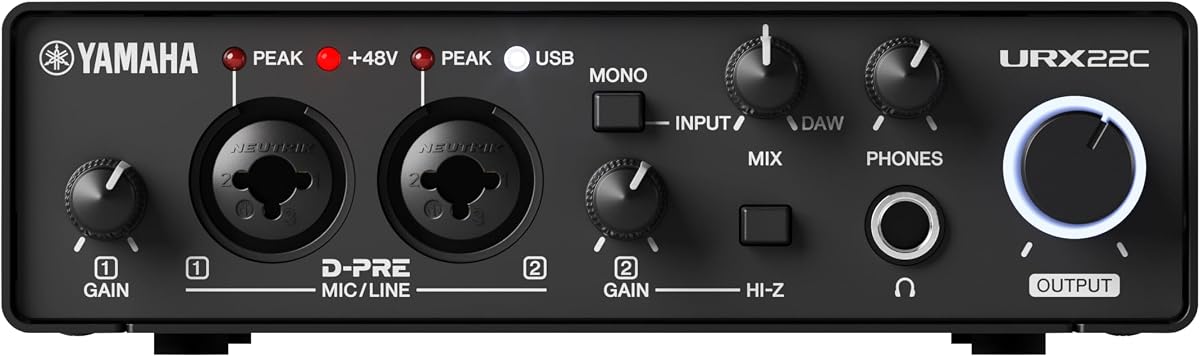
The Yamaha URX22C provides professional DSP-powered monitoring to reduce latency. It includes REV-X reverb and Guitar Amp Classics for live tone shaping.
We may earn a commission when you buy through this link, at no additional cost to you.
Its Class-A D-PRE mic preamps capture vocals with precision. The rugged full-metal housing ensures durability for daily studio use.
The price is high for a 2-in-2-out unit and relies on Steinberg software. However the DSP effects make it great for live performance.
For guitarists and producers who need quality preamps and reverb this is a top pick. It offers reliable performance and great build.
Enhance your voice with a professional reverb algorithm that delivers a natural and spacious sound.
Built with a full-metal housing this interface stands up to the demands of daily use.
We may earn a commission when you buy through this link, at no additional cost to you.
The MOTU UltraLite-mk5 is a massive interface with 18 inputs and 22 outputs. Its CueMix 5 app allows separate mixes for each output pair.
We may earn a commission when you buy through this link, at no additional cost to you.
On-board effects include reverb and EQ to reduce DAW load. The OLED display offers detailed metering for all analog inputs.
Its large size and complexity may not suit small studios. However the expandability is unmatched for multi-mic sessions.
For live sessions or complex setups this unit delivers unmatched flexibility. It is a top choice for professionals who need scale.
Control mixing and settings from your Mac PC or iOS device for flexible routing.
The high-resolution OLED display lets you view all signal activity at a glance.
We may earn a commission when you buy through this link, at no additional cost to you.
The Yamaha URX22 features a large touchscreen that simplifies audio control. Its built-in DSP processor ensures latency-free monitoring during recording sessions.
We may earn a commission when you buy through this link, at no additional cost to you.
Premium mic preamps provide high gain range for demanding microphones. Dual USB ports allow you to connect to two computers at once.
It is expensive and lacks detailed DSP control. However the touchscreen makes adjustments intuitive for creators.
For those who value ease of use this unit is a strong option. It offers a unique blend of interface and convenience.
Adjust levels with smooth precise sliders and monitor with responsive peak meters.
Connect to two computers at once to route audio and stream without delay.
We may earn a commission when you buy through this link, at no additional cost to you.
Selecting the right interface depends on your workflow and the types of effects you need during tracking.
Look for dedicated DSP or FPGA chips that handle effects without CPU strain. This ensures you can record through complex chains in real time.
Zero or ultra-low latency is essential for natural monitoring. Choose interfaces that handle monitoring locally so you never hear delay.
Check if the bundled effects meet your needs. Some offer reverb and EQ while others provide full analog modeled chains.
Ensure the unit supports the number of inputs you need. Consider expandability via ADAT if you plan to add more microphones.
Verify the connection type matches your system. USB-C is common and but Thunderbolt offers faster speeds for large data.
Check that the control software is stable on your OS. Good software simplifies routing and effect control.
Metal housings protect against wear. A well-built unit stands up to daily studio use.
Weigh the cost against included effects and support. A higher price often means better fidelity and stability.
Always install the latest drivers and software updates to ensure stability. This keeps DSP features running smoothly and prevents glitches.
DSP stands for Digital Signal Processing. It allows the hardware to process effects like reverb and compression without using your computer CPU.
Built-in DSP reduces latency during recording and offloads your computer. This lets you track with effects in real time without performance drops.
No each brand uses its own ecosystem. Universal Audio uses UAD plugins while Antelope uses Synergy Core. You cannot mix these.
Yes DSP effects are perfect for streaming. They process your voice in real time so your audience hears the final result instantly.
Most manufacturers provide a control panel that checks for firmware updates. Follow the on-screen instructions to install the latest version safely.
It is worth it if you need real-time monitoring and complex effects. For casual use a regular interface may suffice.
The Antelope Audio Zen Quadro and Universal Audio Apollo Twin X QUAD offer top-tier processing for pros. The Antelope Audio Zenith 2 brings similar power to a budget range.