
PROZOR 192KHz Digital to Analog Audio Converter
4.4Editor score
Supports up to 192kHz sampling
Optical and coaxial inputs
Aluminum alloy housing design
This guide compares the top audio converters for Mac users seeking high fidelity digital to analog conversion, USB audio interfaces, and optical to analog
Finding the right audio converter for your Mac can transform your listening experience. Whether you need to digitize old tapes or connect high-end headphones, the right hardware ensures pristine sound quality without sacrificing compatibility with macOS systems.
We evaluated ten top-rated devices based on audio fidelity, connectivity options, and driver support for Apple computers. Our analysis covers digital to analog converters, USB audio interfaces, and portable dongles suitable for various audio workflows and budgets.
Each pick highlights specific strengths like high resolution support, low latency, or versatile input options. While prices and availability may change, these models represent the current best choices for Mac users seeking reliable audio conversion solutions today.
4.4Editor score

4.6Editor score

4.5Editor score
This side by side comparison highlights the key specifications and strengths of each selected audio converter. We focus on compatibility with Mac systems, input output options, and audio resolution capabilities to help you find the perfect match for your setup.


The Fosi Audio K5 Pro stands out as a top choice for Mac users needing a reliable digital to analog converter. With its strong rating and versatile connectivity, it bridges the gap between modern digital sources and high fidelity analog audio systems effectively.
We may earn a commission when you buy through this link, at no additional cost to you.
Its ability to handle USB Type C Optical and Coaxial inputs ensures compatibility with various Mac setups. The NE5532 op amp chip delivers clean sound with low noise, making it ideal for critical listening or immersive gaming sessions on your desktop.
While it performs exceptionally well, users should note that volume control is integrated into the power button which takes some getting used to. Additionally, while it supports Mac, specific app configurations might be needed for optimal performance in some software.
If you need a device that balances performance and versatility for your Mac audio rig, this K5 Pro is a compelling option. It delivers rich audio details and solid build quality that justify its place among the top converters available today.
The device works with Mac systems allowing you to connect external speakers or headphones directly to your computer for enhanced sound quality.
Supporting up to 24 bit and192kHz via optical coaxial inputs ensures you can enjoy high fidelity audio from streaming services or local files.
We may earn a commission when you buy through this link, at no additional cost to you.
The Fosi Audio Q6 Mini Desktop DAC offers incredible performance for Mac users seeking high resolution audio. Its AKM DAC chip and XMOS processor ensure crystal clear signal conversion that enhances any home stereo or amplifier setup connected to your Mac.
We may earn a commission when you buy through this link, at no additional cost to you.
With support for 32 bit 768kHz PCM and DSD512, this device handles demanding audio formats with ease. It is designed to connect to powered speakers or amplifiers, providing a robust upgrade over built in Mac audio outputs for critical listening.
One limitation is that it does not drive headphones directly so you will need a separate headphone amp if you plan to listen privately. However, for desktop setups where speakers are used, its sound quality and versatility make it a standout choice.
If you want to unlock the full potential of your music library on Mac, the Q6 delivers outstanding fidelity. It blends seamlessly into any desk environment while providing the clean accurate signal conversion audiophiles crave.
Supports PCM 32bit 768kHz and DSD512 allowing you to play lossless files directly from your Mac without losing quality.
Optical Coaxial and USB C inputs make it easy to connect multiple sources like Mac TVs or streamers to your audio system.
We may earn a commission when you buy through this link, at no additional cost to you.
The Shure MVX2U Gen 2 is a premium solution for Mac users focused on recording and streaming. This interface allows you to connect XLR microphones to your Mac with onboard processing ensuring clean consistent audio for podcasts or livestreams.
We may earn a commission when you buy through this link, at no additional cost to you.
Features like Auto Level Mode and Real-Time Denoiser automate audio tuning making it easier to achieve professional results. It provides up to 60dB clean gain and 48V phantom power, handling both dynamic and condenser mics with ease.
While it excels at input conversion for recording, it is less focused on output conversion for listening. If your goal is capturing audio rather than converting it for playback, this device is unmatched in quality and ease of use.
For Mac creators who need reliable high quality input capabilities, this interface is a top investment. Its plug and play convenience and robust processing features make it a standard for modern audio production setups.
Convert any XLR mic to USB C for professional results directly on your Mac or tablet without needing extra processing hardware.
Digital audio processing features like Auto Level Mode and Denoiser ensure consistent output without manual tweaking during recording.
We may earn a commission when you buy through this link, at no additional cost to you.
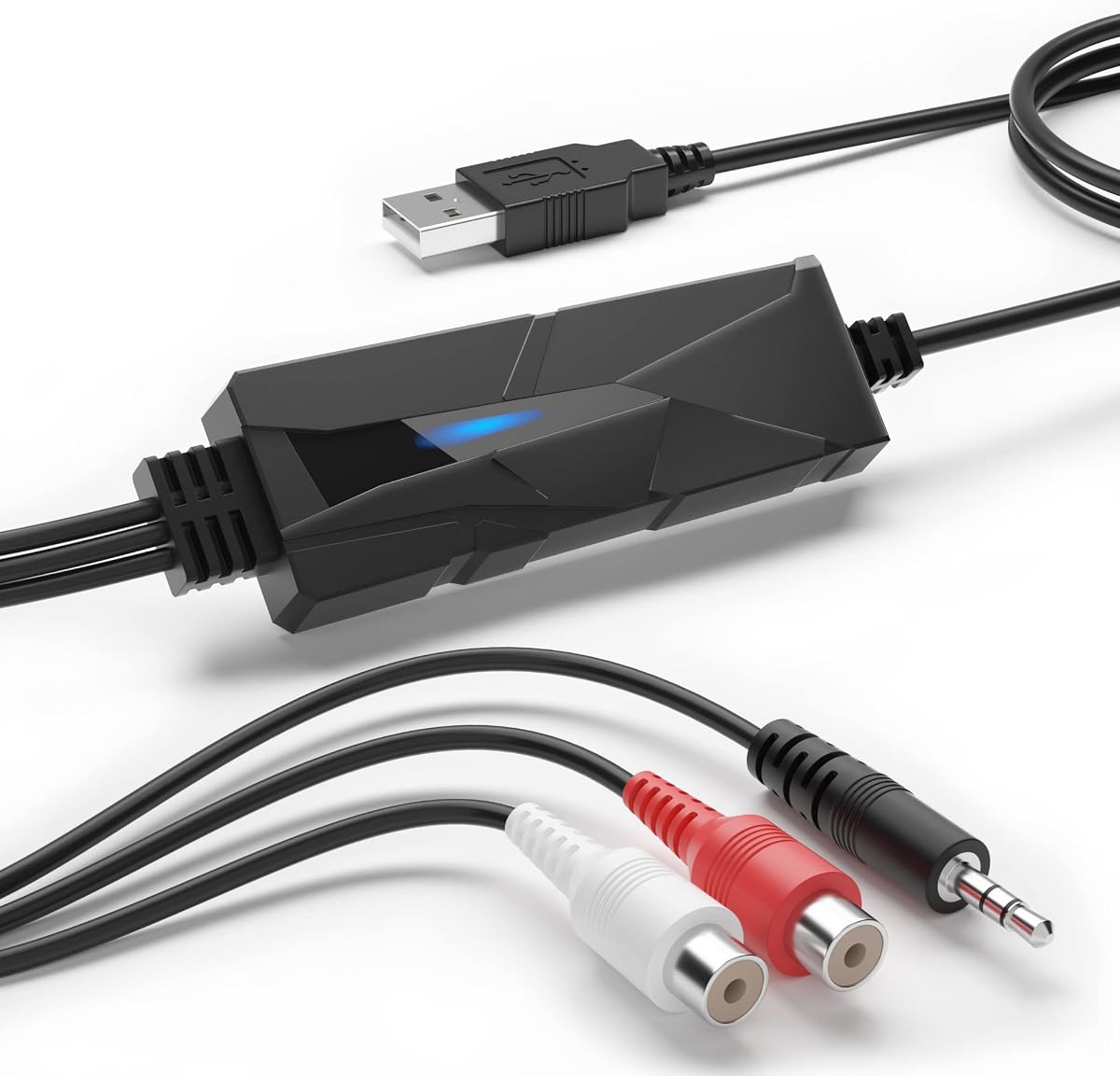
The PROZOR 192KHz DAC offers excellent value for Mac users needing a simple digital to analog conversion solution. It converts optical or coaxial signals to analog RCA and 3.5mm outputs with high resolution support for clear audio playback.
We may earn a commission when you buy through this link, at no additional cost to you.
Its aluminum alloy housing ensures durability and better heat dissipation compared to plastic models. While it is primarily designed for home cinema systems it works well with Mac setups that use optical digital outputs for external speakers or headphones.
One note is that you must ensure your Mac or source device outputs PCM audio and you may need to adjust volume via settings. Also power requires a separate USB cable but the setup remains straightforward and driver-free for most uses.
If you need a reliable and affordable converter to get audio out of your Mac into analog speakers, this model fits the bill. It delivers clean output without requiring complex software or additional drivers for Mac compatibility.
Supports up to 192kHz and 24bit PCM allowing high quality audio output at a very competitive price point.
Aluminum alloy housing provides better shielding and heat dissipation ensuring reliable performance over time in busy setups.
We may earn a commission when you buy through this link, at no additional cost to you.
The Douk Audio USB to Optical Adapter is ideal for Mac users wanting to send high resolution digital audio to external DACs. It uses the XMOS XU316 chip to ensure clean low jitter transmission to optical coaxial or I2S outputs.
We may earn a commission when you buy through this link, at no additional cost to you.
It supports PCM up to 32bit 768kHz and DSD512 making it capable of handling demanding audio files from your Mac. The compact size makes it portable, and the plug and play mode works well with various setups without requiring complex drivers.
While it is a powerful tool for digital signal routing, it does not include volume control or amplification. You will need an external DAC or amplifier to convert the signal to sound. but it serves as a high quality bridge for audio signals.
If you are building a high fidelity audio chain starting from your Mac, this adapter ensures signal purity. It is a smart choice for audiophiles who want to use their existing DACs with modern computer sources.
Handles up to 32bit 768kHz PCM and DSD512 ensuring your digital audio remains intact before conversion by a DAC.
The XMOS chip and reclocking design reduce jitter for stable signal transmission to your external audio equipment.
We may earn a commission when you buy through this link, at no additional cost to you.
The SMSL SU-1 is designed for Mac users who listen to MQA encoded music. It includes an AKM DAC chip and supports MQA CD playback, restoring high resolution signals from your library or physical discs when connected to your computer.
We may earn a commission when you buy through this link, at no additional cost to you.
With distortion lower than 0.00013% it delivers very clean sound. The USB input works with Mac OS, allowing you to use it as a primary DAC for your audio system. However, it is relatively basic in terms of connectivity options.
Some users may need to install drivers for full functionality on Mac, so check compatibility before purchase. Despite this, its ability to handle MQA formats makes it unique compared to other standard DACs in its price range.
If you have a large library of MQA files or use an MQA enabled CD player this device ensures you hear the full quality. It is a specialized but effective choice for audiophiles focused on streaming or digital playback.
Restores original high resolution signals from MQA sources ensuring you hear what the studio intended.
Utilizes the AK4493S chip to achieve extremely low distortion for accurate audio reproduction.
We may earn a commission when you buy through this link, at no additional cost to you.
The SMSL PO100 PRO is a compact USB interface perfect for Mac users needing to send digital audio to external gear. It supports MQA decoding natively and outputs via optical coaxial or I2S, making it versatile for portable or desktop setups.
We may earn a commission when you buy through this link, at no additional cost to you.
Using the XMOS XU316 chip it handles PCM up to 32bit 768kHz ensuring high fidelity signal transmission. The mini design fits easily in a bag, allowing you to connect it to laptops or phones for high quality audio on the go.
Keep in mind it does not include a DAC so you need another device to convert the signal to sound. However for routing digital audio with MQA support it is an efficient and portable tool for Mac users on travel.
If you need a small digital bridge that supports high res formats and MQA this device is excellent. It combines high performance with a footprint that won't clutter your desk or travel kit.
Compact size makes it easy to stow in bags for travel without sacrificing audio quality or features.
Built in MQA decoding allows direct playback without extra software ensuring true hi-res audio streaming.
We may earn a commission when you buy through this link, at no additional cost to you.
The DriverGenius AudioXfer is designed for Mac users looking to convert analog tapes or vinyl into digital files. It captures audio via 3.5mm or RCA inputs and allows you to save recordings as MP3 or WAV using included software.
We may earn a commission when you buy through this link, at no additional cost to you.
With 44.1 and 48kHz sampling rates it ensures good quality for web sharing or local storage. The LED light indicates recording status, making it easy to track progress while transferring music from cassettes or old devices.
Note that you may need to update Audacity to a compatible version for full Mac support. While it is not a DAC for playing back music it excels at digitizing old analog sources to preserve them permanently.
If you want to turn old cassette tapes into MP3 files for your Mac this device is a practical tool. It simplifies the process of archiving your physical music collection without needing professional recording gear.
Converts tape or vinyl signals to digital files so you can listen on modern devices.
Includes Audacity for editing your recordings saving you time and money on software.
We may earn a commission when you buy through this link, at no additional cost to you.
The Sound Blaster Play! 3 offers a simple solution for Mac users needing extra headphone output. It is a small USB adapter that allows you to connect headsets without a splitter, delivering decent quality at a low cost.
We may earn a commission when you buy through this link, at no additional cost to you.
It works straight out of the box with Mac, providing 24 bit 96kHz playback for clear sound. Downloadable software adds audio enhancements, giving you some control over sound profiles for different earphone brands or genres.
While it is not for high-end audio, it solves connectivity issues for users with older Mac models that have limited ports. It is a practical tool for everyday listening, video calls, or light gaming without breaking the bank.
If you just need to connect headphones to your Mac without fuss this adapter does the job. It is reliable and compact making it a convenient addition to your travel or desk setup.
No drivers required so it works immediately with Mac systems for immediate connectivity.
Works with various analog headsets including those with split mic connectors so you do not need adapters.
We may earn a commission when you buy through this link, at no additional cost to you.
The iFi Audio Go Link Max is a premium portable DAC amp for Mac users on the move. Its dual ESS Sabre DAC chips provide balanced audio output and support high resolution formats like 384kHz PCM and DSD256.
We may earn a commission when you buy through this link, at no additional cost to you.
The 4.4mm balanced output offers up to 241mW of power, driving demanding headphones with clarity. Dynamic Range Enhancement and THD compensation ensure clean sound even at high volumes making it great for critical listening.
It uses a USB-C connector that works with modern Macs without needing extra power. The build quality and flexible cable design make it durable for travel while maintaining high fidelity performance wherever you go.
If you need a portable upgrade for your Mac audio that delivers studio quality sound this device is ideal. It combines power and quality in a small package suitable for both daily commutes and serious listening sessions.
Features a 4.4mm balanced output for higher power and better signal separation with compatible headphones.
Uses Dynamic Range Enhancement to improve sound quality and reduce distortion during playback.
We may earn a commission when you buy through this link, at no additional cost to you.
Choosing the right audio converter for your Mac requires understanding your specific needs and budget. This guide breaks down the key factors to consider when selecting a device.
Check what ports your Mac has and what ports the converter offers. Some devices use USB-C while others use Optical or 3.5mm inputs. Ensure the cables match your source devices like speakers or headphones.
Choose a device with the right ports for your setup to avoid needing extra adapters that complicate your desk.
High resolution support like 24-bit or 384kHz ensures better sound quality for lossless files. If you stream music locally, this matters for clarity. However standard 16-bit may suffice for casual listening.
Prioritize higher resolution support if you value sound detail and plan to use high-quality files or speakers.
Many modern converters are plug and play with Mac but some may require drivers for full functionality. Check if the device supports macOS versions you use to avoid setup headaches later on.
Look for driver-free options to ensure seamless installation and immediate use with your Mac system.
Aluminum housing provides better heat dissipation and durability compared to plastic. This matters if the device will sit on your desk for long hours. A sturdy build ensures reliability over time.
Select a converter with metal housing for better protection and stability in your workspace environment.
Some devices require external power adapters while others draw power from USB. If you plan to travel, bus-powered options are more convenient. Check if a cable is included or sold separately.
Choose a power setup that fits your usage scenario to avoid needing extra cables at your desk.
Features like MQA decoding or onboard DSP add value for specific use cases. However ensure these features align with your needs rather than paying for extras you won't use regularly.
Assess what extra features truly benefit your workflow to keep the cost reasonable for your needs.
Budget options work well for basic needs while premium models offer superior sound quality. Decide what your priority is and find a model that offers good features at that price point.
Balance your budget with the performance you need to get the best value for your investment.
Consider whether you need to record audio or just convert it for playback. Some devices are designed for input like XLR interfaces while others are for output to speakers. Matching this helps avoid the wrong purchase.
Clearly define if you need input or output conversion to narrow your choices effectively.
Connect the device to your Mac using the provided USB cable and plug it into a port. Wait for macOS to recognize the audio device automatically if it is plug and play. Ensure the volume on your Mac is set to a reasonable level.
Connect your headphones or speakers to the analog outputs like 3.5mm or RCA. If your device has optical output, use an optical cable to connect to an external DAC or amplifier. Adjust settings in Sound preferences if needed.
Keep the device dry and free from dust to maintain performance. Avoid pulling cables tightly when unplugging. Clean the surface occasionally with a dry cloth to prevent debris from entering the ports and affecting contact.
Many modern converters are plug and play and do not require drivers for basic functionality. However some high-end models might ask for specific drivers to unlock full features. Always check the product description for OS compatibility before buying.
Some devices like the Shure MVX2U are designed for recording inputs such as microphones. Most DACs listed here focus on output for playback. If you need to record, ensure the device has input capabilities like XLR or 3.5mm mic jacks.
For audiophile listening, consider the Fosi Audio Q6 or the iFi Audio Go Link Max. These models support high resolution formats and offer clean signal conversion. Their build quality and DAC chips are designed for critical listening environments.
Use an audio converter that has RCA or 3.5mm outputs. Connect the converter to your Mac via USB and then connect your speakers to the analog outputs. Adjust the sound output settings in System Preferences to select the converter.
Yes portable dongles like the iFi Audio Go Link Max are great for users needing high quality sound on the go. They are small and work directly with USB-C ports. This makes them ideal for laptops and travel setups.
Yes many optical DACs work with Apple TV via the optical port. You will need to connect the TV to the DAC using an optical cable. Then connect your speakers to the DAC output. Ensure TV settings are set to PCM for best results.
We covered ten reliable audio converters that cater to different needs from simple adapters to high-end DACs. Whether you want to upgrade your listening or record content there is a device in this list for you.
Prioritize features like audio resolution and connectivity options based on your daily usage. Investing in the right hardware ensures you get the most out of your Mac and your audio library for years to come.
Prices and stock can change quickly so check current details before making a purchase. Selecting the model that fits your needs will transform how you experience audio on your computer daily.