
Creality Falcon2 Pro 60W Laser Engraver
3.5Editor score
Integrated Safety Enclosure
Fast Batch Processing
Quick 10 Min Install
Finding the right 60W laser engraver means balancing power safety and safety. Professional models offer precise cuts and engraving while maintaining strict safety standards for home workshops.
We evaluated ten top models based on power output, safety certifications, and software compatibility. Each option supports different materials like wood metal acrylic and coated metals for varied projects.
Each pick highlights key features like camera alignment, enclosure safety, and speed. Prices change often so check current listings for the best deals on these professional grade machines.
3.5Editor score

4.5Editor score

4.2Editor score
As an Amazon Associate we earn from qualifying purchases.
This table offers a side by side look at the top 60W laser engravers. Compare key specs like laser type, safety class, and work area to find your ideal match.




The Creality Falcon2 Pro 60W stands out as a top choice for serious makers needing commercial grade power. Its fully enclosed Class 1 design ensures safety while the dual laser system offers unmatched flexibility for varied projects.
We may earn a commission when you buy through this link, at no additional cost to you.
This machine combines a powerful 60W laser with a 1.6W laser for precise positioning. The HD camera workflow allows accurate material placement and batch engraving, reducing setup time significantly. Its adjustable power levels let you match output to material needs.
The enclosed structure minimizes smoke exposure and supports efficient exhaust management. While it commands a premium price, the safety and speed features justify the cost for businesses or advanced hobbyists needing reliable daily use.
Choose this model if safety and production speed are your top priorities. It is perfect for those scaling up from hobbyist to commercial work where precision and compliance matter most.
The fully enclosed Class 1 design minimizes laser exposure and improves smoke containment with intelligent safety monitoring.
The dual laser system pairs a 60W cutter with a 1.6W module for fine engraving and better accuracy.
We may earn a commission when you buy through this link, at no additional cost to you.
The Creality Falcon2 Pro Desktop offers an affordable path into 60W engraving with essential safety features. Its integrated enclosure and camera make it ideal for beginners who want batch processing without the high cost.
We may earn a commission when you buy through this link, at no additional cost to you.
This unit delivers native 60W output and speeds over 500mm per second for efficient production. The built in camera with intelligent focus simplifies positioning so you spend less time measuring and more time creating.
Safety is prioritized with a Class 1 certification and multiple protections like a flame detector. However the lower rating suggests potential reliability quirks so review support terms carefully before buying.
Select this model if you need a cost effective machine for small studio work. It balances speed and safety well for those on a budget who still require professional results.
With engraving speeds exceeding 500mm per second it reduces processing time for high efficiency batch production.
Shipped mostly assembled it needs just 10 minutes to install and test for quick use out of the box.
We may earn a commission when you buy through this link, at no additional cost to you.
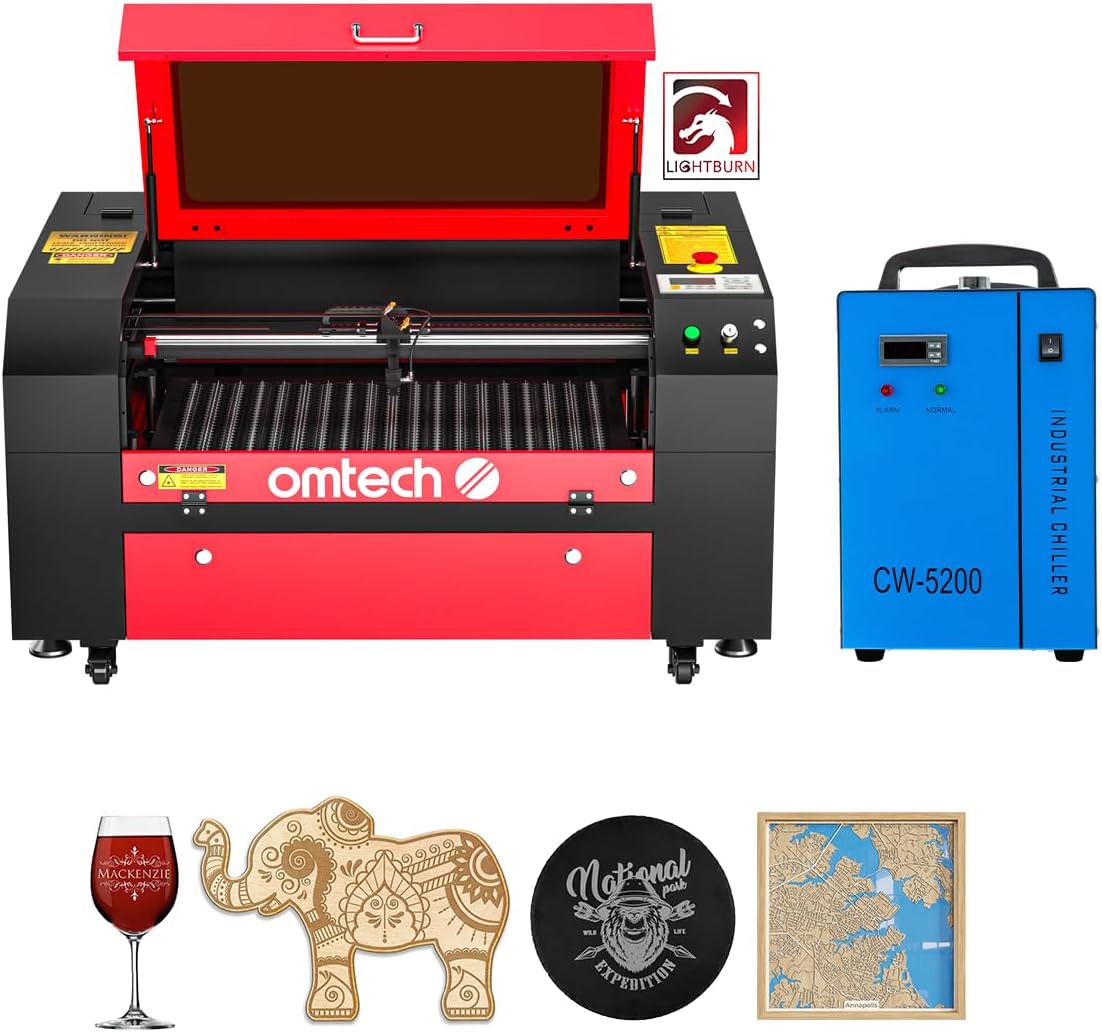
The OMTech Maker 60W CO2 Laser Engraver brings professional tube power to non metal materials with ease. Its large work area and autofocus system make it a favorite for wood and acrylic projects in home shops.
We may earn a commission when you buy through this link, at no additional cost to you.
This bundle includes a water chiller and LightBurn software for consistent laser performance. The 20 by 28 inch work area accommodates large items while four way pass through doors handle longer pieces without hassle.
Safety and cleanup are well handled with a widened viewing window and efficient air assist. The high rating reflects reliable performance though the CO2 nature limits it to non metal engraving tasks.
Opt for this machine if you focus on wood acrylic or leather. It offers exceptional value for those wanting a large area CO2 system with proven software support.
The workbeds adjust with a touch of a button and autofocus automatically finds the right focal distance.
The generous 20 by 28 inch bed fits most projects while pass through doors allow larger items.
We may earn a commission when you buy through this link, at no additional cost to you.
The Creality Falcon2 Pro Desktop Diode model delivers strong cutting power with a focus on safety and ease. It uses a dual laser system to speed up tasks and offers a built in camera for visual workflow improvements.
We may earn a commission when you buy through this link, at no additional cost to you.
This machine can cut 20mm wood in a single pass and offers ultra fine engraving with an extra light module. The enclosure includes fire resistant features and an auto stop function that halts work when opened.
Support is comprehensive with lifetime technical help and a 12 month warranty. The camera needs LightBurn connection for full batch features so consider software costs when planning your workflow setup.
Choose this if you need a safe desktop solution for small business use. It balances performance and safety well for those prioritizing reliability and support.
It cuts 20mm wood and 30mm acrylic in one pass saving up to 50 percent of time.
The enclosure includes auto stop and fire resistant materials to ensure safe operation for all users.
We may earn a commission when you buy through this link, at no additional cost to you.
The xTool F2 Ultra combines a 60W MOPA fiber laser with a 40W diode to master all materials. It stands out for color metal engraving and speed making it a top choice for advanced users.
We may earn a commission when you buy through this link, at no additional cost to you.
Dual 48MP AI cameras boost precision and enable auto detection for one click focus. Operating at up to 15000mm per second it cuts production time significantly while delivering vibrant consistent colors on metal.
Its industrial grade features like deep engraving and welding support make it a true powerhouse. The price is high but the capability to handle metals and non metals justifies the investment.
Pick this if you need a single machine for every material type. It is ideal for professionals wanting the fastest speeds and advanced color capabilities.
The MOPA laser handles metal tasks like color engraving and black marking on aluminum with ease.
AI cameras increase accuracy to 0.2mm and enable one click focus for flawless results every time.
We may earn a commission when you buy through this link, at no additional cost to you.
The Monport 60W Fiber Laser Engraver focuses on precision metal marking with a long lifespan. Its compact design makes it easy to fit in small spaces while maintaining high performance for detailed tasks.
We may earn a commission when you buy through this link, at no additional cost to you.
With speeds up to 10000mm per second and 0.01mm accuracy it excels at deep engraving. The fiber laser handles all metals and offers a 100000 hour lifespan for reliable long term use.
It includes BSLcad software and works with LightBurn for flexibility. The small 150 by 150mm area is optimal for avoiding distortion so consider your typical item size before buying.
Choose this for dedicated metal marking work in limited space. It offers professional quality in a compact format for jewelry or small part marking.
It achieves 10000mm per second with 0.01mm accuracy for precise metal engraving results.
The integrated mini design keeps weight low while maintaining high performance for marking tasks.
We may earn a commission when you buy through this link, at no additional cost to you.
The VEVOR 60W CO2 Laser Engraver offers a spacious work area with a perfect rating from users. Its design supports larger items well and includes essential features for clean reliable operation.
We may earn a commission when you buy through this link, at no additional cost to you.
It features a 24 by 16 inch area with honeycomb and aluminum blade beds. The four way pass through design accommodates longer materials easily while air assist keeps cuts clean and free of burns.
Software compatibility with LightBurn and others ensures smooth workflow integration. While manual focusing is required the guided scales make it simple to get accurate results quickly.
Select this if you need a reliable machine for larger projects on a budget. Its high rating suggests consistent performance for wood and acrylic work.
The 24 by 16 inch area fits leather goods and wooden decor while pass through allows long materials.
A built in air assist clears dust while pull out trays simplify cleanup after use.
We may earn a commission when you buy through this link, at no additional cost to you.
The OMTech 60W CO2 Laser Engraver brings commercial power with a motorized workbed for easy adjustments. It supports large items well and comes bundled with essential cooling software tools.
We may earn a commission when you buy through this link, at no additional cost to you.
Its 20 by 28 inch work area fits most projects while autolift lets you adjust the bed at the touch of a button. This removes manual struggle and helps maintain consistent focus depth.
Safety and cleanup are supported with air assist and a robust tube design for long life. The bundle includes LightBurn so you can start engraving immediately after setup.
Choose this for heavy duty commercial work on large materials. The motorized lift adds convenience that manual machines lack for frequent users.
Motorized workbeds adjust up and down easily at the touch of a button saving manual effort.
Includes LightBurn and water chiller for consistent performance and intuitive navigation from start.
We may earn a commission when you buy through this link, at no additional cost to you.
The Aliencell X1 Lite 60W focuses on photo quality engraving with precise simulation tools. It offers a massive bed size for large projects while maintaining strict safety standards for home use.
We may earn a commission when you buy through this link, at no additional cost to you.
Its preview technology simulates engraving on textures with under 5 percent deviation so you waste less material. The auto focus and one touch features simplify setup for both new and experienced users.
Safety is top tier with SGS certification and flame sensors throughout the enclosure. While the interface is intuitive new users should explore the Space software to unlock full features.
Pick this if photo quality detail matters most for your work. It excels at large batch production with a focus on precision and material savings.
Space simulates engraving on textures with under 5 percent deviation to reduce guesswork and waste.
One touch auto focus locks onto your material instantly so you can start in seconds.
We may earn a commission when you buy through this link, at no additional cost to you.
The Cloudray 60W JPT MOPA Fiber Laser Engraver is designed for precision metal marking and color work. It uses a JPT source for long life and delivers over 100 color markings on metal.
We may earn a commission when you buy through this link, at no additional cost to you.
It includes two F theta lenses for different working areas. The manual lift column supports larger items through adjustable height blocks so you can handle rings or rods easily.
With speeds up to 10000mm per second it engraves quickly while keeping high resolution accuracy. The portable design makes it easy to move around a shop without much hassle.
Choose this for specialized metal marking tasks. It is ideal for small parts jewelry or any project needing durable color or deep markings.
The JPT MOPA source enables over 100 color markings on metal with consistent high quality.
It comes with two F theta lenses and a manual lift column to suit different size parts.
We may earn a commission when you buy through this link, at no additional cost to you.
Choosing the right 60W laser engraver depends on your material needs safety requirements and budget. This guide breaks down the key factors to help you make a smart investment for your workshop.
60W laser engravers come as CO2 diode or fiber types. CO2 works best on wood and acrylic. Diode lasers are versatile for mixed materials. Fiber lasers excel on metals. Match the type to your main project focus.
Ensure the 60W power matches your depth needs. Higher wattage means faster cuts. Always check output power in watts not just marketing claims.
Safety should be your first priority. Class 1 machines are fully enclosed and safe to operate. Class 4 require protective gear and strict protocols. For homes choose Class 1.
Look for flame detectors and emergency stops. A good enclosure contains smoke and noise. This protects your health and keeps your workspace clean.
Work area determines what size projects you can handle. Desktop models range from 10 by 10 inches to 20 by 20. Larger beds fit bigger items but take more space.
Measure your largest material before buying. Some units allow pass through doors for extra length. Match the bed size to your typical project needs.
Camera systems help with material positioning and alignment. High end models use AI to auto detect settings. This reduces setup time and improves batch consistency.
If you do frequent batch work a camera is vital. It lets you preview designs before cutting. This saves material and reduces errors.
Check if the machine supports LightBurn. Most top models include it or work with it. Avoid units that require proprietary paid software only.
Open software options give you more creative freedom. LightBurn is the industry standard. Confirm software support before purchasing.
Good cooling ensures stable performance. Air assist clears smoke and dust from the cut. Water chillers are needed for tube lasers.
Efficient exhaust keeps the workspace safe. Look for built in fans and filters. Proper cooling extends the laser life.
Engraving speed varies by model. Faster speeds mean better production rates. Precision depends on the lens and motor quality.
Check for high speed specs like 500mm per second. Precision matters for small text. Balance speed with detail needs.
Reliable support helps when issues arise. Look for lifetime technical support or long warranties. Community forums also offer great help.
A good warranty covers parts. Ensure the vendor is responsive. Check reviews about support quality.
Start by setting the laser focus correctly. Use autofocus or manual guides to ensure the lens is at the right height. Incorrect focus reduces quality.
Clean the lens regularly to avoid dust buildup. Use lint free cloth and proper solution. Keep the enclosure filters clean for best performance.
Run test cuts on scrap material before full projects. Check alignment and power settings. Always supervise the machine during operation.
A 60W laser engraver can cut wood acrylic leather and coated metals. CO2 and diode models work well on non metals. Fiber lasers are best for raw metals. Always test on new material.
Yes if it is Class 1 enclosed. This design stops laser exposure. Class 4 models need safety gear. Always follow safety rules to stay safe.
A typical CO2 tube lasts 2000 to 5000 hours. Fiber lasers can last 100000 hours. Proper cooling extends life. Check warranty terms for details.
Most support LightBurn which is paid but flexible. Some include free software. Always confirm compatibility before buying to avoid limits.
Diode and CO2 models only mark coated metals. Fiber lasers engrave raw metal easily. Choose the right type for your metal needs.
Choose based on your largest project. A 20 by 20 inch bed fits most needs. Larger beds need more space and budget.
Use a soft lint free cloth and proper solution. Gently wipe the lens surface. Do this weekly for best performance.
Yes air assist keeps cuts clean. It prevents burning and helps with speed. Most modern units include this feature.
The Creality Falcon2 Pro 60W leads with top safety and power. The xTool F2 Ultra excels for metal work. The VEVOR offers great value for larger beds.
Focus on safety class and laser type first. Then consider speed and camera features for your workflow. Match the machine to your main material.
Prices change often so check current listings before buying. Compare specs against your project needs to ensure you get the best fit.