
TP-Link Nano AC600 USB WiFi Adapter
4.5Editor score
Nano Compact Design
Dual Band Connectivity
Easy Plug and Play
This guide compares the top 5GHz WiFi Dongle options for desktop PCs and laptops, evaluating speed, range, and compatibility to help you find the best adapter.
Finding a reliable 5GHz WiFi Dongle is essential for modern desktop PCs that lack built-in wireless capabilities. These adapters provide faster speeds and reduced interference compared to older 2.4GHz models.
We analyzed ten top-rated products based on user feedback, technical specifications, and real-world performance data. Our comparison focuses on speed, range, compatibility, and ease of installation for various operating systems.
Each pick highlights specific strengths like budget pricing or advanced WiFi 6 features. Note that product availability and pricing can change frequently, so check current listings before purchasing your new adapter.
4.5Editor score

4.4Editor score

4.1Editor score
The following table provides a side-by-side comparison of the ten selected adapters. It highlights key specifications such as maximum theoretical speeds, antenna types, and supported operating systems to help you make an informed decision quickly.


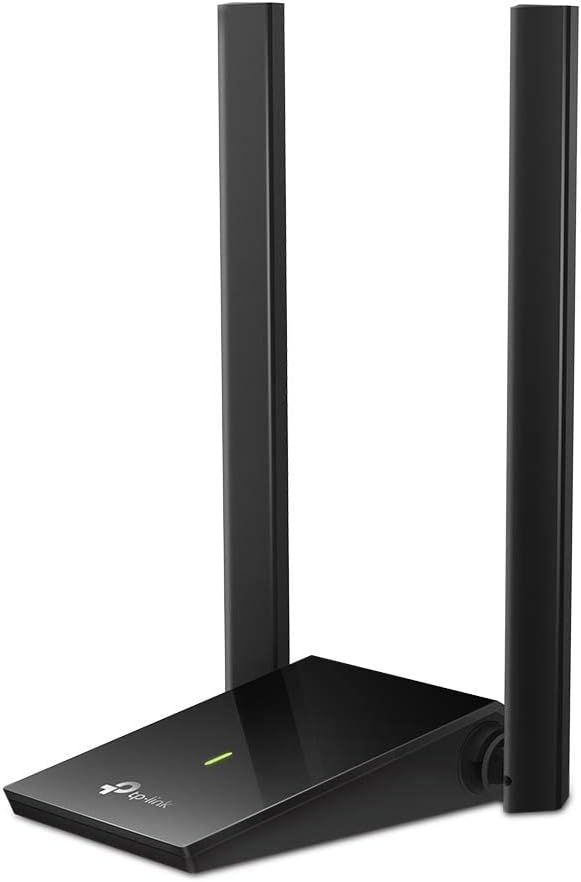


The TP-Link AC1300 USB WiFi Adapter stands out as a top performer in the 5GHz WiFi Dongle market. With a high rating and robust specifications, it delivers consistent performance for streaming and gaming tasks.
We may earn a commission when you buy through this link, at no additional cost to you.
Its MU-MIMO technology ensures efficient data transmission to multiple devices simultaneously. The USB 3.0 port allows for faster data transfer rates compared to older USB 2.0 connections.
While it is highly capable, users may need to install drivers depending on their operating system version. This minor setup step ensures compatibility but adds a small initial hurdle.
Overall, this adapter is ideal for users seeking a balance of speed and portability. It is a solid choice for upgrading desktop PCs with older internal wireless cards.
The dual band design allows switching between 2.4GHz for range and 5GHz for speed, optimizing performance based on your network needs.
Its mini size means you can leave it plugged in without obstructing other USB ports or taking up desk space.
We may earn a commission when you buy through this link, at no additional cost to you.
For users needing a simple and affordable solution, the TP-Link Nano AC600 is an excellent choice. Its small footprint makes it perfect for laptops and tight desktop setups.
We may earn a commission when you buy through this link, at no additional cost to you.
Despite its size, it offers dual band connectivity that includes the faster 5GHz band. This allows for reduced interference from common household devices like microwaves.
The trade-off is lower maximum speeds compared to higher-end models. However, for basic browsing and streaming, the performance is more than sufficient for most users.
We recommend this adapter for budget-conscious buyers who prioritize convenience. It is a reliable tool for getting online quickly without breaking the bank.
The sleek design allows you to plug it in and leave it, reducing clutter and the risk of bending or breaking ports.
By supporting both 2.4G and 5G bands, it provides flexibility to choose the best frequency for your specific environment.
We may earn a commission when you buy through this link, at no additional cost to you.
The BrosTrend AX1800 brings next-generation WiFi 6 technology to desktop users. It delivers faster speeds and better efficiency in crowded networks compared to older AC standards.
We may earn a commission when you buy through this link, at no additional cost to you.
Its high gain antennas significantly improve signal strength through walls and floors. This is beneficial for users with large homes or offices where wireless signals might otherwise weaken.
The included USB 3.0 extension cable allows flexible placement for optimal reception. This feature ensures you can find the best spot for the adapter without moving your computer.
We recommend this for power users who need top-tier performance. If you have a WiFi 6 router, this adapter will help you fully utilize that hardware potential.
OFDMA technology allows the adapter to communicate with multiple devices at once, reducing latency and improving overall network stability.
The two 5dBi antennas focus signal strength, ensuring stable connections even when you are far from the router.
We may earn a commission when you buy through this link, at no additional cost to you.
This TP-Link model is a straightforward solution for users running Windows systems. It offers a reliable connection with a focus on long-range performance and stability.
We may earn a commission when you buy through this link, at no additional cost to you.
The adjustable high gain antenna allows you to physically direct the signal toward your router. This manual adjustment can help overcome physical barriers in your room.
While it lacks USB 3.0 speeds, the throughput is sufficient for standard internet activities. Users looking for basic connectivity will find it meets their daily needs.
We suggest this for desktop PCs that need a simple upgrade. It provides a significant improvement over older wireless N adapters without complicating your setup.
Rotating the multi-directional antenna helps align the signal path, reducing obstructions and improving reception strength.
It supports standard WEP and WPA/WPA2 encryption, ensuring your data remains secure on the wireless network.
We may earn a commission when you buy through this link, at no additional cost to you.
The Nineplus adapter combines high gain antennas with USB 3.0 technology for robust performance. It is designed to provide a stable connection even in areas with weak signals.
We may earn a commission when you buy through this link, at no additional cost to you.
The two external antennas help capture signals from further away. This makes it a good option for users who cannot place their router close to the computer.
While it supports Windows systems well, it does not work with macOS. Users on Mac should look for alternative options in this comparison list.
We recommend this for those needing strong coverage at a lower cost. The included online support adds value for users who might struggle with driver installation.
The dual 5dBi antennas capture weak signals effectively, extending the range beyond what internal antennas typically achieve.
Using a Super Speed USB 3.0 port ensures the adapter can handle the high data rates provided by the 1300Mbps wireless connection.
We may earn a commission when you buy through this link, at no additional cost to you.
This UGREEN adapter introduces WiFi 6 capabilities to desktop users in a compact form. It supports fast transmission speeds on the 5GHz band for high-quality video streaming.
We may earn a commission when you buy through this link, at no additional cost to you.
A key advantage is the built-in driver support for Windows 10 and 11. This removes the hassle of downloading and installing separate software before use.
It also functions as a hotspot, allowing you to share internet connections. This dual mode flexibility is useful for connecting other devices to your PC's network.
We suggest this for Windows users wanting modern speeds without driver trouble. It is a practical choice for upgrading older hardware to support new wireless standards.
With built-in drivers, the setup process is streamlined, allowing for immediate connection upon plugging the device in.
The ability to act as a wireless hotspot makes it versatile for creating local networks when needed.
We may earn a commission when you buy through this link, at no additional cost to you.
The Tenda AX900 offers a strong mix of speed and range features. It uses a high gain antenna to improve signal reception in environments with interference.
We may earn a commission when you buy through this link, at no additional cost to you.
Its AP Mode allows the PC to act as a router, which is handy for sharing connections. This feature adds versatility beyond simple internet access for the device.
Setup is designed to be quick with preloaded drivers for common Windows versions. This reduces the technical burden on users who are not tech-savvy.
We recommend this for users needing a flexible adapter with modern standards. The external antenna ensures that signal quality remains high even in challenging rooms.
The 6dBi antenna rotates to cover different angles, ensuring you can find the best position for signal reception easily.
By enabling AP mode, you can turn your PC into a hotspot for up to eight other devices, creating a small local network.
We may earn a commission when you buy through this link, at no additional cost to you.
If space is a premium, this tiny adapter delivers modern WiFi 6 performance in a small package. It fits easily into tight spots on laptops and small form factor PCs.
We may earn a commission when you buy through this link, at no additional cost to you.
The technology supports 1024-QAM which increases efficiency and speed. This ensures you get the most out of your router even with the smaller physical design.
It lacks USB 3.0, which may limit peak throughput compared to larger models. However, for standard browsing and video calls, the speed is generally adequate.
We suggest this for users needing portability and modern speeds. It is a great option for travelers who want to upgrade their devices on the go.
Measuring just 1.4 inches, it integrates seamlessly with your computer without protruding or risking accidental breaks.
Advanced modulation and multiplexing ensure that your device remains responsive even in busy wireless environments.
We may earn a commission when you buy through this link, at no additional cost to you.
This adapter focuses on robust performance with dual high gain antennas for superior range. It is well-suited for desktop setups where maximum signal stability is required.
We may earn a commission when you buy through this link, at no additional cost to you.
The USB 3.0 port ensures data transfer speeds match the wireless capabilities. This prevents bottlenecks that might occur with older USB interfaces during large downloads.
Its flexible antenna design allows for precise signal direction. You can adjust the angles to ensure the best possible connection quality in your room.
We recommend this for desktop users who need consistent high-speed internet. It balances range and speed effectively for a wide variety of home network scenarios.
Having two high gain antennas improves both reception and transmission, ensuring a reliable link to your router.
Support for both Windows and macOS makes it a versatile choice for mixed operating system environments.
We may earn a commission when you buy through this link, at no additional cost to you.
The UGREEN AX1800 brings advanced WiFi 6 features including WPA3 security. This ensures your browsing and data transfers are protected by the latest encryption standards.
We may earn a commission when you buy through this link, at no additional cost to you.
Its design includes ventilation holes to help dissipate heat during long sessions. This cooling feature helps maintain consistent performance without thermal throttling.
It offers dual mode flexibility allowing it to serve as a hotspot. This adds functionality for sharing connections with other devices in your vicinity.
We suggest this for users prioritizing security and speed. It is a solid choice for those upgrading to a modern WiFi 6 network infrastructure.
WPA3-SAE encryption provides stronger protection against password guessing attacks, keeping your network more secure.
Back ventilation holes allow for better airflow, ensuring the adapter stays cool during extended high-bandwidth use.
We may earn a commission when you buy through this link, at no additional cost to you.
Choosing the right adapter requires understanding several key technical factors that affect performance and compatibility.
Modern adapters support various standards like AC, AX, or WiFi 6. Higher standards offer faster speeds and better efficiency in crowded networks.
Look for an adapter that matches your router capabilities to avoid bottlenecks.
Dual band adapters support both 2.4GHz and 5GHz frequencies. The 5GHz band offers faster speeds with less interference.
Ensure the device supports the 5GHz band specifically for optimal performance.
External antennas usually provide better signal range than internal ones. High gain antennas help penetrate walls and obstacles more effectively.
Consider external antennas if you are far from the router or have many physical barriers.
Not all adapters support every operating system. Some are designed for Windows only while others support macOS or Linux.
Verify the system requirements before purchasing to ensure it works with your computer.
USB 3.0 ports provide faster data transfer rates than USB 2.0. Using a USB 3.0 port can help achieve maximum wireless speeds.
Check if your computer has available USB 3.0 ports for the best connection experience.
Some models come with preloaded drivers while others require manual installation. Preloaded drivers save time and simplify the process.
Choose a model with easy setup if you prefer a hassle-free installation experience.
Look for support for modern encryption standards like WPA3. This ensures your wireless connection is secure from external threats.
Security should be a priority to protect your data while using wireless connections.
Nano adapters are ideal for laptops or travel due to their small size. Desktop users might prefer larger models with more robust antennas.
Select a size that fits your usage scenario and space constraints.
Plug the adapter into an available USB port on your computer. If required, install the latest drivers from the manufacturer website for proper functionality.
Connect to your wireless network using the provided network settings. Ensure you are selecting the 5GHz band if available for faster speeds.
Keep the adapter away from direct sunlight and heat sources to maintain longevity. Avoid bending the cable on extension models to prevent internal wire damage.
Yes, these adapters generally work with any standard router that broadcasts wireless signals. However, to get the fastest speeds you should use a router that supports the same WiFi standard.
Many modern adapters work with plug and play on newer operating systems. Some older systems or specific models may require manual driver installation from the website.
WiFi 6 offers higher speeds and better performance in crowded environments. It uses technologies like OFDMA to manage multiple device connections more efficiently.
Some models support macOS but not all. Always check the product specifications to ensure Mac compatibility before purchasing an adapter.
The 5GHz band provides faster data rates and less interference from other household devices. However it has a shorter range and struggles more with obstacles.
USB 3.0 cables should be kept under six feet to avoid signal loss. Extension cables provided by manufacturers are usually designed to maintain performance.
We reviewed ten top adapters including the AC1300 and AX1800 models. Each offers unique benefits ranging from budget pricing to advanced WiFi 6 features.
Prioritize speed and compatibility based on your specific computer and router setup. Choosing the right standard ensures you get the performance you need.
Remember to verify current pricing and availability before buying as these factors change frequently online.