
GIGABYTE B550 Gaming X V2
4.5Editor score
Affordable AM4 Socket Option
PCIe 4.0 Support
RGB Fusion Lighting
This guide compares the top Gigabyte motherboards for gaming and productivity, analyzing features like chipset support, connectivity options, and power
Choosing the right motherboard is crucial for building a powerful and reliable computer system. Gigabyte offers a wide range of options that cater to different needs, from budget builds to high-end gaming rigs.
We have carefully selected ten top models based on their performance, features, and user ratings. This list covers various chipsets and sockets to ensure you find the perfect match for your processor and budget.
Each pick highlights key strengths and potential trade-offs to help you make an informed decision. Please note that product availability and prices may change over time, so check current listings before buying.
4.5Editor score

4.4Editor score

4.4Editor score
The following table provides a side-by-side comparison of all ten selected motherboards. It highlights their core specifications, connectivity options, and key features to help you quickly identify the best fit for your build.


The GIGABYTE B650 AORUS Elite AX stands out as a top choice for AMD Ryzen builders. It earns a solid 4.4 rating from users who appreciate its balance of performance and features. This motherboard delivers exceptional power delivery and connectivity for modern gaming and workstation tasks.
We may earn a commission when you buy through this link, at no additional cost to you.
Its twin 14+2+1 phase power design ensures stable voltage for high-end Ryzen processors. The 8-layer PCB with 2X copper improves signal integrity and heat dissipation. Connectivity is robust with PCIe 5.0 M.2 support, USB-C ports, and built-in WIFI6E for fast wireless networking.
While the board offers immense value, the RGB Fusion software requires some learning to customize lighting effectively. Additionally, using multiple M.2 drives may reduce PCIe lane bandwidth for other slots. These are minor trade-offs considering the overall feature set.
This motherboard is ideal for gamers and creators who want a future-proof platform without breaking the bank. If you are building a new PC with an AM5 processor, this model provides the reliability and speed you need.
The 70A power stage digital VRM solution handles demanding workloads efficiently. Combined with covered MOSFET heatsinks and an M.2 thermal guard, system stability remains high even during extended gaming sessions.
Front and rear USB-C ports along with PCIe 5.0 support ensure compatibility with the latest peripherals and storage. The 2.5GbE LAN provides reliable wired internet speeds for competitive gaming.
We may earn a commission when you buy through this link, at no additional cost to you.
The X870 AORUS Elite WIFI7 brings next-generation networking to your desktop PC. With a 4.5 user rating, it is praised for its advanced features and robust build quality. This model is perfect for enthusiasts who want the fastest wireless and wired connections available.
We may earn a commission when you buy through this link, at no additional cost to you.
Its design supports Ryzen 9000 series processors with a 16+2+2 power phase configuration. The inclusion of dual USB4 ports allows for ultra-fast data transfer and daisy-chaining devices. Four M.2 slots provide ample room for storage expansion without needing PCIe adapters.
The premium pricing reflects these advanced capabilities but may not suit budget-conscious builders. The extensive heatsinks can sometimes interfere with case fans or large coolers in smaller chassis. However, the performance gains justify the cost for serious users.
If you need top-tier connectivity and plan to use high-speed external storage or WIFI7 routers, this board is an excellent choice. It ensures your system remains relevant as new standards become more common.
WIFI7 offers significantly lower latency and higher throughput compared to previous generations. The 2.5GbE LAN port complements this with a stable wired connection for critical tasks.
Dual USB4 ports support up to 40Gbps data rates, ideal for external SSDs and docking stations. Four M.2 slots ensure you can load your system with fast NVMe drives easily.
We may earn a commission when you buy through this link, at no additional cost to you.
The X870E AORUS PRO ICE combines high performance with a unique aesthetic appeal. It receives a 4.4 rating for its reliability and distinctive white design that looks great in custom builds. This board delivers top-tier specs alongside its premium look.
We may earn a commission when you buy through this link, at no additional cost to you.
Its 80A smart power stages ensure clean and efficient power delivery for overclocking and sustained loads. The VRM and M.2 thermal guards work together to maintain low temperatures under stress. Connectivity includes WIFI7 and USB4 for maximum future-proofing.
The main drawback is the higher cost compared to standard black models. Finding it in stock can also be difficult due to high demand. However, for those who prioritize aesthetics as much as performance, it is worth the investment.
This motherboard is ideal for builders creating a white-themed or high-end workstation. It offers every feature a enthusiast could want in a stylish package that stands out from the crowd.
The white PCB and matching components create a clean look for open-case builds. Heatsinks are designed to look good while providing effective heat dissipation for critical areas.
Advanced thermal solutions keep VRMs and SSDs cool during intensive tasks. This helps maintain boost clocks and prevents thermal throttling over long periods.
We may earn a commission when you buy through this link, at no additional cost to you.
The Z890 AORUS Master is designed for the latest Intel Core Ultra processors. With a 4.2 rating, it shows promise for workstation users and power gamers. This board offers extensive connectivity and robust power delivery for top-tier CPU performance.
We may earn a commission when you buy through this link, at no additional cost to you.
Its 18+1+2 phase power design with 110A smart stages handles demanding tasks with ease. Five M.2 slots allow for massive local storage, while Thunderbolt 4 ports support fast external devices. The 10GbE LAN ensures ultra-fast wired networking.
As a new platform, it comes with a premium price tag that might not fit all budgets. Some BIOS features are still being optimized as the ecosystem develops. These factors make it best suited for early adopters and professionals.
If you need the latest Intel technology and extensive I/O for workstations, this board delivers. It is a strong choice for those building a high-end system that requires maximum performance.
Designed for Core Ultra Series 2, this board supports the newest processor features. It ensures compatibility with upcoming chips for longevity in high-end builds.
Five M.2 slots plus dual Thunderbolt 4 ports offer unparalleled storage expansion. The 10GbE LAN is ideal for networked storage and high-speed file transfers.
We may earn a commission when you buy through this link, at no additional cost to you.
The B650 Eagle AX is highly rated by users for its excellent balance of price and performance. It offers a 4.6 score thanks to its solid features and reliable operation. This board is perfect for mainstream gamers who want DDR5 without paying premium prices.
We may earn a commission when you buy through this link, at no additional cost to you.
Its 12+2+2 phase power design supports Ryzen 9000 series CPUs effectively. Three M.2 slots give you plenty of space for storage. WIFI6E ensures good wireless speeds, and the USB 3.2 Gen2x2 Type-C port handles fast peripherals.
While it lacks the extreme overclocking headroom of higher-end models, it is sufficient for most users. The simpler VRM may struggle under very high loads but works well for standard gaming use. These limits are acceptable given the low price.
This motherboard is a smart pick for budget gamers and students building an AM5 system. It provides all the essential features you need for a fast and stable PC.
It delivers most high-end features at a much lower cost. This makes it accessible for buyers who want modern technology without overspending on extras.
Rear USB-C and built-in Wi-Fi mean you do not need extra adapters. Realtek GbE LAN ensures stable wired internet when needed for gaming or streaming.
We may earn a commission when you buy through this link, at no additional cost to you.
The B550 AORUS Elite AX V2 offers a reliable path for upgrading older AM4 systems. With a 4.5 rating, users appreciate its compatibility and robust feature set. This board allows you to use Ryzen 5000 series CPUs for a cost-effective upgrade.
We may earn a commission when you buy through this link, at no additional cost to you.
It features a digital 12+2 phase power design that keeps power delivery steady. PCIe 4.0 M.2 slots allow for fast storage, and WIFI6 provides good wireless speeds. The integrated I/O shield makes installation easier and saves time.
The main limitation is that it does not support the newest DDR5 or PCIe 5.0 standards. If you plan to use future CPUs, this board will not be compatible. However, for current AM4 users, it remains a solid choice.
This model is best for those upgrading from older AM4 platforms who want modern features. It provides a stable base for gaming and everyday computing at a reasonable price.
Support for Ryzen 5000/4000/3000 series lets you reuse existing AM4 cases and coolers. This makes it a budget-friendly option for system refreshes.
Q-Flash Plus lets you update BIOS without a CPU installed. The integrated I/O shield and RGB Fusion software simplify setup and customization tasks.
We may earn a commission when you buy through this link, at no additional cost to you.
The Z790 Eagle AX provides a solid foundation for Intel Core 14th Gen processors. Its 4.4 rating reflects reliable performance and good feature balance. This board is well-suited for gamers who want DDR5 speed without the high cost of premium boards.
We may earn a commission when you buy through this link, at no additional cost to you.
Its twin 12+1+1 phase power design supports standard overclocking needs. Three M.2 slots offer flexible storage options with PCIe 5.0 support for one drive. WIFI6E ensures fast wireless speeds, and the 2.5GbE LAN handles wired connections well.
It lacks some high-end features like USB4 or advanced BIOS tuning found in expensive models. These limits make it a value choice rather than a top-tier workstation option. For gaming builds, the trade-offs are usually acceptable.
This motherboard is ideal for mid-range Intel builds focusing on gaming performance. It offers the right mix of speed and stability for most users on a moderate budget.
DDR5 memory and PCIe 5.0 support ensure fast data transfer and load times. The VRM design keeps voltages stable during intense gaming sessions.
EZ-Latch simplifies installing graphics cards and M.2 drives. Q-Flash allows easy BIOS updates to improve system stability and compatibility.
We may earn a commission when you buy through this link, at no additional cost to you.
The Z790 AORUS Elite AX offers stronger power delivery than its Eagle counterpart. With a 4.4 rating, it is popular among users who want to overclock safely. This model supports up to four M.2 drives for high-speed storage configurations.
We may earn a commission when you buy through this link, at no additional cost to you.
Its twin 16+1+2 phase design with 70A stages ensures stable power for high-end CPUs. The thermal guard III and covered heatsinks help keep temperatures low. Connectivity includes WIFI6E and USB 3.2 Gen 2×2 for fast data speeds.
It is priced slightly higher than the Eagle version, but the added slots and power justify the cost. Some M.2 slots share bandwidth, so you may not get full speed with all drives active. This is a minor issue for most users.
This motherboard is perfect for enthusiasts who want strong overclocking potential and storage flexibility. It is a great choice for high-performance gaming and content creation rigs.
The advanced VRM design allows safe voltage tweaking for higher performance. Cooling solutions prevent heat buildup during sustained CPU loads.
Four M.2 slots let you install multiple NVMe SSDs for a fast system. Use the top slot for best performance and others for games or media.
We may earn a commission when you buy through this link, at no additional cost to you.
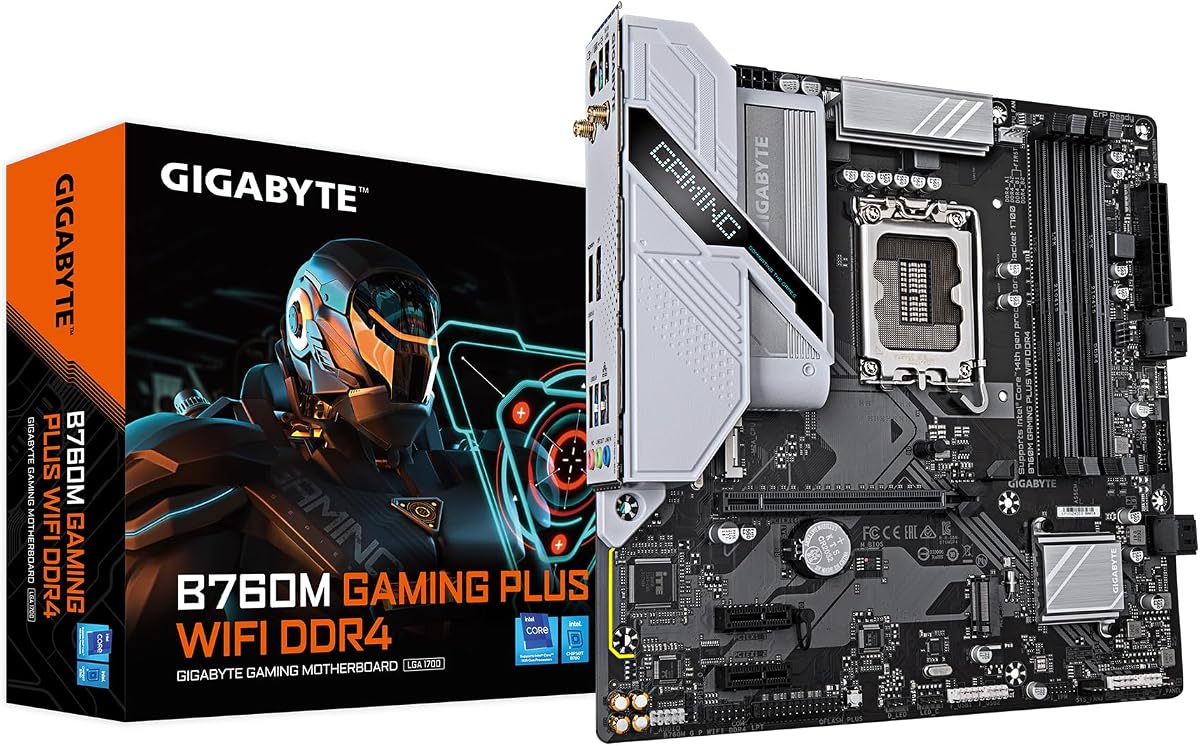
The B760M Gaming Plus WiFi is designed for compact Intel builds on a budget. Its 4.3 rating reflects a solid entry-level option for small form factor PCs. This board supports Intel 14th/13th/12th Gen CPUs and offers essential features without bulk.
We may earn a commission when you buy through this link, at no additional cost to you.
It uses DDR4 memory which is more affordable than DDR5. Two M.2 slots provide enough storage for most users. Wireless connectivity is included, and the front USB 3.2 Gen 1 Type-C port adds convenience.
Expansion is limited due to the small size, so it is not ideal for large setups. The power design is basic, meaning it is best for non-overclocked CPUs. These limits keep the price low for budget builds.
This motherboard is ideal for small gaming PCs or office workstations. It offers the essentials you need in a compact package that fits smaller cases easily.
M-ATX size makes it easy to fit into compact cases. It saves space while still offering necessary ports and slots for standard use.
DDR4 support reduces overall build costs significantly. Included Wi-Fi means no extra dongles are needed for wireless networking.
We may earn a commission when you buy through this link, at no additional cost to you.
The B550 Gaming X V2 is an affordable choice for building an AMD AM4 system. With a 4.5 rating, users value its reliability and low cost. This motherboard provides solid features for budget gaming and general computing tasks.
We may earn a commission when you buy through this link, at no additional cost to you.
Its 10+3 phase power design handles Ryzen CPUs well for standard use. Two M.2 slots offer fast storage options with PCIe 4.0 support. Front USB-C and Q-Flash Plus make it easy to build and maintain over time.
Power delivery is basic compared to higher-end boards, so it may not be best for heavy overclocking. You miss out on premium wireless features like built-in Wi-Fi. But for the price, these are reasonable trade-offs.
This motherboard is best for budget gamers or those reusing parts from old builds. It offers a reliable platform for AMD Ryzen without spending much money.
It delivers essential performance at a very competitive price. This makes it a top pick for cost-conscious builders who need stability.
Integrated I/O shield saves time during the building process. Q-Flash Plus simplifies BIOS updates without needing a CPU installed.
We may earn a commission when you buy through this link, at no additional cost to you.
Selecting the right motherboard depends on your budget, processor choice, and intended use. This guide covers key factors to consider when picking a Gigabyte model.
Ensure the motherboard socket matches your processor exactly. Gigabyte supports both AM4 and AM5 for AMD and various LGA types for Intel. Always check the CPU support list before buying to avoid incompatibility issues.
Matching the socket is the first critical step in choosing a motherboard.
Decide between DDR4 and DDR5 memory based on your budget and performance needs. AM5 and Z790 boards support DDR5 for faster speeds, while older AM4 boards use DDR4. Check the maximum supported capacity for your workflow.
Memory choice impacts overall system speed and future upgradeability.
VRM design affects stability and overclocking potential. High-end boards have more power phases and better cooling for demanding CPUs. Budget boards often have fewer phases suitable for standard performance.
Look for strong power stages if you plan to overclock your CPU.
Consider how many M.2 slots and SATA ports you need for storage. Most Gigabyte boards offer multiple M.2 slots but check if they share PCIe bandwidth. Additional PCIe slots may be needed for capture cards or GPUs.
Count your storage needs to ensure enough slots are available on the board.
Check for USB-C, USB 3.2 Gen 2×2, and Ethernet speeds. Some models include Wi-Fi 6 or 6E while others require separate adapters. USB4 and Thunderbolt 4 are available on premium boards.
Ensure the board has the right ports for your peripherals and internet speed.
ATX boards are larger and offer more slots compared to M-ATX options. Make sure your case supports the chosen size for proper installation. M-ATX boards are great for compact builds.
Match the motherboard size to your case for a clean fit.
Effective heatsinks prevent overheating during heavy loads. Look for covered VRM heatsinks and M.2 thermal guards. Better cooling maintains performance stability over time.
Strong thermal design is key for sustained high performance.
Gigabyte offers different warranty periods depending on the board model. Higher-end boards often include a 5-year warranty for peace of mind. Check the terms for RMA and customer support availability.
A longer warranty adds value and protection for your investment.
Install the motherboard carefully on standoffs in your case to prevent short circuits. Secure all power cables firmly and double-check connections before applying power. Use the front panel header guide in the manual for correct placement.
Update the BIOS using Q-Flash or Q-Flash Plus as soon as you build your system. This ensures compatibility with your CPU and improves stability. Download the latest version from the Gigabyte website for your specific model.
Keep the motherboard clean by dusting it periodically with compressed air. Ensure proper airflow in your case to prevent overheating of components. Avoid touching gold contacts or circuits to prevent damage.
For gaming, the B650 AORUS Elite AX offers excellent performance and connectivity at a fair price. It supports modern Ryzen CPUs and provides fast storage options. Gamers on a budget might prefer the B550 Gaming X V2 for AM4 systems.
Yes, most Gigabyte AM5 boards require a BIOS update for Ryzen 9000 support. Check the CPU support list on Gigabyte's website. Models with Q-Flash Plus allow updates without a CPU installed for convenience.
No, DDR4 and DDR5 RAM are not interchangeable due to different physical layouts and speeds. You must choose the RAM type that matches your motherboard's slots. Check product specs carefully before buying memory.
AORUS boards usually have better power delivery, more premium features, and stronger cooling than Eagle series. Eagle boards focus on essential features at lower price points. Choose AORUS for higher-end or overclocking builds.
Check the product description and motherboard manual for PCIe lane details. Usually, the top M.2 slot shares lanes with the primary GPU slot and supports 5.0. Lower slots often run at PCIe 4.0 speeds for storage.
Most Gigabyte boards with built-in Wi-Fi include a basic antenna. Premium models may come with more advanced antennas for better signal strength. Always check what is included in the box for your specific model.
Gigabyte offers a wide range of motherboards for every build type and budget. Whether you need the latest AM5 platform or a cost-effective AM4 upgrade, there is a suitable option.
Prioritize the features that matter most to you such as power delivery, storage, and networking. Selecting the right board ensures stability and performance for your PC.
Always verify current prices and availability since these details change frequently. Checking the latest listings helps you get the best value for your money today.