
CyberPower CP1000PFCLCD
4.2Editor score
1000VA/600W PFC Sinewave
10 Outlets with USB Ports
Automatic Voltage Regulation
This guide compares ten top-rated battery backup units for workstation PCs, evaluating features like output wave type, outlet count, and warranty coverage for
Protecting your workstation PC from power outages and surges is essential for maintaining productivity and hardware longevity. A reliable battery backup ensures your critical systems stay online during interruptions, allowing you to save work and shut down safely.
We have carefully selected ten highly rated units from trusted brands like CyberPower and GOLDENMATE to help you find the right fit. Our comparison focuses on capacity, waveform quality, outlet configuration, and additional features like AVR and monitoring software.
Each pick below highlights key specifications and real-world performance traits to guide your decision. Keep in mind that prices and availability can change frequently, so verify current details before making your final purchase choice online.
4.2Editor score

4.5Editor score

4.4Editor score
The following table provides a side-by-side view of the top ten battery backup units, highlighting their core specifications to help you quickly compare capacity and features.




The CyberPower CP1500PFCLCD stands out as a top choice for workstation users needing robust protection. With a 4.5 star rating, it delivers 1500VA capacity and uses PFC Sinewave technology to ensure compatibility with modern power supplies.
We may earn a commission when you buy through this link, at no additional cost to you.
Its 12 outlets offer ample space for multiple devices, and the color LCD panel provides immediate, detailed information on battery and power conditions. The included USB ports allow you to keep phones and tablets charged during an outage.
While the unit is heavier than smaller alternatives, its stability and performance justify the footprint. The high connected equipment guarantee adds peace of mind for those protecting expensive workstation hardware.
If you need a reliable backup that handles active PFC supplies without issues, this model is an excellent investment. It balances capacity, features, and protection levels effectively for professional environments.
The PFC Sinewave output ensures safe operation with active PFC power supplies commonly found in workstations.
The color LCD panel displays battery and power conditions clearly, alerting users to potential issues early.
We may earn a commission when you buy through this link, at no additional cost to you.
The CP1500AVRLCD3 offers a high capacity of 1500VA at a competitive price point. It uses simulated sine wave technology which works well for many conventional workstations and network devices.
We may earn a commission when you buy through this link, at no additional cost to you.
With 12 outlets, you can plug in multiple peripherals while ensuring critical components get battery backup. The intelligent LCD panel displays estimated runtime and battery capacity for better planning.
This model includes automatic voltage regulation to handle minor power issues without draining the battery. However, users with active PFC supplies should verify compatibility before purchasing.
For those needing high capacity without the cost of pure sine wave models, this unit provides solid protection. It is a strong contender for general workstation backup needs.
With 1500VA output, this unit can support a full workstation setup with multiple monitors and peripherals.
The LCD panel provides immediate information on battery health and estimated runtime during outages.
We may earn a commission when you buy through this link, at no additional cost to you.
The EC850LCD focuses on energy efficiency with its ECO mode feature. When the connected PC sleeps, it cuts power to peripherals, saving energy and reducing costs during long periods of inactivity.
We may earn a commission when you buy through this link, at no additional cost to you.
While it has a lower 850VA capacity, it still offers 12 outlets for flexible connectivity. The multifunction LCD displays battery conditions clearly for easy monitoring at a glance.
This model is ideal for workstations that do not require massive power reserves. Its connected equipment guarantee ensures your hardware remains protected against surge damage effectively.
Consider this if you want to lower your energy footprint while securing your PC. It strikes a good balance between performance and efficiency for smaller setups.
ECO mode automatically powers down connected peripherals when your computer enters sleep mode.
All outlets include surge protection to shield your equipment from voltage spikes.
We may earn a commission when you buy through this link, at no additional cost to you.
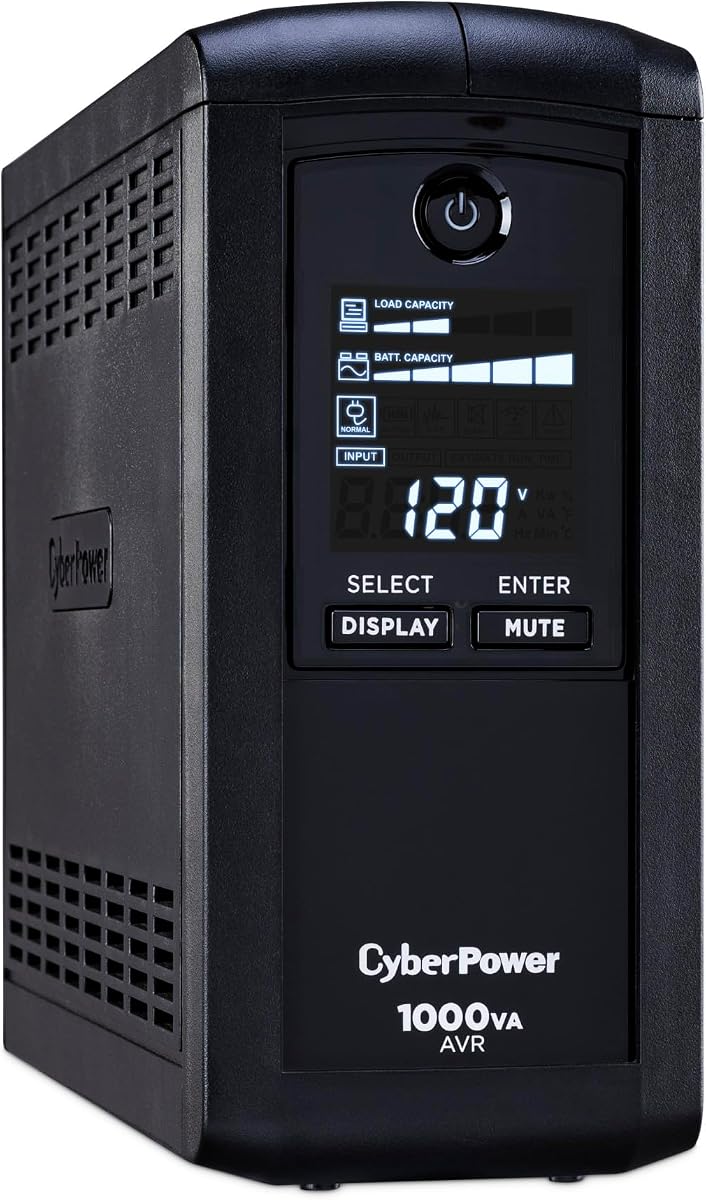
The CP1000PFCLCD brings pure sine wave compatibility to a budget-friendly package. It offers 1000VA capacity which is sufficient for single-monitor workstation setups and essential network gear.
We may earn a commission when you buy through this link, at no additional cost to you.
Its color LCD panel and USB ports provide convenience similar to higher-end models. The AVR technology helps correct minor power fluctuations without switching to battery power frequently.
While it has fewer outlets than larger units, it meets most basic needs efficiently. The 3-year warranty covers the battery and offers strong protection for your investment.
This is the ideal choice for those on a budget who still need safe power for modern supplies. It delivers essential features without the premium price tag.
Access the safety of sine wave output at a lower cost point.
Stay connected with USB ports for phones and tablets on the front.
We may earn a commission when you buy through this link, at no additional cost to you.
With a 4.6 star rating, the AVRG900LCD is a highly trusted model for workstation backup. It provides 900VA capacity and includes data line protection for telephone lines to safeguard network equipment.
We may earn a commission when you buy through this link, at no additional cost to you.
The 12 outlets allow for extensive peripheral connections. While it uses simulated sine wave, it is robust enough for many conventional workstations and entertainment setups.
Its automatic voltage regulation ensures stable power delivery without draining the battery unnecessarily. This feature helps extend the overall lifespan of the internal battery.
For those needing data protection alongside power backup, this unit is a top pick. It balances high user satisfaction with practical connectivity options.
Prevents surges traveling through telephone lines from damaging your connected electronics.
Its 4.6 rating reflects strong reliability and performance in real-world use.
We may earn a commission when you buy through this link, at no additional cost to you.
The CP1000AVRLCD features an intelligent LCD that displays estimated runtime and load capacity. This helps you plan shutdowns or manage power needs during an unexpected outage effectively.
We may earn a commission when you buy through this link, at no additional cost to you.
Its 1000VA capacity provides decent support for mid-range workstations. While it lacks USB ports, its primary function of power backup is handled efficiently.
The automatic voltage regulation prevents unnecessary battery cycles which extends service life. With nine outlets, you can connect your main PC and essential peripherals easily.
This model is a solid choice for users prioritizing clear status feedback. It offers reliable protection without unnecessary complexity or extra costs.
The LCD panel shows estimated runtime so you know how much time you have.
AVR technology corrects minor fluctuations to reduce unnecessary battery usage.
We may earn a commission when you buy through this link, at no additional cost to you.
The GOLDENMATE UPS features advanced LiFePO4 technology that offers over 10 years of battery life. This premium solution eliminates frequent replacements and lowers long-term costs significantly.
We may earn a commission when you buy through this link, at no additional cost to you.
With 2000VA capacity and pure sine wave output, it supports high-power workstations without compromise. The communication port allows automatic shutdown initiation on connected Windows PCs.
Its heavy transformer ensures stable operation within the required voltage range. While the upfront cost is higher, the durability justifies the investment for critical setups.
Choose this unit for long-term reliability and maximum power stability. It is ideal for those seeking a premium backup with minimal maintenance needs.
LiFePO4 batteries offer over 3000 cycles and a decade of service life.
Pure sine wave output ensures safe compatibility with sensitive electronics.
We may earn a commission when you buy through this link, at no additional cost to you.
The ST900U is designed with a slim profile making it easy to fit in tight office spaces. It delivers 900VA capacity with high efficiency to reduce power consumption.
We may earn a commission when you buy through this link, at no additional cost to you.
Twelve outlets with wide spacing accommodate bulky plugs without crowding. While it lacks an LCD, it still provides essential battery backup for home entertainment setups.
This model is best for general use where space is limited. Its connected equipment guarantee ensures safety against surge damage for your electronics.
If you need a compact unit that delivers standard protection efficiently, this is a great option. It balances cost and convenience for everyday needs.
The slim profile design allows for easy placement in crowded desks or cabinets.
GreenPower high efficiency design reduces overall energy usage.
We may earn a commission when you buy through this link, at no additional cost to you.
The CP850AVRLCD offers essential backup features at a competitive price. Its intelligent LCD panel provides immediate information on battery capacity and estimated runtime for better planning.
We may earn a commission when you buy through this link, at no additional cost to you.
With nine outlets and automatic voltage regulation, it handles basic workstation needs effectively. The connected equipment guarantee adds a layer of security for your devices.
This model is suited for standard home office setups without high power demands. It offers reliable protection without unnecessary features or costs.
Choose this for a cost-effective solution that covers your basics well. It ensures your PC can shut down safely during unexpected power issues.
This unit safeguards your PC and peripherals from common power problems.
The LCD panel keeps you informed on battery health and runtime estimates.
We may earn a commission when you buy through this link, at no additional cost to you.
The BRG1500AVRLCD2 stands out with an impressive 5-year warranty and a 4.7 user rating. It provides 1500VA capacity and includes color LCD display for clear monitoring.
We may earn a commission when you buy through this link, at no additional cost to you.
With 12 outlets and USB charging ports, it supports versatile connectivity. While remote management requires an optional card, standard use offers solid protection.
This model is a strong choice for those prioritizing long-term service coverage. It ensures your system remains protected over extended use without extra fees.
Opt for this if you want a reliable unit with exceptional warranty terms. It combines high user trust with practical features for modern workstations.
Enjoy peace of mind with a 5-year warranty covering the battery.
Its 4.7 rating reflects strong performance and reliability.
We may earn a commission when you buy through this link, at no additional cost to you.
Choosing the right battery backup involves evaluating several key factors to match your specific workstation needs and budget.
Power capacity is measured in Volt-Amps (VA) and Watts. Ensure the VA rating exceeds your total equipment load by about 20 percent for safety. For workstations, aim for at least 1000VA if you have multiple monitors and peripherals.
Always check the Watt rating to confirm it can handle the peak draw of your PC and accessories without overloading.
Waveform type determines how smooth the power output is. Pure sine wave is ideal for active PFC power supplies found in modern workstations. Simulated sine wave is cheaper but may not work with all sensitive electronics.
Verify your power supply compatibility before choosing a simulated unit to avoid potential hardware issues.
Workstations often require many outlets for monitors, routers, and peripherals. Look for units with at least ten outlets to avoid using extension strips. Split outlets between battery backup and surge protection.
More outlets provide flexibility for future additions without needing a second unit.
AVR corrects minor power fluctuations without draining the battery. This extends battery life and ensures stable power during brownouts. It is especially valuable in areas with unstable grid power.
Prioritize models with AVR to maintain long-term performance and reduce battery wear.
An LCD panel provides real-time data on battery health and runtime. Color displays offer better visibility and alerts than basic LCDs. This helps you manage power during an outage effectively.
Look for displays that show estimated runtime to help you plan shutdowns properly.
USB ports allow you to charge devices while the main power is off. A communication port enables automatic PC shutdown software to work properly. These features add convenience and data protection.
Ensure the unit supports your preferred charging standards like Type-C if needed.
Warranties vary between three and five years. A longer warranty often reflects better quality control. Also check the connected equipment guarantee for protection against damage from power spikes.
Prioritize brands with robust support to ensure your hardware is covered fully.
Standard lead-acid batteries need replacement every few years. Lithium technology like LiFePO4 offers longer lifespans and fewer maintenance needs. Consider total cost of ownership when comparing options.
Advanced battery tech reduces long-term maintenance and replacement frequency significantly.
Proper placement ensures optimal performance. Keep the unit in a well-ventilated area away from direct sunlight and heat sources. This prevents overheating and maintains battery health for longer service life.
Regularly test the backup function by unplugging the unit during normal operation. Verify your computer switches to battery power smoothly and the alarm sounds correctly. Perform this test every few months to confirm reliability.
Maintain the unit by keeping it clean and free from dust. Avoid placing heavy objects on top of it. Monitor battery status via the LCD panel and schedule replacement when capacity drops significantly below normal levels.
Add up the wattage of all devices you plan to connect to the backup. Multiply this total by 1.2 to find the required VA rating. This buffer ensures safe operation during peak load situations.
Pure sine wave produces smooth, consistent power like the grid. Simulated sine wave creates a stepped waveform that may not work with active PFC supplies. Check your power supply compatibility before choosing.
Lead-acid batteries typically need replacement every three to five years. Lithium models last much longer. Monitor battery runtime and replace when it drops significantly below original capacity levels.
Generally no. Laser printers draw high power spikes that can overload a UPS. Use surge protectors for printers instead to avoid damaging the battery backup unit.
Yes. AVR corrects minor voltage fluctuations without switching to battery mode. This reduces battery discharge cycles and extends the overall lifespan of the unit.
Most units include free personal software like PowerPanel. This tool tracks battery status, sends alerts, and allows automatic PC shutdown settings for data protection.
The CyberPower CP1500PFCLCD leads our list with its balanced features and PFC Sinewave compatibility. For those prioritizing longevity, the GOLDENMATE lithium model offers exceptional battery life.
When selecting a unit, focus on capacity and waveform compatibility with your power supply. Ensure it has enough outlets for your current setup and room for future growth.
Always verify current prices and availability before making a final decision as market conditions change frequently. Investing in reliable backup now can save significant time and hardware costs later.