
PILSAMAS WiFi Caregiver Pager
4.1Editor score
Wi-Fi app integration
Wristband panic button
Multi-channel alerts
This guide compares the top elderly monitoring systems for safety and peace of mind, evaluating features like fall detection, cameras, and alerts for seniors
Keeping loved ones safe is a top priority for families caring for seniors. Elderly monitoring systems provide essential tools to track movement, detect falls, and ensure quick communication when help is needed most.
We analyzed ten leading options based on reliability, ease of use, and specific care needs. Each product was evaluated for its ability to support aging in place while maintaining dignity and privacy for the senior.
Every pick highlights key strengths and potential trade-offs to help you decide. Note that availability and pricing may change frequently, so check current details before making your final selection for your home.
4.1Editor score

4.4Editor score

3.8Editor score
The following table offers a side-by-side look at the ten selected systems. It highlights core capabilities such as connectivity type, alert methods, and specific use cases to help narrow down your choice quickly.






The Lunderg Wireless Early Alert Bed Alarm System stands out for its focus on preserving the dignity of the senior. Unlike traditional alarms that trigger loudly when someone leaves the bed, this system detects movement at the hip level to alert caregivers before the senior stands up. This early detection prevents falls without disrupting sleep or causing agitation.
We may earn a commission when you buy through this link, at no additional cost to you.
Its patented PreRise technology ensures alerts happen while the individual is still resting on the pad. The wireless pager allows caregivers to move freely around the home while maintaining awareness. The setup requires no Wi-Fi or apps, making it accessible for families who prefer simple, reliable hardware over complex software solutions.
The sensor pad is designed to be incontinence-resistant and wipes clean easily, which is crucial for long-term use. While it works exceptionally well for fall prevention at night, it may not track wandering beyond the immediate bed area. However, for targeted bed safety, it is highly effective and non-intrusive.
We recommend this system for families who want to balance safety with the comfort and independence of their loved one. It is particularly suited for those who have shown sensitivity to loud alarms or need early intervention to prevent morning falls.
The hip level sensor triggers alerts before the senior stands up reducing fall risk significantly.
No loud bedside sounds mean the senior is not startled or embarrassed during the night.
We may earn a commission when you buy through this link, at no additional cost to you.
The Nomo Medical Alert System offers a modern approach to senior safety with its smart hub and wearable tags. It is designed for homes that want connectivity without relying on traditional landlines. The system includes satellite range extenders to ensure coverage throughout the house which is vital for larger properties.
We may earn a commission when you buy through this link, at no additional cost to you.
Its standout feature is the automatic fall detection combined with two-way voice communication. In an emergency the senior can press a button or rely on the automatic detection to alert family members. The clear voice communication ensures that help can assess the situation immediately without needing a third-party call center.
The setup is straightforward with plug-and-play installation. However users should be aware that full monitoring requires a monthly subscription after the trial period. This adds an ongoing cost but provides continuous professional monitoring options that some families prefer for peace of mind.
This system is ideal for tech-savvy families who want to use existing Wi-Fi networks. It is especially useful for seniors who move around frequently throughout the day and need reliable coverage in every room of the home.
Satellite extenders ensure signals reach every corner of the house for reliable alerts.
Two-way talk allows caregivers to speak directly through the hub during emergencies.
We may earn a commission when you buy through this link, at no additional cost to you.
This Elderly Monitor with Camera provides a reliable visual link without the need for internet connectivity. It operates on a private secure channel which eliminates concerns about hacking or data privacy. The inclusion of a two-way talk function allows caregivers to check in visually and verbally at any time.
We may earn a commission when you buy through this link, at no additional cost to you.
The system features infrared night vision to ensure visibility in dark conditions. This is particularly helpful for checking on sleeping seniors without disturbing them with lights. Additionally the temperature sensor provides alerts if the room becomes too hot or cold which adds a layer of environmental safety.
The portable screen allows caregivers to carry the monitor while performing other tasks. While the screen is compact it is sufficient for clear visuals and the four times zoom helps get a better look. The setup is simple and does not require technical expertise to get running.
We recommend this monitor for families who prioritize privacy and simplicity. It is an excellent choice for those who want to monitor a specific room like a bedroom or living area without dealing with app accounts or monthly service fees.
Operating without Wi-Fi ensures the video feed remains private and secure from outside access.
Temperature alerts help prevent heat stress or cold exposure in senior living spaces.
We may earn a commission when you buy through this link, at no additional cost to you.
The PILSAMAS WiFi Caregiver Pager offers a cost-effective way to integrate smart alerts into a home. It connects to the home Wi-Fi network allowing for notifications to be sent directly to a caregiver's smartphone. This remote access is valuable when caregivers are not in the same room as the senior.
We may earn a commission when you buy through this link, at no additional cost to you.
The system includes a wearable wristband panic button which is great for seniors on the go. The buttons can be placed in multiple locations like bathrooms or bedrooms to ensure help is always within reach. The app allows customization of tones and volumes to suit individual preferences.
While it relies on Wi-Fi for the app features the core alarm still functions locally. The adjustable settings help tailor the device to different needs without requiring extra hardware. It is a budget-friendly option that bridges the gap between traditional alarms and modern smart home devices.
This device is best suited for families who already have a reliable home internet connection. It works well for seniors who need occasional help or those who want to stay connected with family without needing a full medical alert system.
Smartphone alerts allow caregivers to respond even when they are in another part of the house.
The included wristband ensures the senior can call for help even when moving around.
We may earn a commission when you buy through this link, at no additional cost to you.
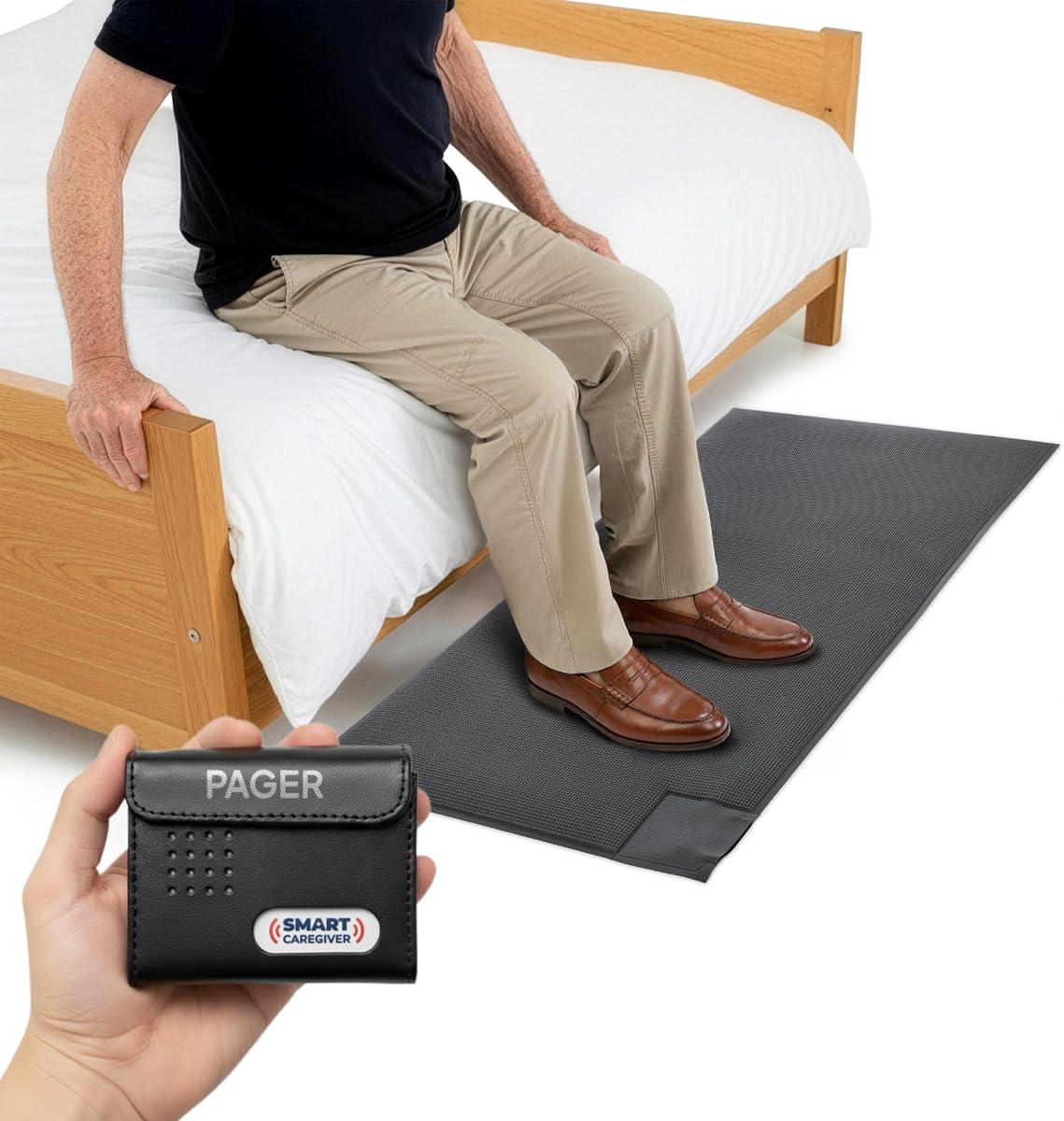
The Smart Caregiver Floor Mat is specifically designed to prevent wandering and falls by alerting caregivers when a senior steps off the bed or towards an exit. It is a robust solution for those who need to monitor movement discreetly. The wireless pager ensures the caregiver is notified without disturbing the senior.
We may earn a commission when you buy through this link, at no additional cost to you.
The mat is large and durable allowing for various placements depending on the specific safety need. It can be used at the bedside or near doors to detect exit attempts. The silent alarm feature means the senior is not alerted by loud noises which helps maintain their sleep quality.
Installation is simple as no tools are required to position the mat. However care must be taken to ensure it lies flat to avoid becoming a trip hazard. The system works well with other alarms from the same brand to create a layered safety network.
This is an excellent choice for families dealing with dementia or mobility issues. It offers peace of mind by ensuring that any unsupervised movement is caught immediately by the caregiver without restricting the senior's freedom unnecessarily.
Placement near exits alerts caregivers immediately if the senior attempts to leave the home.
The alarm sounds on the pager not the room keeping the environment calm for the senior.
We may earn a commission when you buy through this link, at no additional cost to you.
The SecuLife Medical Alert Pendant is unique because it sends alerts directly to family members rather than a call center. It includes GPS tracking which is vital for seniors who leave the home and may lose their way. The design is water resistant allowing it to be worn during showers or in rainy weather.
We may earn a commission when you buy through this link, at no additional cost to you.
The fall detection feature automatically triggers an alert if a fall is detected ensuring help is requested even if the senior cannot press the button. The two-way calling feature lets seniors communicate directly with family members which maintains a personal touch. It does not require a contract giving families flexibility.
While it is a premium option the monthly cost should be considered against the value of GPS and direct communication. The battery life is solid providing several days of usage on a single charge. This device is ideal for seniors who still drive or walk outside regularly.
We recommend this for seniors who are more active and need coverage beyond the home. The ability to track location provides a distinct advantage over stationary systems for families concerned about wandering or outdoor safety.
Real-time GPS allows family to track the senior's location anywhere with cellular coverage.
Notifications go to family phones directly saving time during an emergency response.
We may earn a commission when you buy through this link, at no additional cost to you.
This video monitor provides a dedicated secure connection that does not depend on the internet. The camera and monitor are both rechargeable allowing for flexible placement around the home. The night vision feature is crucial for checking on sleeping seniors without turning on room lights.
We may earn a commission when you buy through this link, at no additional cost to you.
The screen is compact and comes with a belt clip making it easy to carry while doing chores. This mobility is helpful for caregivers who need to stay active but keep an eye on the senior. The inclusion of a call button adds a layer of interactivity beyond just watching.
Because it does not use Wi-Fi it is very simple to set up and less prone to connection drops. However the battery life requires regular charging to ensure continuous overnight use. It is a straightforward tool for visual monitoring without extra digital complexity.
This monitor is best for those who want to avoid smart home ecosystems. It works well as a dedicated unit for specific rooms like a bedroom where visual confirmation is needed without worrying about network security.
The belt clip and rechargeable battery let caregivers move freely while monitoring.
Infrared sensors ensure clear images in low light conditions for better safety checks.
We may earn a commission when you buy through this link, at no additional cost to you.
The SYMYNELEC camera is designed to bridge the gap between seniors and their families through video calling. It features a screen that displays incoming calls with just one touch making it easy for seniors to connect without a smartphone. The high definition quality ensures faces are clear and visible.
We may earn a commission when you buy through this link, at no additional cost to you.
It includes automatic tracking to keep the person in frame which is helpful for those who move around. The physical privacy mode physically rotates the lens away giving seniors control over when they are being watched. This respect for privacy is essential for maintaining dignity at home.
Family photos can be displayed on the screen to combat loneliness and keep loved ones visually close. The system allows for local storage of recordings without monthly fees which is a significant cost advantage over cloud-based systems. It is an emotional and practical tool for connection.
This camera is ideal for families who want to visit virtually but cannot be there in person. It provides a comforting presence through the screen and helps reduce feelings of isolation for seniors living alone or far away from relatives.
Video calling allows families to see smiles and interact daily reducing loneliness effectively.
The physical lens rotation ensures seniors can control when the camera is active.
We may earn a commission when you buy through this link, at no additional cost to you.
This CallToU monitor system is designed for seniors who need clear audio and video without complex setup. It offers a secure FHSS signal that prevents interference and ensures privacy. The inclusion of a temperature sensor and SOS button makes it a comprehensive care tool.
We may earn a commission when you buy through this link, at no additional cost to you.
The SOS assistive device is simple to use which is important for seniors with dementia. The portable receiver allows caregivers to monitor from anywhere in the house without being tethered to a base station. The night vision ensures visibility even in dark environments.
It is a straightforward device that focuses on essential monitoring features. While the screen resolution is not high definition it is adequate for checking on a senior's state. The two-way talk feature allows caregivers to speak through the device to guide or reassure the senior.
This system is suitable for caregivers who need reliable communication tools without internet reliance. It is a practical choice for daily monitoring where simplicity and security are more important than advanced smart features.
The interface is easy to understand reducing confusion for users with memory challenges.
The temperature sensor helps ensure the environment remains comfortable and safe.
We may earn a commission when you buy through this link, at no additional cost to you.
The Smart Caregiver Wireless Motion Sensor is a specialized tool for detecting movement at specific points like a door or bed. It connects to a wireless pager allowing caregivers to know when motion occurs without being in the same room. The range is sufficient for most single-story homes.
We may earn a commission when you buy through this link, at no additional cost to you.
The motion detector is mountable allowing it to be placed high on a wall to maximize coverage. This is useful for monitoring exits without placing the sensor on a surface where it could be accidentally triggered. The pager alerts are customizable to fit the caregiver's needs.
It is a simple and effective device that integrates well with other Smart Caregiver products. Since it does not use Wi-Fi it is reliable in homes with spotty internet connections. It is best used as part of a larger system rather than as a standalone solution.
This sensor is ideal for families who want to detect specific movements like leaving a room. It adds a layer of security without needing cameras or complex wiring making it a practical addition to senior care setups.
Wall mounting allows optimal placement for detecting movement at doorways or beds.
The wireless range ensures alerts reach the pager even when the caregiver is in another room.
We may earn a commission when you buy through this link, at no additional cost to you.
Selecting the right monitoring system depends on the specific needs of the senior and the caregiver. We break down the key factors to consider before making a purchase to ensure the best fit for your situation.
Connectivity determines how the system transmits alerts. Wi-Fi enabled systems offer remote access through apps but require a stable internet connection. Non-Wi-Fi systems use secure local signals which are more private and reliable for homes with weak internet.
Choose Wi-Fi for remote features and non-Wi-Fi for privacy and simplicity.
Fall detection features use sensors to identify sudden changes in movement. Automatic alerts are helpful if the senior cannot reach a button but may have false positives. Manual alerts via buttons ensure control but require the senior to be conscious and able to press.
Prioritize automatic detection for those at high risk of falls.
Cameras provide visual confirmation but raise privacy concerns. Audio monitors allow listening without seeing which can be less intrusive. Consider the balance between security and comfort for the senior.
Use cameras for supervision and audio for discreet check-ins.
Alerts can be loud alarms sound vibrations or app notifications. Loud alarms may startle the senior. Vibrations are discreet but require the caregiver to wear a device. App notifications allow remote awareness but rely on battery life.
Select alert types that match the caregiver's lifestyle and the senior's tolerance.
Consider where sensors will be placed. Motion sensors need line of sight. Bed pads need to be flat on the mattress. Ensure the receiver or pager has enough range to reach the caregiver during their normal activities.
Test the range before installation to avoid dead zones.
Some devices are rechargeable while others use replaceable batteries. Rechargeable units reduce waste but require regular charging. Battery powered units may last longer but require maintenance. Check the estimated battery life against your ability to manage charging.
Look for systems with long battery life for uninterrupted monitoring.
Complex setups can lead to frustration. Plug and play systems are easier for non-tech families. Systems requiring Wi-Fi configuration might need technical support. Evaluate your comfort with technology when choosing a device.
Opt for simple setups to ensure consistent use.
Video and audio data must be secure. Local connections are generally safer than cloud storage. Check if the device offers physical privacy modes or encrypted connections. Protecting the senior's personal space is just as important as physical safety.
Prioritize secure connections and privacy controls.
Place bed and floor mats on a flat surface to ensure accurate pressure sensing. Ensure the pads are secure to avoid tripping hazards for the senior moving around the room.
For camera and motion sensors test the connection to the receiver before relying on it. Confirm that alerts are received in the intended area and adjust volume settings as needed.
Regularly check battery levels and replace or recharge them according to the manual. Keeping the system powered ensures that alerts will be received during critical emergencies.
Not all systems require Wi-Fi. Many operate on secure local signals which are private and do not depend on internet availability. However Wi-Fi models offer remote access via apps which can be useful for caregivers away from home.
Fall detection systems identify sudden movements or impacts indicating a fall anywhere. Bed alarms alert only when someone leaves a bed or mattress. Bed alarms are better for preventing falls at night while detection systems offer broader coverage.
Many basic monitors do not have monthly fees. However some smart systems with cloud features or emergency response services may charge a subscription. Check the product details for any recurring costs before buying.
Many devices are designed to be user friendly for seniors. Simple buttons and clear interfaces allow independent use. However some features like app setup may require initial assistance from a family member or caregiver.
Most wireless systems offer a range of 200 to 300 feet through walls. This allows caregivers to move around the house freely while still receiving alerts. Check the specific range for each model to ensure it fits your home.
Yes many systems allow physical privacy modes or local storage. Non-Wi-Fi models are often the most private as they do not transmit data over the internet. Look for features that let the senior control when monitoring is active.
Some systems allow pairing with additional sensors like motion detectors or call buttons. This creates a more comprehensive safety network. Check if the manufacturer supports adding more devices to the same hub or pager.
The best system for you depends on the specific needs of your loved one. Whether you choose a simple bed alarm or a full video monitoring solution the goal is to improve safety and peace of mind.
Prioritize ease of use and reliability over advanced features. A system that is easy to operate is more likely to be used correctly and consistently by both caregivers and seniors.
Prices and availability may change so always verify the latest details before purchasing. Selecting the right tools today can make a significant difference in the quality of life for seniors at home.