
CENMATE Aluminum 4 Bay
4.3Editor score
Affordable four bay enclosure
Built-in cooling fan included
Supports 2.5 and 3.5 drives
Direct Attached Storage provides a reliable and high-speed way to expand your computer storage without the complexity of networked systems. These devices connect directly via USB or Thunderbolt interfaces, offering immediate access to large volumes of data for backups and media libraries.
We evaluated ten leading DAS models based on their transfer speeds, bay configurations, compatibility, and cooling systems. Our analysis focuses on how well each unit handles demanding workflows like video editing and large file management across different operating systems.
Each pick below highlights specific strengths for different user needs, from budget-friendly expanders to high-performance hybrid enclosures. Please note that availability and pricing can change frequently, so check current listings before making your final purchase decision.
4.3Editor score

4.2Editor score

4.1Editor score
As an Amazon Associate we earn from qualifying purchases.
The following table provides a side-by-side overview of the ten Direct Attached Storage units reviewed in this guide. Use this to quickly compare interface speeds, bay counts, and key features before diving into detailed reviews.


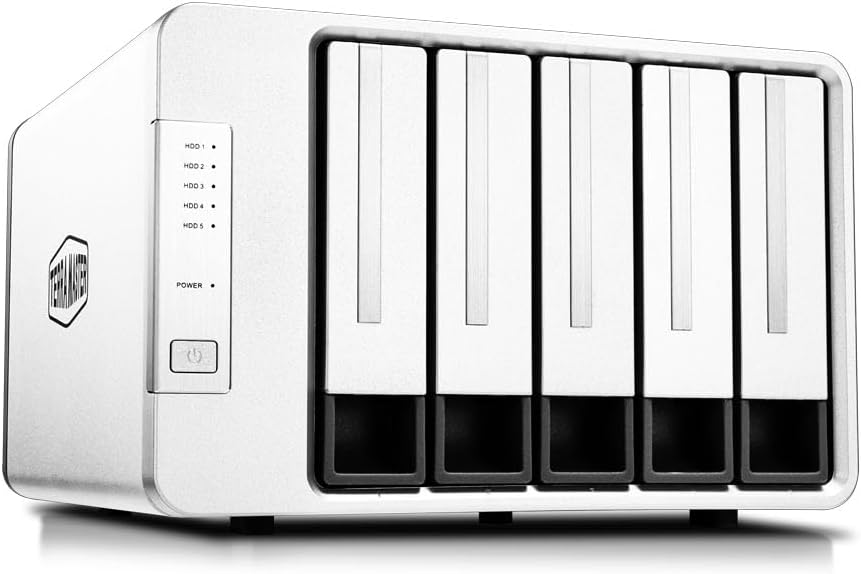


The TERRAMASTER D4-320 stands out as a top choice for users seeking high-speed direct attached storage without unnecessary complexity. It delivers robust performance through USB 3.2 Gen2 connectivity and offers excellent thermal management for steady operation.
We may earn a commission when you buy through this link, at no additional cost to you.
Its standout feature is the combination of 10Gbps throughput and a push-lock mechanism that secures drives firmly. The enclosure supports four 3.5-inch drives and includes a temperature-controlled fan that adapts to usage levels.
While it lacks hardware RAID, users gain flexibility to mount drives individually for simple access. Some noise may occur under heavy load but the system remains quieter than many comparable models.
Ideal for editors and photographers needing reliable speed, this unit provides a stable base for expanding storage capacity. Its plug-and-play nature simplifies setup across Mac and Windows environments.
An intelligent fan adjusts speed based on drive temperature to maintain performance without excessive noise.
The unique tray mechanism ensures drives are secured automatically when inserted preventing accidental disconnection.
We may earn a commission when you buy through this link, at no additional cost to you.
The QNAP TR-004 is designed for users who want to extend their existing NAS infrastructure or need reliable hardware RAID options. It connects via USB Type-C and supports various RAID configurations to protect data integrity.
We may earn a commission when you buy through this link, at no additional cost to you.
This unit shines for its integration with QNAP NAS systems allowing seamless storage pool expansion. The hardware RAID support includes levels like 0 1 and 5 providing redundancy or speed based on user needs.
It does require specific firmware versions on QNAP NAS devices to function fully which can limit its use with older setups. The price is higher than basic enclosures but justified by the RAID capabilities.
Best suited for QNAP owners or those needing redundancy without a full NAS. Its lockable bays add security and it performs reliably as external storage for demanding applications.
Supports multiple RAID modes to balance performance and data protection without relying on software processing.
Designed to expand QNAP NAS capacity when updated to compatible firmware versions for unified storage.
We may earn a commission when you buy through this link, at no additional cost to you.
The TERRAMASTER D8 Hybrid offers a unique blend of SATA HDDs and NVMe SSDs in one enclosure making it ideal for tiered storage workflows. It supports up to eight drives simultaneously with significant total capacity.
We may earn a commission when you buy through this link, at no additional cost to you.
Users can store hot data on fast NVMe drives and cold data on high-capacity HDDs optimizing both speed and cost. The USB 3.2 Gen2 interface ensures high throughput across all connected drives.
Managing mixed drive types requires planning to maximize efficiency but the flexibility is unmatched for large media libraries. Some users note noise levels when the fan runs to cool multiple drives.
Perfect for creators needing both speed and volume this device streamlines data organization. Its inclusion of backup software adds value for maintaining security across all connected storage.
Separate bays for SSDs and HDDs allow users to prioritize speed for active projects and capacity for archives.
Includes TPC Backupper software to schedule automated backups enhancing data security without extra costs.
We may earn a commission when you buy through this link, at no additional cost to you.
The CENMATE Aluminum 4 Bay provides an excellent entry point for users needing affordable multi-bay storage. It supports up to four drives and includes a cooling fan to manage heat during extended use.
We may earn a commission when you buy through this link, at no additional cost to you.
Its aluminum casing aids heat dissipation while providing a sturdy look on any desk. The enclosure supports both 2.5 and 3.5-inch drives making it versatile for different storage needs.
Speed is capped at 5Gbps which is sufficient for most tasks though not ideal for 4K video editing requiring maximum throughput. Some users may find the fan noise noticeable in quiet environments.
Ideal for home users or small businesses needing extra space without breaking the bank. Its simplicity and cost-effectiveness make it a strong recommendation for basic expansion needs.
Balances cost and functionality with a durable build that supports multiple drive sizes effectively.
Built-in fan and aluminum body work together to prevent overheating during long file transfers.
We may earn a commission when you buy through this link, at no additional cost to you.
The SABRENT 5-Bay USB-C delivers premium performance with five independent ASMedia controllers ensuring stable connections for all drives. It supports 10Gbps throughput and includes a daisy-chain port for connecting more peripherals.
We may earn a commission when you buy through this link, at no additional cost to you.
Its cooling system uses PWM control to ramp up only when necessary keeping the unit quieter during daily use. The internal power supply eliminates the need for a bulky external brick improving desk setup.
While the price is higher users gain reliability and expandability that cheaper models lack. The unit is limited to 3.5-inch drives which may not fit all users preferring 2.5-inch SSDs.
Best for professionals needing robust connectivity and silent operation. Its design supports heavy workloads and long-term stability making it worth the investment for critical data tasks.
Dedicated controller per bay ensures each drive maintains a stable link reducing risk of data errors.
Internal power supply removes external bricks for a cleaner desk and simpler cabling for users.
We may earn a commission when you buy through this link, at no additional cost to you.
The TERRAMASTER D8 Hybrid 2 improves on its predecessor with enhanced power management and faster read speeds. It supports four HDDs and four NVMe SSDs allowing optimized storage tiers for active and archive data.
We may earn a commission when you buy through this link, at no additional cost to you.
Read speeds reach up to 1020 MB/s with M.2 SSDs which significantly reduces wait times for large file transfers. The TPM technology offers power save and active modes to suit different workflow needs.
Managing eight drives requires planning but the flexibility is unmatched for large video editing or virtualization projects. Users report high satisfaction with the speed and stability across different operating systems.
Ideal for power users demanding top-tier performance and capacity. Its hybrid approach ensures that expensive SSDs are reserved for tasks that truly benefit from their speed capabilities.
TPM technology switches between active and power save modes to balance energy use and performance.
NVMe slots provide rapid read/write speeds for active projects reducing overall workflow bottlenecks.
We may earn a commission when you buy through this link, at no additional cost to you.
The TERRAMASTER D5-310 simplifies hardware RAID setup with a physical knob to switch between modes quickly. It supports five drives and includes a hot spare feature for enhanced reliability in critical environments.
We may earn a commission when you buy through this link, at no additional cost to you.
Its compatibility with macOS Windows and Linux is notable since many devices struggle with Apple systems. The included TPC Backupper software helps automate backups for extra peace of mind.
Transfer speeds are limited to 5Gbps which may be a drawback for users needing maximum throughput. Some users also note that the fan can be loud during heavy read/write cycles.
Best for users prioritizing data redundancy over raw speed. The hot spare feature and physical RAID controls make it a practical choice for small business backups and archives.
Physical knob on rear allows quick switching between RAID modes without navigating menus.
Hot spare support automatically replaces failed drives in supported RAID modes to minimize downtime.
We may earn a commission when you buy through this link, at no additional cost to you.
The WAVLINK 4-Bay distinguishes itself with an HDMI port supporting 4K video output alongside high-speed storage. It connects via USB 3.2 Gen2 and offers independent power switches for each drive bay.
We may earn a commission when you buy through this link, at no additional cost to you.
Users can expand storage and connect a monitor through a single dock which reduces cable clutter on a desk. The aluminum shell and temp-controlled fans ensure drives stay cool during intensive data transfers.
To use the HDMI feature the host device must support video output over USB-C which adds compatibility considerations. The independent switches allow power cycling individual drives without shutting down the entire system.
Ideal for users needing both storage and display connectivity. Its build quality and speed make it a versatile choice for modern workstations requiring multiple peripherals.
HDMI port enables direct video output reducing the need for separate adapters and cables.
Per-bay power switches allow managing each drive independently for better maintenance.
We may earn a commission when you buy through this link, at no additional cost to you.
The ORICO 5 Bay simplifies installation with a magnetic tool-free cover that eliminates the need for screws. It supports five drives and offers a large total capacity suitable for extensive media collections.
We may earn a commission when you buy through this link, at no additional cost to you.
Its USB-C interface ensures modern connectivity while the magnetic chips on the cover allow quick access to drives. The unit includes various protection features to safeguard data during transmission.
Linux users may find that only one drive is readable at a time which limits its usefulness in that environment. Some users also note that the cooling fan can be audible during operation.
Best for home users needing easy access and high capacity. Its straightforward design makes it a reliable option for expanding storage without complex setup procedures.
Cover stays secure without screws allowing quick and easy access to internal drive bays.
Includes over-voltage and over-heat protection to maintain security during data transmission.
We may earn a commission when you buy through this link, at no additional cost to you.
The QNAP TR-002 offers a compact solution for users needing hardware RAID with just two drive bays. It connects via USB Type-C and supports both 2.5 and 3.5-inch SATA drives.
We may earn a commission when you buy through this link, at no additional cost to you.
Its lockable bays provide physical security which is valuable in shared work environments. The hardware RAID support allows users to configure redundancy without relying on software solutions.
While limited to two drives the unit delivers robust performance and reliability typical of QNAP products. The price is higher per bay than larger models but justified by the build and features.
Ideal for professionals or small offices requiring secure expandable storage. Its compact size and reliable performance make it a solid choice for essential backup tasks.
Lockable bays and small footprint make it suitable for desk use in shared spaces.
Quality construction and RAID support ensure stability for critical data storage needs.
We may earn a commission when you buy through this link, at no additional cost to you.
Selecting the right Direct Attached Storage involves balancing speed, capacity, and ease of use. This guide outlines the key factors to consider when evaluating different models.
The interface type determines how fast data moves between your computer and the storage unit. USB 3.2 Gen2 offers up to 10Gbps while older USB 3.0 caps at 5Gbps. Check your computer ports to ensure compatibility and avoid bottlenecks.
Prioritize USB 3.2 or Thunderbolt if you work with large files like 4K video or raw photos.
Bay count dictates how many drives you can install simultaneously. Models range from two to eight bays. Consider total capacity by multiplying the max drive size by the number of bays.
Choose more bays if you need vast archives; fewer bays suit simpler backup needs.
Hot swappable drives allow you to remove or add drives without powering down the enclosure. This is essential for environments where downtime must be minimized.
Ensure the model supports this feature if you plan to rotate drives frequently.
Enclosures generate heat when multiple drives run. Quality models include temperature-controlled fans to maintain safe operating conditions.
Look for aluminum shells and smart fans to reduce noise while protecting drives.
Some units offer hardware RAID or backup software while others rely on the host system. Hardware RAID provides faster and more reliable redundancy.
Check if included software meets your backup needs before buying additional tools.
Metal enclosures dissipate heat better than plastic and resist physical damage. Sturdy trays and push-lock mechanisms secure drives firmly.
Invest in robust construction to protect valuable data investments.
Ensure the unit works with your specific OS without needing extra drivers. Some models struggle with macOS or older Linux versions.
Verify official compatibility lists to avoid setup hurdles.
Cost varies significantly by features and brand. A good warranty covers defects and provides peace of mind over time.
Balance budget with long-term reliability needs for optimal value.
Connect the DAS enclosure to your computer using the provided high-quality cable. Ensure the unit is powered and recognized by your operating system before mounting drives.
Install your hard drives by sliding them into the bays until they lock securely. Do not force drives into place to avoid damaging connectors.
Keep the enclosure in a well-ventilated area and clean dust from fans regularly to prevent overheating. Periodically check for firmware updates to maintain performance.
DAS connects directly to a single computer via USB or Thunderbolt whereas NAS connects over a network. DAS offers lower latency and simpler setup but lacks multi-user sharing capabilities.
New drives often require formatting to match your OS file system. Most DAS units are plug-and-play but initial setup may involve partitioning tools.
Some hybrid models support mixing SSDs and HDDs to optimize speed and capacity. Check the product specs to confirm hybrid compatibility before purchasing.
Heat results from multiple drives operating simultaneously. Ensure vents are unobstructed and fans are clean. Using aluminum enclosures helps dissipate heat better.
Hardware RAID adds redundancy but is not a substitute for offsite backups. It protects against drive failure but software backups offer broader disaster recovery options.
Some models support daisy-chaining via USB-C ports allowing expanded connectivity. Verify if your specific unit includes this feature in its specifications.
The TERRAMASTER D4-320 leads as the top pick for its speed and ease of use making it suitable for most professionals seeking reliable expansion.
Consider your specific workflow needs such as RAID support or hybrid storage to select the model that aligns with your performance and capacity goals.
Prices and availability fluctuate so verify current listings and specifications before finalizing your purchase to ensure you get the best deal.