
Redragon K512 RGB Membrane Gaming Keyboard
4.5Editor score
Six onboard macro keys
Media wheel included
Detachable wrist rest
This guide compares the best keyboards with macro keys for gaming and productivity, evaluating features like programmable keys, software, and build quality.
Finding the right keyboard with macro keys can transform your workflow and gaming experience. These devices allow you to automate complex commands and streamline tasks with single presses.
We evaluated ten top models based on macro functionality, build quality, and user feedback. Our list covers mechanical and membrane options from budget-friendly to premium choices.
Each pick highlights key strengths and potential trade-offs to help you decide. Remember that prices and availability change frequently, so check current listings before purchasing.
4.5Editor score

4.1Editor score
4.3Editor score
Below is a side-by-side comparison of all ten keyboards to help you quickly identify the best match for your needs.


The VSD K1 Pro stands out as a versatile mechanical keyboard designed for gamers and streamers who need robust macro capabilities. It features a full-key programmable layout that allows you to record and assign macros directly to any key without needing complex software setups. The integrated streaming deck function adds a unique layer of customization with LCD keys and knobs that can control apps or media.
We may earn a commission when you buy through this link, at no additional cost to you.
Its hot-swappable PCB lets you change switches without soldering, which is great for tailoring the typing feel. The gasket mount and five-layer dampening structure reduce noise and improve comfort during long sessions. The color display and multi-function knob provide real-time feedback for settings like volume and backlighting.
One trade-off is that the screen features require software installation and a wired connection, which limits flexibility for wireless setups. Also, the USB-C to USB-C cable is not included, so you may need to source it separately. Despite this, the build quality and feature set make it a strong contender.
If you want a keyboard that doubles as a macro pad and streaming controller, the VSD K1 Pro is an excellent choice. It suits users who value customization and are willing to install software for full functionality. Check current listings to ensure you have the right cables before purchase.
The VSD Craf software allows you to create switchable pages with LCD keys that can launch apps or control media.
Hot-swappable design supports 3-pin or 5-pin switches, letting you personalize the tactile feel easily.
We may earn a commission when you buy through this link, at no additional cost to you.
The Redragon K512 offers an accessible entry point for users seeking a keyboard with macro keys without breaking the bank. It features six onboard macro keys that can be programmed on the fly without installing drivers or software, making it ideal for quick setup. The dedicated media wheel lets you control volume and playback without interrupting your game or work.
We may earn a commission when you buy through this link, at no additional cost to you.
Its membrane switches provide a soft typing experience, which some users prefer for long periods. The RGB lighting includes multiple modes and brightness settings to match your setup. The detachable wrist rest adds comfort, while the double-shot keycaps resist fading over time.
A consideration is that membrane switches lack the tactile feedback of mechanical ones, which might not appeal to enthusiasts. Also, advanced features like custom backlight effects require optional software. However, for everyday use, the built-in macros are sufficient and straightforward.
This keyboard is perfect for budget-conscious gamers or office workers who need macro functionality without complexity. It delivers solid performance and media control at a low cost. Verify the layout fits your needs before buying to ensure satisfaction.
Record and reassign G1-G6 keys directly on the keyboard for instant access to shortcuts or combos.
The media wheel allows quick adjustments to volume and track selection without leaving your application.
We may earn a commission when you buy through this link, at no additional cost to you.
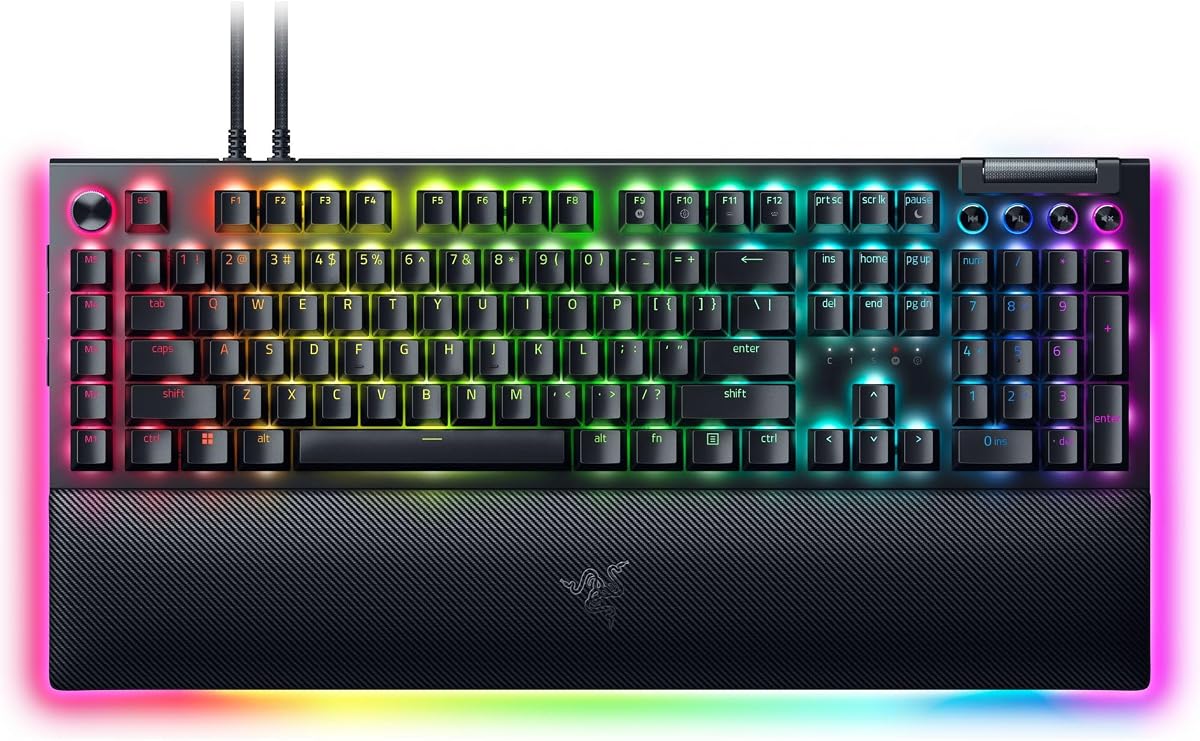
The Razer BlackWidow V4 Pro is a top-tier mechanical keyboard designed for gamers who demand precision and customization. It includes eight dedicated macro keys that can be programmed to execute complex commands with a single press. The command dial adds another layer of control, allowing you to assign custom functions for media or in-game actions.
We may earn a commission when you buy through this link, at no additional cost to you.
The Green mechanical switches provide tactile feedback that many gamers enjoy for precise execution. The magnetic plush leatherette wrist rest with underglow lighting ensures comfort during marathon sessions. Double-shot ABS keycaps ensure labeling never wears off, even with heavy use.
While it is a premium product, the price reflects the advanced features and build quality. Software integration via Razer Synapse is needed to unlock full macro and lighting capabilities, which may be a hurdle for some users. However, the overall experience is smooth and immersive.
If you are looking for a high-end keyboard with extensive macro options and premium comfort, this model is worth the investment. It suits users who value performance and aesthetics. Check compatibility with your existing setup before purchasing.
Assign custom functions to the programmable dial for quick access to volume, brightness, or other settings.
Per-key lighting and underglow sync with games and apps for a visually engaging setup.
We may earn a commission when you buy through this link, at no additional cost to you.
The Corsair K55 RGB PRO is a reliable membrane keyboard that balances affordability with functional macro support. It features six dedicated macro keys that can be set up through iCUE software or used for instant streaming commands via Elgato Stream Deck. The dust and spill-resistant design makes it durable for daily use.
We may earn a commission when you buy through this link, at no additional cost to you.
Dedicated volume and media keys allow quick control without interrupting your game. The RGB backlighting offers multiple zones and effects to personalize your look. A detachable palm rest provides additional comfort for long sessions.
Users should note that macros require software installation, which might not be ideal for those seeking plug-and-play simplicity. Membrane switches also lack the clicky feel of mechanical options. However, the build quality and spill resistance are strong points.
This keyboard is suitable for casual gamers or office users who want macro keys without spending much. It offers good value with solid media controls. Ensure you have access to the software for full macro functionality.
Use instant streaming commands through Elgato Stream Deck software for seamless content creation workflows.
IP42-rated protection guards against spills and dust to extend the keyboard lifespan.
We may earn a commission when you buy through this link, at no additional cost to you.
The Redragon K580 is a mechanical keyboard that offers robust macro features at a reasonable price. It includes five dedicated macro keys that allow you to save complex combos directly on the keyboard without software. The media controls let you manage playback and volume without leaving your game.
We may earn a commission when you buy through this link, at no additional cost to you.
The hot-swappable socket accepts almost any switch, giving you flexibility to upgrade or change the feel. The stock Brown switches provide a gentle tactile bump with less noise than clicky types. Full anti-ghosting ensures accurate input during intense gaming.
A consideration is that software is optional for advanced RGB and macro profiles, which might limit customization without it. The quiet tactile switches may not appeal to users who prefer loud feedback. Still, the build quality and flexibility are commendable.
This keyboard is ideal for gamers who want mechanical switches and macro support without breaking the bank. It suits those who value customization and comfort. Check if the included switches match your preference before purchasing.
Swap switches without soldering to customize the typing feel to your liking.
Save combos directly on the keyboard for quick access during gameplay or work tasks.
We may earn a commission when you buy through this link, at no additional cost to you.
The Redragon K550 stands out for having twelve onboard macro keys, offering extensive programmability without extra software. These keys work on the fly to perform various macros for gaming or productivity. The aluminum top plate adds a premium feel and stability to the keyboard.
We may earn a commission when you buy through this link, at no additional cost to you.
An extra USB pass-through port lets you connect other devices like a mouse or receiver directly to the keyboard. Dedicated media controls allow quick adjustment of volume and track selection. The custom purple switches provide a distinct tactile experience with clear feedback.
Users should be aware that the custom switches may not appeal to those who prefer standard linear or tactile options. Full macro programming requires software, which adds a setup step. However, the hardware quality and macro count are strong advantages.
This keyboard is perfect for users who need many macro keys and a robust build. It suits gamers and power users who want extensive control. Verify switch preferences before buying to ensure satisfaction.
Twelve macro keys allow for a wide range of shortcuts and actions without needing external tools.
USB pass-through port helps reduce cable clutter by connecting peripherals directly to the keyboard.
We may earn a commission when you buy through this link, at no additional cost to you.
The Razer BlackWidow V4 X is a mechanical keyboard designed for those who want macro functionality without loud typing noise. It features six dedicated macro keys that can be programmed to suit your playstyle. The Yellow mechanical linear switches offer rapid inputs with built-in sound dampeners for a quieter experience.
We may earn a commission when you buy through this link, at no additional cost to you.
The Chroma RGB per-key lighting allows extensive customization with over 16.8 million colors. A multi-function roller and secondary media keys provide quick access to volume and playback controls. Double-shot ABS keycaps ensure durability and clear labeling over time.
While it lacks dedicated media keys, the roller and secondary keys compensate well. Software is required for full macro programming, which may be a minor inconvenience. The improved acoustics and switch quality make it a solid choice for shared spaces.
This keyboard is ideal for users who value quiet operation and premium features. It suits gamers and professionals who need macro keys without distraction. Check software requirements before purchasing to ensure compatibility.
Built-in sound dampeners minimize noise during typing and gaming for a more peaceful environment.
Chroma RGB lighting syncs with games and apps for immersive effects across all keys.
We may earn a commission when you buy through this link, at no additional cost to you.
The Redragon K618 PRO offers wireless freedom with extensive macro capabilities in a slim design. It features twenty on-the-fly macro keys that let you record combos without installing anything first. The tri-mode connectivity allows switching between USB-C, Bluetooth, and 2.4GHz wireless seamlessly.
We may earn a commission when you buy through this link, at no additional cost to you.
The low-profile design shortens travel distance for faster actuation and lighter typing. A one-touch Win/Mac switch makes it versatile for different operating systems. The Red switches provide responsive feedback for both gaming and typing tasks.
While the low-profile switches offer speed, they may lack the travel distance some users prefer for mechanical keyboards. Software is optional for deeper customization, which keeps initial setup simple. The wireless options reduce cable clutter significantly.
This keyboard is perfect for users who need portability and macro support on multiple devices. It suits travelers or those with multi-device setups. Verify the wireless mode fits your workflow before buying.
Tri-mode connectivity lets you jump between devices without re-pairing or sacrificing speed.
Twenty macro keys provide ample room for shortcuts without needing external macro pads.
We may earn a commission when you buy through this link, at no additional cost to you.
The Logitech G213 Prodigy is a full-size keyboard designed for gaming and productivity with solid macro support. You can customize lighting zones and program macros using Logitech G HUB software. The anti-ghosting gaming matrix ensures optimal performance during fast-paced games.
We may earn a commission when you buy through this link, at no additional cost to you.
Dedicated media controls let you play, pause, and mute videos instantly. The integrated palm rest and adjustable feet help maintain comfort during long sessions. The slim body and durable construction repel liquids and dirt for easy cleanup.
A drawback is that macro programming requires software installation, which might not be ideal for quick setups. The full-size layout may occupy more desk space than compact options. However, the comfort and build quality are excellent for daily use.
This keyboard is ideal for users who want a reliable full-size keyboard with macro capabilities. It suits gamers and office workers who value ergonomics. Ensure you have access to the software for full macro functionality.
Logitech G HUB software allows deep customization of lighting and macro settings.
Integrated palm rest and adjustable feet reduce fatigue during extended use.
We may earn a commission when you buy through this link, at no additional cost to you.
The Razer BlackWidow V4 is a mechanical keyboard tailored for gamers who prefer linear switches and macro control. It includes six dedicated macro keys that can be programmed to execute complex commands quickly. The Yellow linear switches offer rapid-fire inputs with minimal noise.
We may earn a commission when you buy through this link, at no additional cost to you.
Per-key lighting and two-side underglow create an immersive atmosphere. A magnetic plush leatherette wrist rest provides comfort for long marathons. The multi-function roller and media keys allow easy adjustment of volume and brightness.
Software is needed for full macro programming, which adds a setup step. The price is higher than budget options but justified by the feature set. The underglow adds aesthetic value without compromising performance.
This keyboard is suitable for gamers who value smooth switches and premium features. It suits users who want extensive macro support in a well-built package. Check current listings to ensure compatibility with your setup.
Yellow linear switches provide fast actuation and reset points for quick inputs.
Underglow and per-key lighting sync with games for an immersive visual experience.
We may earn a commission when you buy through this link, at no additional cost to you.
Selecting the right keyboard with macro keys involves weighing several factors to match your specific needs and preferences.
Macro functionality varies by model. Some keyboards allow on-the-fly recording without software, while others require companion apps for complex setups. Consider how many macro keys you need and whether you prefer hardware or software-based configuration.
If you value quick setup and simplicity, look for models with onboard macro recording. For advanced users, software support offers deeper customization options.
Switch type affects the feel and sound of the keyboard. Mechanical switches offer tactile or clicky feedback, while membrane switches provide a softer touch. Linear switches are preferred for fast inputs, and tactile ones for clear feedback.
Choose a switch type that matches your usage style. Gamers often prefer linear or tactile switches, while typists may prefer clicky ones.
Build quality determines durability and stability. Look for keyboards with sturdy materials like aluminum plates or gasket mounts. Also check for features like spill resistance or sound dampening to enhance longevity.
Higher build quality often means better performance over time. Invest in a model that fits your budget but prioritizes durability.
Connectivity options include wired, wireless, or hybrid modes. Wired connections ensure zero latency, while wireless offers flexibility. Some models support multiple devices, which is useful for multi-device setups.
If you work across multiple devices, choose a keyboard with tri-mode connectivity. For competitive gaming, wired options are safer.
Software support expands customization potential. Some brands offer robust apps for lighting, macros, and profiles. Others rely on onboard controls for simplicity. Check if the software is compatible with your operating system.
If you need advanced features, ensure the software is user-friendly. For basic needs, onboard controls may suffice.
Comfort features like wrist rests, ergonomic angles, and keycap quality impact long-term use. A detachable wrist rest adds comfort, while adjustable feet allow for a customized typing angle.
Prioritize keyboards with wrist rests if you type for long hours. Ergonomic designs reduce strain and improve productivity.
Budget plays a key role in selection. Entry-level models offer basic macro support, while premium ones provide advanced features like OLED screens or command dials. Determine how much you are willing to spend.
Set a realistic budget to narrow down options. You can find quality models across different price points if you prioritize key features.
Compatibility with your operating system is essential. Ensure the keyboard supports Windows, macOS, or Linux as needed. Also check for driver support if you plan to use advanced software features.
Verify compatibility before purchasing to avoid issues. Most modern keyboards support both Windows and macOS, but it is best to confirm.
To maximize the benefits of a keyboard with macro keys, start by learning how to record and assign macros. Most models allow you to hold a specific key while pressing the macro key to record a sequence. Practice assigning macros to complex tasks like game combos or repetitive work commands.
Regular maintenance helps keep the keyboard in top condition. Clean the keys with a soft brush or compressed air to remove dust. For spill-resistant models, wipe the surface with a damp cloth if needed to ensure longevity.
Adjust the settings to suit your environment. Customize lighting to reduce eye strain, and position the keyboard ergonomically to avoid wrist fatigue. Periodically review your macros to ensure they still meet your needs.
Yes, many keyboards with macro keys support both Windows and macOS. Check the product details for compatibility notes. Some models include a physical switch to toggle between operating systems.
It depends on the model. Some keyboards allow on-the-fly recording without software. Others require companion apps for advanced features. Onboard macros are ideal for quick setups without installation.
Mechanical keyboards offer better tactile feedback and durability compared to membrane ones. This can help you confirm macro inputs more accurately. However, membrane keyboards can still handle macros well for general use.
The number of macro keys depends on your usage. Casual users may need five to six keys. Power users or gamers might benefit from ten or more. Consider your workflow when deciding.
Some macro keyboards have hot-swappable PCBs that allow switch replacement without soldering. This gives you flexibility to customize the feel. Check the product specs to confirm if it supports this feature.
Many macro keyboards integrate with streaming software like Elgato Stream Deck. This allows you to assign actions to keys for launching apps or controlling media. Verify compatibility with your preferred software before buying.
We have explored ten top keyboards with macro keys, each offering unique features for different needs. Whether you prioritize budget, premium comfort, or wireless flexibility, there is an option that fits.
When choosing, consider your workflow and how often you use macros. Mechanical users may prefer tactile feedback, while others may value quiet linear switches. Ensure the software and compatibility align with your system.
Prices and availability change frequently so check current listings before purchasing. By investing in the right keyboard, you can enhance productivity and enjoy a better user experience daily.