
Amzboy 15.6 Laptop
4.8Editor score
FHD Anti Glare Display
45W Type C Fast Charging
Windows 11 Ready OS
Finding a cheap laptop for everyday use does not mean sacrificing quality or reliability. You need a device that handles browsing streaming and productivity tasks without breaking the bank. This guide explores the best options available to help you make an informed decision.
We evaluated ten real products based on processor speed memory storage display quality and battery life. Our analysis focuses on models that offer the best balance of performance and affordability for daily workflows. Each pick was chosen for its ability to handle common computing needs effectively.
Each product entry shows key specifications pros and cons along with direct links to verify current availability. Prices and stock levels change frequently so always check the retailer page before buying. This list helps you identify the right fit for your specific budget and usage requirements.
4.8Editor score

4.3Editor score

4.5Editor score
As an Amazon Associate we earn from qualifying purchases.
The following table provides a side by side comparison of all ten laptops listed in this guide. It highlights key specifications such as processor type memory storage and display resolution to help you quickly identify which model matches your needs.



The HP Chromebook 14 Laptop stands out as a top choice for everyday computing needs. With a solid 4.3 rating from users it offers a reliable experience for students and home users. Its standout qualities include a long battery life and a secure operating system that requires minimal maintenance.
We may earn a commission when you buy through this link, at no additional cost to you.
Powered by the Intel Celeron N4120 processor this device handles web browsing document editing and streaming efficiently. The 14 inch HD display provides clear visuals for media consumption while the anti-glare coating reduces eye strain. Connectivity is robust with Wi-Fi and Bluetooth ensuring seamless integration with peripherals.
While the 64 GB eMMC storage is limited compared to SSDs it is manageable with cloud storage options. The HD resolution is adequate for general use but may lack the sharpness of higher end models. These trade-offs are acceptable given the price and battery performance it delivers.
This laptop is ideal for anyone needing a portable device for school or light work tasks. Families looking for a secondary machine for browsing and video calls will find it particularly useful. We recommend it for those who prioritize battery life and ease of use over raw power.
The device supports up to 14 hours of battery life which is rare in this price segment. HP Fast Charge technology ensures you can quickly top up power when away from an outlet.
Chrome OS provides a secure environment with automatic updates. You gain access to millions of Android apps through the Google Play Store extending functionality beyond standard web apps.
We may earn a commission when you buy through this link, at no additional cost to you.
The Amzboy 15.6 Laptop is a strong contender for budget conscious buyers seeking a larger screen. It holds an impressive 4.8 rating indicating high user satisfaction. The FHD display offers better visual clarity than many competitors in this range.
We may earn a commission when you buy through this link, at no additional cost to you.
Its N4020 CPU handles daily tasks like Zoom classes and document work smoothly. The fanless design ensures silent operation which is great for quiet environments. Storage expansion up to 1 TB via TF card provides flexibility for media files.
The 4 GB RAM may limit heavy multitasking but works well for standard browsing. The CPU is entry level so video editing or gaming is not recommended. These limitations are expected at this price point and do not hinder basic productivity.
This model is perfect for students needing a portable machine with a large display. It suits users who prefer Windows 11 and need a silent device for study sessions. We suggest it for those who value screen real estate and portability.
The 15.6 inch 1920×1080 screen offers crisp visuals for videos and documents. This resolution is significantly better than HD panels found on similar budget laptops.
It features a compact 45W Type-C PD fast adapter. This allows you to carry one cord for both the laptop and compatible phones reducing travel bulk.
We may earn a commission when you buy through this link, at no additional cost to you.
The HP Everyday Laptop 2026 represents the latest in affordable computing technology. Although it lacks user ratings as a new model it offers advanced features like Windows 11 with Copilot AI. This positions it well for productivity focused tasks.
We may earn a commission when you buy through this link, at no additional cost to you.
Powered by the Intel N150 processor it delivers smooth performance for office work and streaming. The 128 GB SSD ensures faster boot times and application launches compared to eMMC storage. Connectivity is future proof with Wi-Fi 6 and Bluetooth 5.4.
Storage might be tight for large libraries but cloud integration helps mitigate this. The design is sleek and lightweight making it easy to carry for school or work. The lack of historical data means potential buyers should check recent reviews.
This laptop is suited for professionals who need modern AI tools and reliable performance. It is ideal for those upgrading from older devices and seeking better connectivity. We recommend it for users who value new features and brand reliability.
Copilot AI helps with research and summaries directly within the OS. This feature streamlines workflows for students and professionals managing complex tasks.
Wi-Fi 6 ensures faster wireless speeds and better range. Bluetooth 5.4 improves pairing stability with headphones and keyboards for a better experience.
We may earn a commission when you buy through this link, at no additional cost to you.
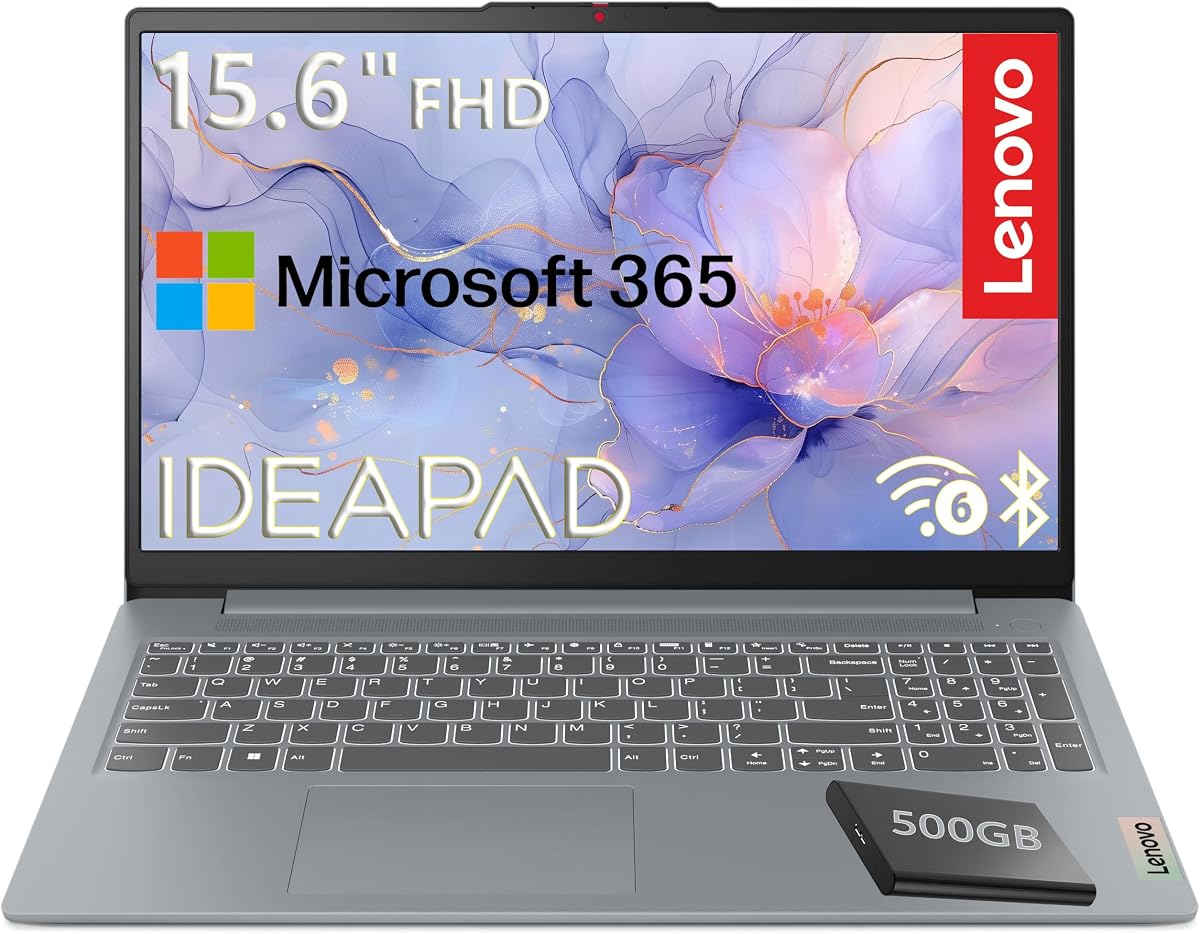
The Lenovo 15.6 FHD Laptop combines storage and durability in one package. With a 4.2 rating it proves reliable for home users and students. The inclusion of a portable external drive is a significant benefit for data storage needs.
We may earn a commission when you buy through this link, at no additional cost to you.
Its Intel N100 processor with 4 cores handles everyday computing tasks efficiently. The FHD display provides good detail for media though the TN panel has limited viewing angles. The stereo speakers enhance audio quality for calls and videos without headphones.
The external HDD is convenient but separate from internal storage which is 128 GB UFS. The military grade certification ensures durability for rough handling during travel. These design choices offer high value for families needing robust hardware.
This model is excellent for users with large media collections or school files. It is also a great choice for travelers who need a durable machine. We suggest it for those prioritizing storage capacity and build quality over premium display tech.
The 500 GB external hard drive allows you to save movies and documents separately. This keeps the internal drive free for faster system performance and essential apps.
MIL-STD-810H certification means the laptop has passed 20 rigorous tests. It can withstand shocks and harsh conditions better than standard consumer laptops.
We may earn a commission when you buy through this link, at no additional cost to you.
This HP Chromebook 14 inch model offers improved memory and storage specs. With a 4.4 rating it shows consistent user approval for daily tasks. The 8 GB RAM is a standout feature that helps significantly with multitasking.
We may earn a commission when you buy through this link, at no additional cost to you.
The Intel Processor N100 ensures reliable performance for online classes and streaming. 128 GB UFS storage provides faster speeds and lower power consumption than eMMC. Chrome OS keeps the system secure and up to date automatically.
While the HD display is not Full HD the high RAM allows for smoother operation. Chrome OS does not support all desktop applications which may limit specific workflows. These trade-offs are common for Chromebooks but acceptable for general web use.
This laptop is best for users who rely on cloud apps and web browsers. Students needing a device for research and writing will find it responsive. We recommend it for those who value speed and memory over native Windows compatibility.
Having 8 GB of RAM allows you to open multiple tabs and apps without slowing down. This is particularly useful for streaming while browsing or taking notes simultaneously.
Universal Flash Storage boots faster and loads apps quicker than standard flash storage. It improves the overall responsiveness of the system for daily interactions.
We may earn a commission when you buy through this link, at no additional cost to you.
The Lenovo Chromebook S330 is a lightweight option for basic daily tasks. It holds a 4.2 rating reflecting steady performance for browsing and media. Its slim design makes it ideal for carrying in a backpack to school.
We may earn a commission when you buy through this link, at no additional cost to you.
Powered by MediaTek processor it handles web apps and video calls efficiently. The 32 GB storage is low but 100 GB cloud storage helps offset this. Battery life lasts up to 10 hours for uninterrupted usage throughout the day.
Internal storage limits offline files so reliance on the internet is high. The processor is not suited for heavy multitasking or creative work. These constraints are expected for such an affordable portable device.
This model suits students needing a cheap device for reading and writing. It is also good as a travel companion for checking email and maps. We suggest it for those who prioritize portability and cloud connectivity over local storage.
Google Drive cloud storage extends your space for documents and photos. This feature keeps the device light and reduces the need for physical storage.
At less than 3.3 lbs and under 1 inch thick this laptop is easy to carry. It fits into almost any bag making it perfect for commuting students.
We may earn a commission when you buy through this link, at no additional cost to you.
The HP Essential Laptop 2026 targets productivity with built-in Office 365. Its 4.5 rating suggests strong user satisfaction for work and study tasks. The inclusion of software subscriptions adds significant value to the purchase price.
We may earn a commission when you buy through this link, at no additional cost to you.
The N150 processor supports smooth browsing and document editing. Wi-Fi 6 ensures reliable connections for video calls. Noise reduction audio improves clarity during meetings which is vital for remote work.
RAM may restrict heavy workflows but is adequate for general office use. The 128 GB storage requires management of large files. These are standard limits for affordable productivity machines.
This laptop is perfect for professionals needing a ready-to-go work device. It suits students who need Word and Excel without extra costs. We recommend it for those who value software inclusion and modern connectivity.
Microsoft 365 Personal gives access to Word and Excel for a year. This saves immediate cost compared to buying licenses separately for home or school.
AI Noise Reduction filters background sounds during calls. This ensures your voice is heard clearly during online meetings or classes.
We may earn a commission when you buy through this link, at no additional cost to you.
The Lenovo Flagship Chromebook stands out with a touchscreen interface. A 4.2 rating confirms it is reliable for school and general use. The 14 inch FHD display offers better clarity than many HD screens.
We may earn a commission when you buy through this link, at no additional cost to you.
Its Kompanio 520 processor provides strong performance for everyday activities. The IPS panel ensures wide viewing angles which is great for sharing content. Battery efficiency is improved compared to older Chromebook models.
Storage is limited to 64 GB requiring careful management or cloud use. The operating system may not support all desktop software needs. These trade-offs are typical for Chromebook form factors.
This laptop is ideal for users who enjoy touch interaction. It suits students in classrooms using touch optimized apps. We suggest it for those who value screen quality and modern processing power.
The touchscreen allows for intuitive navigation and quick zooming. This feature enhances the experience for visual content and apps designed for touch.
An octa-core processor ensures smooth multitasking and app switching. It elevates performance in daily activities compared to dual-core alternatives.
We may earn a commission when you buy through this link, at no additional cost to you.
The HP Slim Laptop 2026 focuses on modern connectivity and performance. As a new model it lacks user ratings but uses latest DDR5 memory and Wi-Fi 6. This makes it a future proof choice for everyday computing.
We may earn a commission when you buy through this link, at no additional cost to you.
Its N150 processor handles standard tasks smoothly. The 128 GB SSD offers faster boot times than eMMC. Connectivity includes essential ports for monitors and storage without needing hubs.
DDR5 RAM improves bandwidth but 4 GB is still low for heavy apps. The model is new so long term reliability is unproven. These limitations are expected for current entry level laptops.
This laptop is best for users wanting modern tech features. It suits professionals needing reliable wireless performance. We recommend it for those who prefer newer hardware specs and design.
DDR5 RAM offers faster data transfer and better power efficiency. This helps the system handle updates and multiple background processes more effectively.
Wi-Fi 6 and Bluetooth 5.4 ensure stable connections. Essential ports allow direct connections to printers and external displays easily.
We may earn a commission when you buy through this link, at no additional cost to you.
This 15.6 Inch Laptop offers high memory capacity for multitasking. A 4.2 rating indicates solid performance for school and home tasks. The 12 GB RAM is rare in this price range and helps with productivity.
We may earn a commission when you buy through this link, at no additional cost to you.
The Pentium Gold 6500Y processor provides basic computing power. The IPS screen ensures vibrant colors and wide viewing angles. Connectivity is generous with multiple USB ports and HDMI options.
The CPU is older so it may lag on intensive tasks. Battery life is not specified which is a risk for travel. These are acceptable compromises for the high RAM and storage offered.
This model suits users needing extra memory for many open tabs. It is good for home office setups needing multiple ports. We suggest it for those who prioritize memory and display quality over CPU speed.
12 GB RAM allows running several apps faster than 8 GB models. This reduces lag when switching between browser tabs and documents.
A physical camera slider lets you cover the lens completely. This adds peace of mind during video calls and online classes.
We may earn a commission when you buy through this link, at no additional cost to you.
Choosing the right laptop requires balancing hardware capabilities with your daily needs. This guide outlines key factors to consider for an informed purchase decision.
The processor is the engine of your laptop. For everyday use, models with Intel N100 or similar mid-range chips are sufficient for browsing and office work. Avoid older dual-core processors if you plan on multitasking.
Prioritize processors with at least 4 cores for smoother performance in the long run.
RAM determines how many apps you can run at once. 4 GB is the minimum, but 8 GB or more is recommended for comfortable multitasking. Chromebooks often manage well with less RAM due to the OS efficiency.
Look for at least 8 GB if you keep many tabs open simultaneously.
SSD and UFS storage offer faster boot times than eMMC. Aim for 128 GB minimum to store essential files. External storage or cloud solutions can help if internal storage is limited.
Ensure the storage type supports fast application launches.
A Full HD (1920×1080) screen provides sharper images than HD. IPS panels offer better viewing angles for media consumption. Anti-glare coatings reduce eye strain during long sessions.
Select a resolution and panel type that suits your visual needs.
Battery life affects portability. Look for models claiming 10 hours or more for all-day use. Fast charging features reduce downtime when you are away from a power source.
Check user reviews for real-world battery duration.
Modern laptops should have USB-C, USB-A, and HDMI ports. Wi-Fi 6 ensures faster and more reliable wireless connections. Bluetooth support is essential for connecting peripherals.
Verify the ports match your external device requirements.
Windows 11 supports a wider range of applications and desktop software. Chrome OS is simpler, more secure, and ideal for web-based tasks. Consider your specific software needs before choosing.
Align the OS choice with your workflow complexity.
Materials affect longevity. Look for MIL-STD certifications if you travel often. A sturdy hinge and solid chassis prevent damage from daily handling. Check the warranty terms for added security.
Prioritize durability if the device will be moved frequently.
Keep your laptop clean by using a microfiber cloth to wipe the screen and keyboard regularly. Avoid eating over the device to prevent crumbs from entering the vents and causing overheating.
Manage storage space by deleting unused files and using cloud services for backups. Regularly update your operating system to ensure you have the latest security patches and performance improvements.
Protect your device by using a sleeve when carrying it in a backpack. Avoid leaving it in extreme temperatures, as heat can damage the battery and internal components over time.
eMMC storage is cheaper and often found in budget models but offers slower read and write speeds. SSDs provide significantly faster performance for booting and opening apps. While eMMC is acceptable for basic use, an SSD is better for overall responsiveness.
Chrome OS is highly suitable for everyday work like browsing, document editing, and video calls. It offers strong security and seamless integration with Google apps. However, it lacks support for traditional Windows software which may limit certain workflows.
For smooth multitasking, 8 GB of RAM is recommended to run multiple browser tabs and applications without lag. While 4 GB can work for basic use, it may slow down when running several programs simultaneously.
Many of these laptops offer storage expansion via microSD cards or external hard drives. Some models include slots for upgrading internal storage, but this depends on the specific design. Always check the product specs for expandability options.
For everyday use, processors like the Intel N100 or N4120 offer a good balance of power and efficiency. They handle web browsing and streaming well without draining the battery quickly. Higher-end chips are usually unnecessary for basic tasks.
Yes, these laptops are excellent for students due to their portability and battery life. They support online classes, document creation, and research effectively. The low price point makes them an accessible option for school budgets.
We have reviewed ten models ranging from budget Chromebooks to affordable Windows laptops. The HP Chromebook 14 and Amzboy 15.6 stand out as top contenders for their balance of features and price.
When choosing, prioritize battery life and display quality if you work on the go. For students, memory capacity and software compatibility should guide your decision to ensure a smooth experience.
Prices and availability can fluctuate quickly so check current deals before buying. Verifying the latest specs on the retailer page ensures you get the best value for your money.