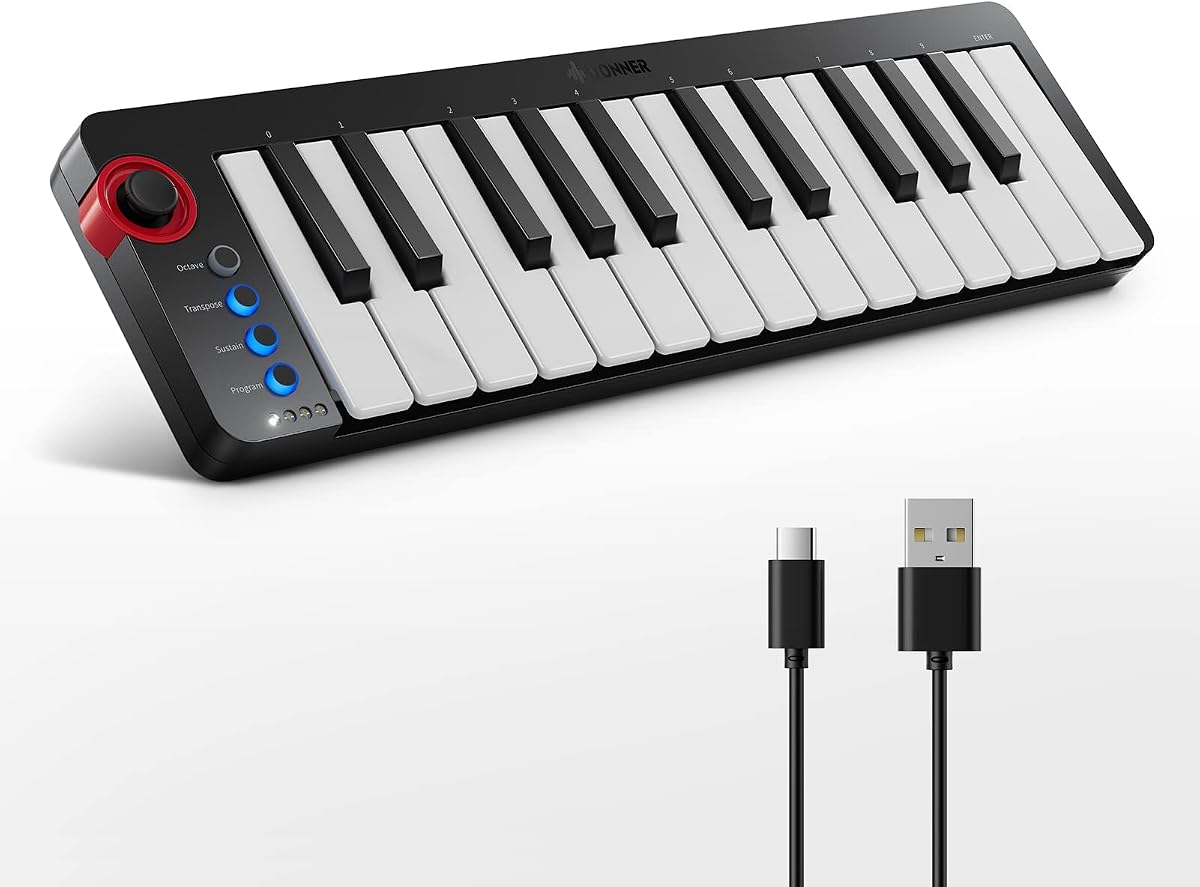
Donner Mini MIDI Keyboard N-25
4.1Editor score
Compact portable design
40 teaching courses included
Light up rocker buttons
This guide compares the top 25 key MIDI controllers for producers and musicians in October 2026, focusing on features, compatibility, and value.
Finding the right 25 key MIDI controller can transform your music production workflow. These compact devices offer portability and essential controls for composers and beat makers.
We compared ten leading models based on key response, software integration, and build quality. Each option brings unique strengths to different creative needs and budgets.
Our reviews highlight specific features and real-world performance details. Prices fluctuate often, so check current listings before making your final purchasing decision.
4.1Editor score

4.6Editor score

4.6Editor score
This side-by-side comparison helps you quickly identify which controller matches your specific production needs and workflow preferences.


The Akai Professional MPK Mini MK3 stands out as the top choice for serious producers needing a compact 25 key MIDI controller. With a 4.6 rating, it balances performance and portability effectively.
We may earn a commission when you buy through this link, at no additional cost to you.
Its 25 velocity sensitive keys offer expressive playing, while the 8 backlit MPC pads provide precise drum programming. The 4 way thumbstick allows dynamic pitch and modulation control during live performance.
While the keys are compact, they remain responsive enough for professional use. Some users prefer larger keybeds, but the portability trade-off is acceptable for most workflows.
We recommend this for musicians wanting a complete production station in a small form factor. Its integration with DAWs makes it ideal for both studio and live settings.
The thumbstick and knobs allow real-time tweaking of synth parameters without touching the computer mouse.
NKS integration lets you browse and load sounds directly from compatible libraries without manual mapping.
We may earn a commission when you buy through this link, at no additional cost to you.
The Donner Mini MIDI Keyboard N-25 offers excellent value for beginners exploring music production. It comes with 40 teaching courses, making it more than just a controller.
We may earn a commission when you buy through this link, at no additional cost to you.
Its velocity sensitive keys allow basic expression, and the light up buttons add visual feedback for learning. The compact design fits easily on small desks.
Build quality is simple, focusing on cost efficiency. While not as durable as premium models, it suffices for casual use and learning.
Ideal for students or hobbyists needing a functional entry-level controller. The included courses help users understand music theory and production basics quickly.
The included 40 lessons cover arrangement essentials and help novices unlock creativity without prior knowledge.
Compatible with Mac and PC via USB MIDI without needing extra drivers for immediate setup.
We may earn a commission when you buy through this link, at no additional cost to you.
The Novation Launchkey Mini 25 MK4 delivers premium features in a compact design. It stands out with 16 FSR pads and polyphonic aftertouch for advanced performance.
We may earn a commission when you buy through this link, at no additional cost to you.
Scale mode ensures you never hit a wrong note, while the seamless DAW integration speeds up workflow. The build quality supports rigorous daily use.
While pricier, the advanced features justify the cost for serious producers. Mapping may take time, but once set, it operates intuitively.
We recommend this for professionals seeking high performance controls. It excels in live performance and complex studio arrangements.
FSR drum pads support polyphonic aftertouch, enabling expressive control for chords and melodies.
Scale and chord modes help beginners compose complex progressions with simple key presses.
We may earn a commission when you buy through this link, at no additional cost to you.
The Akai Professional LPK25 focuses on simplicity and portability. It is perfect for musicians who need a keyboard without extra controls.
We may earn a commission when you buy through this link, at no additional cost to you.
Its responsive keys allow expressive playing, and the built-in arpeggiator aids creative melody generation. The preset slots recall custom mappings quickly.
Lacking pads and knobs limits its versatility compared to other models. However, it excels as a straightforward input device for MIDI.
We recommend this for travelers or those focusing solely on keyboard composition. Its plug-and-play nature makes it very user-friendly.
The dedicated octave buttons and sustain control provide essential range access without cluttering the layout.
Use the arpeggiator and clock to manipulate sound sources dynamically during live or studio sessions.
We may earn a commission when you buy through this link, at no additional cost to you.
The Akai Professional APC Key 25 MK2 is designed specifically for Ableton Live integration. Its 5×8 RGB pad matrix offers visual feedback for clip launching.
We may earn a commission when you buy through this link, at no additional cost to you.
Keyboard navigation with arrow buttons allows quick track and scene scrolling. The rotary knobs control volume, pan, and effects effectively.
While optimized for Ableton, it lacks flexibility for other DAWs. The keyboard feel is standard, but the clip launching is the true strength.
We recommend this for Ableton users needing a controller for live performance. It simplifies complex workflows significantly.
Launch loops, vocals, and melodic samples instantly using the color-coded RGB pads for immediate creativity.
Direct control of Ableton macros via 360 knobs helps fine-tune sounds during live mixes.
We may earn a commission when you buy through this link, at no additional cost to you.
The Arturia MiniLab 3 adapts to your workflow with a focus on fluid control. It features 4 faders and 8 drum pads for versatile manipulation.
We may earn a commission when you buy through this link, at no additional cost to you.
The velocity sensitive keys provide expressive playing, while the faders allow quick track adjustments. The white finish adds aesthetic appeal to any studio.
Setting up custom mappings takes time, but once done, it offers intuitive access. It suits users who prioritize tactile control.
We recommend this for producers needing detailed mixing control alongside keyboard input. It elevates the overall creative experience significantly.
The premium keys and faders offer a smooth, responsive feel that makes production less mouse-heavy.
Punch in drum patterns and adjust mixer tracks seamlessly without breaking your musical flow.
We may earn a commission when you buy through this link, at no additional cost to you.
The Akai MPK Mini Play MK3 functions as a standalone mini keyboard with a built-in speaker. You can compose music without connecting to a computer.
We may earn a commission when you buy through this link, at no additional cost to you.
It includes over 100 internal sounds and a clear OLED display for navigation. The 8 MPC pads and knobs provide full control.
While convenient, the speaker is small and best for quiet environments. It is perfect for travel or outdoor inspiration.
We recommend this for songwriters needing flexibility away from the studio. It bridges the gap between instrument and controller.
Compose and record beats anywhere with included instruments without needing external hardware or software.
Includes Melodics educational software download to improve your playing skills over time.
We may earn a commission when you buy through this link, at no additional cost to you.
The M-VAVE 25 Key stands out with Bluetooth connectivity for wireless music production. It offers a compact design with semi-weighted keybed feel.
We may earn a commission when you buy through this link, at no additional cost to you.
With a 16-hour battery life, it supports long sessions without charging. The touch stripes provide expressive pitch bends during performance.
Bluetooth can occasionally introduce latency depending on the device. However, USB mode resolves this, offering flexibility.
We recommend this for mobile producers needing wireless freedom. It fits well in bags for on-the-go creativity.
Eliminate cables by connecting wirelessly to tablets or phones for immediate playback and recording.
The touch stripes enhance expressiveness by allowing real-time pitch modulation during tracks.
We may earn a commission when you buy through this link, at no additional cost to you.
The Rhymo 25 Key features a modern USB-C port for fast charging and data transfer. It remains slim and compact for easy transport.
We may earn a commission when you buy through this link, at no additional cost to you.
Its X-Y joystick controls pitch and modulation efficiently. The arpeggiator allows multiple modes for creative sound generation.
While it offers Bluetooth MIDI, the build is basic. It suffices for beginners looking for a modern connection option.
We recommend this for users preferring USB-C convenience. It integrates well with tablets and new laptops.
Power and connect directly via USB-C without extra adapters, simplifying your setup significantly.
Use loop functions and transpose controls to adapt melodies instantly for different keys or styles.
We may earn a commission when you buy through this link, at no additional cost to you.
The Akai MPK Mini MK3 Black offers the same robust features as the white version but with a sleeker aesthetic. It remains a top contender for production.
We may earn a commission when you buy through this link, at no additional cost to you.
With 8 MPC pads and velocity keys, it handles beats and melodies equally well. The thumbstick and knobs provide precise control.
There are no functional differences from other models, just visual. It suits those preferring a minimalist look.
We recommend this for studios needing a dark finish to match gear. It delivers professional performance without compromise.
The black finish helps the controller blend seamlessly with professional dark studio equipment.
Enjoy all the same productivity tools, including NKS integration and bundled sound libraries.
We may earn a commission when you buy through this link, at no additional cost to you.
Selecting the right controller requires understanding your production needs, budget, and software ecosystem.
Velocity sensitive keys are essential for dynamic expression. Check if keys are mini or full-sized to suit your playing style.
Prioritize models with responsive keys that feel natural to your fingers for comfortable sessions.
Extra controls like pads, knobs, and faders expand your creative possibilities beyond keyboard input.
Look for controllers that match your workflow, such as MPC pads for drumming or faders for mixing.
Ensure compatibility with your Digital Audio Workstation for seamless mapping and control.
Models with dedicated software or plugins can speed up your production workflow significantly.
For travelers, consider weight and size. USB-C or battery power adds convenience on the go.
Choose a lightweight option if you plan to move the controller frequently between locations.
Durable materials ensure longevity under regular use. Check for sturdy knobs and pads.
Invest in robust construction to avoid breakage during intense creative sessions.
Many controllers include DAWs or virtual instruments that save money.
Verify included software compatibility and value before purchasing.
Modern options include Bluetooth MIDI or USB-C for versatile connection.
Ensure the connection type matches your computer or mobile device.
Set a realistic spending limit. Entry-level models are affordable, while premium ones offer more features.
Balance cost with essential features to find the best value for your needs.
Connect the controller via USB to your computer. Install any required drivers and mapping software for best performance.
Explore the included manuals to understand button functions. Customize settings to match your preferred workflow.
Store the controller in a dry, stable environment. Clean keys regularly with a soft cloth to maintain sensitivity.
Most controllers work with major DAWs like Ableton Live, Logic Pro, Cubase, and FL Studio. Always check specific mapping software.
Most models are USB powered, eliminating the need for external power supplies. Some advanced models support battery options.
Yes, their compact size and simplified controls make them ideal for learning production basics. Many include tutorials.
Many support iOS and Android via Bluetooth or USB-C adapters. Check system requirements for specific compatibility.
MIDI controllers send data to software, while USB keyboards often have built-in sounds. MIDI offers more flexibility.
High-end models like Novation support aftertouch, allowing dynamic expression after pressing keys. Check specs carefully.
We highlighted top picks including the Akai MPK Mini MK3 and Novation Launchkey Mini for their robust features.
Prioritize controls and DAW integration to enhance your production workflow effectively.
Always check current pricing and availability before purchasing your new controller.