
G.SKILL Flare X5 Series DDR5 RAM
4.7Editor score
AMD EXPO and XMP 3.0
Stable overclocking profiles
Matte Black aesthetic design
Optimized for AM5 and LGA1700
This guide compares the top 10 DDR5 RAM for Overclocking kits based on speed, latency, compatibility, and stability for gaming and high performance computing.
Choosing the right DDR5 RAM for Overclocking is essential for maximizing your system's potential in gaming and professional workloads. High-speed memory ensures smoother performance and faster data processing across demanding applications.
We evaluated ten leading kits based on their clock speeds, latency timings, platform compatibility, and overall stability under load. Each product was analyzed against real-world performance metrics and user feedback to ensure reliability.
Every pick in this list highlights key strengths and potential trade-offs to help you find the perfect match for your build. Please note that availability and pricing may change frequently, so verify details before purchasing.
4.7Editor score

4.8Editor score

4.6Editor score
The following table provides a side by side comparison of all ten selected memory kits. It highlights their core specifications such as capacity, speed, timings, and platform support to help you make an informed decision quickly.




The Crucial Pro 32GB DDR5 RAM Kit stands out as the top choice for users seeking reliable performance without unnecessary flash. With a solid rating of 4.8 stars, this kit delivers consistent results for both gaming and productivity tasks.
We may earn a commission when you buy through this link, at no additional cost to you.
Its 6000MHz speed paired with CL36 timings ensures that your system responds quickly to demanding applications. The optimized compatibility with Intel 13th gen and AMD Ryzen 9000 series CPUs makes installation straightforward and stable.
While it lacks RGB lighting, the focus remains on pure performance and reliability. The extended timings of 36-38-38-80 are tuned for stability, meaning you won't face crashes during critical workloads or long gaming sessions.
If you value trust and proven technology over aesthetics, this kit is the ideal pick. It is perfect for enthusiasts who want to push their systems without worrying about complex BIOS tweaking or instability issues.
Lower latency at CL36 ensures that your frame rates remain steady during competitive gaming sessions.
Rigorously tested at component and module levels to ensure top performance and reliability over time.
We may earn a commission when you buy through this link, at no additional cost to you.
The Corsair Vengeance RGB RS DDR5 32GB combines visual flair with high-speed performance. It is designed for users who want their system to look as good as it runs with dynamic addressable lighting.
We may earn a commission when you buy through this link, at no additional cost to you.
Its dual memory profiles allow for easy selection of optimized settings whether you are running an AMD or Intel processor. The onboard voltage regulation helps maintain stability when you push frequencies higher than standard limits.
While the rating is solid, it is slightly lower than some competitors due to the requirement for BIOS adjustments to reach maximum speed. However, this is common for overclocking kits and offers control to enthusiasts.
Choose this kit if aesthetics are a priority for your build. It delivers maximum bandwidth and tight response times for the latest motherboards, ensuring your system looks stunning while performing efficiently.
Individually addressable lighting delivers vibrant effects through a sleek panoramic diffuser for visual appeal.
Dual profiles allow you to easily select optimized settings for your specific AMD or Intel processor platform.
We may earn a commission when you buy through this link, at no additional cost to you.
The Crucial Pro DDR5 RAM 32GB Kit offers exceptional speed with up to 6400MHz at CL32 timings. This kit is designed to boost gaming and multitasking by reducing latency significantly compared to standard modules.
We may earn a commission when you buy through this link, at no additional cost to you.
Its elite compatibility ensures stable overclocking with Intel XMP 3.0 and AMD EXPO profiles. The battle-ready heat spreader adds a tactical aesthetic while helping to dissipate heat during high-load scenarios.
Extended timings of 32-40-40-103 ensure stability even under stress. However, this performance is best utilized on newer platforms like Intel Core Ultra Series 2 or Ryzen 9000 Series CPUs.
This kit is perfect for enthusiasts who want the highest possible speeds without sacrificing stability. It is a top-tier choice for those building next-gen systems where every millisecond counts.
Compatible with Intel Core Ultra Series 2 and Ryzen 9000 Series desktop CPUs for stable performance.
Powered by Micron advanced memory technology for next-gen computing and reduced latency.
We may earn a commission when you buy through this link, at no additional cost to you.
The Crucial Pro Overclocking Edition DDR5 is a versatile single module that offers 16GB capacity at 6000MHz. It is ideal for users who need to upgrade their existing RAM without replacing the full kit.
We may earn a commission when you buy through this link, at no additional cost to you.
Its UDIMM compliant design fits standard DDR5 UDIMM 288-pin configurations perfectly. This ensures broad compatibility with systems that support DDR5-6000 memory standards across various motherboard brands.
Running at CL36 with 1.35V, this module provides a stable overclocking foundation. However, since it is a single module, you may need to install two for dual-channel performance to maximize bandwidth.
Buy this if you are looking to expand your system capacity incrementally. It delivers reliable performance and is backed by the trusted reputation of Crucial for memory quality and testing.
Ideal for systems that require additional memory capacity without removing existing modules.
UDIMM compliant with industry standard DDR5 UDIMM 288-pin configuration for broad compatibility.
We may earn a commission when you buy through this link, at no additional cost to you.
The G.SKILL Flare X5 Series DDR5 RAM is engineered specifically to deliver top performance on AM5 and Intel platforms. With dual profiles for AMD EXPO and Intel XMP 3.0, it simplifies the overclocking process.
We may earn a commission when you buy through this link, at no additional cost to you.
Its 32GB capacity and up to 6000MT/s speed make it a strong contender for high-end gaming rigs. The kit includes JEDEC default profiles alongside optimized overclock profiles for easy setup.
Users should note that maximum speed requires BIOS adjustments. Mixing memory kits is not recommended as it can lead to stability issues or system failure according to manufacturer warnings.
This kit is highly recommended for users building with AMD Ryzen 9000 series CPUs. It provides the necessary tools for stable overclocking and ensures compatibility with latest motherboards like X670 and B650.
Includes AMD EXPO and Intel XMP 3.0 memory overclock profile for easy optimization.
Refer to G.SKILL memory QVL or RAM Configurator tool for details on validated motherboard and hardware.
We may earn a commission when you buy through this link, at no additional cost to you.
The Patriot Viper Venom DDR5 RAM offers an impressive balance of speed and cost. With a speed of 6000MHz and CL30 timings, it is one of the more affordable options for high-performance systems.
We may earn a commission when you buy through this link, at no additional cost to you.
It is tested across the latest DDR5 platforms to ensure reliability on high-performance builds. The included limited lifetime warranty adds peace of mind for buyers concerned about long-term durability.
While the brand may not be as visible as others, the performance is competitive. The XMP 3.0 and EXPO support makes it easy to enable high speeds without complex manual configuration steps.
This kit is perfect for budget-conscious enthusiasts who want high speed without breaking the bank. It delivers tight response times and maximum bandwidth for the latest motherboards effectively.
Optimized for peak performance on the latest DDR5 motherboards for maximum bandwidth.
Backed by a limited lifetime warranty to ensure reliability on high performance builds.
We may earn a commission when you buy through this link, at no additional cost to you.
The CORSAIR Vengeance RGB DDR5 RAM combines premium performance with vibrant lighting. Its ten-zone RGB lighting is individually addressable and offers vivid effects from any viewing angle in your case.
We may earn a commission when you buy through this link, at no additional cost to you.
With up to 6000MHz speed and CL30 timings, this kit delivers fast response times. The onboard voltage regulation enables easier and more stable overclocking through CORSAIR iCUE software.
While the power draw is slightly higher, the stability it provides is worth it for high-frequency builds. The gray color scheme offers a sleek look that fits well in modern gaming setups.
Choose this kit if you want to control lighting and speed from one interface. It is optimized for peak performance on the latest Intel DDR5 motherboards and supports AMD EXPO for higher frequencies.
Ten individually addressable ultra-bright RGB LEDs per module encased in a panoramic light bar.
Onboard voltage regulation enables easier more stable overclocking through CORSAIR iCUE software.
We may earn a commission when you buy through this link, at no additional cost to you.
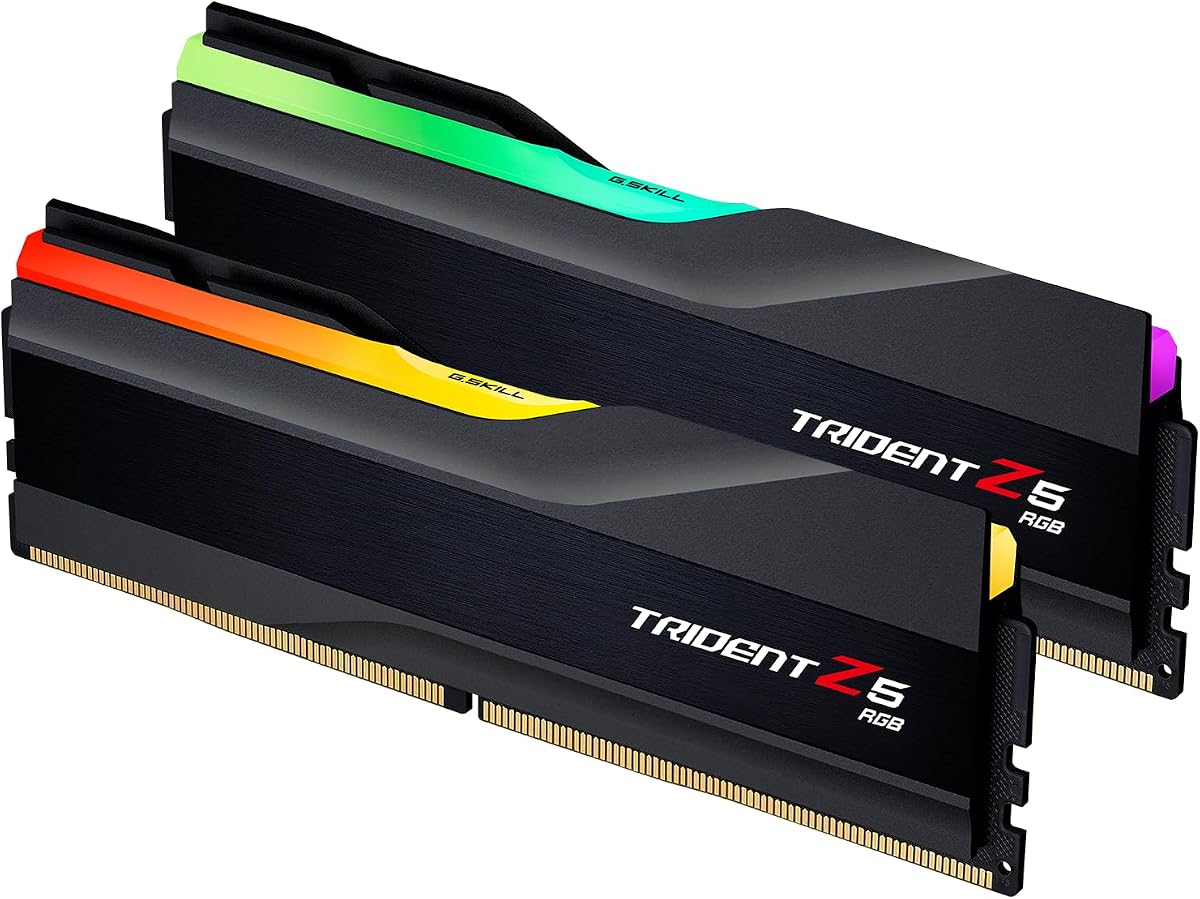
The G.SKILL Trident Z5 RGB Series DDR5 RAM is a premium choice for high-performance systems. It supports both Intel XMP 3.0 and AMD EXPO profiles to ensure flexibility across different platforms.
We may earn a commission when you buy through this link, at no additional cost to you.
With up to 6000MT/s speed and CL36 timings, this kit provides excellent responsiveness. The 1.35V voltage design helps maintain stability while pushing the memory to its limits.
As with all kits of this type, mixing memory kits is not advised to avoid system failure. The kit is validated for specific platforms to ensure consistent performance during heavy workloads.
Buy this kit if you want top-tier aesthetics and performance. It is a robust solution for users who demand the best from their memory and want reliable operation under overclocking conditions.
Refer to G.SKILL memory QVL for details on validated motherboard and hardware compatibility.
Includes JEDEC default profile and Intel XMP 3.0 and AMD EXPO memory overclock profile.
We may earn a commission when you buy through this link, at no additional cost to you.
The CORSAIR Vengeance DDR5 32GB is a straightforward option that focuses on performance rather than flash. With a solid 4.8 rating, it is known for its consistent results in gaming and work environments.
We may earn a commission when you buy through this link, at no additional cost to you.
Tightly screened memory chips provide extended overclocking potential for enthusiasts. The dual memory profiles allow you to select optimized settings based on whether you use AMD or Intel processors.
Onboard voltage regulation ensures easier and more stable tuning compared to previous generation motherboard control. This makes it easier to achieve higher frequencies without compromising system stability during operation.
Select this kit if you prefer a clean look without RGB lights. It delivers maximum bandwidth and tight response times for the latest motherboards making it a reliable choice for serious builds.
Carefully screened memory chips for extended overclocking potential and stability.
Onboard voltage regulation enables easier more stable overclocking than previous generation control.
We may earn a commission when you buy through this link, at no additional cost to you.
The G.SKILL Ripjaws S5 Series DDR5 RAM is an excellent option for users seeking value and performance. It includes profiles for both Intel XMP 3.0 and AMD EXPO to simplify setup on various platforms.
We may earn a commission when you buy through this link, at no additional cost to you.
With up to 6000MT/s speed and CL36 timings, this kit offers competitive performance for the price. The matte black finish ensures it fits seamlessly into most modern PC builds without standing out.
The kit is validated for specific Intel and AMD platforms to ensure consistent performance. Users should refer to the G.SKILL memory QVL to confirm compatibility with their motherboard and CPU combination.
This is a great choice for those wanting solid performance without extra features. It provides reliable overclocking support and fits well within a budget while delivering fast data rates.
Includes Intel XMP 3.0 and AMD EXPO memory overclock profile for easy setup.
Refer to G.SKILL memory QVL for details on validated motherboard and hardware.
We may earn a commission when you buy through this link, at no additional cost to you.
Selecting the right DDR5 RAM involves considering several critical factors that impact your system's speed and stability. Below are key elements to evaluate before making your purchase.
The speed of your RAM measured in MHz or MT/s determines how fast data can be transferred. Higher speeds generally lead to better performance in gaming and rendering tasks.
Look for kits rated at 6000MHz or higher to ensure your system remains future-proof and responsive.
CAS Latency or CL indicates the delay before data is accessed. Lower CL values mean faster data retrieval and smoother performance during intensive tasks.
Aim for kits with CL30 to CL36 timings for the best balance of speed and cost efficiency.
Capacity refers to the total amount of memory available for your system. Most users find 32GB sufficient for gaming and productivity workloads.
If you run virtual machines or heavy editing software consider opting for 64GB to avoid bottlenecks.
Different CPUs and motherboards support different memory standards. Ensure your RAM supports the correct profiles like XMP 3.0 for Intel or EXPO for AMD.
Always check your motherboard's Qualified Vendor List to confirm the RAM is supported on your specific hardware.
Voltage determines the power supplied to the memory modules. Standard DDR5 operates at 1.1V but overclocked kits may require up to 1.4V.
Ensure your motherboard can handle the required voltage to prevent instability during high-frequency operation.
A heat spreader helps dissipate heat generated by the memory modules during operation. Effective cooling is crucial for maintaining stability when overclocking.
Choose kits with aluminum or robust heat spreaders if you plan on pushing your RAM to its limits.
A good warranty ensures that you are protected against defects or failures in the memory module. Most reputable brands offer lifetime warranties on their products.
Always verify the warranty terms to ensure you have long-term support for your investment.
RGB kits add visual flair but may come at a higher cost and require software control. Non-RGB kits focus purely on performance and are often more affordable.
Decide whether the aesthetic value of RGB is worth the extra cost based on your build requirements.
Install the RAM modules into the second and fourth DIMM slots on your motherboard to enable dual-channel mode for optimal performance.
Enter the BIOS setup and enable the XMP 3.0 or EXPO profile to automatically configure the RAM to its advertised speeds and timings.
Monitor your system's stability using stress testing tools and ensure adequate airflow inside the case to prevent overheating of the memory modules.
In 2026, speeds of 6000MHz to 6400MHz are considered the sweet spot for DDR5 RAM. These speeds offer excellent performance without requiring extreme voltage or complex manual tweaking.
Yes, you typically need to enable XMP 3.0 for Intel or EXPO for AMD in your BIOS settings. This tells the motherboard to run the RAM at its rated speeds instead of default JEDEC speeds.
It is generally not recommended to mix different RAM kits. Using mismatched kits can lead to instability or failure to boot due to differences in chip design or timing profiles.
Most consumer DDR5 RAM does not support ECC error correction. ECC support is usually found on specific server-grade modules which are not designed for standard overclocking scenarios.
You can use system information tools like CPU-Z to verify the memory frequency. Check the DRAM Frequency value and multiply it by 2 to get the effective speed.
Overclocking is safe as long as you stay within the voltage and temperature limits. Always stress test your system after changes to ensure stability during daily use.
Our top picks like the Crucial Pro 32GB and G.SKILL Flare X5 offer the best balance of speed and reliability for most users.
Prioritize compatibility and timing consistency over raw speed to ensure your system remains stable during high-demand gaming or work sessions.
Remember to check current availability and stock levels before purchasing since inventory fluctuates frequently for high-performance components.