
8Bitdo M30 Wired Controller
4.2Editor score
Officially licensed
6-Button Layout
USB-C connection
3 profile switch
This guide compares the top 10 fightpads for PC to help you find the best tournament grade controller for competitive gaming and arcade precision.
Finding the right fightpad for PC is essential for competitive gamers who demand precision and speed. A good controller offers responsive buttons, accurate directional input, and ergonomic design for long sessions.
We compared ten top-rated fightpads based on build quality, switch type, layout, and platform compatibility. Each product was evaluated for its suitability in fighting games and general PC gaming.
Each pick includes key features, pros, cons, and detailed analysis. Prices may change, so verify current details before purchasing. Choose the pad that fits your style and budget.
4.2Editor score

4.1Editor score

4.2Editor score
Explore our side-by-side comparison of the top ten fightpads. We break down key specifications so you can choose the right controller for your PC setup.
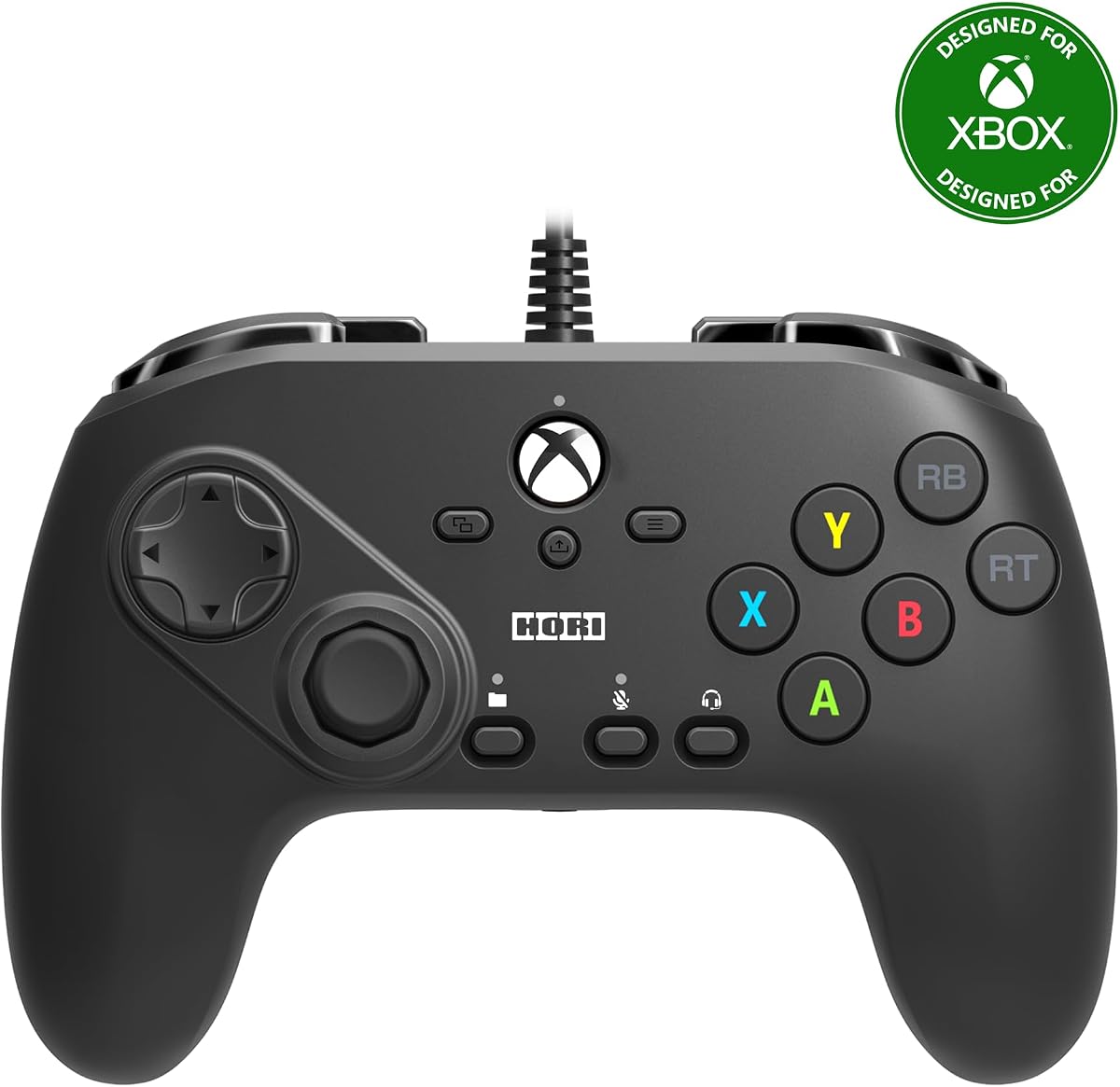


The HORI Fighting Commander OCTA stands out as a top choice for PC fighting game enthusiasts. With a 4.1 rating, it delivers tournament-grade precision and reliable performance.
We may earn a commission when you buy through this link, at no additional cost to you.
Its Micro Switch buttons ensure rapid actuation, critical for combo execution. The Short Throw Analog Stick with an 8-way gate enhances accuracy. The adjustable D-Pad lets players tailor sensitivity to their grip.
While the companion app is needed for full customization, it adds significant flexibility. The headset input and onboard audio controls are practical additions for communication during play.
This controller is ideal for players seeking a balance of affordability and pro features. Its official licensing ensures compatibility and quality assurance.
Micro Switch buttons and a Short Throw Analog Stick work together to minimize latency and maximize execution speed in competitive matches.
The companion app allows deep customization of settings, making it easy to adapt the controller to various fighting games and personal preferences.
We may earn a commission when you buy through this link, at no additional cost to you.
This HORI controller is designed with Xbox players in mind but works seamlessly with Windows 10. It features a six-button layout optimized for fighting game mechanics and speed.
We may earn a commission when you buy through this link, at no additional cost to you.
Users can customize and save up to four profiles using the companion app. The profile button allows easy switching between setups. This flexibility is great for players who rotate between multiple characters.
The Micro Switch Buttons and short throw analog stick provide the accuracy needed for execution. The adjustable d-pad ensures the directional input matches your style.
While it has a lower rating, its specific focus on Xbox integration and Windows compatibility makes it a solid choice for those in that ecosystem.
Being able to save and switch between four profiles on the fly is a major advantage for competitive players juggling different fighting games.
The 8-way gate and Micro Switch buttons are standard tournament features that ensure consistent input and reduced missed inputs during high-stress moments.
We may earn a commission when you buy through this link, at no additional cost to you.
The 8Bitdo M30 offers exceptional value with a 4.2 rating. It is officially licensed by Xbox and provides a reliable 6-Button Layout for fighting games.
We may earn a commission when you buy through this link, at no additional cost to you.
Its USB-C wired connection ensures virtually lag-free performance. The 3 profile switch button lets you switch setups on the fly without disconnecting. This is crucial for tournament environments.
Support for 8BitDo Ultimate Software adds remapping and customization options. The included 3.5mm audio jack and volume control are convenient for headsets.
If you need a budget-friendly, official license without sacrificing core performance, this controller is a top contender. It fits well in any PC setup.
The USB-C connection is designed to eliminate input lag, ensuring your moves are registered instantly during critical moments in matches.
The 6-Button Layout honors classic arcade standards, making it familiar for veterans while remaining accessible for newcomers to the genre.
We may earn a commission when you buy through this link, at no additional cost to you.
This leverless controller boasts a 4.4 rating and impressive versatility across PC, consoles, and Steam Deck. The reinforced USB-C port and detachable braided cable ensure durability.
We may earn a commission when you buy through this link, at no additional cost to you.
Its OLED display shows input modes and SOCD settings at a glance. Customization happens via a web browser, eliminating the need for bulky software. This is a streamlined approach.
Hot-swappable switches mean you can change the feel without soldering. The 16-button hitbox-style layout offers tournament-level control depth with Turbo macros.
If you want a controller that grows with your needs and works everywhere, this is a strong option. The web-based customization sets it apart.
SOCD clean modes like Neutral, Last-Input, and Up-Priority ensure compliance with competition rules and consistent directional input.
Hot-swappable switches allow you to tune the tactile feedback to your preference, keeping the controller fresh and personalized over time.
We may earn a commission when you buy through this link, at no additional cost to you.
The Akko FUNBOX leverless controller brings next-gen Hall Effect switches to PC gaming. With a 4.2 rating, it offers durability and high-performance features rarely seen in this range.
We may earn a commission when you buy through this link, at no additional cost to you.
Rapid Trigger is adjustable from 0.1mm to 2.8mm, giving fine control over actuation. The 50KHz scan rate and 8,000Hz polling deliver lightning-fast responsiveness for competitive edges.
A built-in full-color LCD serves as a control hub for SOCD settings and animations. The aluminum multi-function dial allows intuitive access to settings without digging through menus.
For serious players who want the latest tech and maximum customization, this premium pick is worth the investment. It truly sets a new standard.
Contactless magnetic switches eliminate friction and debris buildup, meaning they never wear out like traditional mechanical switches do.
The Full Color LCD isn't just for show; it lets you switch modes, test inputs, and upload animations to personalize your controller.
We may earn a commission when you buy through this link, at no additional cost to you.
This edition targets TEKKEN fans with a licensed design. It maintains the same tournament-grade quality as other OCTA models. A 3.8 rating reflects its solid, if niche, appeal.
We may earn a commission when you buy through this link, at no additional cost to you.
Top-quality components like Microswitch buttons ensure accuracy and durability. The Short throw left analog stick with an 8-way gate boosts execution speed. The six button layout is classic and efficient.
The analog slide pad assists with in-game navigation. Official licensing by Bandai Namco ensures it works seamlessly with TEKKEN 8 on PC.
If you are invested in the TEKKEN franchise or want a specialized controller, this is a great choice. It combines brand appeal with pro features.
Being officially licensed by Bandai Namco Entertainment guarantees that the controller meets the specific requirements of TEKKEN 8.
The Microswitch buttons and Short throw stick are optimized for the rapid inputs required in TEKKEN 8.
We may earn a commission when you buy through this link, at no additional cost to you.
The HORI Wireless OCTA Pro offers the freedom of wireless play with PC support. It features an 8-gate analog stick and programmable rear buttons for advanced inputs. This flexibility is highly prized.
We may earn a commission when you buy through this link, at no additional cost to you.
A swappable D-pad offers three options to choose from, ensuring you have the right fit. The analog slider pad aids in lobby navigation. Firmware updates are necessary for optimal performance.
The USB-C charging cable includes a lock to prevent disconnects, addressing a common wireless frustration. It is officially licensed by Sony for quality assurance.
For players who hate cables and need rear buttons, this is a premium wireless option. It balances pro specs with convenience effectively.
Having three D-pad options to swap lets you adapt the controller to different games or hand sizes without buying new hardware.
The locking USB-C cable prevents accidental disconnects during charging, keeping your sessions uninterrupted and reliable.
We may earn a commission when you buy through this link, at no additional cost to you.
This renewed unit offers access to the OCTA build at a better value. It retains the eight-button layout and tournament-grade design. While ratings are N/A, the brand reputation remains.
We may earn a commission when you buy through this link, at no additional cost to you.
Features include a touchpad and programmable macros. These tools allow for complex moves and shortcuts. The official Sony license ensures it works on PC and consoles.
Renewed products often come with testing and quality checks. This reduces risk while lowering the cost. It is a smart buy for budget-conscious gamers who still want quality.
If you are comfortable with refurbished gear, this is a reliable choice. It provides the core OCTA experience without the premium price tag.
Buying renewed allows you to access high-end tournament gear at a more accessible price point while maintaining essential features.
Despite being renewed, the controller keeps key features like macros and the touchpad, ensuring a full experience for fighting games.
We may earn a commission when you buy through this link, at no additional cost to you.
The Logitech G F310 is a general-purpose pad with a 4.4 rating. It works with many titles and is easy to set up. The familiar layout reduces the learning curve for casual players.
We may earn a commission when you buy through this link, at no additional cost to you.
The floating D-pad is unique, resting on four switches for quick direction changes. The six-foot cord gives you freedom to lean back. Profiler software allows deep customization.
With 10 programmable buttons and an 8-way D-pad, it offers flexibility. While not fighter-specific, its broad support makes it versatile for various genres.
For those who want a reliable, all-around pad for different games, this is a strong pick. It balances cost and utility perfectly.
The unique floating D-pad allows for more responsive directional changes than traditional pivot-point designs, which is helpful in action games.
Profiler software lets you program the gamepad to perform keyboard commands, expanding its utility to titles without native controller support.
We may earn a commission when you buy through this link, at no additional cost to you.
This mini stick brings arcade precision to your desk in a compact package. It features an 8-button layout and a classic joystick with V-cut housing. A 4.2 rating confirms its reliability.
We may earn a commission when you buy through this link, at no additional cost to you.
The 8ft cable provides ample reach. Its lightweight and portable design makes it easy to transport to tournaments. It is a great option for both arcade and fighting game fans.
Official Sony licensing ensures compatibility with PS5, PS4, and PC. The small form factor saves desk space without sacrificing input quality. This is a great starter stick.
If you want arcade feel without a huge footprint, this is ideal. It combines portability with the trusted HORI build quality.
The classic 8-Button Layout and original Joystick provide an authentic arcade feel that translates well to fighting games.
The compact and lightweight design makes it easy to carry to local meetups or tournaments, reducing setup time and effort.
We may earn a commission when you buy through this link, at no additional cost to you.
Selecting a fightpad involves considering several technical factors. This guide outlines what to prioritize for performance and comfort.
Switches determine how your controller registers inputs. Micro switches offer tactile clicks and fast actuation. Hall effect switches use magnetism for zero wear and high durability.
Choose micro switches for tactile feedback or hall effect for longevity and customization.
Fightpads come in stick or pad forms. Sticks offer arcade precision. Pads mimic console ergonomics but may lack directional accuracy. Consider your play style.
Choose sticks for precision and pads for ergonomics and comfort.
Ensure the controller supports your specific PC setup. Some require specific drivers or firmware. Official licensing helps guarantee compatibility.
Check system requirements before purchasing to avoid driver issues.
Build quality matters. Look for reinforced ports and braided cables. Hot-swappable switches allow part replacement without replacing the whole controller.
Prioritize durable materials to reduce repair costs over time.
Wired options ensure zero latency and constant power. Wireless offers freedom but may need charging. For competitive play, wired is preferred.
Choose wired for competition and wireless for convenience.
SOCD cleaning ensures valid directional inputs. Neutral or last-input modes prevent invalid inputs. This feature is critical for competitive integrity.
Look for adjustable SOCD settings to match tournament rules.
Customization options like remapping and profile switching add versatility. Browser-based tools are convenient. Software-free hardware may be more reliable.
Evaluate software needs before choosing the hardware.
Comfort during long sessions is key. Rubber feet and base stability prevent slipping. D-pad options help find the best fit.
Choose sizes that match your hand shape.
Connect your fightpad via USB and install any required drivers. Test buttons in a game or tool to ensure all inputs register correctly.
Clean the controller regularly with a soft cloth to prevent dust buildup. Store it in a cool, dry place to avoid moisture damage.
Use firmware updates from the manufacturer to keep performance optimal. Check for any loose parts or worn switches periodically to maintain reliability.
Fightpads are designed specifically for fighting games with optimized layouts. They provide faster inputs and better accuracy than standard gamepads. This makes them a preferred choice for competitive play.
Most modern fightpads work plug-and-play. Some advanced models may require companion apps for full customization. Check the product page for specific software needs.
Micro switches use mechanical contacts for tactile feedback. Hall effect switches use magnetism, eliminating friction and wear. Hall effect lasts longer but costs more.
Many licensed controllers support both consoles and Windows. Always verify PC compatibility on the product page to ensure drivers are available.
Wired connections remove latency issues. They also keep the controller powered continuously. This ensures consistent input during long matches.
They allow you to replace worn switches easily. This extends the controller's lifespan. For enthusiasts, this feature adds significant value.
The HORI Fighting Commander OCTA leads with its balance of pro features and value. The 8Bitdo M30 offers great budget performance. The Akko FUNBOX brings high-end tech.
Prioritize switch type and layout based on your play style. Wired models ensure stability. Consider multi-platform support for flexibility.
Verify current prices and compatibility before buying. These models deliver reliable performance for any fighting game fan.