
Gwolves Skoll Mini SK-S Black 50g Ultralight Weight
4.4Editor score
Affordable wireless gaming option
Honeycomb design for weight reduction
3389 sensor for precise tracking
This guide compares the top claw grip gaming mice for small hands to help you find the perfect lightweight ergonomic design for precise control.
Finding the right gaming mouse for small hands can be challenging especially when you prefer a claw grip style. Lightweight ergonomic designs help reduce fatigue during long sessions while providing precise control. We examined ten top rated options to help you choose the best fit for your needs.
Our team analyzed product specifications user reviews and expert feedback to compile this comprehensive list. We focused on weight sensor performance grip shape and build quality. Each product offers unique features tailored to claw gamers with smaller hands seeking accuracy and comfort.
Each pick in this guide highlights key strengths and potential trade-offs to consider. We include detailed specs pros and cons to help you decide. Keep in mind that prices may change so check current listings before purchasing your next gaming mouse.
4.4Editor score

4.6Editor score

4.1Editor score
The following table provides a side-by-side comparison of all ten gaming mice featured in this guide. Look closely at weight sensor specs and button layouts to find the ideal match for your grip style and hand size.


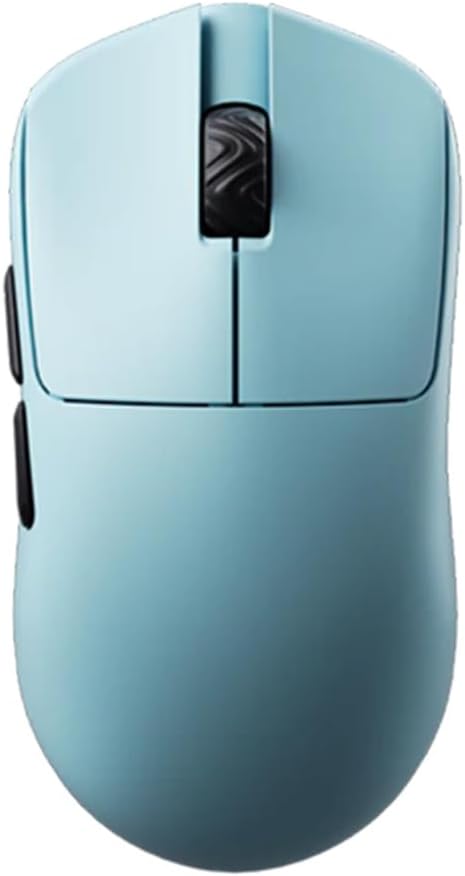

The Lamzu Atlantis Mini Champion Edition stands out as our top pick for small hands requiring a claw grip. It features a 51 gram lightweight design that reduces strain during long sessions. The PAW3950 sensor ensures accurate tracking across various surfaces.
We may earn a commission when you buy through this link, at no additional cost to you.
Its symmetrical shape and broad back help prevent finger cramps while providing comfort. The optical switches offer a lifespan of 70 million cycles for consistent clicks. The Nordic MCU delivers fast response times with no noticeable lag in games.
While the price is higher than budget options, the performance justifies the investment. The dust proof encoder ensures longevity and reliability over time. Some users may find the lack of extra buttons limiting for MMO genres.
This mouse is ideal for competitive gamers seeking precision and comfort. If you value lightweight performance and top tier sensor tech, this is a great choice. It balances ergonomics and speed effectively for small handed claw users.
The PAW3950 sensor supports up to 30000 DPI and 750 IPS for flawless tracking.
Weighing only 51 grams, it reduces wrist strain while maintaining robust build quality.
We may earn a commission when you buy through this link, at no additional cost to you.
The Gwolves Skoll Mini offers exceptional value for gamers on a budget. Weighing 50 grams with a honeycomb design, it delivers lightweight performance without breaking the bank. The 3389 sensor provides reliable tracking for competitive play.
We may earn a commission when you buy through this link, at no additional cost to you.
Its ergonomic shape supports claw grip comfortably for extended sessions. PTFE skates included ensure smooth movement across any mousepad. The detachable cable adds convenience for travel and storage in your setup.
Although it lacks wireless connectivity, the wired connection ensures zero latency. Dust can accumulate in the honeycomb shell over time requiring occasional cleaning. The cable is standard but functional for most desk setups.
Choose this if you want a lightweight wired mouse without overspending. It fits small hands well and performs efficiently in fast paced games. Great for budget conscious gamers needing reliable precision.
Delivers strong sensor performance and low weight at a very accessible price point.
High quality PTFE skates allow for effortless tracking on all common surfaces.
We may earn a commission when you buy through this link, at no additional cost to you.
The Pulsar X2H Mini brings premium features to small handed claw gamers. Its higher hump and narrower waist provide stability for aggressive claw gripping. The PAW3395 sensor delivers precise tracking with Motion Sync technology.
We may earn a commission when you buy through this link, at no additional cost to you.
Optical switches minimize double clicks and ensure swift responses. With up to 100 hours of battery life, it supports long gaming sessions without interruption. The Nordic MCU enhances efficiency and battery status readings.
As a renewed unit, pricing is lower but warranty terms may vary. The shell rigidity is improved over standard models for consistent clicks. Some users may prefer newer stock for full original packaging.
This mouse is perfect for those wanting wireless freedom without compromise. The ergonomic shape supports palms and claws alike. It is a strong choice for competitive play demanding high performance specs.
The elevated rear hump offers enhanced support for fingers during rapid clicking.
Enjoy up to 100 hours of usage on a single charge at 1000Hz polling.
We may earn a commission when you buy through this link, at no additional cost to you.
The Bloody V7 Ergonomic offers a traditional gaming mouse experience for small hands. It includes 8 programmable buttons for macros and automation tasks. The 3200 DPI sensor provides sufficient precision for casual and semi competitive play.
We may earn a commission when you buy through this link, at no additional cost to you.
A rubberized black coating ensures a secure grip even during intense sessions. Convenient next and previous buttons aid web browsing as well as gaming. The software allows CPI adjustments from 100 to 12000.
The sensor is older compared to modern flagships but reliable for basic needs. Design may feel dated compared to contemporary ultra light mice. Report rate adjustments allow customization for different use cases.
Select this if you need programmable buttons on a budget. It fits claw grips comfortably and works across many systems. Good for users prioritizing function over cutting edge sensor tech.
8 programmable buttons let you script complex actions without external tools.
Rubberized coating prevents slipping and adds tactile comfort during use.
We may earn a commission when you buy through this link, at no additional cost to you.
The Pulsar X3 LHD redefines lightweight design with an ultra light 43 gram body. Its hybrid ergonomic shape combines palm and claw comfort for extended sessions. The XS1 sensor boasts 32000 DPI resolution for precise control.
We may earn a commission when you buy through this link, at no additional cost to you.
Optical switches minimize unintended double clicks and ensure pinpoint responses. DOT skates enhance glide speed and precision on any surface. The durable build resists wear even after extended use.
It is designed specifically for left handed gamers which limits right handed users. The price reflects its flagship features and specialized design. Some may find the minimal shape less stable for palm users.
Ideal for left handed players seeking top tier performance. The featherlight build reduces fatigue significantly. A solid choice for competitive gaming demanding speed and accuracy.
At 43 grams, it feels nearly weightless for faster cursor movements.
DOT skates deliver low friction movement for consistent aiming performance.
We may earn a commission when you buy through this link, at no additional cost to you.
The Corsair IRONCLAW Wireless SE is designed for larger hands and right handed palm or claw users. It features 10 programmable buttons for extensive customization via iCUE software. The MARKSMAN sensor delivers up to 26000 DPI for accuracy.
We may earn a commission when you buy through this link, at no additional cost to you.
Battery life is massive with up to 285 hours on 2.4GHz or 532 hours via Bluetooth. RGB lighting is customizable with 3 stage indicators for DPI cues. The asymmetric shape helps avoid wrist strain.
It is heavier than many small hand focused mice. Users with smaller hands may find it less comfortable for claw grip. The sensor is excellent but bulkier than minimal ultra light designs.
Best for those needing many buttons and wireless freedom. It suits palm grip better but works for claw with larger hands. Good for productivity and gaming hybrid setups.
10 buttons let you map macros and keybinds directly on the device.
Battery life lasts for weeks of gaming on a single charge.
We may earn a commission when you buy through this link, at no additional cost to you.
The V8 Gaming Mouse features an ultra lightweight 36 gram design reducing hand fatigue. Its symmetrical shape supports both claw and fingertip styles comfortably. The PAW3950 chip delivers low latency and stable performance for esports.
We may earn a commission when you buy through this link, at no additional cost to you.
Kailh optical switches offer instant actuation with near-zero debounce delay. A web based driver allows adjustments without installing software on your PC. The included 8K dongle ensures responsive wireless connection.
The lack of desktop software may limit advanced customization for some. The lightness might feel unstable for heavy hand users. Color options are limited but the build is robust.
Perfect for players valuing minimal weight and ease of use. The driverless setup simplifies customization. A great pick for competitive shooters needing speed and agility.
Adjust settings through a web browser without installing local software.
Optical switches provide instant actuation for rapid gameplay reactions.
We may earn a commission when you buy through this link, at no additional cost to you.
The Pulsar X2H Wireless offers a refined experience for small handed claw gamers. Its higher hump and narrower waist provide stability for aggressive grip styles. The PAW3395 sensor supports up to 26000 DPI for precision.
We may earn a commission when you buy through this link, at no additional cost to you.
Optical switches ensure swift responses without double click issues. Battery life reaches up to 100 hours with consistent performance via Nordic MCU. The shell rigidity is sturdier than older models for better clicks.
Availability in limited colors like white may be a consideration. The price reflects high end specs but competitors exist. Some users may prefer black variants for aesthetics.
Choose this for balanced wireless performance and ergonomic support. It excels in FPS games requiring fast accurate movements. A reliable option for competitive small handed players.
PAW3395 sensor offers integrated Motion Sync for accurate cursor movement.
Improved shell rigidity ensures consistent clicks and reliable tactile feedback.
We may earn a commission when you buy through this link, at no additional cost to you.
The V6 Gaming Mouse weighs only around 40 grams reducing fatigue during play. Its symmetrical shell design supports fingertip and claw grips easily. The PAW3950 sensor delivers accurate tracking with no noticeable acceleration.
We may earn a commission when you buy through this link, at no additional cost to you.
Concave main buttons fit fingers naturally providing clear click positioning. A stable 2.4GHz wireless connection ensures lag free performance. The no hole design protects internals from dust and spills.
The simple web driver may lack depth for advanced users. Limited colors restrict aesthetic choices for personalization. The weight might feel too light for users preferring stability.
Great for those wanting a solid wireless mouse without complexity. It offers reliable control and speed for competitive gaming. A top pick for small handed players needing agility.
Concave buttons fit fingers naturally for consistent rapid clicking.
No hole shell design keeps internals clean for longer lifespan.
We may earn a commission when you buy through this link, at no additional cost to you.
The BenQ Zowie S2-C is built for competitive performance with a small size shape. It offers a driverless setup allowing direct use without software installation. The 3360 sensor supports 4 adjustable DPI levels for precision.
We may earn a commission when you buy through this link, at no additional cost to you.
The paracord cable minimizes drag for smooth movement on surfaces. The 24 step scroll wheel provides better grip for scrolling actions. It is optimized for FPS games with adjustable polling rates.
Lack of customization software limits flexibility for some users. Fixed DPI levels may not suit everyone preferences. The cable version requires desk space compared to wireless.
Ideal for esports purists valuing simplicity and reliability. The shape fits small hands perfectly for claw grip. A professional choice for those preferring plug and play setups.
Designed for FPS gaming with reliable sensor and cable performance.
No software needed for quick setup and immediate use.
We may earn a commission when you buy through this link, at no additional cost to you.
Selecting the right mouse requires understanding your grip and priorities. We break down key factors to consider before making a purchase.
Lightweight mice under 60 grams reduce strain and allow faster movements. For small hands, staying below 50 grams can improve agility significantly. Always check the listed grams to ensure comfort during long sessions.
Prioritize a lighter mouse if you play fast paced games frequently.
A high performance sensor ensures precise tracking and low latency. Look for chips like PAW3950 or PAW3395 for accuracy. Avoid older sensors if you demand competitive level consistency.
Invest in modern sensors to avoid spin outs or acceleration issues.
Claw grip needs a mouse with a hump near the palm for support. Symmetrical designs work best for small hands to allow flexibility. Ensure the waist is narrow enough for your fingers to rest naturally.
Choose a shape that allows your fingertips to reach buttons easily.
Wireless mice offer freedom but wired ones guarantee zero latency. If budget allows, choose 2.4GHz wireless with low delay. For competitive play, a high quality paracord cable is reliable.
Decide between wireless comfort and wired stability based on your setup.
Long battery life ensures uninterrupted gaming sessions. Aim for at least 80 hours to avoid frequent charging. Check if quick charging options are available for convenience.
Select models with robust power systems if you game daily.
Optical switches offer faster response and higher durability. Mechanical switches can suffer from double clicking over time. Look for dust proof encoders for scroll wheel longevity.
Opt for optical switches to minimize wear and improve response time.
Programmable buttons help with macros and quick actions. Ensure they are reachable with your fingertips comfortably. Avoid too many buttons if you prefer minimalism.
Balance button count with your need for customization and control.
Quality PTFE skates provide smooth gliding on surfaces. Some mice come with replaceable skates for maintenance. Avoid cheap plastic feet that scratch mousepads quickly.
Check the material of the skates for a smooth glide experience.
To get started, connect your mouse via USB or wireless receiver and install any required software. Adjust DPI settings to match your preferred speed on the desktop.
Hold the mouse gently with your fingers arched slightly off the base. Practice clicking with your fingertips to avoid straining your palm or wrist.
Clean the skates regularly with a cloth to maintain smooth gliding. Store the mouse in a dry place to prevent dust or moisture damage.
A claw grip mouse typically has a humped back and narrow waist to support an arched hand. This design allows fingers to hover above buttons for faster response and precise clicks. It suits users who prefer fingertip control over palm contact.
Yes, lighter mice reduce fatigue and improve speed for small hands. A weight under 60 grams helps minimize wrist strain during long sessions. Most top claw mice for small hands fall between 40 to 55 grams.
Wireless mice are convenient but wired ones ensure zero latency. High end wireless models now match wired performance closely. If you move around a lot, wireless adds flexibility without compromise.
Measure your hand length and compare it to the mouse dimensions. Your middle finger should rest comfortably without reaching too far. A proper fit prevents cramping and enhances control during play.
Optical switches use light signals instead of metal contacts for clicks. They prevent double clicking issues and last longer than mechanical ones. They also provide faster response times for competitive advantage.
Driverless mice simplify setup by avoiding software installation. They rely on onboard memory for settings and work on most systems. However, they lack deep customization for advanced users.
Use a soft cloth slightly dampened to wipe the bottom surface. Avoid soaking them in water or chemicals that may damage the plastic. Regular cleaning keeps glide smooth and consistent over time.
Most gamers prefer DPI between 400 and 1600 for balance. Lower DPI helps with precision while higher DPI offers speed. Adjust it based on your mousepad size and personal comfort level.
We reviewed ten top options including the Lamzu Atlantis Mini and Pulsar X2H Mini. Each brings unique strengths for claw gamers seeking precision and comfort in a small form.
Prioritize weight, sensor quality, and shape to ensure a perfect fit for your hand. Investing in a mouse that matches your grip style can elevate your performance significantly.
Always check current prices and availability before purchasing. Sales and discounts may make premium options more accessible at any time.